
How to Reduce Databricks Costs Without Slowing Pipelines Down
Most guides to reducing Databricks costs open with a DBU rate table, but the rate is only one of four terms in your bill and the one you control least. This guide works a real cluster through all four - showing why moving scheduled jobs off All-Purpose Compute cuts the actual invoice by 44% rather than the 73% the rate table implies, why Photon must make a job 23% faster just to break even and does nothing at all for UDF-heavy code, why spot never touches the DBU line, and why a published TPC-DS benchmark found the highest-rate SKU produced the cheapest run. Plus the August 2026 predictive optimization rollout that may already be billing you twice for the same table maintenance.

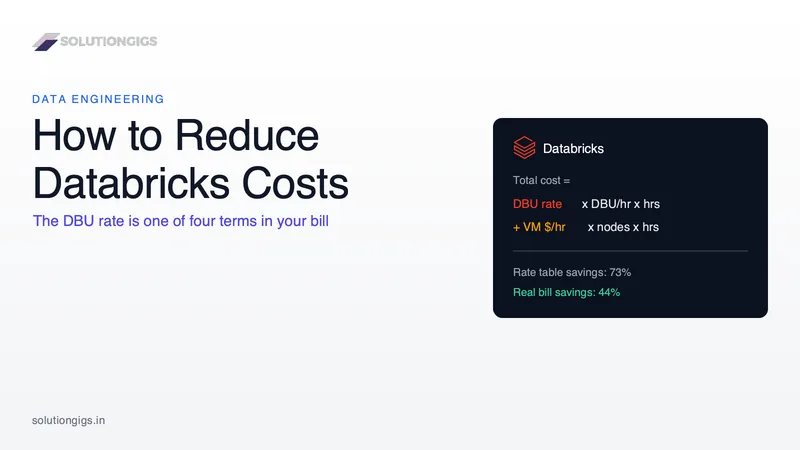
Quick Answer: To reduce Databricks costs, stop optimising the DBU rate and start optimising the whole bill. Your cost is DBU rate × DBU/hour × hours plus VM $/hour × hours on classic compute — four terms, and the rate is the one you control least. In practice the five levers that move money are: move scheduled work off All-Purpose Compute (≈44% off the real bill, not the 73% the rate table implies), eliminate idle cluster time, make jobs finish faster, buy the VM half on spot, and delete the maintenance jobs that predictive optimization now runs for you.
Almost every guide to reducing Databricks costs opens the same way: a table of DBU rates, with All-Purpose at $0.55 and Jobs Compute at $0.15, and the conclusion that you should move to the cheaper SKU and save 73%.
You should move to the cheaper SKU. You will not save 73%.
The DBU rate is one of four terms in a Databricks invoice, and it is the term with the least leverage. This article shows the arithmetic for all four, works a concrete cluster through every lever, and covers the change that landed on AWS and Azure accounts this month — one that makes a piece of standard cost advice actively wrong.
Why the DBU rate is the least useful number on your bill
On classic compute you receive two invoices, not one. Databricks bills you for DBUs consumed. Your cloud provider bills you separately for the EC2, Azure VM or GCE instances that the cluster ran on. Every "reduce your Databricks costs" table that shows only the first invoice is describing a minority of your spend.
The full identity looks like this:
Total cost = (DBU rate × DBUs per hour × hours)   ← the Databricks invoice
           + (VM price per hour × node count × hours)  ← the cloud invoice
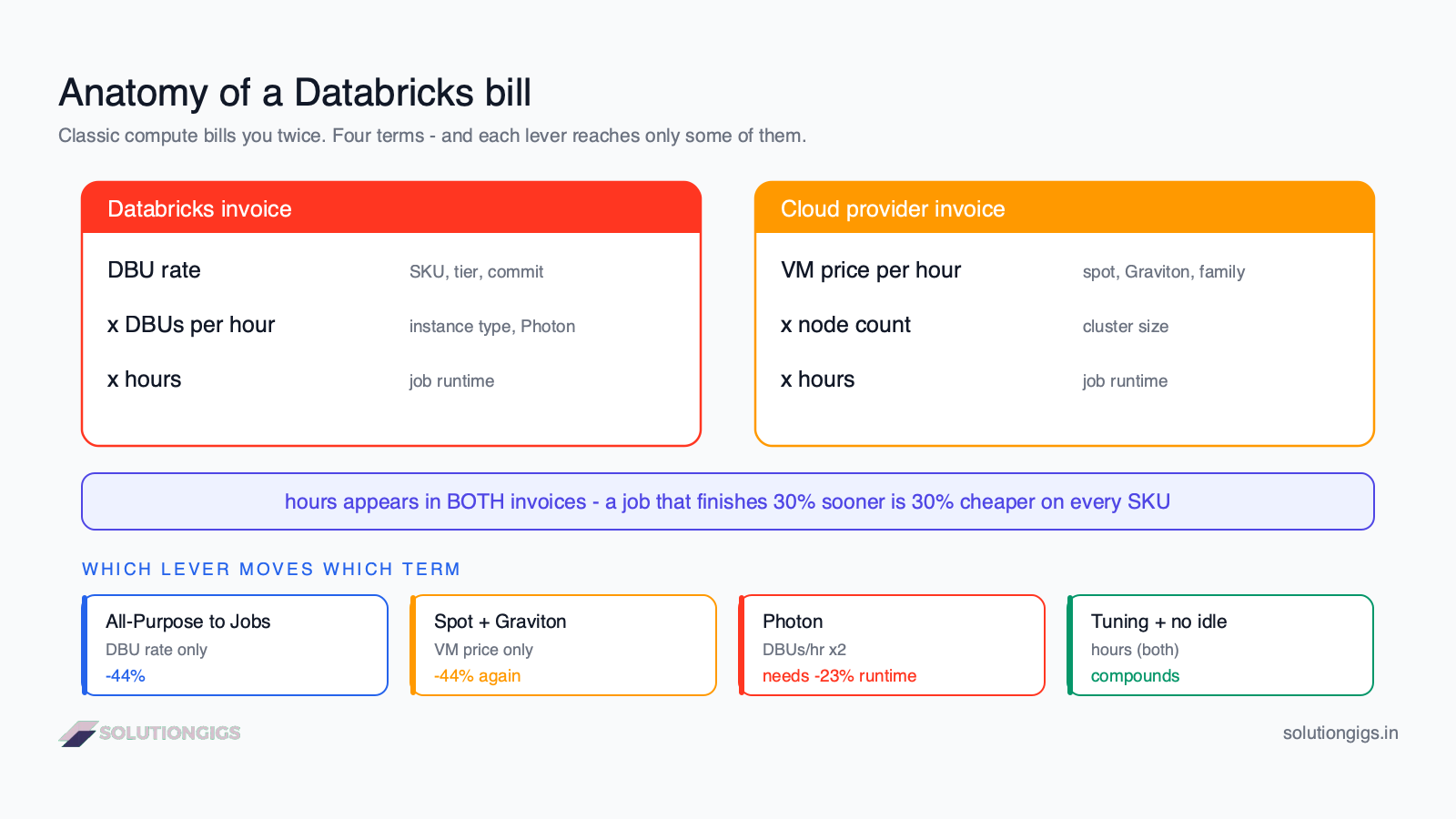
Four terms. Note which levers reach which:
| Term | What changes it | What does not change it |
|---|---|---|
| DBU rate | Compute SKU choice, tier, committed-use discount | Cluster size, tuning, spot |
| DBUs per hour | Instance type, node count, Photon multiplier | Which SKU you picked |
| Hours | Job tuning, autoscaling, auto-termination | Any pricing decision |
| VM price/hour | Spot, Graviton, instance family, node count | Anything on the Databricks side |
hours is the only term that multiplies both invoices. That is why performance tuning outranks pricing tricks — and why the cheapest-looking SKU frequently loses.
The list rates in this article are AWS, Premium tier, US regions, as of August 2026: All-Purpose $0.55/DBU, Jobs Compute $0.15/DBU, Serverless Jobs $0.35/DBU, Serverless SQL $0.70/DBU. Databricks no longer publishes a single plain-text price table — rates vary by cloud, region, tier and instance type. Confirm yours on the official pricing page before you build a business case on them. The method below is what transfers; the numbers are illustration.
The benchmark that inverts the standard advice
Capital One Software published a TPC-DS comparison of Databricks compute types (Scale Factor 1000, 95 queries, r6idn.xlarge, Photon and spot enabled on the classic cluster). Their published per-run results:
| Configuration | P99 (sec) | DBUs | $/DBU | Total cost |
|---|---|---|---|---|
| Jobs Classic (8 workers) | 82.22 | 60 | $0.15 | $10.22 |
| Jobs Serverless — Standard | 231.45 | 37 | $0.35 | $12.95 |
| Jobs Serverless — Performance | 159.08 | 52 | $0.35 | $18.20 |
| DBSQL Medium warehouse | 2.05 | 3.86 | $0.70 | $2.70 |
Read the first and last rows together. The SKU with the highest DBU rate produced the lowest cost per run — 74% below the SKU with the lowest rate. It charged 4.7× more per DBU and consumed 94% fewer of them, because it finished in 2 seconds instead of 82.
That is the whole thesis in one table. A rate is a price per unit of something you are trying to consume less of. Optimising the price of a unit while ignoring how many units you burn is how teams "follow best practice" and watch the bill stay flat.
Serverless jobs, meanwhile, came out 27–78% more expensive than Jobs Classic in the same test — the opposite of what most migration advice implies.
Lever 1 — Move scheduled work off All-Purpose Compute
This is still the highest-value single change, and it requires no code changes. All-Purpose Compute exists for interactive notebook work. If a scheduled job, a Lakeflow pipeline or a dbt run is attached to an All-Purpose cluster, you are paying an interactivity premium on a workload that nobody is watching.
Here is the honest arithmetic. Take a cluster of 1 driver + 8 workers, consuming 10 DBUs/hour, on instances costing $0.40/hour on demand:
| DBU cost/hr | VM cost/hr | Total/hr | DBU share | |
|---|---|---|---|---|
| All-Purpose ($0.55) | $5.50 | $3.60 | $9.10 | 60% |
| Jobs Compute ($0.15) | $1.50 | $3.60 | $5.10 | 29% |
- Saving computed from the rate alone: 73%
- Saving on the actual bill: 44%
Still excellent — a 44% cut for a configuration change is the best trade in this article. But notice what the table also tells you: once you are on Jobs Compute, 71% of your cost is the cloud VM line, which no Databricks-side setting will touch. That reframes everything after this point.
How to find the offenders: in the Jobs UI, filter for jobs whose cluster is an existing all-purpose cluster rather than a job cluster. Then enforce it with a compute policy so it cannot regress — policies can mandate auto-termination, restrict instance types and force the spot strategy.
Lever 2 — Eliminate idle time, which nobody budgets for
Idle cluster time is the most expensive thing in Databricks because you are billed for both invoices and receive nothing on either. A running cluster with no job attached consumes DBUs and rents VMs exactly as fast as a busy one.
The default auto-termination window is generous, and developers rarely shut clusters down manually. Take a modest dev cluster — 1 driver + 2 workers, 4 DBUs/hour, All-Purpose, $0.40/hour instances, so $3.40/hour:
Auto-terminate at 120 min instead of 15 min
  → 105 wasted minutes per session
  × 3 sessions/day × 20 working days = 105 hours/month of pure idle

105 h × $3.40 = $357 per developer per month
              = $3,570/month for a team of ten
Three concrete fixes:
- Set auto-termination to 15 minutes on every interactive cluster, and enforce it with a compute policy rather than trusting habit. Restart cost is the objection; cluster pools are the answer.
- Use cluster pools for teams that restart often. Pools keep warm instances ready so restarts take seconds, and Databricks does not charge DBUs for idle instances sitting in a pool — you pay only the cloud VM cost.
- Stop running always-on streaming for batch-shaped work. If your "streaming" job reads a source that updates hourly, a 24/7 cluster is 24 hours of billing for a few minutes of data. Structured Streaming's
Trigger.AvailableNowprocesses everything outstanding and shuts down, which Databricks explicitly recommends in its cost optimization best practices for incremental batch. Our Spark structured streaming tuning guide covers when a workload genuinely needs to stay resident.
Lever 3 — Make the job finish faster (the term that multiplies everything)
hours appears in both invoices, so a 30% faster job is a 30% cheaper job on every SKU — no pricing negotiation required. This is where cost optimisation stops being a FinOps exercise and becomes a data engineering one.
The highest-yield targets, in the order we usually find them:
- Data skew. One straggler task holds the whole stage — and therefore the whole cluster — open. See Spark data skew: causes and fixes.
- The small files problem. Thousands of tiny files turn a scan into metadata overhead. See the small files problem in Spark.
- Over-provisioned or wrongly shaped clusters. Too small causes shuffle spill to disk; too large means idle executors billed at full rate. Our Spark executor tuning guide and the free Spark config optimizer will get you to a defensible starting shape.
- Adaptive Query Execution. On by default in modern runtimes, and it fixes several skew and partition-count problems at runtime.
Photon: the multiplier most cost guides get backwards
Photon is where the four-term identity earns its keep. Photon does not raise the price per DBU — it raises how many DBUs per hour you consume. Databricks states plainly that "Photon instance types consume DBUs at a different rate than the same instance type running the non-Photon runtime." In practice that multiplier is commonly around 2×.
So Photon is a bet: pay more per hour, finish enough sooner to come out ahead. Take our Jobs Compute cluster ($5.10/hr, 29% DBUs) and double the DBU consumption:
With Photon:  (10 DBU × 2 × $0.15) + $3.60 VM = $6.60/hr
Break-even:   $5.10 / $6.60 = 0.773
              → Photon must cut runtime by at least 22.7%
Above ~23% faster, Photon pays. Below it, you have raised the bill. And at zero speedup you have raised it by 29%.
When is the speedup zero? Databricks documents the answer, and it is the part that gets skipped:
- No support for UDFs, the RDD API, or the Dataset API. A pipeline built around Python UDFs falls back to standard execution — and still pays the multiplier.
- Stateless streaming only. Stateful streaming does not benefit.
- Queries under two seconds see no meaningful improvement, because planning overhead dominates.
The practical rule: Photon is close to free money on SQL and DataFrame-native ETL, and a pure ~29% price increase on UDF-heavy Python jobs. Enable it per workload and measure, never account-wide by default. If your job is mostly
@udf-decorated Python, rewriting those UDFs into native Spark functions saves you twice — faster runtime and the ability to turn Photon on profitably.
Lever 4 — Buy the VM half on spot (and know its limit)
Spot instances discount the cloud invoice only. Databricks charges the same DBU rate regardless of how you bought the underlying instance. This is the most commonly overstated lever on the internet: "spot saves 70%" is 70% off a fraction of your bill.
On our Jobs Compute cluster, VMs are 71% of the cost, so the fraction is large and it is genuinely worth doing. Keeping the driver on demand (a reclaimed driver kills the whole job) and moving the 8 workers to spot at ~$0.12/hr:
| Configuration | DBU/hr | VM/hr | Total/hr | vs All-Purpose on demand |
|---|---|---|---|---|
| All-Purpose, on demand | $5.50 | $3.60 | $9.10 | — |
| Jobs Compute, on demand | $1.50 | $3.60 | $5.10 | −44% |
| Jobs Compute, spot workers | $1.50 | $1.36 | $2.86 | −69% |
Levers 1 and 4 together take this cluster down 69%, and neither touched a line of pipeline code.
Two supporting moves on the same term: Graviton instances (Databricks recommends them for better price-performance) and the fleet instance type, which lets Databricks pick the best available AWS instance on price and availability rather than pinning you to one that may be scarce.
Two cautions. Spot suits fault-tolerant batch; a reclaimed worker means retried tasks, so avoid it on tight-SLA jobs. And on serverless there is no VM line at all — this entire lever disappears, which is part of why serverless benchmarks worse on steady batch.
Lever 5 — Delete the maintenance jobs Databricks now runs for you
This is the piece of standard advice that stopped being correct, and the timing is why it matters right now.
For years the recommendation was to schedule nightly OPTIMIZE and VACUUM jobs on your Delta tables. Predictive optimization now does this automatically on Unity Catalog managed tables — running OPTIMIZE, VACUUM and ANALYZE on Databricks-managed serverless infrastructure, deciding which tables actually need it.
The rollout dates are the part to check against your own account:
| Account | Predictive optimization default |
|---|---|
| Created on or after 11 Nov 2024 | Enabled by default |
| Existing AWS and Azure accounts | Gradual rollout, expected to complete by August 2026 |
| Existing Google Cloud accounts | Default since 7 May 2025, rollout completed mid-Oct 2025 |
That AWS/Azure completion date is this month. Which produces two live problems:
1. A serverless line item appears that no job of yours created. Predictive optimization bills under the serverless jobs SKU. Teams running entirely on classic compute suddenly see serverless spend and cannot trace it to a scheduled job. It is not a billing error.
2. You are now paying twice to compact the same tables. Your nightly OPTIMIZE job still runs on your cluster. Predictive optimization also evaluates those tables. The work is redundant, and both invoices arrive.
What to do: find out whether it is on, see what it costs, then retire the jobs it replaces.
-- What is predictive optimization actually costing you?
SELECT
  u.usage_date,
  SUM(u.usage_quantity * p.pricing.default) AS list_cost
FROM system.billing.usage u
JOIN system.billing.list_prices p
  ON p.sku_name = u.sku_name
 AND u.usage_end_time >= p.price_start_time
 AND (p.price_end_time IS NULL OR u.usage_end_time < p.price_end_time)
WHERE u.billing_origin_product = 'PREDICTIVE_OPTIMIZATION'
  AND u.usage_date >= current_date() - INTERVAL 30 DAYS
GROUP BY u.usage_date
ORDER BY u.usage_date DESC;
Check the detail in system.storage.predictive_optimization_operations_history. If it is running against your tables, delete your own OPTIMIZE and VACUUM jobs for those tables — that is a whole scheduled workload removed from your bill. If you would rather keep manual control, you can disable it with ALTER at catalog, schema or table level; note that disabling at account level does not override a catalog or schema that explicitly enabled it.
It is worth knowing this is not the only background feature on that SKU. Lakehouse monitoring, materialized views, fine-grained access control, Lakeflow Connect and vector search all bill as serverless too, each with its own billing_origin_product value.
Working through a cost review and want a second pair of eyes on the numbers before you present them? See how we can help →
First, find out where the money actually goes
Every lever above assumes you know your own four terms. Most teams do not, and guess wrong about which workload dominates. system.billing.usage is the source of truth.
-- Top 20 cost drivers in the last 30 days
SELECT
  u.sku_name,
  u.usage_metadata.job_name,
  u.identity_metadata.run_as,
  SUM(u.usage_quantity)                        AS dbus,
  SUM(u.usage_quantity * p.pricing.default)    AS list_cost
FROM system.billing.usage u
JOIN system.billing.list_prices p
  ON p.sku_name = u.sku_name
 AND u.usage_end_time >= p.price_start_time
 AND (p.price_end_time IS NULL OR u.usage_end_time < p.price_end_time)
WHERE u.usage_date >= current_date() - INTERVAL 30 DAYS
GROUP BY 1, 2, 3
ORDER BY list_cost DESC
LIMIT 20;
⚠️ The join is the trap. Joining
list_pricesonsku_namealone is the most common error in homegrown Databricks cost dashboards. Each SKU carries multiple price records with effective start and end dates, so a bare join fans every usage row out against every historical price and inflates your totals — sometimes by a multiple. Theprice_start_time/price_end_timebounds in the query above are not optional.
Three things to remember when reading the output:
- This is list cost, not your cost. It ignores committed-use discounts and any negotiated rate.
- It contains no cloud VM spend. For classic compute you must add your EC2/VM bill to get the true figure — go back to the four-term identity.
- Tag from day one.
custom_tagsinherits from serverless usage policies, and untagged spend is unattributable spend. Set a minimum convention of business unit and project.
The checklist: what to do this week
In descending order of money-per-hour-of-effort:
- Audit job-to-cluster attachment. Any scheduled job on All-Purpose Compute moves to Jobs Compute today. (≈44% off those workloads.)
- Set auto-termination to 15 minutes everywhere and lock it with a compute policy. Add cluster pools if restart latency is the objection. (Hundreds of dollars per developer per month.)
- Move batch workers to spot, driver on demand. Skip it for tight-SLA jobs. (≈44% off the remaining total.)
- Check predictive optimization, then delete the
OPTIMIZE/VACUUMjobs it has made redundant. (A whole scheduled workload.) - Audit Photon per workload. Off for UDF-heavy Python, on for SQL and DataFrame ETL. (Up to 29% on the wrong jobs.)
- Then tune the slowest three jobs.
hoursmultiplies both invoices, so this compounds with everything above. - Set budgets and alerts in the account console so the next surprise arrives as an email, not an invoice.
Common mistakes that keep the bill high
| Mistake | Why it costs you |
|---|---|
| Comparing SKUs on DBU rate alone | Ignores the VM invoice and DBU consumption — the 73%/44% gap |
| Enabling Photon account-wide | Pays a ~2× DBU multiplier on UDF and RDD jobs that cannot benefit |
| Assuming "spot saves 70%" | Spot never touches the DBU line, and does not exist on serverless |
| Migrating to serverless "to save money" | Benchmarked 27–78% more expensive than Jobs Classic on batch |
Joining list_prices on sku_name only |
Duplicates usage rows against historical prices, inflating dashboards |
Still running nightly OPTIMIZE |
Duplicates predictive optimization; you pay for the same compaction twice |
| Long auto-termination "to avoid restarts" | Cluster pools solve restart latency without paying DBUs for idle time |
| Optimising cost before measuring it | The workload you assume is expensive usually isn't the top line |
Frequently Asked Questions
What is the fastest way to reduce Databricks costs?
Move every scheduled workload off All-Purpose Compute onto Jobs Compute, and set auto-termination to 15 minutes on every interactive cluster. Neither change requires touching pipeline code. On a typical classic cluster the SKU switch cuts the total invoice by around 44% — not the 73% implied by comparing DBU rates, because the cloud VM half does not change.
Is Jobs Compute really cheaper than All-Purpose Compute?
Yes, but by less than the rate table suggests. All-Purpose lists around $0.55/DBU on AWS and Jobs Compute around $0.15 — apparently 73%. On classic compute you also pay your cloud provider for the instances, and that line is identical on both. For a cluster at 10 DBU/hour on nine $0.40 nodes, the bill falls from $9.10 to $5.10 an hour: a 44% saving. Still the best single change here.
Does Photon always reduce Databricks costs?
No. Photon consumes DBUs at a higher rate — commonly around 2× — so it saves money only when it outruns that multiplier. On a Jobs Compute cluster where DBUs are 29% of the bill, Photon must cut runtime by about 23% to break even. Databricks documents that it does not support UDFs, the RDD API or the Dataset API, so on UDF-heavy Python it delivers near-zero speedup and becomes a ~29% price increase.
Why did my Databricks serverless costs suddenly increase in 2026?
Most likely predictive optimization. It is enabled by default on accounts created on or after 11 November 2024, and the gradual rollout to existing AWS and Azure accounts was expected to complete by August 2026. It runs OPTIMIZE, VACUUM and ANALYZE automatically on Unity Catalog managed tables and bills under the serverless jobs SKU — so a line appears that no job of yours created. Filter billing_origin_product = 'PREDICTIVE_OPTIMIZATION' in system.billing.usage to confirm.
Do spot instances reduce your Databricks bill?
Spot reduces the cloud VM half only — Databricks charges the same DBU rate however the instance was purchased. A 70% spot discount is 70% off a fraction of the invoice. On a Jobs Compute cluster where VMs are ~71% of cost, moving workers to spot while keeping the driver on demand cuts the total by about 44%. On serverless there is no VM line, so the lever does not exist.
Is serverless compute cheaper than classic compute on Databricks?
Usually not for scheduled batch. In Capital One Software's published TPC-DS comparison, Jobs Classic cost $10.22 per run against $12.95 for serverless standard and $18.20 for serverless performance — Jobs Classic was 27–78% cheaper. Serverless buys sub-minute startup, no cluster management and no idle risk, which is worth real money on bursty or infrequent work. It is a latency and operations purchase, not a discount.
How do I find where my Databricks money is actually going?
Query system.billing.usage joined to system.billing.list_prices, grouped by sku_name and usage_metadata.job_name. The critical detail is the join: matching on sku_name alone duplicates every usage row against every historical price for that SKU and badly inflates the result. Bound it with usage_end_time against price_start_time and price_end_time. Remember the output is list cost and excludes your cloud VM bill entirely.
Should I use Databricks or EMR to cut costs?
That is a platform decision, not a cost lever, and the honest answer depends on how much of Databricks you actually use. EMR removes the DBU invoice but hands you the cluster management, Delta tooling and governance that Unity Catalog provides. We compared both in detail in Databricks vs AWS EMR. Fix the five levers above before you consider migrating — most teams find the savings without changing platform.
Conclusion
The reason Databricks cost advice underdelivers is that it optimises a rate when the bill is a product of four terms. Fix the identity first and the priorities reorder themselves.
Three numbers are worth carrying out of this article. Moving scheduled work off All-Purpose Compute cuts the real bill by about 44%, not 73% — still the best change available, but plan the budget on the honest figure. Photon must make a job at least 23% faster to pay for its DBU multiplier, and it cannot speed up UDF, RDD or Dataset code at all, so enabling it everywhere quietly taxes your Python-heavy pipelines by ~29%. And the highest-rate SKU in a published TPC-DS benchmark produced the cheapest run — 74% below the lowest-rate SKU — because it finished in 2 seconds instead of 82.
Then there is the one with a date on it. Predictive optimization's rollout to existing AWS and Azure accounts was expected to complete by August 2026. If your account was created before November 2024, check it this week: you may be paying for a new serverless line item you cannot trace, while still running the nightly OPTIMIZE job it has already made redundant. That one is free money in both directions.
Measure before you optimise, tag everything, and remember that the single most effective cost lever on this platform is a job that finishes sooner.
If you want your Databricks spend audited, the pipelines behind it tuned, or the architecture reviewed before it scales, tell us what you're running — you get a scope and a price within one business day, or a straight no.
A failed job is a cost problem too: retries hold the cluster open through the wait interval, so a task that fails three times can bill over five times a clean run. See why a Databricks job failed and what the retry actually costs.
Mohammed Yaseen
Founder, SolutionGigs
Mohammed builds and tunes Spark and Databricks pipelines, and has spent enough time reconciling DBU invoices against EC2 invoices to distrust any cost guide that shows only one of them. LinkedIn →
Try Free Spark Config Optimizer
Free, no signup — right in your browser.
Try Free Spark Config Optimizer →More in Data Engineering
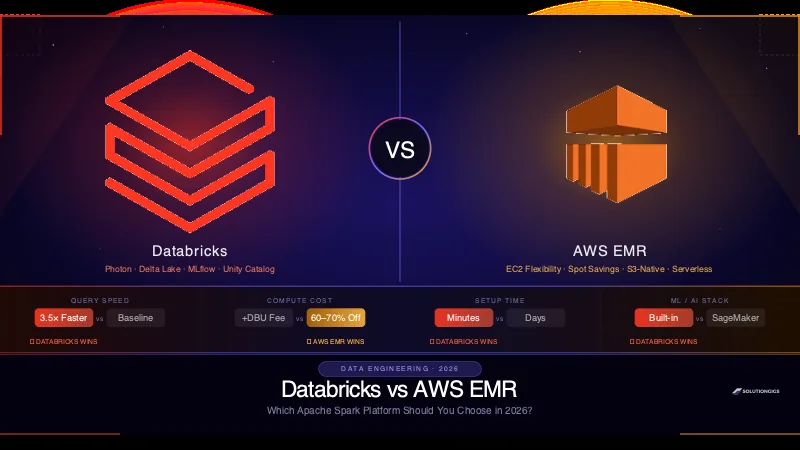
Databricks vs AWS EMR: Which Spark Platform Wins?
Databricks vs AWS EMR head-to-head across performance, cost, ML integration, and developer experience. Real cost modelling, a 5-question decision framework, and a clear verdict for 2026.
Data Engineering on AWS: S3, EMR & Glue
Data engineering on AWS explained — how S3, Glue, EMR, Athena, and Redshift fit together into a data pipeline, what each service does, and when to use which.
Data Lake vs Data Warehouse vs Lakehouse: The Real Differences
Data lake, data warehouse, and lakehouse aren't three products you pick off a shelf — they're three stages in how the industry solved the same problem, each born because the last one hit a wall. The one idea that separates them: when and where structure is applied to your data. This guide gives the one-line difference, a full side-by-side comparison table, the history that explains why the lakehouse exists (the “two-system tax”), a decision framework, and the mistakes that quietly cost teams money — written from the data-engineering trenches, not a vendor brochure.