
Spark Data Skew: How to Detect and Fix It
Data skew is the #1 hidden cause of slow Spark jobs — one hot key floods a single partition and stalls a whole stage at 99%. Learn how to detect skew in the Spark UI and fix it with AQE skew join, broadcast joins, null-key handling, and salting — with real PySpark code.

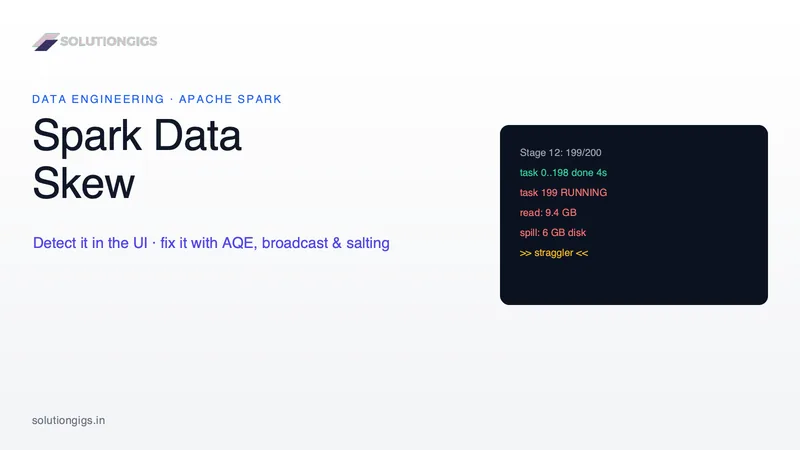
Quick Answer: Data skew in Spark is when data is unevenly distributed across partitions, so one or a few partitions hold far more rows than the rest. Because a stage finishes only when its slowest task finishes, that one giant partition becomes a straggler — it runs for minutes while every other executor sits idle, often spilling to disk (which is 10–100× slower than memory). You detect it in the Spark UI when a stage hangs near 99% and one task's Shuffle Read dwarfs the median. You fix it, in order of effort: enable AQE skew join (free), broadcast small tables, filter null/junk keys, and finally salt the hot keys to spread them across partitions.
If a Spark job that "should" be fast quietly takes 30 minutes, and the Spark UI shows 199 tasks done and 1 still spinning, you almost certainly have data skew — the single most common and most misdiagnosed cause of slow Spark jobs. Having tuned Spark on AWS EMR across pipelines handling hundreds of millions of events per day, I've seen a single hot key turn a well-written join into a cluster-wide bottleneck. This guide is the code-level walkthrough I wish existed in one place: what skew actually is, the five ways it creeps in, how to detect it precisely in the Spark UI, and four proven fixes with real PySpark code. It pairs with our guides on the Spark small files problem and Spark Structured Streaming tuning.
What is data skew in Spark?
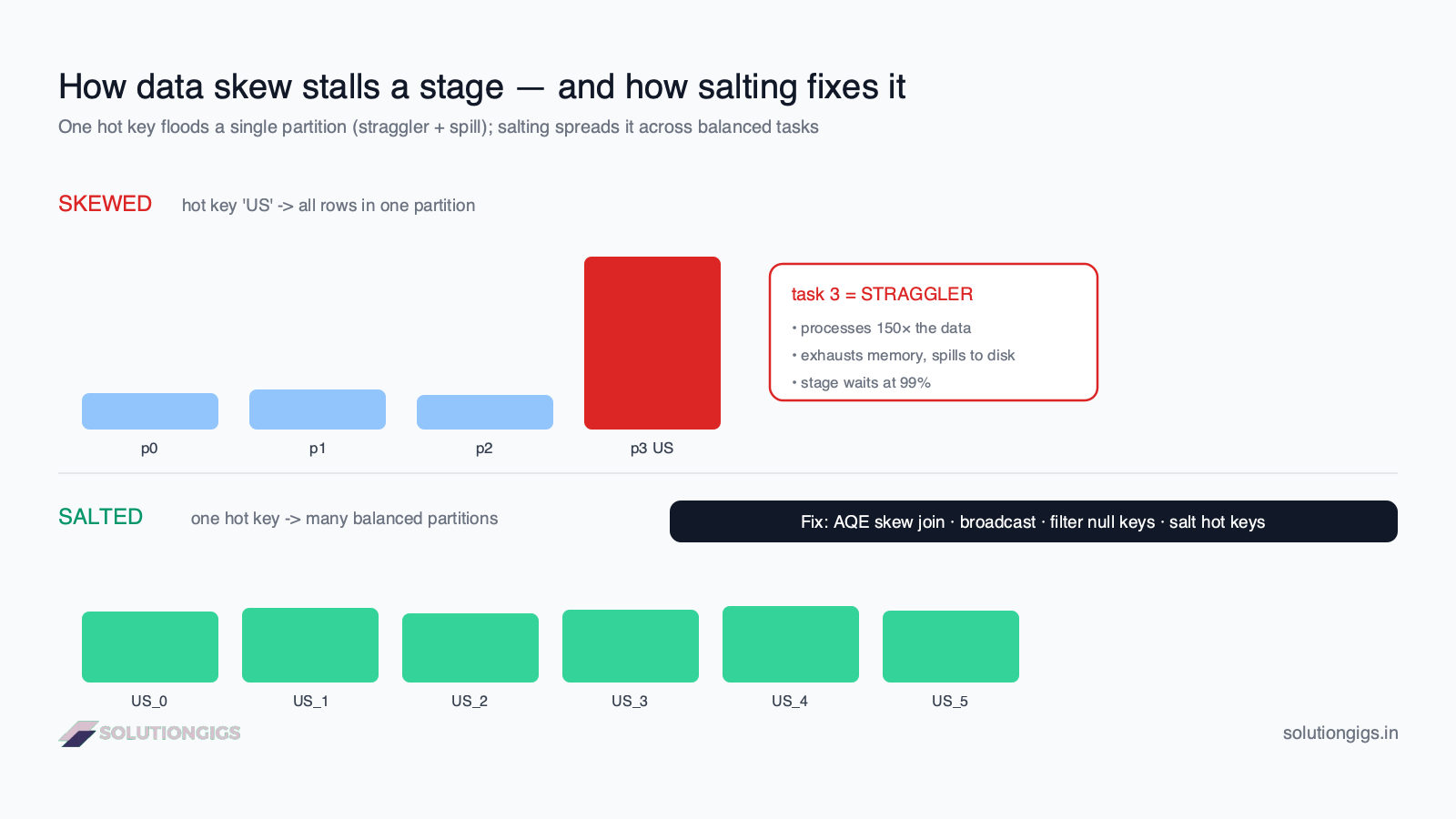
Data skew is an uneven distribution of rows across Spark's partitions — a few partitions are enormous while the rest are tiny. Spark parallelizes work by splitting data into partitions and running one task per partition. That model only pays off when partitions are roughly equal. When one partition is 100× larger than the others, its task does 100× the work, and the whole stage waits for it.
The trap is that skew is invisible in aggregate metrics. Your job reads a reasonable amount of data, your cluster has plenty of cores, and CPU utilization looks fine — because 199 cores finished in seconds and one core is still grinding. Total volume is not the problem; distribution is. Skew shows up almost exclusively during wide transformations that shuffle data by key: join, groupBy, reduceByKey, distinct, and window functions. All rows with the same key are forced into the same partition, so a popular key means a bloated partition.
What causes data skew? (5 common causes)
Skew is caused by a few keys appearing far more often than the rest, then being grouped or joined on. Here are the five patterns that produce it in practice:
- Null or junk keys. Millions of rows with
user_id = NULL(or0,-1,"unknown", empty string) all hash to the same partition. This is the single most common cause in real pipelines — dirty source data quietly funnels into one task. - Celebrity / hot keys. A natural popularity imbalance: one
product_idin a mega-sale, onecountry = 'US', onetenant_idfor your biggest customer. Real-world data follows power laws, so a few keys dominate. - Low-cardinality join or group keys. Joining or grouping on a column with few distinct values (a boolean, a status, a date) crams huge row counts into a handful of partitions.
- Default partition count vs. data reality.
spark.sql.shuffle.partitionsdefaults to 200. If your key distribution doesn't fan out across those 200 buckets evenly, some fill up and some stay empty. explode()and one-to-many expansions. Exploding an array column where a few rows contain huge arrays multiplies those specific rows into a monster partition.
Rule of thumb: if a query does a
joinorgroupByand one key value accounts for more than a few percent of all rows, assume skew until the Spark UI proves otherwise.
How to detect data skew in the Spark UI
The definitive symptom of skew is a stage stuck near 99% while one task keeps running — and the task-level metrics confirm it. Don't guess; measure. Here's the exact detection workflow.
1. Find the stalled stage
In the Spark UI → Stages tab, look for a stage where almost all tasks are complete but the stage won't finish. A stage that sits at "199/200" for minutes is the classic skew fingerprint.
2. Read the summary metrics distribution
Open the stage and look at the Summary Metrics table, which shows Min, 25th percentile, Median, 75th percentile, and Max for each metric. Skew screams at you here:
| Metric | Median | Max | Interpretation |
|---|---|---|---|
| Duration | 4 s | 22 min | One task runs ~300× longer |
| Shuffle Read Size | 60 MB | 9.4 GB | One partition got ~150× the data |
| Records Read | 1.1 M | 180 M | A hot key dominates |
| Spill (Disk) | 0 B | 6 GB | The straggler exhausted memory |
If Max is orders of magnitude larger than Median, that gap is the skew. Healthy stages have Max within ~2–3× of Median.
3. Sort tasks by duration and confirm the straggler
In the stage's task table, sort by Duration descending. A skewed stage shows one (or a few) tasks at the top reading far more Shuffle Read Size and Records than the rest — and usually a non-zero Spill column. That spill is the killer: spilling to disk is 10–100× slower than in-memory processing, so a task that should take 30 seconds can take 30 minutes.
4. Confirm which key is skewed (programmatically)
Before you fix it, prove which key is hot. Group by the suspect key and count:
from pyspark.sql import functions as F

# Which join/group keys dominate?
(df.groupBy("user_id")
   .count()
   .orderBy(F.desc("count"))
   .show(20, truncate=False))

# Quick null check — often the real culprit
df.filter(F.col("user_id").isNull()).count()
If the top key holds a huge share of rows (or nulls do), you've found your skew — now fix it.
How to fix data skew in Spark (4 fixes, easiest first)
Apply fixes in order of effort: AQE first, then broadcast, then clean the keys, and only salt as a last resort. Escalating this way means you often solve skew with a single config flag and never touch your logic.
Fix 1 — Enable AQE skew join (the free fix)
Adaptive Query Execution (AQE), introduced in Spark 3.0, can automatically detect and split skewed partitions in sort-merge and shuffle-hash joins at runtime. It's the first thing to try because it needs zero code changes. On Spark 3.2+ AQE is on by default, but verify:
spark.conf.set("spark.sql.adaptive.enabled", "true")
spark.conf.set("spark.sql.adaptive.skewJoin.enabled", "true")

# Detection thresholds (defaults shown):
spark.conf.set("spark.sql.adaptive.skewJoin.skewedPartitionFactor", "5")
spark.conf.set("spark.sql.adaptive.skewJoin.skewedPartitionThresholdInBytes", "256MB")
AQE flags a partition as skewed only when both conditions hold: the partition is larger than skewedPartitionThresholdInBytes (default 256 MB) and larger than the median partition size × skewedPartitionFactor (default 5). It then splits that big partition into several smaller sub-partitions so the work spreads across tasks. (Spark performance-tuning docs.)
The catch: AQE only handles skew in joins, not in groupBy aggregations, and it can't help with null/junk keys that legitimately belong to one group. If your skewed partition is under 256 MB but still slow, lower the threshold. On Spark 3.3+, spark.sql.adaptive.forceOptimizeSkewedJoin=true applies the optimization even when it adds an extra shuffle.
Fix 2 — Broadcast the small side of the join
If one side of a skewed join is small (under ~10 MB by default, tunable to a few hundred MB), broadcast it to eliminate the shuffle entirely — no shuffle, no skew. A broadcast join ships the small table to every executor, so the large table is never repartitioned by key.
from pyspark.sql.functions import broadcast

result = large_df.join(broadcast(small_dim_df), "country_code")
Spark auto-broadcasts tables below spark.sql.autoBroadcastJoinThreshold (default 10 MB). Raise it deliberately if your dimension table is bigger but still fits in executor memory:
spark.conf.set("spark.sql.autoBroadcastJoinThreshold", 100 * 1024 * 1024) # 100 MB
This is the highest-leverage skew fix for the extremely common large-fact-table joined to small-dimension-table pattern. It doesn't apply when both sides are large — then you need salting.
Fix 3 — Isolate and handle null / junk keys
If nulls or a sentinel value cause the skew, don't let Spark join or group on them at all — split them out. Rows with a null key can't match anything in an inner join anyway, so filtering them is free correctness:
# For an inner join: null keys never match — drop them before the shuffle
clean = large_df.filter(F.col("user_id").isNotNull())
result = clean.join(users_df, "user_id")

# If you must keep nulls (e.g. left join), give them random keys so they scatter
salted = large_df.withColumn(
    "user_id",
    F.when(F.col("user_id").isNull(),
           F.concat(F.lit("null_"), (F.rand() * 1000).cast("int")))
     .otherwise(F.col("user_id"))
)
This one change often fixes a "skewed" job that was really just a dirty-data job.
Fix 4 — Salt the hot keys (last resort, for large-to-large joins and groupBy)
Salting appends a random number to a hot key so its rows spread across N partitions instead of one — the go-to fix when both tables are large and AQE isn't enough. The idea: turn one overloaded key into N virtual keys.
Salting a skewed join. Add a random salt to the big table's key, and replicate the small table's matching rows across every salt value so the join still finds its matches:
from pyspark.sql import functions as F

N = 16  # salt buckets — spread the hot key across 16 partitions

# 1. Salt the skewed (large) side with a random bucket
large_salted = large_df.withColumn(
    "salt", (F.rand() * N).cast("int")
).withColumn("join_key", F.concat_ws("_", "user_id", "salt"))

# 2. Explode the small side so every salt bucket has a copy to match
salt_range = spark.range(N).withColumnRenamed("id", "salt")
small_exploded = (small_df
    .crossJoin(salt_range)
    .withColumn("join_key", F.concat_ws("_", "user_id", "salt")))

# 3. Join on the composite salted key — the hot key is now 16 balanced partitions
result = large_salted.join(small_exploded, "join_key")
Salting a skewed groupBy uses a two-stage aggregation — partial aggregate per salt bucket, then combine — which is the trick AQE can't do for you:
# Stage 1: aggregate within salted sub-groups
partial = (df
    .withColumn("salt", (F.rand() * N).cast("int"))
    .groupBy("user_id", "salt")
    .agg(F.sum("amount").alias("partial_sum")))

# Stage 2: combine the partials back into the real key
final = (partial
    .groupBy("user_id")
    .agg(F.sum("partial_sum").alias("total_amount")))
Salting works, but it adds a shuffle, more code, and a tuning knob (N). Reach for it only after AQE and broadcasting have failed — and salt only the hot keys if you can, leaving cold keys untouched to avoid the overhead.
Which fix should you use? (decision guide)
Match the fix to the shape of your skew — most jobs are solved before you ever write salting code.
| Situation | Best fix |
|---|---|
| Skew in a join, Spark 3.x | Fix 1 — enable AQE skew join |
| One side of the join is small | Fix 2 — broadcast join |
| Skew caused by null / sentinel keys | Fix 3 — filter or randomize nulls |
| Skew in a groupBy aggregation | Fix 4 — two-stage salted aggregation |
| Both join sides large, AQE insufficient | Fix 4 — salt the hot keys |
The 90% path: turn on AQE, broadcast your dimension tables, and clean null keys. That combination removes the vast majority of production skew without a single line of salting.
Common mistakes when fixing data skew
- Cranking up
spark.sql.shuffle.partitionsand calling it done. More partitions don't help if all the hot-key rows still land in one of them — the key hashes to the same bucket regardless of partition count. - Salting everything. Salting cold keys adds shuffle and cross-join overhead for no benefit. Salt only the keys the Spark UI proved are hot.
- Adding more executors/RAM. Throwing hardware at skew just gives the straggler a bigger machine to be slow on; the other executors still idle. Skew is a distribution problem, not a capacity problem.
- Forgetting AQE is join-only. Teams enable AQE, see the groupBy still skewed, and conclude "AQE doesn't work." AQE doesn't touch aggregation skew — that needs salting.
- Not removing the salt. After a salted groupBy you must re-aggregate on the real key (stage 2), or your results are wrong.
- Treating skew as a performance problem only. It is also one of the most expensive bugs on the bill. While one straggler task runs, the entire cluster stays allocated and billed — on Databricks classic compute that means DBUs and the cloud VM line, for every idle executor. A stage that takes 40 minutes instead of 8 because of one hot key costs 5x. See how to reduce Databricks costs for the arithmetic.
If you're fighting a Spark pipeline that's slowed to a crawl, the fastest way through is usually someone reading the stage detail with you. Send me the Spark UI numbers — the skewed task is normally visible in under a minute.
Frequently Asked Questions
What is data skew in Spark?
Data skew is an uneven distribution of rows across Spark's partitions, where a few partitions hold far more data than the rest. Because a stage finishes only when its slowest task finishes, the one oversized partition becomes a straggler that runs long after every other task is done. It typically appears during shuffle operations like joins and groupBy, wasting cluster capacity even when total data volume is modest.
How do I detect data skew in the Spark UI?
Go to the Stages tab and look for a stage stuck near 99% for a long time. Open it and read the Summary Metrics row: if the Max Shuffle Read Size or Duration is 10× or 100× the Median, you have skew. Then sort the task table by Duration — the straggler task at the top, often with disk Spill, is processing the hot partition.
Does Adaptive Query Execution fix data skew automatically?
Partly. Spark 3.0+ AQE automatically splits skewed partitions in sort-merge and shuffle-hash joins when spark.sql.adaptive.enabled and spark.sql.adaptive.skewJoin.enabled are true. A partition counts as skewed when it exceeds 256 MB and is more than 5× the median partition size. AQE does not handle groupBy aggregation skew or null-key skew, so it removes the easy cases but not all of them.
What is salting in Spark and when should I use it?
Salting appends a random number to a hot key so its rows spread across many partitions instead of one. For a skewed join you salt the large table's key and replicate the small table across every salt value; for a groupBy you aggregate in two stages. Use salting only after AQE and broadcast joins have failed, because it adds shuffle overhead and code complexity.
What is the difference between data skew and the small files problem?
They are opposite imbalances. Data skew is a runtime compute problem — a few in-memory partitions hold too much data, creating straggler tasks during shuffles. The small files problem is a storage-layout problem — a dataset is split into too many tiny files, adding per-file read overhead. Skew makes one task slow; small files make every task pay a metadata tax.
Why is my Spark stage stuck at 99%?
A stage stuck at 99% almost always means skew: nearly all tasks finished and the stage is waiting on one straggler that received a disproportionately large partition. That task is usually processing a hot key, a flood of null keys, or a low-cardinality join key, and it often spills to disk. Check the task table for a single task with a much larger Shuffle Read Size or Duration than the rest.
Can increasing the number of partitions fix skew?
Rarely on its own. Raising spark.sql.shuffle.partitions spreads data into more buckets, but every row with the same key still hashes to the same partition — so the hot key stays concentrated. More partitions help balanced data, not skewed keys. To break up a hot key you need AQE skew-join splitting, broadcasting, or salting.
Conclusion
Data skew is the highest-impact, most-overlooked performance bug in Spark: no bad code, no missing index, just one key that's more popular than your partitioning assumed. It hides behind healthy-looking averages and only reveals itself in the Spark UI, where one straggler task keeps a whole stage — and a whole cluster — waiting. The diagnosis is always the same: find the stage stuck at 99%, compare Max vs. Median in the Summary Metrics, and prove which key is hot with a groupBy().count().
The cure is a ladder you climb only as far as you need to: enable AQE skew join for free, broadcast small dimension tables to skip the shuffle, clean null and sentinel keys that dirty data funneled into one partition, and salt the genuinely hot keys when two large tables must meet. Most production skew dies at the first two rungs. Start by opening the Spark UI on your slowest job today — if one task's Shuffle Read towers over the median, you've just found minutes (and cloud dollars) waiting to be reclaimed.
This ladder is also one of the most reliably asked scenario questions in Spark hiring loops — the "199 tasks finished, one is still running" prompt. We walk through how to answer it, and five other real diagnostic scenarios, in PySpark interview questions and answers.
Fighting a slow Spark pipeline or a job that's stuck at 99%? Tell me which stage is hanging and I'll tell you which rung of the ladder above will actually fix it.
Mohammed Yaseen
Founder, SolutionGigs
Mohammed tunes Spark pipelines on AWS EMR processing hundreds of millions of events per day, where diagnosing and killing data skew is a routine performance and cost win. LinkedIn →
Try Free Parquet to CSV Converter
Free, no signup — right in your browser.
Try Free Parquet to CSV Converter →More in Data Engineering

Spark Executor Tuning: Cores, Memory & How Many Executors
Ask three data engineers how to size a Spark cluster and you'll get three answers — and usually a job that crawls or dies with 'Container killed for exceeding memory limits.' This guide replaces the guesswork with four arithmetic steps: how many cores per executor (and why 5), how much memory, how to calculate the executor count, plus memoryOverhead, fat vs thin executors, dynamic allocation, and a fully worked sizing example you can copy.

Spark Join Strategies: Broadcast vs Sort-Merge vs Shuffle Hash
The same Spark query can finish in 30 seconds or run for an hour — and the difference is almost always which join strategy the optimizer picked. This guide breaks down the three: broadcast hash, sort-merge, and shuffle hash join, exactly how Spark chooses between them, how to force a broadcast join (and the six reasons yours won't trigger), the key thresholds, and how Adaptive Query Execution re-plans joins at runtime — with a decision tree and real PySpark.
Spark Small Files Problem: Causes & How to Fix It
The Spark small files problem quietly wrecks query speed and inflates cloud bills. Learn why it happens, how to detect it, and 5 proven fixes with real code — repartition vs coalesce, maxRecordsPerFile, AQE, and Delta/Iceberg compaction.