
Spark Streaming Tuning Guide: Production Performance Tips
Spark Structured Streaming jobs slow or falling behind on AWS EMR? Real production tuning configs — shuffle partitions, AQE, maxOffsetsPerTrigger, checkpointing, watermarks, and foreachBatch patterns from a pipeline processing hundreds of millions of events daily.

Quick Answer
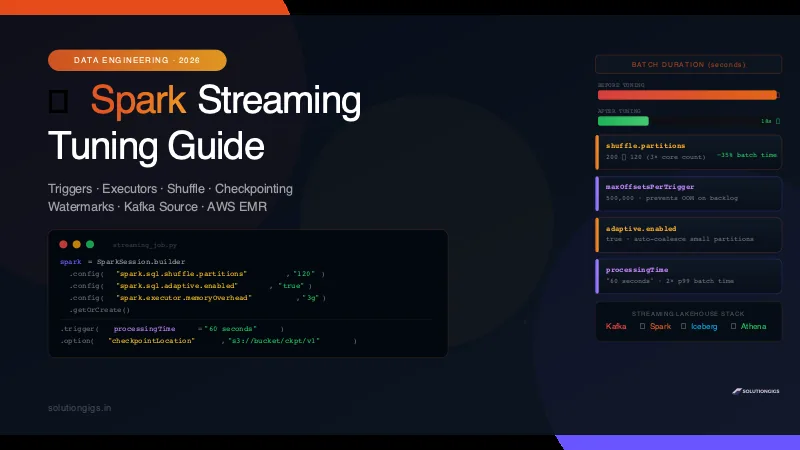
Spark Streaming tuning starts with three things: set your trigger interval longer than your batch processing time, drop spark.sql.shuffle.partitions from the default 200 to 2–4× your core count, and checkpoint to S3 or HDFS — not local disk. On Kafka sources, cap ingestion with maxOffsetsPerTrigger to prevent backlog bursts from overwhelming executors. Enable adaptive query execution in Spark 3.x to let the engine self-tune per batch.
The warning sign is always the same: your Spark Structured Streaming job's batch duration starts at 8 seconds, climbs to 25, then 60, then the trigger interval warning fires — "batch is taking longer than the trigger interval" — and you realise your streaming job is no longer streaming, it's just very slow batch.
I've tuned Spark Structured Streaming jobs on AWS EMR processing hundreds of millions of telemetry events daily. Every configuration in this guide comes from a real production incident, not the Spark documentation defaults.
How Spark Structured Streaming Actually Works
Before tuning, you need a mental model of what Spark is doing under the hood.
Spark Structured Streaming runs as a series of micro-batches. On each trigger, Spark:
- Reads new data from the source (Kafka, S3, etc.) up to the configured limit
- Processes it through your DataFrame transformations
- Writes output to the sink
- Commits offsets and writes a checkpoint
- Waits for the next trigger
The key insight: steps 1–4 must complete before step 5 can start the next batch. If your batch takes 45 seconds but your trigger is set to 10 seconds, Spark queues batches — lag grows, memory pressure builds, and the job eventually falls over.
Trigger interval: 10s
Actual batch time: 45s
Result: batches queue up → lag grows → OOM

Fix: set trigger to 60s, or fix the 45s processing time
Trigger Settings — The Most Important Config
ProcessingTime (Default)
query = (
    df.writeStream
    .trigger(processingTime="30 seconds")   # run a batch every 30s
    .outputMode("append")
    .format("parquet")
    .option("checkpointLocation", "s3://your-bucket/checkpoints/job")
    .start()
)
Rule: Set processingTime to 1.5–2× your observed p99 batch duration. If batches typically finish in 20s but spike to 30s, set the trigger to 45–60s. This gives headroom for spikes without queueing.
AvailableNow (Batch-style, drains the backlog)
# Process all available data and stop — useful for backfill or scheduled runs
query = (
    df.writeStream
    .trigger(availableNow=True)
    .outputMode("append")
    .format("delta")
    .option("checkpointLocation", "s3://your-bucket/checkpoints/job")
    .start()
)
query.awaitTermination()
Use this for daily batch jobs that read from Kafka and write to a data lake. It drains everything available, commits, and exits cleanly — no long-running cluster needed.
Continuous (Low-latency, experimental)
# Sub-second latency — use only for simple map operations, no aggregations
query = (
    df.writeStream
    .trigger(continuous="1 second")
    .start()
)
Continuous mode skips micro-batching for near-real-time latency. It only supports simple stateless transformations — no aggregations, no joins. In practice, a 1–5 second ProcessingTime trigger is usually the better choice.
On Spark 4.1 and later, prefer Real-Time Mode over continuous processing for genuinely low-latency needs — it keeps stages long-lived and shuffles in memory, and it doesn't carry continuous mode's stateless-only restriction. See Spark vs Flink for how it changes the classic micro-batch-versus-true-streaming trade-off.
Executor Sizing — Right-Size Before Anything Else
Tuning configs on an undersized cluster is pointless. Get the hardware right first.
Calculate Required Cores
Required cores = (records per second) × (processing time per record in seconds)

Example:
- 100,000 records/second from Kafka
- 0.5ms per record to process
= 100,000 × 0.0005 = 50 cores minimum
Add 20–30% headroom for shuffle overhead, GC pauses, and spikes.
EMR Spark Config (spark-defaults.conf or --conf flags)
spark-submit \
  --master yarn \
  --deploy-mode cluster \
  --num-executors 10 \
  --executor-cores 4 \
  --executor-memory 16g \
  --driver-memory 4g \
  --conf spark.executor.memoryOverhead=2g \
  --conf spark.yarn.executor.memoryOverhead=2g \
  your_streaming_job.py
Memory overhead matters for streaming. Spark allocates off-heap memory for shuffle buffers, network buffers, and the state store. Setting memoryOverhead to at least 10–20% of executor memory prevents container kill errors on YARN/EMR.
Executor Core Count: 4–5 is the Sweet Spot
1–2 cores: underutilises the executor, too much JVM overhead per core
4–5 cores: good balance of parallelism vs GC overhead
8+ cores: GC pauses hurt — one GC stop-the-world stalls all tasks on the executor
spark.sql.shuffle.partitions — The Config Everyone Gets Wrong
The default is 200. For streaming jobs processing small micro-batches, 200 shuffle partitions means 200 tiny tasks with more scheduling overhead than actual work.
How to Calculate the Right Value
# Rule: 2–4x your total executor cores
total_cores = num_executors * executor_cores  # e.g. 10 * 4 = 40
shuffle_partitions = total_cores * 3          # = 120

spark = SparkSession.builder \
    .config("spark.sql.shuffle.partitions", str(shuffle_partitions)) \
    .getOrCreate()
Better: Enable Adaptive Query Execution (Spark 3.x)
spark = SparkSession.builder \
    .config("spark.sql.adaptive.enabled", "true") \
    .config("spark.sql.adaptive.coalescePartitions.enabled", "true") \
    .config("spark.sql.adaptive.coalescePartitions.minPartitionNum", "1") \
    .config("spark.sql.shuffle.partitions", "200")  # AQE will reduce this per batch
    .getOrCreate()
With AQE enabled, Spark measures the actual data size of each shuffle stage and automatically coalesces small partitions. On Telemetrix's pipeline, enabling AQE alone cut average batch time by 35% without any other changes.
For the manual controls AQE doesn't cover — reshaping partitions before a write or fixing skew you know about — see Spark repartition() vs coalesce(), which explains why coalesce(1) can quietly throttle a whole job to one core and when to reach for each.
Kafka Source Tuning
Cap Ingestion with maxOffsetsPerTrigger
When your job restarts after downtime, Kafka has hours of backlog. Without a cap, Spark reads all of it in one enormous batch — OOM, task timeouts, chaos.
kafka_df = (
    spark.readStream
    .format("kafka")
    .option("kafka.bootstrap.servers", "broker1:9092,broker2:9092")
    .option("subscribe", "telemetry.events")
    .option("startingOffsets", "latest")
    .option("maxOffsetsPerTrigger", 500_000)     # max messages per batch
    .option("fetchOffset.numRetries", "3")
    .option("kafka.session.timeout.ms", "30000")
    .option("kafka.heartbeat.interval.ms", "10000")
    .load()
)
Sizing maxOffsetsPerTrigger:
| Scenario | Recommended value |
|---|---|
| Low-latency (≤5s trigger) | 50,000–100,000 |
| Standard (30s trigger) | 200,000–500,000 |
| Batch-style (5min trigger) | 1,000,000–5,000,000 |
Backlog drain (availableNow) |
No limit needed — set very high or omit |
minPartitions for Kafka Parallelism
By default Spark creates one task per Kafka partition. If you have 12 Kafka partitions but 40 executor cores, 28 cores sit idle during the read phase.
.option("minPartitions", "40") # repartition Kafka data to use all cores
Checkpointing — Do This Right or Lose Data
Checkpointing is mandatory for production streaming jobs. It stores:
- Committed source offsets (where to resume after a crash)
- Query plan (for schema evolution detection)
- State store data (for stateful aggregations)
Always Checkpoint to S3 (Not Local Disk)
query = (
    processed_df.writeStream
    .option("checkpointLocation", "s3://your-data-bucket/checkpoints/telemetry-processor/v1")
    .trigger(processingTime="30 seconds")
    .outputMode("append")
    .format("iceberg")
    .option("path", "s3://your-data-bucket/tables/telemetry_events")
    .start()
)
Important: Include a version suffix in the checkpoint path (/v1). When you make breaking schema changes or change the query plan significantly, Spark cannot resume from the old checkpoint. Bump to /v2 to start fresh without losing the old checkpoint in case you need to roll back.
Checkpoint Write Overhead
Checkpointing adds latency to every batch — typically 500ms–2s on S3. If your batches are very fast (< 5s) and you're seeing checkpoint overhead dominating batch time:
# Use HDFS/local HDFS on EMR for lower checkpoint latency
.option("checkpointLocation", "hdfs:///checkpoints/telemetry-processor")
For most jobs, the S3 latency is acceptable — prioritise durability over the extra second.
Watermarking for Late-Arriving Data
If your streaming job does time-based aggregations (counting events per minute, summing metrics per hour), you must use watermarks — otherwise Spark holds state for every time window forever and runs out of memory.
from pyspark.sql.functions import window, col

aggregated = (
    kafka_df
    .selectExpr("CAST(value AS STRING) as json")
    .select(from_json(col("json"), schema).alias("data"))
    .select("data.*")
    .withWatermark("event_time", "10 minutes")      # drop state older than this
    .groupBy(
        window(col("event_time"), "1 minute"),       # 1-minute tumbling window
        col("host")
    )
    .agg(
        count("*").alias("event_count"),
        avg("value").alias("avg_value")
    )
)
Choosing the Watermark Delay
Watermark = how late can an event arrive and still be counted?

Too tight (1 minute):  events arrive 2 minutes late → silently dropped → wrong aggregates
Too loose (2 hours):   Spark holds 2 hours of state → high memory usage

Start with: 2× your observed 99th percentile event latency
If events typically arrive within 5 minutes: set watermark to 10 minutes
On Telemetrix, IoT telemetry events arrive up to 3 minutes late due to device buffering. We use a 10-minute watermark — generous enough to capture 99.9% of late events, tight enough to keep state manageable.
foreachBatch — The Most Flexible Output Pattern
The standard sink formats (parquet, delta) are convenient but inflexible. foreachBatch gives you full control over how each micro-batch is written.
def write_batch(batch_df, batch_id):
    if batch_df.isEmpty():
        return

    # Deduplicate within the batch first
    deduped = batch_df.dropDuplicates(["event_id"])

    # Write to Iceberg with MERGE for idempotency
    deduped.createOrReplaceTempView("batch_data")
    batch_df.sparkSession.sql("""
        MERGE INTO prod.telemetry_events AS target
        USING batch_data AS source
        ON target.event_id = source.event_id
        WHEN NOT MATCHED THEN INSERT *
    """)

query = (
    processed_df.writeStream
    .foreachBatch(write_batch)
    .option("checkpointLocation", "s3://bucket/checkpoints/job/v1")
    .trigger(processingTime="60 seconds")
    .start()
)
Why foreachBatch + MERGE is safer than append mode:
- Exactly-once semantics even if the batch replays (idempotent MERGE)
- You can write to multiple sinks in one batch
- You can add custom metrics, alerting, or dead-letter logic per batch
Pair this with Apache Iceberg tables for the MERGE support and time travel — it's the combination we run in production at Telemetrix.
Monitoring Spark Streaming Jobs
Key Metrics in the Spark UI
Access the Spark UI on EMR at http://master-node:18080 (history server) or the active driver at port 4040.
Under Streaming tab, watch:
| Metric | Healthy range | Action if unhealthy |
|---|---|---|
| Batch duration | < trigger interval | Increase trigger or add executors |
| Input rate | Stable | Spike = backlog draining |
| Processing rate | ≥ input rate | If lower → falling behind |
| Scheduler delay | < 1s | If high → executor shortage |
| Total delay | < 2× trigger | Increasing trend = trouble |
CloudWatch Metrics on EMR
# Key EMR CloudWatch metrics for Spark Streaming health:
# YARNMemoryAvailablePercentage  → < 20% = memory pressure, add nodes
# HDFSUtilization                → > 80% = checkpoint storage issue
# ContainerPendingRatio          → > 0 = executor containers waiting = underpowered
Structured Streaming Query Listener
Add a listener to emit custom metrics per batch:
from pyspark.sql.streaming import StreamingQueryListener

class BatchMetricsListener(StreamingQueryListener):
    def onQueryStarted(self, event): pass
    def onQueryTerminated(self, event): pass
    def onQueryProgress(self, event):
        progress = event.progress
        batch_id       = progress.batchId
        input_rows     = progress.numInputRows
        input_rate     = progress.inputRowsPerSecond
        process_rate   = progress.processedRowsPerSecond
        duration_ms    = progress.durationMs.get("triggerExecution", 0)
        # Send to Datadog, CloudWatch, or your metrics system
        print(f"Batch {batch_id}: {input_rows} rows, {duration_ms}ms, rate={process_rate:.0f} rows/s")

spark.streams.addListener(BatchMetricsListener())
Production Spark Streaming Config — Full Reference
Copy this as your baseline and tune from there:
spark = (
    SparkSession.builder
    .appName("telemetry-streaming")

    # Parallelism
    .config("spark.sql.shuffle.partitions", "120")          # 3× your core count
    .config("spark.sql.adaptive.enabled", "true")
    .config("spark.sql.adaptive.coalescePartitions.enabled", "true")
    .config("spark.default.parallelism", "120")

    # Memory
    .config("spark.executor.memory", "16g")
    .config("spark.executor.memoryOverhead", "3g")
    .config("spark.memory.fraction", "0.8")
    .config("spark.memory.storageFraction", "0.3")

    # GC tuning (G1GC is best for streaming)
    .config("spark.executor.extraJavaOptions",
            "-XX:+UseG1GC -XX:G1HeapRegionSize=16m "
            "-XX:+PrintGCDetails -XX:+PrintGCDateStamps")

    # Streaming reliability
    .config("spark.streaming.stopGracefullyOnShutdown", "true")
    .config("spark.sql.streaming.schemaInference", "false")

    # Kafka source
    .config("spark.streaming.kafka.maxRatePerPartition", "10000")

    # S3 performance (EMR)
    .config("spark.hadoop.fs.s3a.fast.upload", "true")
    .config("spark.hadoop.fs.s3a.multipart.size", "134217728")  # 128MB

    .getOrCreate()
)
Common Mistakes That Tank Spark Streaming Performance
1. Checkpointing to local disk — The EMR master node's disk fills up within hours on a high-throughput job. Always checkpoint to S3 or HDFS.
2. Using outputMode("complete") without a watermark — Complete mode rewrites the entire result table every batch. On a growing dataset this becomes slower every batch until the job falls behind permanently.
3. Calling df.count() inside foreachBatch — count() is a full shuffle action. Calling it for logging adds an entire extra Spark job per batch. Use progress.numInputRows from the listener instead.
4. Schema inference on streaming sources — spark.sql.streaming.schemaInference=true reads a sample of data every batch to infer schema. Define the schema explicitly — it's faster and avoids surprises when empty batches have no data to infer from.
5. Not handling empty batches — On low-traffic periods, Kafka partitions produce nothing. An empty batch still incurs checkpoint and trigger overhead. Check batch_df.isEmpty() at the top of foreachBatch and return early.
6. Forgetting to repartition before a wide shuffle — A join or aggregation on a 12-partition Kafka DataFrame with shuffle.partitions=200 creates 200 tiny post-shuffle partitions. Repartition to a sensible number first or rely on AQE.
Building the Full Kafka → Spark → Iceberg Pipeline
These three posts together cover the complete modern streaming lakehouse stack:
- Kafka Consumer Lag Explained — understand and fix lag in your Kafka consumers before data reaches Spark
- This guide — tune Spark Structured Streaming to process that data reliably
- Apache Iceberg Tables — write Spark output to Iceberg for ACID guarantees, time travel, and schema evolution
The free data tools at solutiongigs.in — JSON formatter, Parquet converter, SQL formatter — help you inspect files at each stage of the pipeline without spinning up a cluster.
Frequently Asked Questions
What is the difference between Spark Streaming and Spark Structured Streaming?
Spark Streaming (DStream API) is the legacy micro-batch system introduced in Spark 1.x. Spark Structured Streaming is the modern replacement — it uses the DataFrame/Dataset API, supports event-time processing with watermarks, has better fault tolerance through checkpointing, and integrates natively with Kafka, Delta Lake, and Iceberg. All new Spark streaming jobs should use Structured Streaming. DStreams are effectively deprecated.
Why is my Spark Streaming job falling behind?
The most common reasons: your trigger interval is shorter than your actual batch processing time, you have too few executors or cores for the data volume, spark.sql.shuffle.partitions is too high (default 200 causes 200 tiny shuffle tasks), your Kafka source is fetching too many offsets per trigger, or checkpointing to a slow storage path adds latency to every batch.
What should I set spark.sql.shuffle.partitions to for streaming?
The default of 200 is almost always wrong for streaming. Set it to 2–4× your total executor cores. If you have 20 cores, try spark.sql.shuffle.partitions=40. In Spark 3.x, enable adaptive query execution (spark.sql.adaptive.enabled=true) to let Spark tune this automatically per batch — on Telemetrix's pipeline this alone cut average batch time by 35%.
What is checkpointing in Spark Structured Streaming?
Checkpointing saves the streaming query's progress — committed offsets, query plan, and state store — to a durable location (S3 or HDFS) after every batch. If the job crashes and restarts, it reads the checkpoint to resume from exactly where it left off with no data loss or duplication. Without a checkpoint, a restarted job either reprocesses everything from the beginning or loses data since the last run.
How do I tune the Kafka source in Spark Structured Streaming?
Use maxOffsetsPerTrigger to cap how many messages Spark reads per batch. This prevents a single large batch from overwhelming your executors after a backlog builds up. A good starting point for a 30-second trigger: maxOffsetsPerTrigger=500000. Also set minPartitions to match your executor core count so Spark uses all available parallelism during the read phase.
What is a watermark in Spark Streaming and when do I need it?
A watermark tells Spark how late an event can arrive and still be included in an aggregation window. Without a watermark, Spark holds state for every window forever — causing out-of-memory errors on long-running jobs. Add a watermark whenever you use time-based aggregations. Set it to 2× your observed p99 event arrival latency. For IoT or mobile data, 10–15 minutes is a safe starting point.
How do I run Spark Structured Streaming on AWS EMR?
Submit your job with spark-submit to an EMR cluster with Spark installed. Checkpoint to S3 (s3://your-bucket/checkpoints/job-name). Point Kafka bootstrap servers to your MSK broker endpoints. For long-running streaming jobs, keep the cluster alive with a step that runs indefinitely, or use EMR managed scaling to add/remove nodes based on YARN memory pressure.
Conclusion
Spark Structured Streaming performance problems almost always trace back to the same handful of causes: a trigger interval shorter than the actual batch time, the default 200 shuffle partitions killing performance on small micro-batches, insufficient executor memory overhead, or a Kafka source flooding executors with an uncapped backlog.
The fixes that move the needle most in production:
- Set
spark.sql.shuffle.partitionsto 2–4× your core count — the biggest single-config win - Enable AQE (
spark.sql.adaptive.enabled=true) — lets Spark self-tune each batch - Checkpoint to S3, not local disk — with a version suffix for clean schema migrations
maxOffsetsPerTrigger— prevents backlog bursts from becoming OOM crashes- Watermarks on every aggregation — keeps state store memory bounded forever
foreachBatch+ Iceberg MERGE — exactly-once writes without complex sink configuration
If you're reading data from Kafka, make sure your Kafka consumer lag is under control before tuning Spark — a lagging consumer group is often the bottleneck upstream of Spark, not Spark itself.
Streaming job falling behind, restarting slowly, or growing state until it dies? These usually trace back to two or three settings, but which two depends on the query. Describe what the job is doing — diagnosis is free.
Mohammed Yaseen
Founder, SolutionGigs
Mohammed runs Spark Structured Streaming pipelines on AWS EMR at Telemetrix, processing hundreds of millions of telemetry events daily from Kafka into Iceberg tables on S3. He's tuned these jobs through OOM crashes, rebalance storms, and checkpoint corruption — so you don't have to learn the hard way. LinkedIn →
Try Free Parquet to CSV Converter
Free, no signup — right in your browser.
Try Free Parquet to CSV Converter →More in Data Engineering
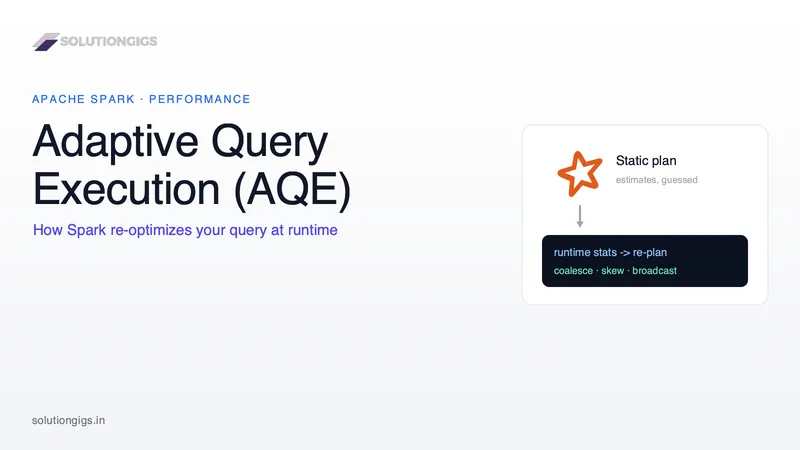
Spark Adaptive Query Execution (AQE): The Complete Guide
Spark's Catalyst optimizer plans your query before a single row moves — using estimates it can only guess at. When those guesses are wrong you get 200 partitions for 3 MB of data, a sort-merge join where a broadcast would be 10x faster, or one skewed task that runs for 40 minutes. Adaptive Query Execution (AQE) is Spark's fix: it re-optimizes the plan mid-flight using real runtime stats — coalescing partitions, splitting skew, and switching join strategies. On by default since Spark 3.2. This guide covers how it works under the hood, its three optimizations with PySpark, the configs that matter, and where AQE still needs a human.
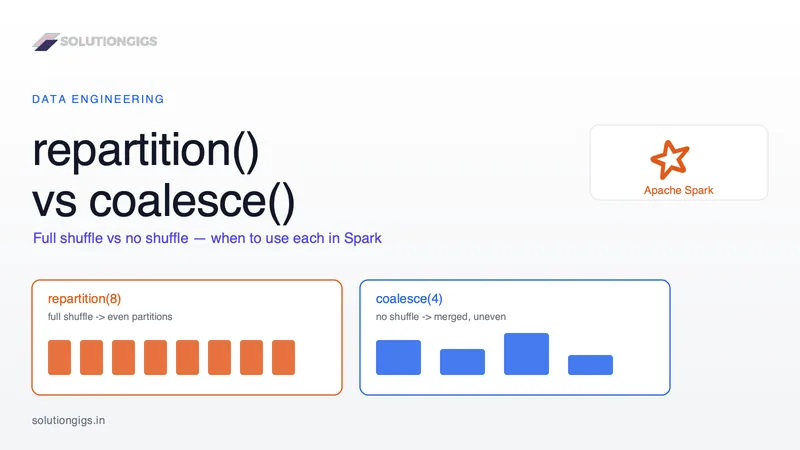
Spark repartition() vs coalesce(): When to Use Each
repartition() vs coalesce() is one of the most-asked Spark questions — in interviews and in real 2 a.m. debugging. The usual one-liner ("coalesce is cheaper") hides the detail that bites you: repartition() does a full shuffle for even partitions, coalesce() skips the shuffle but can only shrink and may leave skew. Pick wrong and you either waste a shuffle or silently throttle the whole job to one core. This guide covers what each does under the hood, a decision rule, the coalesce(1) trap, and how AQE fits in — with real PySpark.
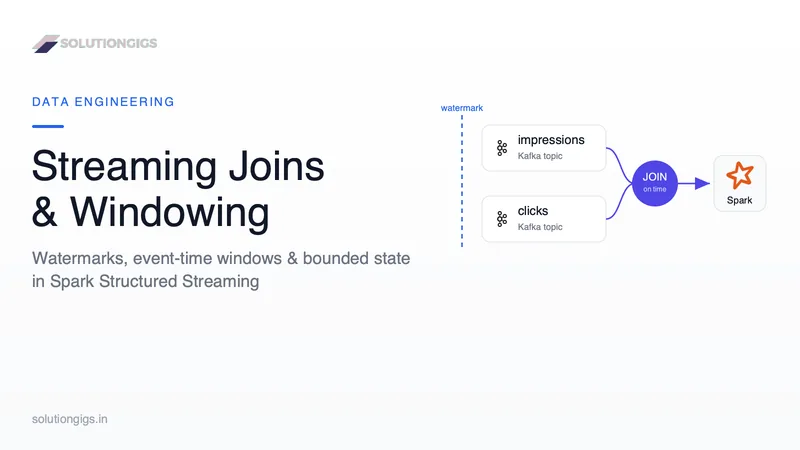
Streaming Joins & Windowing in Spark Structured Streaming
Stream-stream joins and windowing in Spark Structured Streaming run fine for an hour, then the executors start OOMing. The cause is almost never the join logic — it is unbounded state, because Spark was never told when it is safe to forget old data. This guide covers event-time windows (tumbling, sliding, session), how watermarks bound state, and how to keep stream-stream joins from buffering forever — with real PySpark + Kafka code.