
Kafka Consumer Lag Explained: Causes, Monitoring & Fixes
Kafka consumer lag spiking in production? A data engineer's guide to what causes it, how to monitor it with JMX, Datadog, and Prometheus, and 7 proven fixes — with real configs and code from a pipeline processing hundreds of millions of events daily.

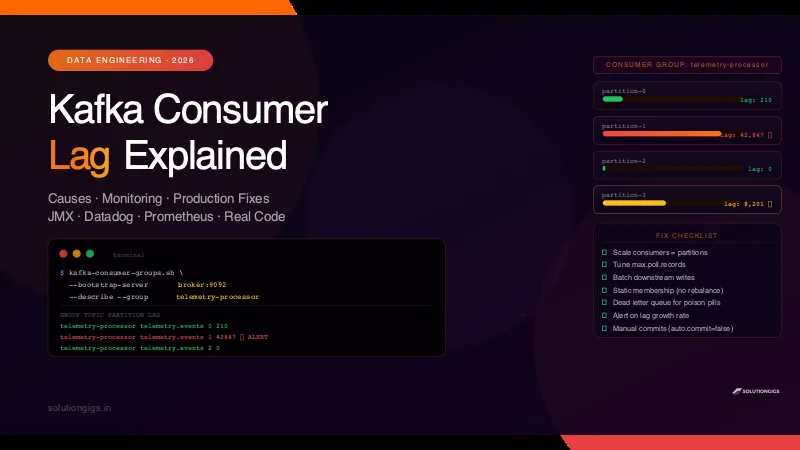
Quick Answer
Kafka consumer lag is the number of messages a consumer group is behind the latest offset on a partition. Lag = log-end offset − committed offset. It spikes when producers write faster than consumers process. Fix it by adding consumer instances (up to the partition count), tuning max.poll.records and fetch.min.bytes, or reducing per-message processing time. Monitor it with kafka-consumer-groups.sh, Datadog, or Prometheus + Grafana.
The first time I saw a Kafka consumer lag alert fire on Telemetrix's pipeline, the number was 4.2 million messages. The dashboard was showing data that was 40 minutes old. Downstream services were making decisions on stale telemetry.
It took 90 minutes to diagnose, tune, and drain. This guide is everything I learned from that incident — and the dozens of smaller ones since — so you don't repeat the same mistakes.
What Is Kafka Consumer Lag?
Kafka consumer lag is the gap between where a producer has written and where a consumer group has read, measured in number of messages per partition.
Every Kafka message has an offset — a sequential integer that identifies its position in a partition. There are two offsets that matter for lag:
- Log-end offset (LEO): The offset of the last message produced to the partition
- Committed offset: The offset your consumer group last confirmed it processed
Lag = Log-End Offset − Committed Offset
A lag of 0 means your consumer is fully caught up — it has processed every message that exists. A lag of 50,000 means there are 50,000 unprocessed messages sitting in the broker.
Why Lag Exists at All
Kafka is a pull-based system. Consumers poll the broker for new messages at their own pace. The broker never pushes — it waits to be asked. If the consumer is slow or has fewer instances than partitions, messages pile up faster than they're consumed.
| Metric | What it means |
|---|---|
| Lag = 0 | Consumer is real-time, fully caught up |
| Lag stable (non-zero) | Consumer is behind but keeping pace |
| Lag growing | Consumer is falling further behind — action needed |
| Consumer group = Dead | All consumers crashed — lag will grow until fixed |
How Kafka Measures Lag (The Offset Math)
Kafka stores committed offsets in an internal topic: __consumer_offsets. Every time your consumer calls commitSync() or commitAsync(), Kafka writes the latest processed offset to this topic under your group ID.
# Python consumer — explicit commit after processing
from confluent_kafka import Consumer

consumer = Consumer({
    'bootstrap.servers': 'broker:9092',
    'group.id':          'telemetry-processor',
    'auto.offset.reset': 'earliest',
    'enable.auto.commit': False,   # manual commit — safer in production
})

consumer.subscribe(['telemetry.events'])

while True:
    msg = consumer.poll(timeout=1.0)
    if msg is None:
        continue
    if msg.error():
        handle_error(msg.error())
        continue

    process_message(msg)          # your logic here
    consumer.commit(asynchronous=False)  # commit AFTER processing
Critical: With
enable.auto.commit=True(the default), Kafka commits offsets on a timer — not after your processing logic completes. If your process crashes mid-batch, those messages are marked as processed even though they weren't. Always use manual commits in production pipelines. This commit-after-processing discipline is also the foundation of exactly-once processing in Spark Structured Streaming, where the committed offset plus an idempotent sink is what prevents both data loss and duplicates on replay.
Why Kafka Consumer Lag Spikes — 6 Root Causes
1. Slow Per-Message Processing
The most common cause. If each message takes 50ms to process and you have 1,000 messages/second arriving, a single consumer thread can only handle 20 messages/second. Lag grows at 980 messages/second.
Diagnose it:
# Time how long your process_message() takes on average
# If it's > 10ms for a high-throughput topic, that's your bottleneck
Fix: Move slow work (DB writes, HTTP calls) to a thread pool or async queue. Process messages in micro-batches instead of one at a time.
2. Too Few Consumer Instances
Kafka assigns one consumer per partition. If your topic has 12 partitions and you have 2 consumer instances, each instance handles 6 partitions — you're leaving 10 consumer slots empty.
Max useful consumers = number of partitions
Fix: Scale consumers horizontally up to the partition count. In Kubernetes:
# Scale to match partition count
kubectl scale deployment kafka-consumer --replicas=12
3. Producer Burst / Traffic Spike
A sudden 10× spike in producer throughput — a viral event, a batch job triggering a flood of events — overwhelms a consumer sized for normal load.
Fix: Design for peak, not average. Keep autoscaling rules ready. On Telemetrix, we pre-scale consumers before scheduled batch jobs that generate large event bursts.
4. Consumer Rebalancing
Every time a consumer joins or leaves the group, Kafka triggers a rebalance — all consumers in the group pause while partitions are reassigned. During a rebalance, lag grows unchecked.
Common triggers: rolling deployments, consumer crashes, JVM GC pauses, heartbeat timeouts.
// Increase heartbeat and session timeout to reduce rebalance frequency
props.put("heartbeat.interval.ms", "3000");    // default 3000
props.put("session.timeout.ms", "45000");      // default 45000 — increase if GC pauses cause false timeouts
props.put("max.poll.interval.ms", "300000");   // increase if processing a batch takes > 5 min
5. Downstream Bottleneck
Your consumer processes fast, but every message makes a synchronous DB write or an HTTP call to a slow API. The bottleneck isn't Kafka — it's downstream.
Fix: Batch writes. Instead of one INSERT per message:
# Inefficient: one DB write per message
for msg in messages:
    db.insert(parse(msg))

# Efficient: batch insert every 500 messages or 1 second
batch = []
for msg in messages:
    batch.append(parse(msg))
    if len(batch) >= 500:
        db.bulk_insert(batch)
        batch = []
6. Small max.poll.records
The default max.poll.records=500 limits how many messages your consumer fetches per poll cycle. On a high-throughput topic this means more round trips, more overhead, lower effective throughput.
How to Check Kafka Consumer Lag
Option 1 — kafka-consumer-groups.sh (Built-In)
kafka-consumer-groups.sh \
  --bootstrap-server localhost:9092 \
  --describe \
  --group telemetry-processor
Output:
GROUP                TOPIC              PARTITION  CURRENT-OFFSET  LOG-END-OFFSET  LAG
telemetry-processor  telemetry.events   0          10482991        10483201        210
telemetry-processor  telemetry.events   1          10481774        10484021        2247
telemetry-processor  telemetry.events   2          10483100        10483100        0
Sum the LAG column for total group lag:
kafka-consumer-groups.sh \
  --bootstrap-server localhost:9092 \
  --describe \
  --group telemetry-processor \
  | awk 'NR>1 {sum += $6} END {print "Total lag:", sum}'
Option 2 — Datadog Kafka Integration
Install the Datadog agent Kafka check and you get per-partition lag as a metric out of the box.
Key metrics to monitor in Datadog:
| Metric | Alert threshold |
|---|---|
kafka.consumer_group.lag |
Alert if growing for 5+ consecutive minutes |
kafka.consumer_group.lag_max |
Alert if > your acceptable backlog |
kafka.consumer_group.members |
Alert if drops to 0 (group died) |
# datadog/conf.d/kafka_consumer.d/conf.yaml
instances:
  - kafka_connect_str: localhost:9092
    consumer_groups:
      telemetry-processor:
        telemetry.events: [0, 1, 2, 3, 4, 5, 6, 7, 8, 9, 10, 11]
On Telemetrix, we alert on lag_max > 100,000 AND on lag growing > 10,000/min — the growth rate alert catches problems faster than the absolute threshold.
Option 3 — Prometheus + Grafana (kafka-lag-exporter)
The kafka-lag-exporter by Lightbend scrapes consumer group lag and exposes it as Prometheus metrics.
# docker-compose snippet
kafka-lag-exporter:
  image: seglo/kafka-lag-exporter:0.8.2
  environment:
    - KAFKA_LAG_EXPORTER_KAFKA_BROKERS=broker:9092
    - KAFKA_LAG_EXPORTER_KAFKA_GROUP_WHITELIST=telemetry-processor,events-indexer
Prometheus query for total lag across all partitions:
sum(kafka_consumergroup_group_lag) by (group, topic)
Grafana alert rule:
# Alert if lag grows by > 5000 per minute for 3 consecutive minutes
increase(kafka_consumergroup_group_lag[1m]) > 5000
How to Fix Kafka Consumer Lag — 7 Proven Tuning Steps
Step 1 — Scale Consumers to Match Partitions
# Check current partition count
kafka-topics.sh --bootstrap-server localhost:9092 \
  --describe --topic telemetry.events | grep PartitionCount

# Scale consumers to match
kubectl scale deployment kafka-consumer --replicas=<partition-count>
Step 2 — Tune max.poll.records
consumer = Consumer({
    'bootstrap.servers': 'broker:9092',
    'group.id':          'telemetry-processor',
    'max.poll.records':  2000,     # up from default 500
    'fetch.min.bytes':   50000,    # wait for 50KB before responding
    'fetch.max.wait.ms': 500,      # but don't wait more than 500ms
})
Step 3 — Process in Micro-Batches
BATCH_SIZE = 1000
batch = []

while True:
    msg = consumer.poll(timeout=0.1)
    if msg:
        batch.append(parse(msg))

    if len(batch) >= BATCH_SIZE:
        process_batch(batch)       # bulk DB insert, bulk API call, etc.
        consumer.commit()
        batch = []
Step 4 — Increase Partitions (Last Resort)
If you've maxed out consumers and lag still grows, you need more partitions. This is irreversible and affects message ordering, so plan carefully.
kafka-topics.sh --bootstrap-server localhost:9092 \
  --alter --topic telemetry.events \
  --partitions 24
After increasing partitions, scale your consumer group to match the new count.
Step 5 — Separate Fast and Slow Consumers
If one topic serves both real-time dashboards (need < 1s lag) and batch jobs (can tolerate minutes of lag), use separate consumer groups. Each group maintains its own offsets independently.
# Real-time consumer group
Consumer({'group.id': 'dashboard-realtime', ...})

# Batch consumer group — can fall behind without affecting dashboards
Consumer({'group.id': 'batch-processor', ...})
Step 6 — Fix Rebalance Storms with Static Membership
Kubernetes rolling deployments cause constant rebalances as pods restart. Static membership assigns a persistent member ID so rejoining consumers get their old partitions back without triggering a full rebalance.
consumer = Consumer({
    'group.id':              'telemetry-processor',
    'group.instance.id':     f'consumer-{socket.gethostname()}',  # stable per pod
    'session.timeout.ms':    60000,
})
On Kafka 4.0 and later there is a cleaner answer than static membership alone: the new consumer rebalance protocol from KIP-848 (group.protocol=consumer) moves partition assignment to the group coordinator on the broker and makes rebalances incremental, so a pod restart no longer pauses the whole group. If you are on 4.x and still see sawtooth lag, that one client setting is usually the fix. Until then, pair group.instance.id with partition.assignment.strategy=org.apache.kafka.clients.consumer.CooperativeStickyAssignor so the rebalances that do happen are incremental rather than stop-the-world.
Step 7 — Dead Letter Queue for Poison Pills
A single malformed message that throws an exception on every retry will stall your consumer indefinitely — lag grows while the consumer loops on the same offset.
MAX_RETRIES = 3
retry_count = {}

msg = consumer.poll(timeout=1.0)
key = f"{msg.topic()}-{msg.partition()}-{msg.offset()}"

try:
    process_message(msg)
    consumer.commit()
    retry_count.pop(key, None)
except Exception as e:
    retry_count[key] = retry_count.get(key, 0) + 1
    if retry_count[key] >= MAX_RETRIES:
        send_to_dlq(msg)           # dead letter queue topic
        consumer.commit()          # skip the poison pill
        retry_count.pop(key, None)
Kafka Consumer Lag Monitoring Checklist
Before going to production with any Kafka consumer, make sure you have:
-
kafka-consumer-groups.shaccess confirmed on your broker - Lag metric exported to Datadog, Prometheus, or CloudWatch
- Alert on
lag_maxabsolute threshold (sized to your SLA) - Alert on lag growth rate — catches problems before absolute threshold fires
- Alert on consumer group state =
DeadorEmpty -
enable.auto.commit=falsewith explicit manual commits - Dead letter queue topic configured for poison pills
- Runbook written: "lag is growing — here are the first 3 things to check"
When lag is already an incident
Everything above is the calm-Tuesday version. If lag is climbing right now and you need to know in fifteen minutes whether it is capacity, a rebalance storm, a hot key or a deploy regression — and which change is safe to make at 2 a.m. — use the Kafka lag and Kinesis throttling break-fix runbook. It orders the fixes by blast radius and covers the Kinesis equivalent, ProvisionedThroughputExceededException, for teams running both.
Working with Data Pipelines Beyond Kafka
Consumer lag is just one part of a healthy data pipeline. If your consumers write to a data lake, consider using Apache Iceberg tables for the storage layer — they give you ACID transactions, schema evolution, and time travel on top of your Parquet files on S3. The combination of Kafka + Iceberg is the backbone of most modern streaming lake architectures.
Need to inspect or convert data files while debugging your pipeline? The free tools at solutiongigs.in — JSON formatter, Parquet to CSV converter, SQL formatter — work in the browser without any local setup.
Frequently Asked Questions
What is Kafka consumer lag?
Kafka consumer lag is the difference between the latest offset produced to a partition and the offset the consumer group has committed. A lag of 0 means the consumer is fully caught up. A lag of 10,000 means there are 10,000 messages the consumer has not yet processed. High lag indicates the consumer is falling behind the producer, which can cause data delays and eventually out-of-memory issues if messages accumulate.
What causes Kafka consumer lag to spike?
The most common causes are: slow message processing (each message takes too long), too few consumer instances vs partitions (consumers are underpowered for the throughput), a sudden producer burst (traffic spike produces faster than consumers can process), consumer rebalancing (consumers pause while the group reassigns partitions), and downstream bottlenecks (database or API calls inside the consumer loop throttle throughput).
How do I check Kafka consumer lag from the command line?
Use kafka-consumer-groups.sh --bootstrap-server localhost:9092 --describe --group your-consumer-group. This outputs each partition's current offset, log-end offset, and LAG column. A quick total: pipe the output through awk to sum the LAG column. On AWS MSK, the same script works — just replace localhost with your broker endpoint.
How many consumers should I run per Kafka topic?
The maximum useful consumers in a consumer group equals the number of partitions in the topic. Adding more consumers than partitions gives you idle consumers — Kafka assigns at most one consumer per partition. If you have 12 partitions and lag is consistently high, increase consumers up to 12 instances. To go beyond that, increase the partition count first — but that is irreversible.
What is a safe Kafka consumer lag threshold for alerting?
There is no universal number — it depends on your topic's message rate. A better metric is lag growth rate. If lag is stable at 5,000 messages, that may be acceptable. If lag is growing by 1,000 messages per minute, that is a problem even if the absolute value is small. Alert on lag growing for 5+ consecutive minutes, and separately alert on consumer group state = Dead or Empty.
Does increasing fetch.min.bytes help with consumer lag?
Yes, for high-throughput topics. fetch.min.bytes tells the broker to wait until it has at least N bytes before responding to a fetch request. Higher values mean fewer network round trips and larger batches per poll — better throughput at the cost of slightly higher latency per batch. A typical production tuning: fetch.min.bytes=50000, fetch.max.wait.ms=500, max.poll.records=1000. Always benchmark before applying to production.
How do I monitor Kafka consumer lag in Datadog?
Install the Datadog Kafka integration and monitor kafka.consumer_group.lag (per-partition lag) and kafka.consumer_group.lag_max (max lag across all partitions in a group). Set monitors with both an absolute threshold alert and a change alert for growing lag. The Datadog Kafka dashboard gives you a pre-built view — clone it and add group filters for your specific consumer groups.
Conclusion
Kafka consumer lag is one of the most common production issues in event-driven systems — and one of the most fixable once you understand the offset math behind it.
The key takeaways:
- Lag = log-end offset − committed offset — measure it per partition, alert on growth rate not just absolute value
- Root causes: slow processing, too few consumers, producer bursts, rebalancing, downstream bottlenecks, poison pills
- First fix to try: scale consumers up to match your partition count — it's free and instant
- Tune
max.poll.recordsandfetch.min.bytesfor high-throughput topics before adding partitions - Use manual commits (
enable.auto.commit=false) in every production consumer — auto-commit silently loses messages on crashes - Dead letter queue every consumer — one malformed message should never stall your entire pipeline
If you're storing Kafka output to a data lake, pair it with Apache Iceberg tables for ACID guarantees and time travel — the combination is the foundation of a modern streaming lakehouse.
Lag climbing on a consumer group right now and none of the seven fixes above are moving it? Tell me what the group is doing — partitions, throughput, and where it stalls — and I'll help you find the bottleneck. Diagnosis costs nothing.
Mohammed Yaseen
Founder, SolutionGigs
Mohammed runs Kafka pipelines processing hundreds of millions of telemetry events daily at Telemetrix, monitored end-to-end with Datadog. He's debugged consumer lag incidents ranging from misconfigured poll intervals to full partition rebalance storms in production. LinkedIn →
More in Data Engineering
Fix Kafka Consumer Lag and Kinesis ProvisionedThroughputExceededException in Production
Kafka consumer lag and Kinesis ProvisionedThroughputExceededException are one incident in two uniforms: a partition or shard taking in more than it can hand off. The 15-minute triage, fixes in blast-radius order, and why retries turn a slowdown into an outage. A production break-fix runbook: read the lag shape or the per-shard throttle metric, match one of four faults, then fix consumers, poll size, partition keys and retry budgets in the right order — and what to do if it is still red.

Data Mesh Architecture: What It Is and When It Actually Works
Data mesh is an operating model, not an architecture you can install — it moves data ownership to the business domains and holds them to a product standard. This guide skips the hype and answers the question every other one dodges: should you actually do this? Inside: the four principles stated plainly, an honest verdict on what survived after five years of real adoption (the data product model went mainstream; full decentralization mostly didn't), the 8-item spec a dataset must meet to be a data product, a readiness gate scored on six signals, the data mesh vs data fabric vs lakehouse table, the hybrid shape teams actually run, and a 90-day path that starts with one product instead of a domain-boundary workshop.
Data Pipeline Monitoring: The Complete Guide to Metrics, SLAs & Alerting
The worst data incidents are silent: the job is green, the DAG is all checkmarks, and the dashboard has been wrong for three days. Data pipeline monitoring asks the harder question — is the data fresh, complete, correct, and on time? This pillar guide covers the four signals to track (freshness, volume, quality, system health), how to set data SLAs/SLOs/SLIs with error budgets, the tooling landscape, how to alert without drowning in noise, and how to stop high-cardinality custom metrics from exploding your monitoring bill.