
What Is Google Cloud Platform (GCP)?
Google Cloud Platform (GCP) explained: how projects and billing work, core services mapped to AWS and Azure, the free tier, pricing traps and a first deploy. Includes a worked BigQuery example where one dashboard costs $9,000 or $1.84 a month depending on two query choices, a compute decision list, and six default settings to change on day one.

Quick Answer: Google Cloud Platform (GCP) is Google's public cloud: rent computing, storage, databases, analytics and AI on the same global infrastructure that runs Google Search and YouTube, and pay per second of use. Everything lives inside a project, which holds your resources, permissions, enabled APIs and billing link. Its standout services are BigQuery (serverless data warehouse), GKE (managed Kubernetes), Cloud Run (serverless containers) and Vertex AI (Gemini models). New accounts get $300 in credit for 90 days plus an Always Free tier.
Google Cloud computing is no longer the distant third option it was five years ago. In Q2 2026 Google Cloud revenue grew 82% year over year to $24.77 billion, the fastest of the big three, and its contracted backlog passed $514 billion (CNBC, Alphabet Q2 2026 earnings). More teams are landing on GCP, and more engineers are being asked to "just deploy it on Google Cloud" without ever having opened the console.
Most "what is GCP" articles give you a list of 100 product names. This guide explains how GCP is actually organised, the few design choices that make it behave differently from AWS and Azure, the pricing traps that produce surprise bills, and a first deploy you can finish in 15 minutes.
What Is Google Cloud Platform?
Google Cloud Platform (GCP) is a suite of on-demand cloud computing services from Google that lets you run applications, store data and use AI over the internet instead of owning servers. You create resources such as virtual machines, databases or storage buckets through a web console, the gcloud command-line tool, an API or Terraform, and you pay only for what you use.
GCP covers all three classic cloud service models:
- IaaS (Infrastructure as a Service): raw virtual machines, disks and networks — Compute Engine, Persistent Disk, VPC.
- PaaS (Platform as a Service): you bring code or a container and Google runs it — Cloud Run, App Engine, GKE Autopilot.
- SaaS-style managed services: fully managed products you just use — BigQuery, Firestore, Pub/Sub, Vertex AI.
Google Cloud vs GCP vs Google Workspace
The naming confuses almost everyone, so here is the short version:
| Name | What it actually means |
|---|---|
| Google Cloud | The whole business unit — infrastructure platform, Workspace, Gemini Enterprise, security products |
| Google Cloud Platform (GCP) | The infrastructure and developer services: Compute Engine, BigQuery, GKE, Cloud Run, Vertex AI… |
| Google Workspace | Gmail, Docs, Drive, Meet for businesses — sold by Google Cloud, but not part of GCP |
| Firebase | Google's app-development platform; every Firebase project is a GCP project underneath |
Google's own docs now mostly say "Google Cloud", while job posts, certifications and engineers still say "GCP". In practice they mean the same infrastructure platform.
GCP by the numbers
| Metric | Value | Source |
|---|---|---|
| Revenue, Q2 2026 | $24.77B (+82% YoY) | Alphabet Q2 2026 earnings |
| Contracted backlog | $514B | Alphabet Q2 2026 earnings |
| Cloud infrastructure market share | ~15% (AWS ~28%, Azure ~20%) | Synergy Research, Q2 2026, via The Register |
| Regions / zones | 43 regions, 130 zones | Google Cloud locations |
| Regions in India | 2 — Mumbai (asia-south1), Delhi (asia-south2) |
Google Cloud locations |
A region is a geographic area (for example Mumbai), and each region has three or more zones — separate data centres with independent power and networking. You deploy across zones for high availability and across regions for disaster recovery.
How Google Cloud Is Organised: The Resource Hierarchy
Everything you create in GCP belongs to a project, projects can be grouped into folders, and folders sit under an organisation. Permissions and policies set higher up flow down to everything below. Understanding this one tree explains most of GCP's security and billing behaviour.
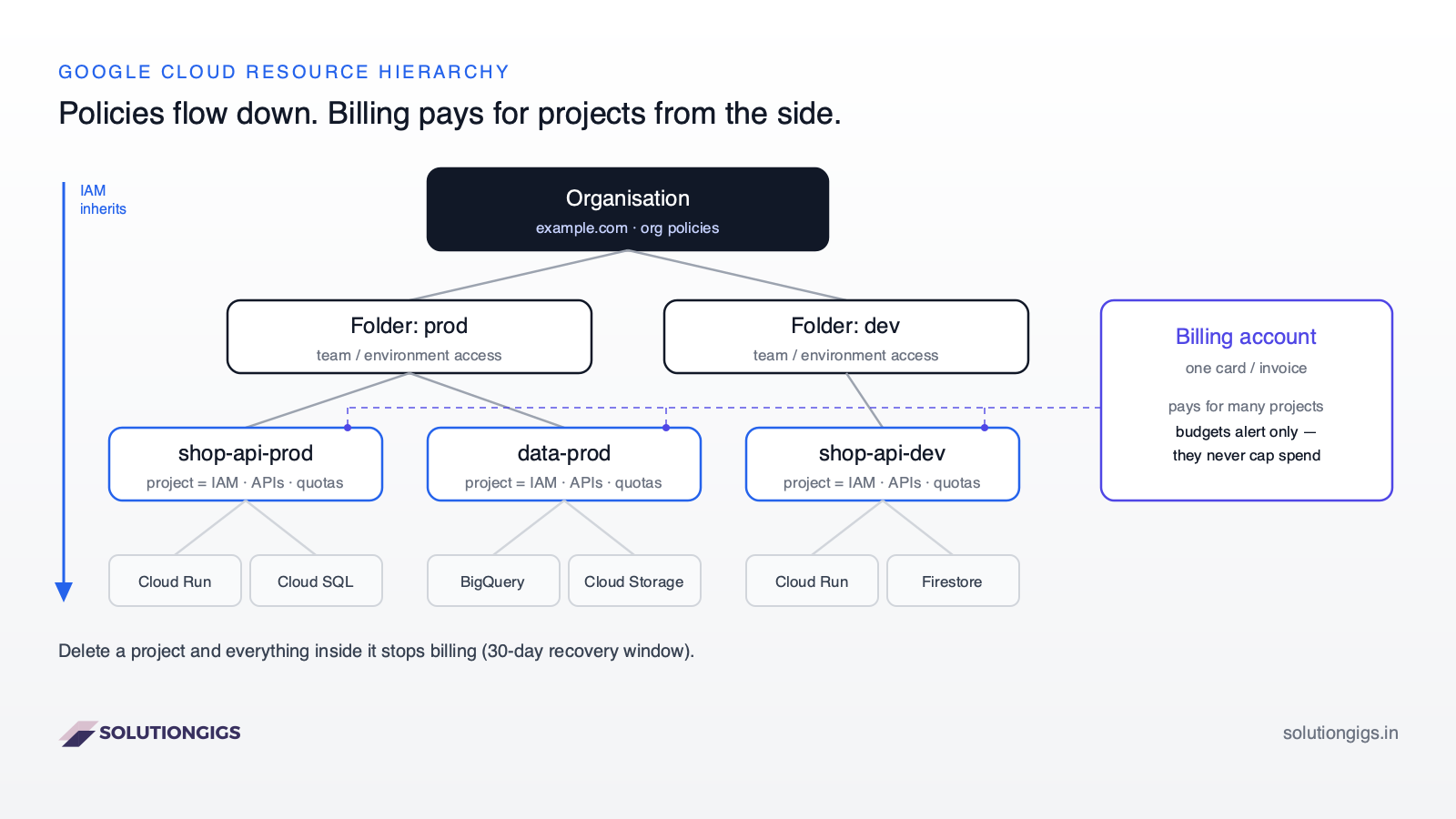
The four levels, top to bottom:
- Organisation — your company's root node, tied to a Google Workspace or Cloud Identity domain (e.g.
example.com). Org-wide policies live here, such as "no public IPs on VMs" or "resources only in Indian regions". - Folders — optional groupings, usually by environment (
prod,dev) or by team. Grant a team access to a folder and they get every project inside it. - Projects — the unit you work in every day. A project owns its resources, its enabled APIs, its quotas and its IAM policy. It has a human-readable name, a globally unique project ID (which you can never change) and a project number.
- Resources — the actual VMs, buckets, datasets and services.
The billing account sits beside this tree, not inside it. One billing account (one credit card or invoice) can pay for many projects, and you can move a project to a different billing account at any time.
Why projects matter more on GCP than accounts do on AWS
On AWS, the closest thing to a project is a whole AWS account, and creating one is heavyweight enough that most teams share a few big accounts. On GCP, projects are cheap and fast to create, so the idiomatic pattern is one project per app per environment — shop-api-dev, shop-api-prod. That gives you:
- Clean cost reports, because every bill line is tagged with its project.
- Blast-radius control — a leaked key for
shop-api-devcannot touch production. - Easy clean-up — shutting down a project deletes everything inside it (after a 30-day recovery window), which is the only reliable way to guarantee a forgotten test resource stops billing.
Takeaway: if you only remember one GCP concept, remember that the project is the boundary for resources, access, APIs, quotas and cost.
What Makes GCP Different From AWS and Azure?
GCP's main architectural difference is that much of its networking is global by default, running on Google's private fibre backbone, while AWS and Azure build most networking per region. A few other defaults — automatic discounts and live-migrating VMs — change how you design and budget.
| Design choice | Google Cloud | AWS / Azure | Why it matters |
|---|---|---|---|
| VPC scope | A VPC network is global; subnets are regional | VPCs / VNets are regional | One network spans Mumbai and Iowa with no peering or transit gateway |
| Load balancing | Global external load balancer with one anycast IP worldwide | Regional load balancers, plus a separate global layer (Global Accelerator / Front Door) | Users hit the nearest Google edge automatically |
| Network path | Premium Tier carries traffic on Google's backbone from the edge closest to the user | Traffic generally rides the public internet to the region | Lower, more consistent latency for global users |
| VM maintenance | Most VMs are live-migrated during host maintenance — no reboot | Scheduled maintenance events often require a reboot or stop/start | Fewer surprise restarts on long-running servers |
| Automatic discounts | Sustained use discounts apply automatically, no commitment | Discounts require Savings Plans / Reservations | Some always-on workloads get cheaper with zero paperwork |
The global VPC is the one that surprises AWS engineers most. On GCP you create a single network, add a subnet in asia-south1 and another in us-central1, and VMs in both talk over private IPs immediately. There is no inter-region peering to configure.
Core Google Cloud Services (With AWS and Azure Equivalents)
GCP has well over 100 products, but about 20 of them cover almost every real workload. The table below maps each one to its closest AWS and Azure equivalent so you can translate what you already know.
| Category | Google Cloud service | What it does | AWS equivalent | Azure equivalent |
|---|---|---|---|---|
| Compute | Compute Engine | Virtual machines | EC2 | Virtual Machines |
| Compute | Cloud Run | Serverless containers, scale to zero | App Runner / ECS on Fargate | Container Apps |
| Compute | Cloud Run functions (formerly Cloud Functions) | Event-driven functions | Lambda | Azure Functions |
| Compute | GKE | Managed Kubernetes (Standard or Autopilot) | EKS | AKS |
| Storage | Cloud Storage | Object storage for files, backups, data lakes | S3 | Blob Storage |
| Storage | Persistent Disk / Hyperdisk | Block storage for VMs | EBS | Managed Disks |
| Database | Cloud SQL | Managed PostgreSQL, MySQL, SQL Server | RDS | Azure Database for PostgreSQL / MySQL |
| Database | AlloyDB | High-performance PostgreSQL-compatible database | Aurora PostgreSQL | Azure Database for PostgreSQL (closest) |
| Database | Spanner | Globally distributed, strongly consistent SQL | Aurora DSQL (closest) | Cosmos DB (closest) |
| Database | Firestore | Serverless document database | DynamoDB | Cosmos DB |
| Database | Bigtable | Wide-column NoSQL for huge time-series data | Keyspaces / DynamoDB | Cosmos DB for Apache Cassandra |
| Analytics | BigQuery | Serverless data warehouse, pay per query | Redshift | Synapse / Fabric Warehouse |
| Analytics | Dataproc | Managed Spark and Hadoop | EMR | HDInsight / Fabric Spark |
| Analytics | Dataflow | Managed Apache Beam, batch and streaming | Managed Service for Apache Flink / Glue | Stream Analytics |
| Messaging | Pub/Sub | Global messaging and event streaming | SNS + SQS / Kinesis | Event Hubs / Service Bus |
| AI | Vertex AI | Train, tune and serve ML models, incl. Gemini | SageMaker AI / Bedrock | Azure AI Foundry |
| Security | Cloud IAM | Who can do what on which resource | IAM | Entra ID + Azure RBAC |
| Ops | Cloud Monitoring & Logging | Metrics, logs, alerts | CloudWatch | Azure Monitor |
| DevOps | Artifact Registry / Cloud Build | Container registry and CI builds | ECR / CodeBuild | ACR / Azure Pipelines |
For deeper, service-by-service comparisons see our breakdowns of Cloud Storage vs S3 vs Azure Blob Storage, BigQuery vs Snowflake vs Redshift and Kafka vs Kinesis vs Pub/Sub.
Which GCP Compute Service Should You Use?
Start with Cloud Run; move to GKE only when you need Kubernetes features, and to Compute Engine only when you need a full VM. Most new web apps and APIs never need to leave Cloud Run.
Work down this list and stop at the first "yes":
- Is it a small piece of code triggered by an event (a file upload, a Pub/Sub message, a webhook)? → Cloud Run functions.
- Is it a stateless web app, API or background worker you can put in a container? → Cloud Run. It scales from zero to thousands of instances, bills only while handling requests (by default), and needs no cluster management.
- Do you run many services that need service mesh, custom networking, GPUs at scale, stateful sets or existing Kubernetes manifests? → GKE Autopilot (Google manages nodes; you pay per pod) — or GKE Standard if you need full node control. Not sure whether you need Kubernetes at all? Read Docker vs Kubernetes first.
- Do you need a specific OS, kernel access, licensed software, or a lift-and-shift of an existing server? → Compute Engine.
- Are you running Spark or Hadoop jobs? → Dataproc (or Dataproc Serverless for batch jobs without a cluster).
App Engine still works and still has users, but for new projects Cloud Run does everything its flexible environment did with a simpler container model.
Google Cloud Pricing Explained (and Where Surprise Bills Come From)
GCP charges per second for compute, per GB-month for storage, per GB for data leaving Google's network, and per TiB scanned for BigQuery on-demand queries. The rate card is rarely what hurts; usage patterns are.
The four ways to pay for compute
| Model | Discount | Commitment | Best for |
|---|---|---|---|
| On-demand | 0% | None | Spiky or short-lived workloads |
| Sustained use discounts (SUDs) | Up to 30%, automatic | None — applies when a VM runs over 25% of the month | Always-on VMs on eligible families (N1, N2, N2D, C2…) |
| Committed use discounts (CUDs) | Up to 55%, or 70% on memory-optimized | 1 or 3 years | Steady baseline load |
| Spot VMs | Up to 91% | None, but Google can reclaim them at any time | Batch jobs, CI runners, fault-tolerant Spark |
Discount types do not stack. One detail most guides miss: the default E2 machine family does not get sustained use discounts at all, because it is already priced lower. If you run a VM 24/7 and expect SUDs to kick in, check the machine family first. Figures are from Google's Compute Engine pricing page.
Worked example: the $9,000 BigQuery dashboard
BigQuery's on-demand model charges $6.25 per TiB scanned in US regions (first 1 TiB per month free). It charges for the columns your query reads, not the rows it returns — and LIMIT does not reduce the bytes scanned.
Take a 2 TiB events table with 40 columns of similar size, and a dashboard tile that refreshes every hour (720 times a month):
| Query | Data scanned per run | Cost per run | Cost per month (720 runs) |
|---|---|---|---|
SELECT * … LIMIT 100 |
2 TiB | $12.50 | $9,000 |
SELECT user_id, event, ts … (3 of 40 columns) |
~0.15 TiB | ~$0.94 | ~$675 |
| Same 3 columns, table partitioned by day, filtered to yesterday | ~0.4 GiB | ~$0.003 | ~$1.84 |
Same dashboard, same answer, and a ~4,900× cost difference driven entirely by column selection and partitioning. This is the single most common GCP bill shock we see in data-engineering work. Two guardrails prevent it: set a maximum bytes billed limit on queries, and set custom per-user or per-project query quotas in BigQuery. The storage-side choices are covered in data lake vs data warehouse vs lakehouse.
Egress: the line item nobody budgets for
Data moving into Google Cloud is free. Data moving out to the internet, or between regions, is charged per GB. A database in Mumbai serving an app in us-central1 pays inter-region transfer on every query result. Keep compute and data in the same region, and put a CDN in front of anything user-facing.
The Google Cloud Free Tier
Google Cloud offers a $300 credit for 90 days to new customers plus an Always Free tier with monthly limits that never expire. The free tier is generous enough to run a real hobby project, provided you pick the right region.
| Service | Always Free monthly limit |
|---|---|
| Compute Engine | 1 e2-micro VM in us-west1, us-central1 or us-east1; 30 GB-months standard persistent disk |
| Cloud Storage | 5 GB-months regional storage (US regions only) |
| BigQuery | 1 TiB of queries, 10 GiB of storage |
| Cloud Run | 2 million requests, 360,000 GB-seconds memory, 180,000 vCPU-seconds |
| Cloud Run functions | 2 million invocations |
| Pub/Sub | 10 GiB of messages |
| Firestore | 1 GiB storage; 50,000 reads and 20,000 writes per day |
Limits are from Google's free-tier documentation as of September 2026. Two catches: the free VM only exists in three US regions, and the free tier does not stop you from being billed — anything over the limit is charged normally.
Getting Started: Your First GCP Deploy in 15 Minutes
The fastest path to a working app on Google Cloud is: create a project, link billing, set a budget alert, then deploy a container to Cloud Run from source. Install the Google Cloud CLI first, then run:
# 1. Log in and create a project (project IDs are global and permanent)
gcloud auth login
gcloud projects create hello-gcp-20260925 --name="Hello GCP"
gcloud config set project hello-gcp-20260925

# 2. Link a billing account (find its ID with: gcloud billing accounts list)
gcloud billing projects link hello-gcp-20260925 \
  --billing-account=XXXXXX-XXXXXX-XXXXXX

# 3. Set a budget alert BEFORE deploying anything
gcloud billing budgets create \
  --billing-account=XXXXXX-XXXXXX-XXXXXX \
  --display-name="hello-gcp-budget" \
  --budget-amount=10USD \
  --threshold-rule=percent=0.5 \
  --threshold-rule=percent=0.9

# 4. Enable the APIs Cloud Run needs
gcloud services enable run.googleapis.com cloudbuild.googleapis.com \
  artifactregistry.googleapis.com

# 5. Deploy the app in the current folder (Cloud Build creates the container)
gcloud run deploy hello --source . --region us-central1 --allow-unauthenticated
The last command prints an https://hello-….run.app URL. Your app now scales to zero when idle and sits comfortably inside the free tier at hobby traffic. When you are done experimenting, gcloud projects delete hello-gcp-20260925 removes everything.
For anything beyond a first test, define infrastructure as code rather than clicking in the console — our free Terraform generator scaffolds Google provider configs so your projects, buckets and services are reproducible.
GCP vs AWS vs Azure: When Google Cloud Is the Right Choice
Choose Google Cloud when analytics, AI or containers are at the centre of your product; choose AWS or Azure when breadth of services, enterprise Microsoft integration or hiring pool matters more. No provider wins everywhere.
GCP is usually the strongest pick when:
- Your core workload is analytics — BigQuery's serverless, pay-per-query model removes cluster sizing entirely.
- You run Kubernetes — GKE is the most mature managed Kubernetes (Google created Kubernetes).
- You want Gemini models and Google's TPUs close to your data on Vertex AI.
- Your users are global and you want one network and one load-balancer IP.
AWS or Azure is often a better fit when:
- You need a niche service only one provider offers, or the largest third-party tooling ecosystem (AWS).
- Your company runs on Microsoft 365, Active Directory and .NET (Azure).
- You need to hire quickly — AWS skills are still the most common on the market.
If you are a founder choosing a first cloud, our AWS vs GCP vs Azure for startups guide compares credits and a decision framework in detail.
Common Google Cloud Mistakes (and How to Avoid Them)
Most GCP incidents for new teams come from five defaults left unchanged, not from exotic failures.
- Assuming a budget is a spending cap. Cloud Billing budgets only send emails. To enforce a hard stop, route budget notifications to Pub/Sub and have a Cloud Run function disable billing on the project.
- Leaving the default network's firewall open. Every new project's
defaultVPC includesdefault-allow-sshanddefault-allow-rdprules open to0.0.0.0/0. Delete them, or build a custom VPC and use IAP TCP forwarding for SSH instead. - Downloading service account keys. A JSON key file on a laptop or in Git is a long-lived credential. Use Workload Identity Federation for CI/CD (GitHub Actions, GitLab) and attached service accounts on Google compute. Google Cloud organisations created since mid-2024 block key creation by default for exactly this reason.
- Granting basic roles.
OwnerandEditorgrant broad access across the whole project. Use predefined roles such asroles/run.developerorroles/bigquery.dataViewer. - Running
SELECT *in BigQuery. See the worked example above — always select columns, partition large tables by date, and set maximum bytes billed. - Picking a region at random. Latency, data residency and price all vary by region. For users in India, use
asia-south1(Mumbai) orasia-south2(Delhi).
How to Learn Google Cloud (Certifications and Path)
The practical learning path is: free tier hands-on → Associate Cloud Engineer → one Professional certification matching your role. Certifications matter more on GCP job posts than on most, because the GCP talent pool is smaller than AWS's.
| Certification | Who it's for | Focus |
|---|---|---|
| Cloud Digital Leader | Managers, sales, non-engineers | Cloud concepts and Google Cloud products |
| Associate Cloud Engineer | Every engineer's starting point | Projects, IAM, networking, Compute Engine, GKE, Cloud Run |
| Professional Cloud Architect | Solution and platform architects | Designing secure, reliable, cost-aware systems |
| Professional Data Engineer | Data engineers | BigQuery, Dataflow, Pub/Sub, Dataproc, data governance |
| Professional Machine Learning Engineer | ML engineers | Vertex AI, pipelines, model serving |
If you're heading towards the data side, our free Data Engineering course covers the pipeline, warehouse and streaming concepts that the Professional Data Engineer exam assumes, and the free Gemini CLI tutorial is a zero-cost way into Google's AI tooling.
Frequently Asked Questions
Is Google Cloud free to use?
Partly. New accounts get a $300 credit to spend within 90 days, and an Always Free tier continues after that: one e2-micro VM per month in us-west1, us-central1 or us-east1, 5 GB of regional Cloud Storage, 1 TiB of BigQuery queries per month, and 2 million Cloud Run requests per month. Anything above those limits is billed at normal rates, so set a budget alert on day one.
What is the difference between Google Cloud and GCP?
Google Cloud is the whole business unit: the infrastructure platform plus Google Workspace, Gemini Enterprise and other products sold to companies. Google Cloud Platform (GCP) is the infrastructure part — Compute Engine, Cloud Storage, BigQuery, GKE, Vertex AI and the other developer services. Google's docs mostly say "Google Cloud" now, but engineers and job posts still say GCP, and both usually mean the infrastructure platform.
Is GCP better than AWS?
Neither is better overall. GCP is usually stronger for analytics (BigQuery), Kubernetes (GKE), global networking and Google's own AI models. AWS has the largest service catalogue, the most third-party tooling and the biggest hiring market. Pick GCP when data, AI or containers are central to the product; pick AWS when you need breadth, a specific AWS-only service, or the largest pool of engineers who already know it.
What is Google Cloud Platform used for?
GCP is used to run applications and store and analyse data without owning servers. Typical uses are hosting web apps and APIs on Cloud Run or GKE, running data warehouses and analytics on BigQuery, building streaming pipelines with Pub/Sub and Dataflow, training and serving machine learning and Gemini models on Vertex AI, and storing backups and data lakes in Cloud Storage.
Does a Google Cloud budget stop charges automatically?
No. A Cloud Billing budget only sends alerts when spend crosses a threshold such as 50%, 90% or 100%. It never shuts anything down by itself. To enforce a hard cap you must connect the budget to a Pub/Sub topic and run a small Cloud Run function that disables billing on the project when the limit is reached, which stops every paid service in that project.
Which Google Cloud region should I use in India?
Google Cloud has two Indian regions: asia-south1 in Mumbai and asia-south2 in Delhi. Use one of them for users in India to get the lowest latency and to keep data in the country. The Always Free e2-micro VM only applies in three US regions, so free-tier experiments usually run in us-central1 while production workloads for Indian users run in Mumbai or Delhi.
Which Google Cloud certification should I start with?
Engineers should start with the Associate Cloud Engineer certification, which covers projects, IAM, networking, Compute Engine, GKE and Cloud Run hands-on. Non-technical roles can start with Cloud Digital Leader. After Associate, pick a professional track that matches your job: Professional Cloud Architect for design roles, Professional Data Engineer for BigQuery and pipelines, or Professional Machine Learning Engineer for Vertex AI work.
Conclusion
Google Cloud Platform is easiest to understand as a tree: an organisation, folders, and projects that own your resources, permissions and costs. On top of that tree sit a handful of services that do most of the work — Cloud Run and GKE for applications, Cloud Storage and BigQuery for data, Pub/Sub and Dataflow for pipelines, and Vertex AI for models. What sets GCP apart is its global network, serverless analytics and first-party AI; what catches teams out is treating budgets as caps, leaving default firewall rules open and scanning whole tables in BigQuery.
Start small: one project, one budget alert, one Cloud Run service. Then add infrastructure as code and a proper project-per-environment layout before the second app arrives.
Need an engineer who has already made these mistakes on someone else's bill? Get matched with a vetted cloud or data engineer on solutiongigs.in — it's free to post a project.
Mohammed Yaseen
Founder, SolutionGigs
Mohammed writes SolutionGigs' cloud and data engineering guides, drawing on hands-on work building data platforms and pipelines across Google Cloud, AWS and Azure. LinkedIn →
More in Cloud & DevOps
AWS vs GCP vs Azure for Startups: Which to Pick
AWS vs GCP vs Azure for startups in 2026 — startup credits compared, real pricing, provider strengths, and a clear decision framework to pick the right cloud without vendor lock-in.
How to Hire a Developer Without Paying Upfront
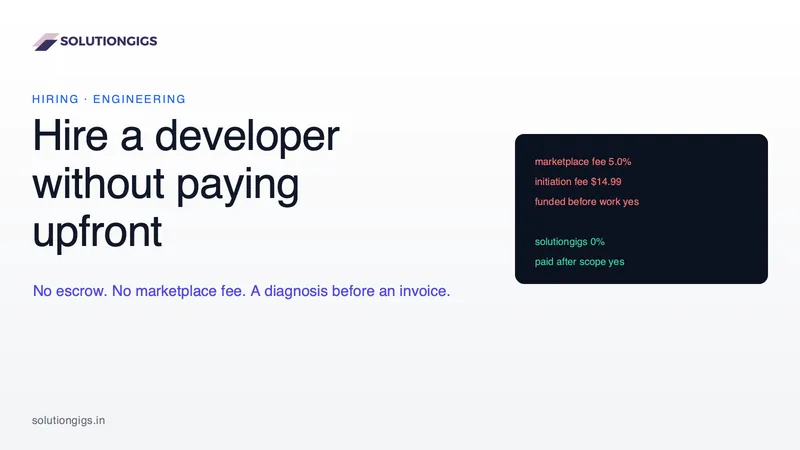
Marketplace fees, escrow funded before anyone opens your problem, and six to fifteen unpaid hours screening candidates — the rate is the one cost you can see. This puts real figures on all three, explains why escrow exists and when it is right, and shows how to structure a pay-after engagement safely, including if you never hire us.
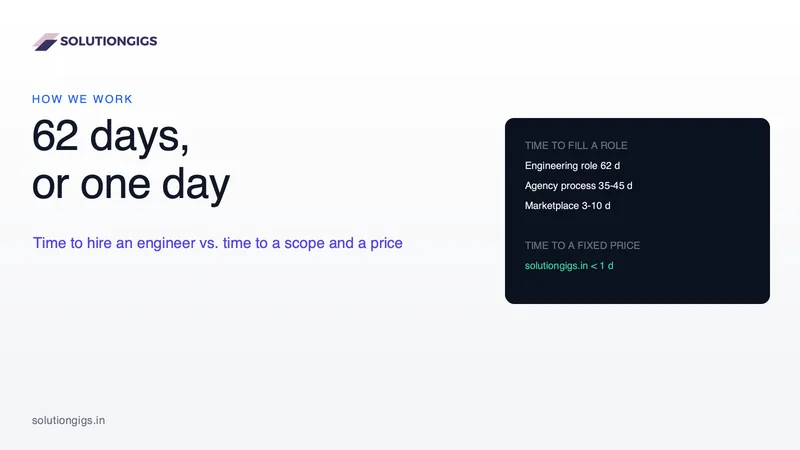
How Long It Takes to Hire a Freelance Developer — and How to Skip the Wait
Hiring an engineer averages 62 days, and almost none of them are engineering. This breaks down where the time actually goes across the job-posting, agency and marketplace routes, what the delay costs you, and exactly what happens on the /fix and /services intake pages — including what a one-day ETL does and does not buy, and what “ten times faster” honestly measures.