
Docker vs Kubernetes: When to Use Which in Production
Docker and Kubernetes are not competitors — they solve different problems. Learn exactly when to use Docker alone, when to bring in Kubernetes, and how they work together in 2026.

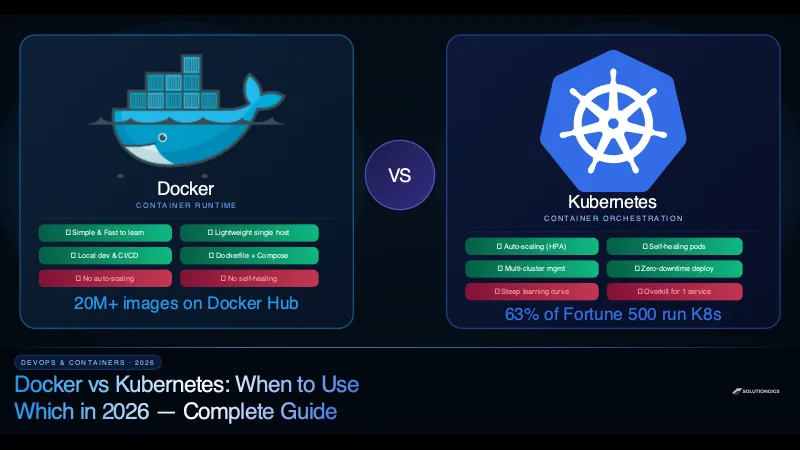
Quick Answer: Docker and Kubernetes are not competitors — they are complementary tools that operate at different layers. Docker packages and runs individual containers on a single machine. Kubernetes orchestrates thousands of containers across fleets of machines, handling scheduling, auto-scaling, self-healing, and networking automatically. The real question is not "which one" — it is "do I need orchestration yet?" For most teams under 10 services on a single server, Docker Compose is sufficient. Beyond that, Kubernetes pays for its complexity.
Every developer learns Docker first. It clicks instantly — package your app, run anywhere, done.
Then someone mentions Kubernetes. You read the documentation, encounter words like etcd, kubelet, Ingress controller, and Custom Resource Definitions, and suddenly wonder if you took a wrong turn.
Here is the truth: Docker and Kubernetes solve different problems. Understanding that distinction — and knowing exactly when each tool applies to your situation — is one of the most valuable mental models in modern DevOps.
This guide explains both tools from first principles, when to use each one, and how they work together in real production environments in 2026.
What Is Docker?
Docker is a container runtime and toolchain that lets you package an application and all its dependencies into a standardised unit called a container. The official Docker overview is the canonical reference for the build-ship-run model described here.
Before Docker (circa 2013), deploying software reliably across environments was painful. "It works on my machine" was a real crisis — different OS versions, library conflicts, and environment-specific configuration made deployments fragile and slow.
Docker solved this with three core ideas:
- Images — a read-only blueprint of your application and its environment, built from a
Dockerfile - Containers — a running instance of an image, isolated from the host OS via Linux namespaces and cgroups
- Registry — a repository to store and distribute images (Docker Hub, AWS ECR, Google GCR)
What Docker Does Well
- Consistency — the same image runs identically on a developer's laptop, in CI, in staging, and in production
- Isolation — containers share the host kernel but are isolated from each other; no dependency conflicts
- Speed — containers start in milliseconds, not minutes like virtual machines
- Portability — any machine running a container runtime can run your image, regardless of the underlying OS
- Ecosystem — 20 million+ public images on Docker Hub covering databases, caches, web servers, monitoring agents, and more
A Simple Dockerfile Example
FROM node:20-alpine

WORKDIR /app

COPY package*.json ./
RUN npm ci --only=production

COPY . .

EXPOSE 3000
CMD ["node", "server.js"]
Build and run:
docker build -t my-api:1.0 .
docker run -d -p 3000:3000 --name api my-api:1.0
Your Node.js app is now running in a container on port 3000 — isolated, reproducible, and portable.
Docker Compose: Multi-Container Local Development
When your application has multiple services — an API, a database, a cache, a worker — Docker Compose lets you define and run them all with a single file:
# docker-compose.yml
version: "3.9"
services:
  api:
    build: .
    ports: ["3000:3000"]
    environment:
      DATABASE_URL: postgres://user:pass@db:5432/mydb
    depends_on: [db, redis]

  db:
    image: postgres:16
    volumes:
      - pgdata:/var/lib/postgresql/data
    environment:
      POSTGRES_PASSWORD: pass
      POSTGRES_USER: user
      POSTGRES_DB: mydb

  redis:
    image: redis:7-alpine

  worker:
    build: .
    command: node worker.js
    depends_on: [db, redis]

volumes:
  pgdata:
Start everything: docker compose up -d
Four services running in seconds, with automatic networking between them. This is why Docker Compose is the gold standard for local development and small production deployments.
What Is Kubernetes?
Kubernetes (commonly abbreviated as K8s, where 8 represents the eight letters between K and s) is an open-source container orchestration platform originally developed by Google and released in 2014.
Where Docker answers "how do I run a container?", Kubernetes answers "how do I run thousands of containers reliably across hundreds of machines?"
The Problems Kubernetes Solves
Imagine you have 50 microservices, each with 3–10 instances, running across 20 servers. Without orchestration, you face:
- Manual placement — which service runs on which server? What if a server runs out of memory?
- No auto-scaling — traffic spikes at 9 AM every day. Do you manually spin up more instances?
- No self-healing — a container crashes at 3 AM. Does it stay down until someone notices at 8 AM?
- Complicated networking — how does Service A find Service B when instances come and go dynamically?
- Manual rolling deploys — how do you update 20 instances of a service without downtime?
Kubernetes solves every one of these automatically.
Kubernetes Core Concepts
| Concept | What it is |
|---|---|
| Pod | The smallest deployable unit — one or more containers sharing a network namespace |
| Deployment | Declares the desired state: "I want 5 replicas of this container image" |
| Service | A stable network endpoint that routes traffic to healthy pods |
| Ingress | HTTP/S routing rules — maps domain names and paths to Services |
| ConfigMap | Non-sensitive configuration data injected as env vars or files |
| Secret | Sensitive data (API keys, passwords) stored encrypted in etcd |
| Namespace | Logical cluster partitioning — team-a and team-b get separate namespaces |
| HPA | Horizontal Pod Autoscaler — scales replicas up/down based on CPU/memory |
| PersistentVolume | Persistent storage that survives pod restarts |
A Basic Kubernetes Deployment
# deployment.yaml
apiVersion: apps/v1
kind: Deployment
metadata:
  name: my-api
  namespace: production
spec:
  replicas: 5
  selector:
    matchLabels:
      app: my-api
  strategy:
    type: RollingUpdate
    rollingUpdate:
      maxSurge: 2
      maxUnavailable: 0       # zero-downtime deploy
  template:
    metadata:
      labels:
        app: my-api
    spec:
      containers:
        - name: api
          image: my-api:1.2.0
          ports:
            - containerPort: 3000
          resources:
            requests:
              cpu: "100m"
              memory: "128Mi"
            limits:
              cpu: "500m"
              memory: "512Mi"
          livenessProbe:
            httpGet:
              path: /health
              port: 3000
            initialDelaySeconds: 10
            periodSeconds: 15
          readinessProbe:
            httpGet:
              path: /ready
              port: 3000
            initialDelaySeconds: 5
            periodSeconds: 10
Apply it: kubectl apply -f deployment.yaml
Kubernetes will:
- Schedule 5 pods across available nodes, respecting resource limits
- Restart any pod that fails the liveness probe
- Remove pods from load balancing if they fail the readiness probe
- Roll out new image versions two pods at a time with zero downtime
- Scale up or down automatically if you configure an HPA
Docker vs Kubernetes: Head-to-Head Comparison
| Feature | Docker (+ Compose) | Kubernetes |
|---|---|---|
| Primary purpose | Build & run containers | Orchestrate containers at scale |
| Hosts supported | Single host | Multi-host clusters |
| Auto-scaling | Manual / not built-in | ✅ HPA + VPA + KEDA |
| Self-healing | ✅ restart: always (basic) |
✅ Full liveness/readiness probes |
| Rolling deployments | Manual / limited | ✅ Native, zero-downtime |
| Service discovery | ✅ Docker network DNS | ✅ CoreDNS + kube-proxy |
| Secret management | .env files / bind mounts |
✅ Kubernetes Secrets (etcd encrypted) |
| Load balancing | Port forwarding | ✅ Service + Ingress + cloud LB |
| Storage management | Volumes (local) | ✅ PersistentVolumes + StorageClasses |
| Learning curve | Low | High |
| Operational overhead | Very low | High (reduced with managed K8s) |
| Cost | Host cost only | Host cost + control plane (EKS ~$0.10/hr) |
| Best for | Dev, small prod, CI/CD | Production at scale, microservices |
When to Use Docker (Without Kubernetes)
Use Docker alone — with or without Compose — when:
1. Local Development
Every developer on your team should run the full application stack locally via Docker Compose. It eliminates "works on my machine" problems and onboards new engineers in minutes (git clone + docker compose up).
2. Single-Server Production (Under 5 Services)
A startup with an API, a PostgreSQL database, a Redis cache, and an Nginx reverse proxy is perfectly well-served by Docker Compose on a single VPS. Kubernetes would add weeks of setup and a constant operational burden for zero meaningful benefit.
3. CI/CD Pipelines
Docker is the backbone of modern CI/CD. Your GitHub Actions or GitLab CI pipeline builds a Docker image, runs tests inside a container, pushes to a registry, and triggers a deploy — all using standard Docker commands.
# .github/workflows/deploy.yml
jobs:
  build-and-push:
    steps:
      - uses: actions/checkout@v4
      - name: Build and push image
        run: |
          docker build -t $ECR_REGISTRY/my-api:$GITHUB_SHA .
          docker push $ECR_REGISTRY/my-api:$GITHUB_SHA
4. Stateful Services (Databases)
Running PostgreSQL, MongoDB, or Kafka in Docker with persistent volumes is straightforward. In Kubernetes, stateful workloads require StatefulSets, PersistentVolumeClaims, and StorageClasses — significantly more complex.
5. Side Projects and MVPs
If you are shipping fast and validating an idea, Docker Compose on a $10/month VPS gets you to production in an afternoon. Optimise infrastructure when the product is proven.
When to Use Kubernetes
Kubernetes earns its complexity when:
1. You Need Auto-Scaling
Your application receives unpredictable traffic. A news site that gets 10x normal traffic when a story goes viral cannot manually scale fast enough. Kubernetes' Horizontal Pod Autoscaler watches CPU and memory metrics (or custom metrics via KEDA) and adds or removes pods in under 30 seconds.
apiVersion: autoscaling/v2
kind: HorizontalPodAutoscaler
metadata:
  name: my-api-hpa
spec:
  scaleTargetRef:
    apiVersion: apps/v1
    kind: Deployment
    name: my-api
  minReplicas: 3
  maxReplicas: 50
  metrics:
    - type: Resource
      resource:
        name: cpu
        target:
          type: Utilization
          averageUtilization: 65
With this config, Kubernetes automatically scales from 3 to 50 pods based on CPU load — no human intervention required.
2. You Have 10+ Microservices
At 10+ services, the operational overhead of managing Docker Compose files and deployments across multiple servers becomes unsustainable. Kubernetes provides a unified control plane with a consistent model for deploying, scaling, and monitoring every service.
3. You Require Zero-Downtime Deployments
Kubernetes rolling updates are designed for zero downtime. Combine maxUnavailable: 0 with readiness probes and you get deployments that:
- Bring up new pods
- Wait until they pass readiness checks
- Only then stop old pods
- Roll back automatically if new pods fail health checks
4. Multi-Region or Multi-Cloud Deployment
Kubernetes provides a consistent API regardless of whether you're running on AWS, GCP, Azure, or bare metal. Multi-region Kubernetes clusters with federated control planes are the standard approach for globally distributed applications in 2026.
5. Compliance and Security Requirements
Kubernetes provides fine-grained RBAC (Role-Based Access Control), Pod Security Standards, Network Policies for micro-segmentation, and native secrets encryption. For financial services, healthcare, or any SOC 2 / HIPAA regulated workload, Kubernetes' security primitives are far more comprehensive than plain Docker.
How Docker and Kubernetes Work Together
A common misconception is that Kubernetes replaces Docker. In practice, they work together:
Developer writes code
      ↓
docker build → Creates container image
      ↓
docker push → Pushes to registry (ECR / GCR / Docker Hub)
      ↓
kubectl apply → Kubernetes pulls image, schedules pods
      ↓
containerd (inside K8s node) → Actually runs the container
You still write Dockerfiles. You still build images with Docker. Kubernetes just takes those images and runs them at scale.
Note: Since Kubernetes v1.24, Docker is no longer the default container runtime inside cluster nodes — that role belongs to containerd (which is actually what Docker uses under the hood anyway). This change is transparent to developers; your Dockerfiles and images work identically.
Docker Compose vs Kubernetes YAML: Side-by-Side
The same two-service application in both tools:
Docker Compose:
services:
  api:
    image: my-api:1.0
    ports: ["3000:3000"]
    environment:
      DB_URL: postgres://user:pass@db/mydb
    restart: unless-stopped
  db:
    image: postgres:16
    volumes:
      - pgdata:/var/lib/postgresql/data
volumes:
  pgdata:
Kubernetes equivalent (simplified):
# api-deployment.yaml
apiVersion: apps/v1
kind: Deployment
metadata:
  name: api
spec:
  replicas: 3
  selector:
    matchLabels:
      app: api
  template:
    metadata:
      labels:
        app: api
    spec:
      containers:
        - name: api
          image: my-api:1.0
          ports:
            - containerPort: 3000
          env:
            - name: DB_URL
              valueFrom:
                secretKeyRef:
                  name: db-secret
                  key: url
---
apiVersion: v1
kind: Service
metadata:
  name: api-service
spec:
  selector:
    app: api
  ports:
    - port: 80
      targetPort: 3000
---
# + StatefulSet for PostgreSQL
# + PersistentVolumeClaim
# + Service for DB
# + Secret for DB credentials
# = 4–5 more YAML files
The Kubernetes version is significantly more verbose — but it buys you replicas, self-healing, zero-downtime deploys, and production-grade networking.
Managed Kubernetes in 2026: Reducing the Complexity
The biggest barrier to Kubernetes adoption is operational complexity — someone has to manage the control plane (the API server, etcd, scheduler, controller manager). Managed Kubernetes services eliminate this entirely:
| Provider | Service | Highlights |
|---|---|---|
| AWS | EKS | Deepest AWS integration (IAM, ALB, EBS, EFS) |
| Google Cloud | GKE | Most mature; Autopilot mode = fully managed nodes |
| Microsoft Azure | AKS | Best for .NET and Windows workloads |
| DigitalOcean | DOKS | Simplest UX, great for startups |
| Linode (Akamai) | LKE | Most affordable, straightforward |
With GKE Autopilot or EKS Fargate, you don't even manage worker nodes — Google or AWS handles node provisioning, scaling, and patching. You just deploy workloads.
At SolutionGigs, we've helped teams migrate from Docker Compose on a single VPS to EKS or GKE as they scaled. The right time to migrate is usually when you hit the first of these triggers: three or more engineers stepping on each other's deployments, a need for auto-scaling, or a serious production incident caused by a container crash that wasn't auto-restarted.
Decision Framework: Docker vs Kubernetes
Ask yourself these four questions:
1. How many services do you have?
- Under 5 → Docker Compose is sufficient
- 5–15 → Docker Compose with Docker Swarm, or evaluate K8s
- 15+ → Kubernetes is the right tool
2. Do you need auto-scaling?
- No → Docker is fine
- Yes → Kubernetes (or a managed platform like Cloud Run / Fargate as a simpler alternative)
3. How large is your team?
- 1–3 engineers → Kubernetes overhead is not worth it
- 5+ engineers with dedicated DevOps/Platform → Kubernetes pays off
4. What is your SLA?
- Best-effort / side project → Docker
- 99.9%+ uptime SLA → Kubernetes' self-healing and rolling deploys are essential
Monitoring Docker and Kubernetes in Production
Both Docker and Kubernetes produce metrics, logs, and traces that need observability tooling:
- Datadog — first-class Docker and Kubernetes support, Autodiscovery, live container view. See our complete Datadog guide and cost comparison with alternatives.
- Grafana + Prometheus — free, open-source, the most popular K8s monitoring stack
- Elastic APM — excellent for correlating container logs with traces
For Kubernetes specifically, deploy the Datadog Cluster Agent or Prometheus + kube-state-metrics for cluster-level metrics including node resource usage, pod scheduling events, and HPA activity. The Kubernetes concepts documentation is worth reading alongside this section — the control-plane model it describes is what the monitoring above is actually observing.
If the cluster is already running and nobody on the team owns it, that is a common reason teams stall here. Rather than opening a role for it, see how long it takes to hire a freelance developer — a scoped handover is usually days, not the 62-day hiring benchmark.
Frequently Asked Questions
What is the difference between Docker and Kubernetes?
Docker is a container runtime that packages and runs individual containers on a single host. Kubernetes is a container orchestration platform that manages thousands of containers across multiple hosts, handling scheduling, scaling, self-healing, and networking automatically. Docker builds the containers; Kubernetes operates them at scale. Most production Kubernetes clusters still use Docker (or its underlying engine, containerd) to build images.
Do you need Docker to use Kubernetes?
No. Since Kubernetes v1.24, Docker is no longer the default runtime inside cluster nodes — containerd is. However, developers still use Docker to build container images locally. Those images are then pulled by Kubernetes' containerd runtime at deployment time. You write a Dockerfile; both Docker and Kubernetes can run the resulting image.
When should I use Docker Compose instead of Kubernetes?
Use Docker Compose for local development environments, small single-server deployments with 2–5 services, CI/CD pipeline test stages, and early-stage product development. Switch to Kubernetes when you need auto-scaling, self-healing across multiple hosts, zero-downtime rolling deployments, or are running more than 10 services in production.
Is Kubernetes overkill for small projects?
Yes, for most small projects. Kubernetes introduces significant operational complexity — Pods, Deployments, Services, Ingress, ConfigMaps, Secrets, RBAC, and more. For projects with fewer than 5 services on a single VPS, Docker Compose delivers 90% of the value at 10% of the complexity. Add Kubernetes when you hit real scale or SLA requirements that demand it.
What is Kubernetes used for?
Kubernetes is used to run containerised applications at scale across multiple servers. Its primary use cases are auto-scaling workloads based on CPU or memory demand, zero-downtime rolling deployments, self-healing by restarting failed containers, multi-cloud and hybrid deployments, and managing complex microservices architectures with dozens or hundreds of independent services.
Which is better for production: Docker or Kubernetes?
It depends entirely on your scale. For production workloads on a single server with 2–5 services, Docker Compose is often the better choice — simpler, faster to operate, easier to debug. For multi-service architectures requiring auto-scaling, self-healing, and high-availability across multiple nodes, Kubernetes is the industry standard used by 63% of Fortune 500 companies.
What are the managed Kubernetes services available in 2026?
The main managed Kubernetes services in 2026 are Amazon EKS (AWS), Google GKE (Google Cloud — with Autopilot mode for fully managed nodes), Azure AKS (Microsoft), DigitalOcean Kubernetes, and Linode LKE. Managed services handle the control plane, reducing operational overhead significantly compared to self-managed clusters.
Conclusion
Docker and Kubernetes are not a binary choice — they are a progression.
Start with Docker. Learn containers, write Dockerfiles, use Docker Compose for your local environment and your first production deployment. This alone puts you ahead of the majority of development teams and eliminates an entire class of "it works on my machine" problems.
Graduate to Kubernetes when the problems it solves become real problems for you — auto-scaling, self-healing at scale, multi-host deployments, zero-downtime deploys across many services. Not before.
The most common mistake teams make is jumping to Kubernetes too early, spending months on infrastructure complexity instead of shipping product. The second most common mistake is staying on Docker Compose too long, and managing a scaling crisis without the right tools.
Know the threshold. Use the right tool at the right stage.
Need help designing your container strategy or migrating from Docker Compose to Kubernetes? We've made this transition for teams at every stage — and often talked people out of it, because a single VPS is sometimes honestly right. Tell us what you're running today →
Mohammed Yaseen
Founder, SolutionGigs
Mohammed has architected container deployments for startups and scale-ups across AWS, GCP, and Azure — from first Dockerfile to multi-region Kubernetes clusters. He founded SolutionGigs to connect teams with engineers who've solved exactly these infrastructure challenges. LinkedIn →
Try Free Kubernetes YAML Generator
Free, no signup — right in your browser.
Try Free Kubernetes YAML Generator →More in DevOps & Containers
JPG to WebP Converter — Reduce Image Size for Faster Websites
Convert JPG images to WebP online free. WebP is 25–35% smaller than JPG at the same quality — perfect for improving your website's PageSpeed score. No account needed.
JSON to CSV Converter — Free Online, No Code Needed
Convert JSON arrays to CSV (or CSV back to JSON) online for free. No signup, no code, no limits. Works with any API export or database dump.
Free JWT Decoder Online — Inspect Header, Payload & Expiry
Decode any JSON Web Token instantly. Our free online JWT decoder shows header algorithm, all payload claims, expiry countdown, and issuer — no signup, works in your browser.