
GCS vs AWS S3 vs Azure Blob Storage
Google Cloud Storage vs Amazon S3 vs Azure Blob Storage compared for data engineers: real per-GB and per-request pricing, IAM access models, archive-tier retrieval speed, and Azure's new 128 KiB minimum billable object size that can 32x a small-file bill.

Quick Answer: For most data engineering workloads, choose the object store your compute already sits next to — cross-cloud egress dominates every other cost line once you move real volume. On pure technical merit: Google Cloud Storage wins on archive-tier speed (still millisecond reads at every tier) and has no small-object minimum; Amazon S3 wins on ecosystem compatibility and predictable request pricing; Azure Blob Storage (via ADLS Gen2) wins for Spark/Hadoop-style data lakes that need real directories and POSIX ACLs — but its new 128 KiB minimum object fee, rolling out from July 2026, can multiply a small-file bill by 30x or more.
Object storage is the one service every cloud data platform sits on top of, yet most "S3 vs GCS vs Blob Storage" comparisons stop at a per-GB price table. That table hasn't decided a real architecture in years — the differences that actually bite a data engineering team live in retrieval latency on the coldest tier, how access control is modeled, whether the namespace is flat or hierarchical, and a billing-floor change Azure only just introduced. In the multi-cloud consulting work we do at SolutionGigs, the storage-tier decision is consistently the one clients get wrong first, usually by picking a tier on price alone and discovering the retrieval-time or access-control trade-off only after data is already sitting there. This is the first article in SolutionGigs' GCP vs AWS vs Azure series, comparing the three clouds service by service instead of as a single "which cloud is best" verdict.
What Are Cloud Storage, S3, and Blob Storage, Exactly?
Google Cloud Storage (GCS), Amazon S3, and Azure Blob Storage are the three major public-cloud object storage services — all HTTP-addressable, schema-less stores for unstructured data, billed by gigabytes stored, gigabytes moved, and API calls made, not by a provisioned disk size.
Amazon S3 ("Simple Storage Service") launched in 2006 and its REST API became the de facto industry standard — nearly every third-party backup tool, S3-compatible provider (Cloudflare R2, MinIO, Wasabi), and open-source data framework speaks "the S3 API" as its default protocol, even when talking to a different vendor's storage.
Google Cloud Storage is Google's literal product name, which is why practitioners say "GCS" to disambiguate it from the generic term "cloud storage." It's built on the same infrastructure that powers Google Search and Gmail, and it exposes one flat, unified API regardless of storage class — unlike AWS, where Glacier used to be (and still partly is) a conceptually separate product bolted onto S3.
Azure Blob Storage ("Binary Large Object" storage) is one of several services — alongside Queues, Tables, and Files — that live inside an Azure Storage Account. Its most important variant for data engineers is Azure Data Lake Storage Gen2 (ADLS Gen2), which is not a separate product but Blob Storage with a Hierarchical Namespace flag turned on at account creation, adding real directory semantics on top of the same blob engine.
Storage Classes and Tiers, Side by Side
All three providers offer the same conceptual ladder — hot, infrequent, cold, and archive — but they name the rungs differently and enforce different minimum commitments.
| Tier purpose | AWS S3 | Google Cloud Storage | Azure Blob Storage |
|---|---|---|---|
| Hot / frequent access | Standard | Standard | Hot |
| Infrequent access | Standard-IA, One Zone-IA (30-day min) | Nearline (30-day min) | Cool (30-day min) |
| Cold | Glacier Instant Retrieval (90-day min) | Coldline (90-day min) | Cold (90-day min) |
| Coldest / archive | Glacier Flexible Retrieval (90-day min), Glacier Deep Archive (180-day min) | Archive (365-day min) | Archive (180-day min) |
| Automatic tiering | S3 Intelligent-Tiering | Autoclass | Lifecycle policy rules (age-based, not access-pattern-based) |
Two things jump out once you line them up. First, S3 has more tiers than the other two — splitting "cold but occasionally needed" into Glacier Instant Retrieval (millisecond reads) and Glacier Flexible Retrieval (minutes-to-hours) is a distinction neither GCS nor Azure makes explicitly. Second, GCS's Archive minimum (365 days) is the longest commitment of the three — a trade-off for the retrieval-speed advantage covered next.
The Archive-Tier Trap: Milliseconds vs. Hours
The single biggest functional difference between these three services isn't price — it's whether the coldest, cheapest tier can still be read back instantly. Get this wrong and a "cost optimization" turns into a multi-hour outage for whoever needed that file.
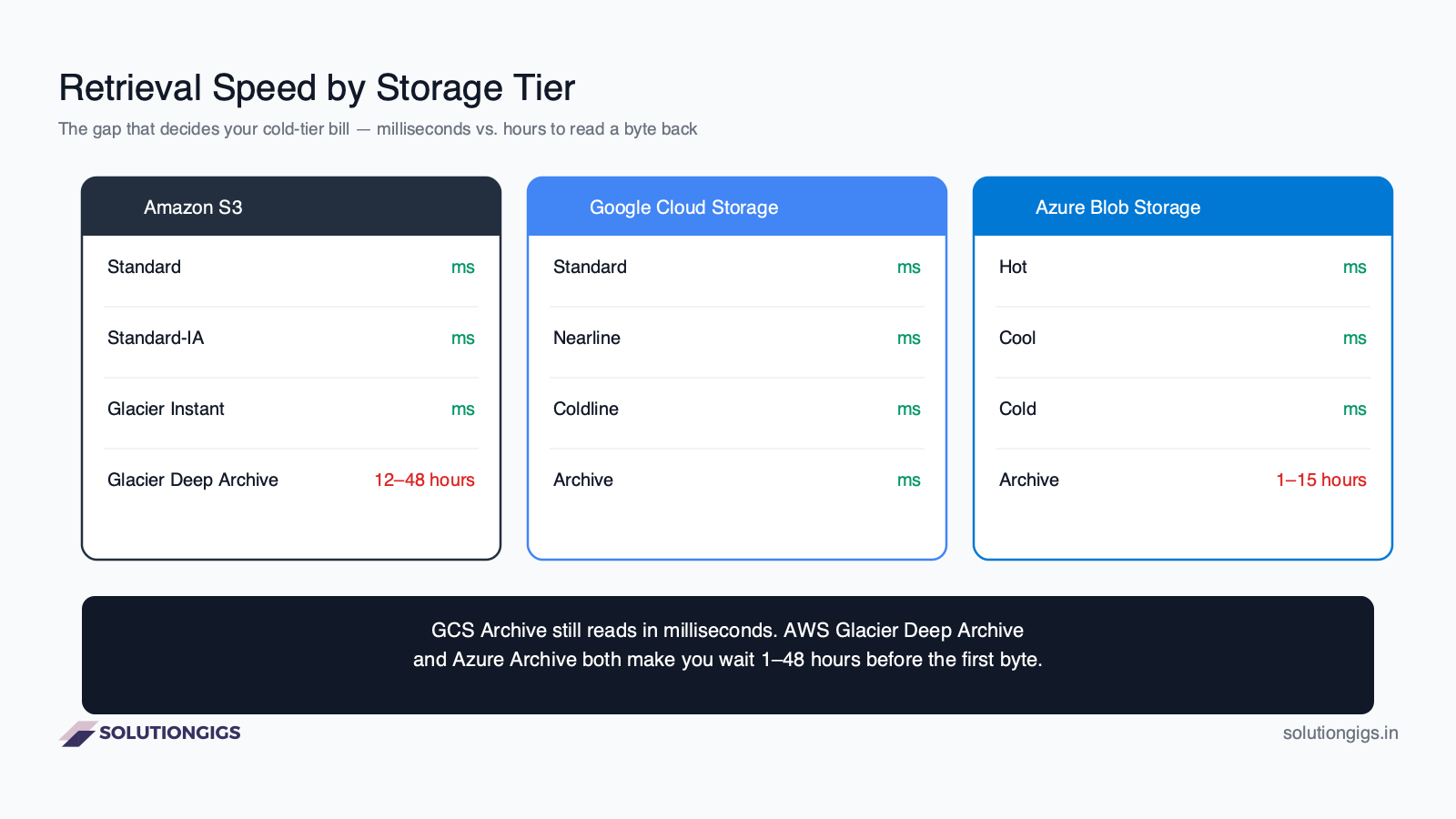
Google Cloud Storage keeps millisecond first-byte latency at every storage class, including Archive. There's no separate "restore" step — you request the object and it streams back, the same as Standard. The Archive discount comes purely from the storage price and an early-deletion penalty, never from making you wait.
AWS S3 Glacier Deep Archive is the opposite extreme. Standard retrieval takes up to 12 hours; bulk retrieval takes up to 48 hours, with no expedited option at any price — if an auditor needs a file from Deep Archive "now," the honest answer is "in half a day." S3 Glacier Instant Retrieval avoids this entirely and still reads in milliseconds, but it only reaches the 90-day-minimum cold tier, not the deepest archive pricing.
Azure's Archive tier sits in between. Standard-priority rehydration can take up to 15 hours for objects under 10 GB; High-priority rehydration can finish in under an hour for the same size, but Microsoft caps priority rehydration at roughly 10 GiB per storage account per hour — so "high priority" doesn't scale to a bulk restore of a large dataset.
Takeaway: if any part of your retention policy might need an ad hoc, same-day restore (legal hold, incident forensics, a customer data request), don't default to the coldest tier on AWS or Azure. Either keep that subset on a warmer, instant-read tier, or accept the wait and build it into your SLA — GCS Archive is the only one of the three where "coldest tier" and "instant read" aren't mutually exclusive.
Pricing Compared: Storage, Requests, and Egress
Object storage pricing has three independent meters — storage, requests, and egress — and the one that dominates your bill depends entirely on your access pattern, not the class you picked. Cloud list prices change often and vary by region; treat the numbers below as directional and verify current rates before budgeting.
Per-GB standard (hot) storage, typical US region:
| Provider | List price |
|---|---|
| Azure Blob (Hot, LRS) | ~$0.018 / GB / month |
| Google Cloud Storage (Standard) | ~$0.020 / GB / month |
| AWS S3 (Standard) | ~$0.023 / GB / month |
Per-1,000-request pricing is where the story gets more interesting than most comparisons let on:
| Operation | AWS S3 | Google Cloud Storage | Azure Blob (Hot) |
|---|---|---|---|
| Write / list (PUT, COPY, LIST) | ~$0.005 | ~$0.005 (Class A) | ~$0.0050 |
| Read (GET) | ~$0.0004 | ~$0.0004 (Class B) | ~$0.0055 |
S3 and GCS price a GET at roughly 12x cheaper than a write, and they land within a rounding error of each other. Azure inverts this — its hot-tier read transactions cost roughly the same as a write, and around 10x more per read than S3 or GCS at list price. For a workload dominated by writes (logging, ingestion), that's irrelevant. For a workload dominated by small, frequent reads — a lakehouse serving thousands of tiny Parquet-file reads per query — Azure's cheaper storage price can be erased by its transaction cost before the storage bill ever matters.
Egress (data leaving the cloud to the internet), first tier:
| Provider | List price |
|---|---|
| Azure Blob | ~$0.087 / GB |
| AWS S3 | ~$0.09 / GB |
| Google Cloud Storage | ~$0.12 / GB |
Egress is the line every cross-cloud architecture underestimates. Moving 50 TB out of GCS to a non-Google destination at list price runs into the thousands of dollars — which is exactly why "just replicate to another cloud for redundancy" is a much bigger commitment than the storage price alone suggests.
Azure's New 128 KiB Minimum Object Size (Read This Before You Migrate Small Files)
Starting July 1, 2026 for newly created storage accounts — and July 1, 2027 for every existing account — Azure bills any object smaller than 128 KiB in the Cool, Cold, or Archive tiers as if it were a full 128 KiB. The Hot tier is unaffected. This is new enough that most 2025-era "S3 vs Blob Storage" comparisons don't mention it at all, and it directly reverses a decade of standard cost-optimization advice: tiering small files to a cooler class no longer guarantees savings.
The effect scales with how far below 128 KiB your average object sits. A telemetry or log-archival platform storing 2 billion 4 KB files in the Cool tier illustrates it starkly:
| Actual data | Billed data | Approx. annual cost | |
|---|---|---|---|
| Before the floor | 8 TB | 8 TB | ~$432 |
| After the floor (128 KiB minimum) | 8 TB | 256 TB | ~$13,800 |
That's a 32x inflation — 128 KiB divided by 4 KB — purely from the billing floor, with zero change in actual bytes stored. An 8 KiB average object faces a 16x multiplier; a 64 KiB object faces 2x. AWS S3 has enforced an equivalent 128 KB minimum on Standard-IA, One Zone-IA, and every Glacier tier for years, so this isn't unprecedented — but it's brand-new for Azure, and it catches teams mid-migration who modeled their savings on Azure's old, floor-free pricing. Google Cloud Storage has no minimum object size on any class, which is a genuine and current differentiator, not a historical footnote.
If you're running a small-object-heavy pipeline, this is the same shape of problem covered in our Spark small files guide — except here the penalty isn't compute overhead, it's a direct multiplier on the storage bill itself. Compact small files into larger ones (Parquet row-group consolidation, OPTIMIZE-style compaction) before tiering to Cool/Cold/Archive on Azure, not after.
Consistency Model: Still a Real Differentiator?
No — and any article treating this as a decision factor in 2026 is citing outdated information. All three providers now guarantee strong read-after-write consistency for standard object operations, at no extra cost and no special configuration.
| Provider | Strong consistency since |
|---|---|
| Google Cloud Storage | Always (by design, since launch) |
| Azure Blob Storage | Always (by design, since launch) |
| Amazon S3 | December 2020 (previously eventually consistent) |
This used to be a genuine S3 weakness, and it spawned a generation of workarounds — most notably EMRFS Consistent View, a DynamoDB-backed patch that many older tutorials still recommend for FileNotFoundException errors on EMR. As our AWS EMR troubleshooting guide covers in more depth, that workaround has been unnecessary since S3 gained native strong consistency and hit end of standard support in 2023 — yet it still provisions (and keeps billing) a DynamoDB table on anyone who follows the stale advice today.
One nuance worth flagging: Azure's strong consistency guarantee applies within a single storage account and region. If you enable geo-redundant storage (GRS) and read from the secondary region, that read can lag the primary — an eventual-consistency window that S3 and GCS's single-region guarantees don't have to think about, but that only matters once you turn on cross-region replication.
IAM & Access Control: Three Different Mental Models
Moving a Terraform module between clouds means re-modeling permissions from scratch, not just swapping a bucket name — each provider's access-control system works on a fundamentally different mental model.
| Provider | Primary model | Time-limited sharing | Notable quirk |
|---|---|---|---|
| AWS S3 | IAM policies (identity-based) and bucket policies (resource-based) | Presigned URLs | Two-sided check: both the identity policy and the bucket policy must allow the action — troubleshooting means checking both. ACLs are legacy and disabled by default on new buckets since 2023. |
| Google Cloud Storage | Cloud IAM roles at project/bucket/object level | Signed URLs (via service account key or signBlob) |
Single, unified IAM system shared with the rest of Google Cloud — no separate resource-policy layer to reconcile. |
| Azure Blob Storage | Azure RBAC via Microsoft Entra ID | Shared Access Signatures (SAS tokens) | ADLS Gen2 additionally supports POSIX-style ACLs on individual files and directories — the only one of the three with per-file Unix-like permission bits. |
The practical consequence: an S3 access-denied error can come from either the IAM side or the bucket-policy side, so debugging requires checking both independently. GCS collapses that into one IAM surface, which is simpler but less granular at the resource level. Azure's RBAC-plus-SAS-plus-POSIX-ACL stack is the most layered of the three, but it's also the only model that maps cleanly onto a Hadoop cluster migrating off an on-prem HDFS deployment that already used POSIX permissions.
Namespace & Data Lake Performance: Flat vs. Hierarchical
S3 and Google Cloud Storage are flat key-value stores where "folders" are a display illusion built from key prefixes; Azure's ADLS Gen2 is the only one of the three with a real, filesystem-like hierarchical namespace.
An object named sales/2026/09/part-000.parquet in S3 or GCS has no actual directory — the slashes are just characters inside one flat key, and listing "a folder" means filtering by prefix. Renaming or moving a directory of 10,000 part-files therefore requires copying and deleting every object individually. On ADLS Gen2, the same rename is a single atomic metadata operation, because directories are real.
This single difference is why the modern data-lake table formats exist in their current shape. Apache Spark's and Apache Iceberg's commit protocols go to considerable lengths — staging directories, atomic manifest-file swaps, avoiding rename-based commits entirely — specifically to work around the lack of atomic rename on S3 and GCS. If your pipeline still relies on directory-rename-as-commit (an older Hadoop pattern), it behaves very differently depending on which of the three stores it lands on. See our guides on data partitioning strategies and migrating Hive tables to Iceberg for how table formats route around this gap on flat-namespace storage.
Minimum Storage Duration & Early Deletion Fees
Every cooler-than-Standard tier on all three clouds charges an early-deletion fee if you delete or re-tier an object before its minimum commitment ends — you pay for the remaining committed days as if the object were still sitting there.
| Provider | Tier | Minimum duration |
|---|---|---|
| AWS S3 | Standard-IA / One Zone-IA | 30 days |
| AWS S3 | Glacier Instant / Flexible Retrieval | 90 days |
| AWS S3 | Glacier Deep Archive | 180 days |
| Google Cloud Storage | Nearline | 30 days |
| Google Cloud Storage | Coldline | 90 days |
| Google Cloud Storage | Archive | 365 days |
| Azure Blob | Cool | 30 days |
| Azure Blob | Cold | 90 days |
| Azure Blob | Archive | 180 days |
Worked example: a 1 GB object moved to any provider's 90-day-minimum cold tier and deleted after only 10 days is billed for the full 90 days regardless — the remaining 80 days are charged as an early-deletion penalty on top of what you already paid. Lifecycle rules that transition objects based on age (not access pattern) can trigger this by accident when a dataset turns out to need updating sooner than the policy assumed.
Common Mistakes to Avoid
- Assuming "S3-compatible" means fully equivalent. Many third-party and open-source tools support "the S3 API," but consistency guarantees, ACL defaults, and multipart-upload limits still vary by the actual backend.
- Treating lifecycle transitions as instant. All three providers run lifecycle rules as periodic batch jobs, typically once per day — an object can sit past its threshold for up to 24 hours before it actually moves tiers.
- Defaulting small, frequently-read objects straight into a deep archive tier without checking retrieval latency — the "coldest = cheapest" instinct ignores that AWS and Azure's coldest tiers add hours of wait time GCS's doesn't.
- Ignoring egress when designing a cross-cloud pipeline. A "backup to another cloud" plan that looks cheap on storage price alone can be dominated by egress the first time you actually need to restore from it.
- Migrating a small-object workload to Azure Cool/Cold/Archive without re-checking the 128 KiB floor rolling out from July 2026 — savings modeled on old pricing can silently invert into a cost increase.
- Relying on directory-rename-as-commit patterns from on-prem Hadoop on flat-namespace stores (S3, GCS) without a proper commit protocol — it's slow, non-atomic, and a source of partial-write corruption under failure.
Which Should You Choose? A Decision Framework
In practice, the deciding factor is almost never the object store in isolation — it's what compute, IAM, and data-lake tooling you're already committed to, because egress and identity-model friction cost more than any per-GB price gap.
| If your priority is… | Lean toward |
|---|---|
| You're already running compute in one cloud with no strong reason to diverge | Stay in that cloud — egress alone usually outweighs any storage price difference |
| Spark/Hadoop-heavy data lake migrating off on-prem HDFS, need POSIX ACLs and real directories | Azure Blob Storage with ADLS Gen2 |
| Cost-sensitive archival with occasional, unpredictable access needs; feeding BigQuery/Vertex AI | Google Cloud Storage |
| Broadest third-party tool and S3-API-first ecosystem compatibility | Amazon S3 |
| Multi-cloud backup target without deep AWS lock-in | Consider an S3-API-compatible alternative (Cloudflare R2, MinIO) alongside your primary cloud's native store |
The SolutionGigs.in Advantage
Standing up equivalent buckets, IAM roles, and lifecycle policies across all three clouds by hand is exactly the kind of repetitive, error-prone Terraform work most data teams don't have time for. Our free Terraform Generator scaffolds provider-correct infrastructure-as-code for AWS, GCP, and Azure storage resources in minutes, so you can prototype a multi-cloud storage layout without hand-writing HCL for three different providers from scratch.
Frequently Asked Questions
Is Google Cloud Storage cheaper than S3?
At list price, yes for standard hot storage: GCS Standard runs around $0.020/GB/month versus roughly $0.023/GB/month for S3 Standard in comparable US regions. But storage price is a small line item — request pricing is nearly identical between the two, and your real bill is dominated by egress and retrieval patterns. Always check current regional pricing before deciding.
Which cloud has the cheapest egress?
At published first-tier internet egress rates, Azure Blob Storage is typically cheapest at around $0.087/GB, AWS S3 sits near $0.09/GB, and Google Cloud Storage is highest at roughly $0.12/GB for the first terabyte. The gap narrows at volume-discount tiers. The bigger lever is architecture: keep compute and storage in the same cloud and region, and egress mostly disappears.
Does Azure Blob Storage support POSIX permissions like HDFS?
Only when Hierarchical Namespace is enabled, turning it into Azure Data Lake Storage Gen2 (ADLS Gen2). That mode adds real directories, atomic folder rename/delete, and POSIX-style ACLs on files and folders — something neither S3 nor Google Cloud Storage offers natively, since both are flat key-value stores that only simulate folders with key prefixes.
What happens if I delete a Glacier or Archive object early?
All three providers charge an early-deletion fee if you delete or transition an object before its storage class's minimum storage duration ends. You're billed for the remaining committed days as if the object were still there. This applies to AWS Glacier tiers and S3 Standard-IA, GCS Nearline/Coldline/Archive, and Azure Cool/Cold/Archive alike — it isn't unique to one vendor.
Can I access AWS Glacier Deep Archive data immediately in an emergency?
No. Glacier Deep Archive has no instant-access option — standard retrieval takes about 12 hours and bulk retrieval up to 48 hours, regardless of urgency. For emergency-speed access to cold data, use S3 Glacier Instant Retrieval (millisecond reads) or Google Cloud Storage Archive, which reads in milliseconds at every tier.
Is S3 still eventually consistent?
No — this is outdated advice still repeated on older blogs and Stack Overflow threads. Since December 2020, Amazon S3 has provided strong read-after-write consistency for all PUT and DELETE operations in every AWS region, at no extra cost. Workarounds like EMRFS Consistent View are now obsolete and just add cost.
What is the new Azure 128 KiB minimum object size rule?
Starting July 1, 2026 for new storage accounts (and July 1, 2027 for all existing accounts), Azure bills any object smaller than 128 KiB in the Cool, Cold, or Archive tiers as if it were a full 128 KiB. The Hot tier is unaffected. For workloads with millions of small files, this can multiply the effective storage bill by double digits — re-check tiering policies before migrating small-object workloads to Azure's cooler tiers.
Conclusion
None of these three object stores is objectively "best" — they optimize for different failure modes. Google Cloud Storage's flat pricing model and always-instant retrieval make it the easiest to reason about; Amazon S3's ecosystem gravity and request-pricing predictability make it the safest default for tooling compatibility; Azure Blob Storage's ADLS Gen2 mode is the only one that speaks the language of an on-prem Hadoop migration, at the cost of a newly-introduced small-object penalty worth checking before you commit. Model your actual access pattern — object size distribution, read/write ratio, and how often "cold" data really needs to come back — before picking a tier, not just a provider.
Need help architecting a multi-cloud or cloud-migration data platform without guessing at these trade-offs? Get matched with a vetted data engineer on solutiongigs.in — it's free to post a project.
Mohammed Yaseen
Founder, SolutionGigs
Mohammed writes SolutionGigs' data engineering and cloud infrastructure guides, drawing on hands-on work architecting storage and pipeline layers across AWS, GCP, and Azure. LinkedIn →
More in Data Engineering
AWS vs GCP vs Azure for Startups: Which to Pick
AWS vs GCP vs Azure for startups in 2026 — startup credits compared, real pricing, provider strengths, and a clear decision framework to pick the right cloud without vendor lock-in.

AI and Data Engineering: What Really Changes and What Doesn't
AI changed data engineering in two directions at once, and most articles only cover one: agents that write pipelines, and pipelines that serve models. This guide separates them, then defines what "AI-ready data" actually means as a specification rather than a slogan - a ten-dimension comparison against the BI-ready standard, a decision table for what to delegate to agents and what to never hand over, and a 90-day plan to get a platform ready.
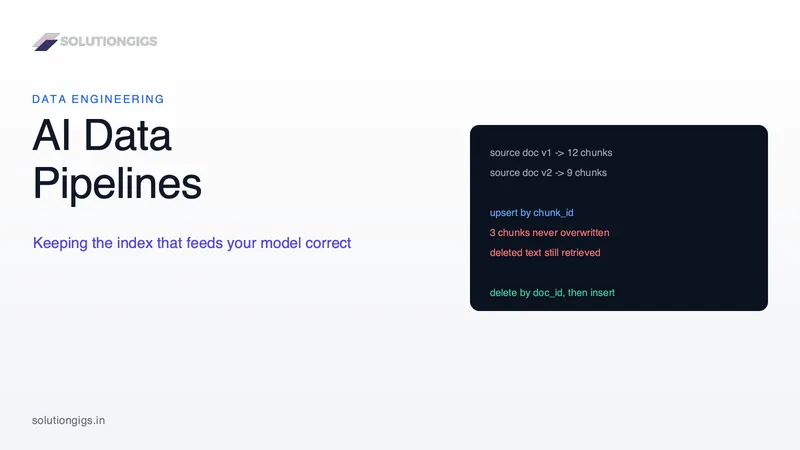
AI Data Pipelines: How to Build One That Doesn't Go Stale
An AI data pipeline is easy to build once and hard to keep correct. This guide covers the sync problems that only appear in production: the chunk-boundary trap that leaves deleted text retrievable, why vector deletions are harder than inserts, what an embedding model upgrade actually costs, and how to choose a freshness target you can defend. The core reframe: your vector index is a materialised view over your source content, so every one of these problems already has a known data engineering answer.