
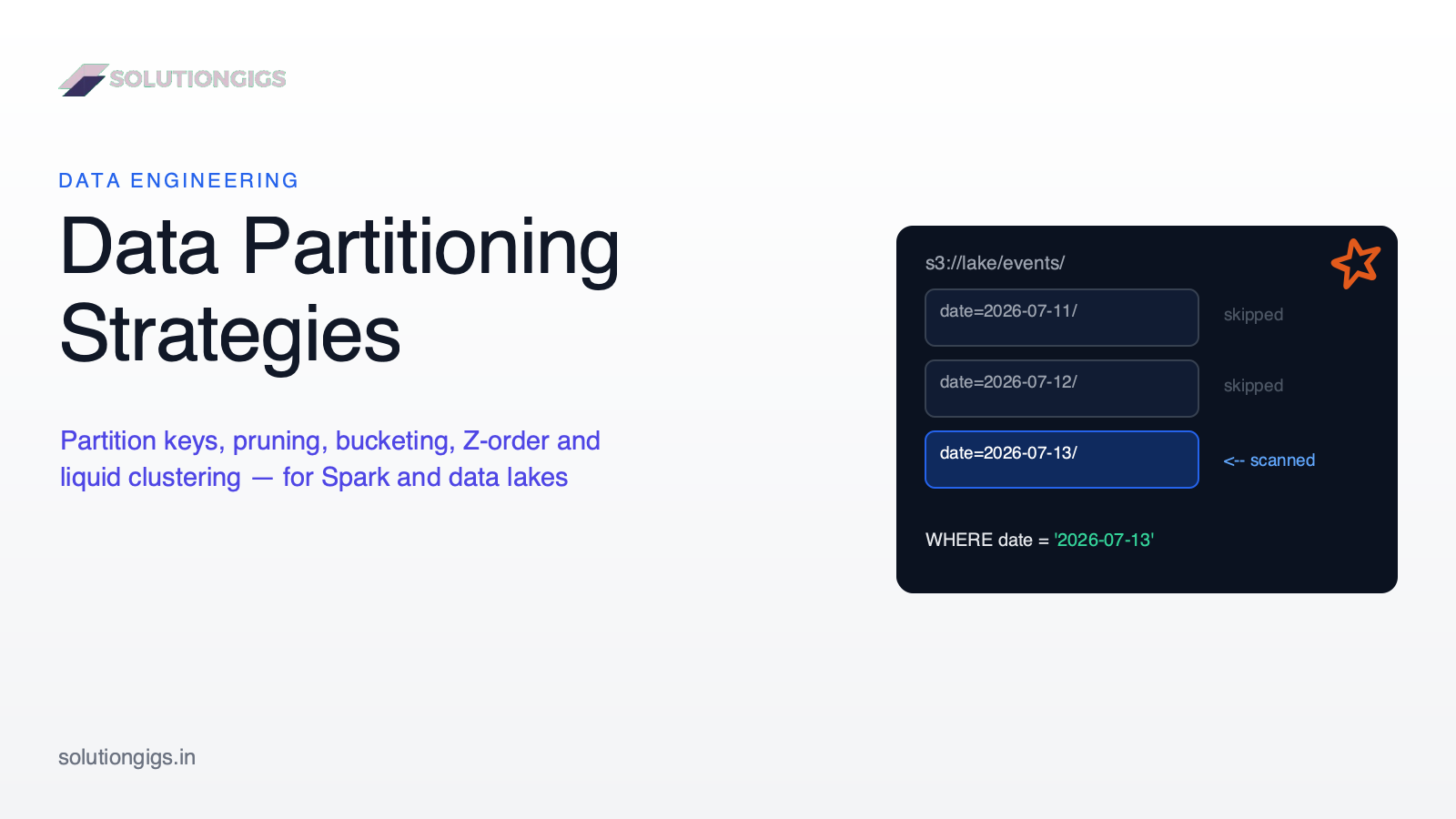
Data Partitioning Strategies: How to Partition Data in Spark & Data Lakes
Last Updated: July 2026 | 15 min read
Quick Answer: Data partitioning splits a large dataset into physical chunks — usually directories keyed by a column like date — so queries scan only the chunks they filter on instead of the whole table. The strategy that works for most pipelines: partition by date (low cardinality, matches how queries and backfills are scoped), keep every partition at 1 GB or more, and don't partition tables under ~1 TB at all. For everything a directory can't fix — high-cardinality filters, slow joins — use clustering (Z-order or liquid clustering) or bucketing inside the table instead of more partition columns.
Partitioning is the highest-leverage decision you make about a table: get it right and a year of queries prune down to seconds; get it wrong and you're the reason the platform team has a "small files" runbook. Yet most data partitioning strategies advice is either "partition by date" with no reasoning, or a Databricks-only tour of liquid clustering. This guide covers the whole decision: the two different things "partition" means in Spark, how partition pruning actually works, how to pick a key (and when to pick nothing), and how partitioning compares to bucketing, Z-ordering, liquid clustering, and Iceberg's hidden partitioning — with the exact thresholds we use on our own pipelines.
The two meanings of "partition" in Spark (don't mix them up)
Spark uses the word "partition" for two unrelated things: the in-memory chunks a DataFrame is split into for parallel processing, and the on-disk directory layout of a table. Half the confusion in this topic — and a good share of real production bugs — comes from conflating them.
| In-memory partitions | Storage (table) partitions | |
|---|---|---|
| What it is | Chunks of a DataFrame processed as parallel tasks | Directories like date=2026-07-13/ holding the table's files |
| Controlled by | repartition(), coalesce(), spark.sql.shuffle.partitions, AQE |
partitionBy() on write, table DDL (PARTITIONED BY) |
| Lifetime | One job | The life of the table |
| Optimizes | Parallelism, shuffle cost, task sizing | Partition pruning — how much data queries read |
| Wrong setting causes | Idle cores or task spills / OOM | Full scans or the small files problem |
They meet at exactly one point: when you write. Each in-memory partition writes its own file into each storage partition it holds data for — which is why the two must be planned together (worked example below).
How storage partitioning and partition pruning work
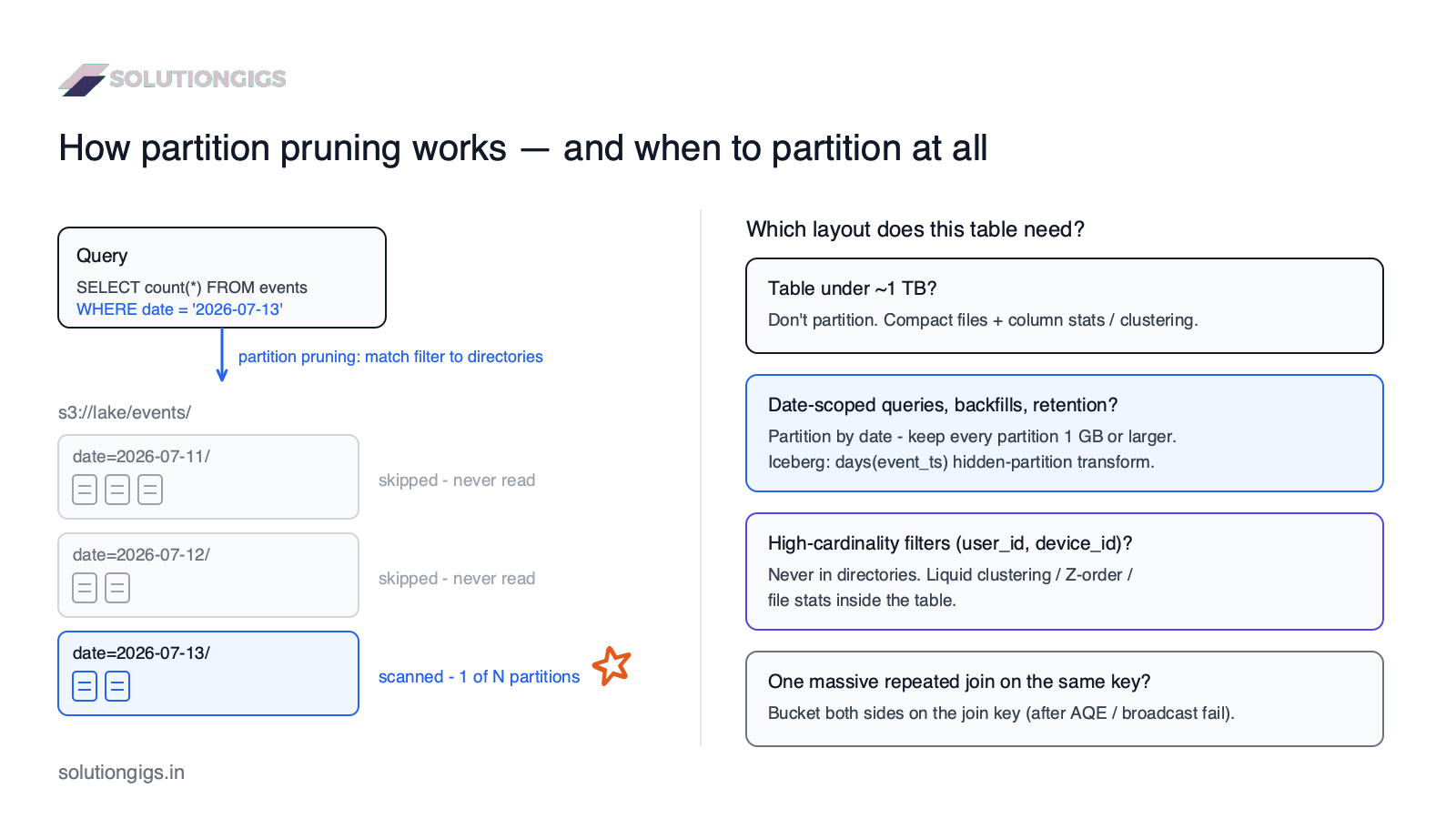
Hive-style partitioning writes each distinct value of the partition column into its own directory, and partition pruning is the engine skipping every directory the query doesn't need. A table of events partitioned by date looks like this on S3 or HDFS:
s3://lake/events/
├── date=2026-07-11/
│   ├── part-0001.parquet
│   └── part-0002.parquet
├── date=2026-07-12/
│   └── part-0001.parquet
└── date=2026-07-13/
    └── part-0001.parquet
When a query filters on the partition column —
SELECT count(*) FROM events WHERE date = '2026-07-13';
— Spark (or Trino, Athena, Snowflake external tables…) resolves the filter against the directory listing before reading any data and scans one directory out of hundreds. That's the entire value proposition: a filter that used to scan 2 TB now scans 4 GB, and cost and latency drop by the same ratio.
Two properties follow directly, and they drive every rule in the next section:
- Pruning only fires when queries filter on the partition column. A partition key nobody filters on is pure overhead.
- Every distinct value creates a directory, and every writing task creates a file per directory it touches. Cardinality multiplies file count — which is how over-partitioning manufactures the small files problem.
Takeaway: partitioning is an index you pay for at write time. It's only worth paying for if your queries actually use it.
How to choose a partition key
Choose the lowest-cardinality column that your queries, deletes, and backfills are most often scoped by — for the vast majority of pipelines, that's a date. Here is the checklist we apply to every new table, in order:
- What do queries filter on? Look at real query history, not intuition. The column in 80% of
WHEREclauses is your candidate. If nothing dominates, that's a signal not to partition. - What's the cardinality? Target at least ~1 GB per partition (Databricks' official guidance). Daily partitions of a table growing 50 GB/day: great. Partitioning by
customer_idwith 4 million customers: you've just ordered 4 million directories of dust. - How is data deleted or replaced? Retention jobs ("drop data older than 90 days"), GDPR erasure, and backfills all become metadata-cheap when they align with partition boundaries —
INSERT OVERWRITEon one date partition is the backbone of idempotent pipelines. - Is it stable and predictable? Good keys (
date,region,event_typewith a handful of values) don't grow unboundedly. Bad keys (user_id,session_id, raw timestamps) do. - One column, maybe two. Each extra partition column multiplies directory count.
datealone serves most tables;date+ a small enum (regionwith 5 values) is the sensible maximum.
When you should NOT partition
If the table is under about 1 TB, the honest answer is: don't partition it. This is the single most-ignored rule in data lake design. Databricks states it plainly — most tables below 1 TB don't benefit — because modern table formats already carry per-file column statistics (min/max), so engines skip files without any directory structure, and compaction (OPTIMIZE) keeps files healthy. A partitioned 200 GB table gets all of partitioning's failure modes and none of its wins.
At SolutionGigs we learned this the expensive way on Telemetrix, our infrastructure-monitoring product. The first version of our Spark-on-EMR telemetry pipeline partitioned events by date and device_id — "queries filter by device, so it must help, right?" Within weeks the table had ~2 million directories, most holding a single sub-megabyte Parquet file; S3 listing alone added minutes to every job, and EMR spent more time planning than scanning. The fix was to partition by date only and let Parquet min/max stats handle device filtering within compacted ~512 MB files. Query times dropped 6×. The directory tree is not where fine-grained filtering belongs — that's what clustering is for.
Tuning in-memory partitions (shuffle, repartition, coalesce)
In-memory partitioning is about task sizing: enough partitions to keep every core busy, few enough that each task does real work. Three controls cover nearly all of it:
spark.sql.shuffle.partitions— how many partitions every shuffle (join, groupBy) produces. The default of 200 is wrong for almost everyone: too many for a laptop, too few for a 5 TB join. Since Spark 3.2, Adaptive Query Execution (AQE) is on by default and coalesces shuffle partitions to sensible sizes at runtime — so on modern Spark, set this high-ish (or usespark.sql.adaptive.coalescePartitions.enabled) and let AQE shrink it. See the Spark SQL performance tuning docs.repartition(n)/repartition(col)— full shuffle intonpartitions or by a column's hash. Use it to restore parallelism after a heavy filter, or to align data with the write layout (below).coalesce(n)— merges partitions without a shuffle. Cheaper thanrepartition, only shrinks, and can accidentally shrink the parallelism of upstream stages — use it just before a write, not mid-pipeline.
Uneven in-memory partitions are their own failure mode — one giant partition stalls the whole stage — covered in depth in our Spark data skew guide.
The write pattern that ties both together
The number of files per storage partition = the number of in-memory partitions that contain data for it. This one sentence explains most small-file incidents. The fix is one line:
# BAD: 400 shuffle partitions × 30 dates = up to 12,000 files
df.write.partitionBy("date").parquet("s3://lake/events/")

# GOOD: cluster in-memory by the same key you partition by on disk
(df
  .repartition("date")                      # 1 in-memory partition per date
  .write
  .partitionBy("date")                      # 1 directory per date
  .mode("overwrite")
  .option("partitionOverwriteMode", "dynamic")   # replace only touched dates
  .parquet("s3://lake/events/"))
If single dates are large, repartition(4, "date") (or a salt column) gives a few files per date instead of one. And always verify pruning actually happens: run EXPLAIN and check PartitionFilters: [isnotnull(date), (date = 2026-07-13)] appears in the scan — if the filter shows up only under PushedFilters or nowhere, you're scanning everything.
Partitioning vs bucketing vs Z-order vs liquid clustering vs hidden partitioning
Directories are only one of five layout tools, and 2026-era table formats have shifted the default answer away from them. Here's the landscape:
| Technique | How it lays data out | Best for | Watch out for |
|---|---|---|---|
| Hive-style partitioning | One directory per column value | Low-cardinality filter columns; partition-scoped overwrite/delete (backfills, retention) | Over-partitioning → small files; queries must filter on the key |
| Bucketing | Hash a column into a fixed number of files | Repeated large joins/aggregations on the same key (skips shuffle) | Fixed bucket count ages badly; both sides must match; write-time cost |
| Z-ordering (Delta) | Sorts data on multiple columns within files (OPTIMIZE ... ZORDER BY) |
Data skipping on 1–4 filter columns, incl. high-cardinality | Requires re-running OPTIMIZE; superseded on Databricks |
| Liquid clustering (Delta) | Incremental automatic clustering by key, no fixed directories | New Delta tables; high-cardinality keys; evolving query patterns | Databricks/Delta-specific; less useful for partition-scoped overwrites |
| Hidden partitioning (Iceberg) | Partition by a transform — days(ts), bucket(16, id) — tracked in metadata |
Getting pruning without users knowing the layout; changing the spec later without rewriting data | Iceberg-only; still needs a sane transform choice |
Three practical rules fall out of this table:
- Partition for lifecycle, cluster for queries. Date partitions earn their keep through cheap overwrites and retention even if clustering handles the filtering. High-cardinality filter columns (
user_id,device_id) belong in Z-order/liquid clustering or file stats — never in the directory tree. - On Databricks, liquid clustering is now the recommended default over both partitioning and Z-ordering for new tables (Databricks docs, delta.io) — it adapts as data grows and lets you change keys without rewriting.
- On Iceberg, use hidden partitioning transforms —
days(event_ts)gives you date pruning while queries filter on the raw timestamp, killing the classic "forgot to filter on the deriveddatecolumn" full-scan bug. It also supports partition evolution: change the spec and only new data uses it. See the Iceberg partitioning docs and our Iceberg + PySpark guide.
Which format those rules play out in — Delta or Iceberg — is its own decision: Delta Lake vs Iceberg.
Decision rule: what should this table use?
- Under ~1 TB? → No partitions. Compact files, rely on column stats; add clustering if a filter column dominates.
- Big table, time-scoped queries + partition-scoped overwrites/retention? → Partition by date (
days()transform on Iceberg). One extra low-cardinality column max. - Big table, high-cardinality or shifting filter patterns? → Liquid clustering (Delta on Databricks) or Z-order/clustering on your filter columns; date partitions only if lifecycle needs them.
- A specific massive join is the bottleneck, same key every time? → Consider bucketing both sides on the join key — after proving broadcast joins and AQE can't fix it.
Common partitioning mistakes (and their blast radius)
Every one of these comes from a real incident — ours or a client's:
- Partitioning by a high-cardinality column.
user_id,session_id, raw timestamps. Millions of directories, millions of tiny files, planning time that dwarfs scan time. The #1 killer. - Partitioning a small table. All cost, no benefit. Under ~1 TB, don't.
- Writing without aligning in-memory partitions.
partitionBywithoutrepartition(col)sprays hundreds of fragments into every directory (fix above). - Queries that don't filter on the partition key. If the table is partitioned by a derived
datecolumn but analysts filter onevent_ts, nothing prunes. Iceberg's hidden partitioning exists precisely for this; on Hive/Delta layouts, make the partition column the documented query contract. - Partition skew. Partitioning by
countrywhen 70% of traffic is one country gives you one monster partition and a long tail of dust — the storage-layout twin of data skew in Spark. - Set-and-forget. Data grows and query patterns drift. Revisit layout quarterly: check average file size per partition, partitions-scanned-per-query, and compaction backlog.
Need this kind of judgment applied to your own lake? SolutionGigs connects you with vetted data engineers who've tuned exactly these layouts on Spark, EMR, Databricks, and Iceberg — see how we can help →
Frequently Asked Questions
What is data partitioning in data engineering?
Data partitioning is splitting a large dataset into smaller physical chunks based on the values of one or more columns, so queries can read only the chunks they need. In a data lake, hive-style partitioning writes each value to its own directory (date=2026-07-13/), and engines like Spark, Trino, and Athena skip every directory the query doesn't filter on. Done well, it turns full-table scans into reads of a tiny fraction of the data.
How do I choose a partition column?
Pick the column your queries filter on most, with low enough cardinality that each partition holds at least about 1 GB of data. For most pipelines that is a date column — almost every query and every backfill is scoped by date. Never partition by a high-cardinality column like user_id or device_id: millions of partitions means millions of tiny files and a query planner drowning in metadata.
When should you NOT partition a table?
Don't partition tables smaller than about 1 TB. Databricks' own guidance is that most tables under 1 TB don't benefit from partitioning at all — modern formats like Delta Lake and Iceberg get more from file statistics, compaction, and clustering than from directories. A small partitioned table pays all of partitioning's costs (small files, metadata overhead, skew) and collects none of its benefits.
What is the difference between repartition and partitionBy in Spark?
repartition() changes the in-memory partitions of a DataFrame — how many parallel tasks Spark uses during a job. partitionBy() on a DataFrameWriter controls the on-disk directory layout when the data is written. They're independent: the number of in-memory partitions per partitionBy value determines how many files land in each directory, which is why df.repartition("date").write.partitionBy("date") produces one clean file per date instead of hundreds of fragments.
What is the difference between partitioning and bucketing?
Partitioning splits data into directories by column value and speeds up filters through partition pruning. Bucketing hashes a column into a fixed number of files per partition and speeds up joins and aggregations by letting engines skip the shuffle. Partition by the column you filter on (usually date); bucket by the column you join on (usually an ID) — and only bucket when a large-table join is a proven bottleneck.
Is liquid clustering better than partitioning?
For new Delta Lake tables on Databricks, yes in most cases — Databricks now recommends liquid clustering over both partitioning and Z-ordering. It clusters data by key without fixed directories, handles high-cardinality keys, adapts as data grows, and lets you change keys without rewriting the table. Classic date partitioning still wins when you need cheap partition-scoped deletes or overwrites (retention, GDPR, backfills) or when you're on plain Parquet or engines without clustering support.
What is hidden partitioning in Apache Iceberg?
Hidden partitioning means Iceberg derives partition values from a transform on a real column — days(event_ts), bucket(16, user_id) — and tracks the mapping in table metadata. Queries filter on the original column (WHERE event_ts > ...) and Iceberg prunes automatically; users never need to know the partition layout, so the classic bug of forgetting to filter on a derived partition column disappears. Iceberg can also evolve the partition spec later without rewriting old data.
Conclusion
Partitioning is a bet you place at write time on how a table will be read for years — so place it with data, not folklore. The strategy that survives contact with production: don't partition under ~1 TB; above that, partition by date for pruning, cheap overwrites, and retention; keep partitions ≥ 1 GB and align in-memory layout with repartition(col) at write time; and push everything finer-grained — high-cardinality filters, join keys — into clustering, stats, and bucketing inside the table. On modern formats, let liquid clustering (Delta) or hidden partitioning transforms (Iceberg) do the heavy lifting the directory tree used to do badly.
If your lake is already paying the price of a layout chosen in a hurry — slow scans, small files, jobs that plan longer than they run — a few days of expert attention usually pays for itself in the first month's compute bill. Get matched with a vetted Spark and data lake engineer on solutiongigs.in today. It's free to post.

Mohammed Yaseen
Founder, SolutionGigs
Data engineer and founder of SolutionGigs. Mohammed builds and tunes Spark, Kafka, and EMR pipelines in production — including the partition layouts behind Telemetrix, SolutionGigs' infrastructure-monitoring product. LinkedIn →