
Backfilling Data Pipelines: How to Reprocess History Safely
Last Updated: July 2026 | 14 min read
Quick Answer: Backfilling is running a data pipeline over past time periods to fill in data that's missing, wrong, or newly required — a new column, a fixed bug, or a gap left by an outage. The danger is that a naïve backfill appends rows that already exist and double-counts your metrics, or hammers the source and takes production down. You backfill safely by doing four things in order: make each run idempotent (overwrite a partition or MERGE on a key, never append), scope it to a parameterized date range, chunk and throttle it so it can't starve the live pipeline, and reconcile row counts per partition when it's done.
Ask any data engineer for their worst on-call memory and a backfill is usually in it: someone re-ran three months to add a column, the job appended instead of overwrote, and Monday's dashboard showed 4× the real revenue. Backfilling data pipelines is one of the most common tasks in the job and one of the least documented — most tutorials teach you to build the pipeline, then go quiet the moment you need to re-run history. This guide fills that gap. You'll learn exactly what a backfill is, why they corrupt data and topple production, and the concrete playbook — with PySpark, SQL, and Airflow — to reprocess any time range safely. It builds directly on idempotent data pipelines, which is the single prerequisite for a backfill you can trust.
What is backfilling in data engineering?
Backfilling is re-running a pipeline over historical periods to populate data that was never produced, or to replace data that was produced incorrectly. Your pipeline normally runs forward — today's job processes today's data. A backfill runs it backward, over a window of past dates, to bring the historical record up to the state it should have been in all along.
You reach for a backfill in a handful of recurring situations:
- New table or column. You add
customer_regionto a model today, but every historical row isNULL. A backfill recomputes the past so the column is populated end to end. - Bug fix. A transformation had a wrong join for the last two months. You fix the code, then backfill those two months so the corrected logic is applied retroactively.
- Outage recovery. The source API was down for six hours, or an orchestrator was paused for a day. A backfill fills the gap left behind.
- New source onboarding. You connect a system that has three years of history. A backfill loads that history before switching to incremental.
The mechanics are the same in every case: run the same pipeline you already have, parameterized to a past date range, once per partition. What separates a safe backfill from an incident is entirely in how those re-runs write their output.
Backfill vs reprocess vs catchup
These three terms get used interchangeably, but the distinction changes how you write the job. Here's the precise difference:
| Term | What it means | Does the target already hold rows for those dates? | Write strategy |
|---|---|---|---|
| Backfill | Fill periods never processed (new table/column, gap, new source) | Usually no (or NULLs) | Overwrite / insert |
| Reprocess | Re-run periods already processed, to fix logic or bad source | Yes | Must overwrite or MERGE |
| Catchup | Orchestrator auto-runs intervals it missed while paused/deployed | Depends | Same task logic, run per interval |
The one that bites people is reprocess: because the target already has rows for those dates, appending is guaranteed to duplicate them. In practice you should design every pipeline so backfill and reprocess are the same operation — an idempotent re-run — and then you never have to think about which one you're doing.
The mental model: a backfill is not a special pipeline. It's your normal pipeline, pointed at the past, run once per partition. If your normal pipeline is idempotent, backfilling is boring. If it isn't, backfilling is dangerous.
How to backfill a data pipeline safely (the playbook)
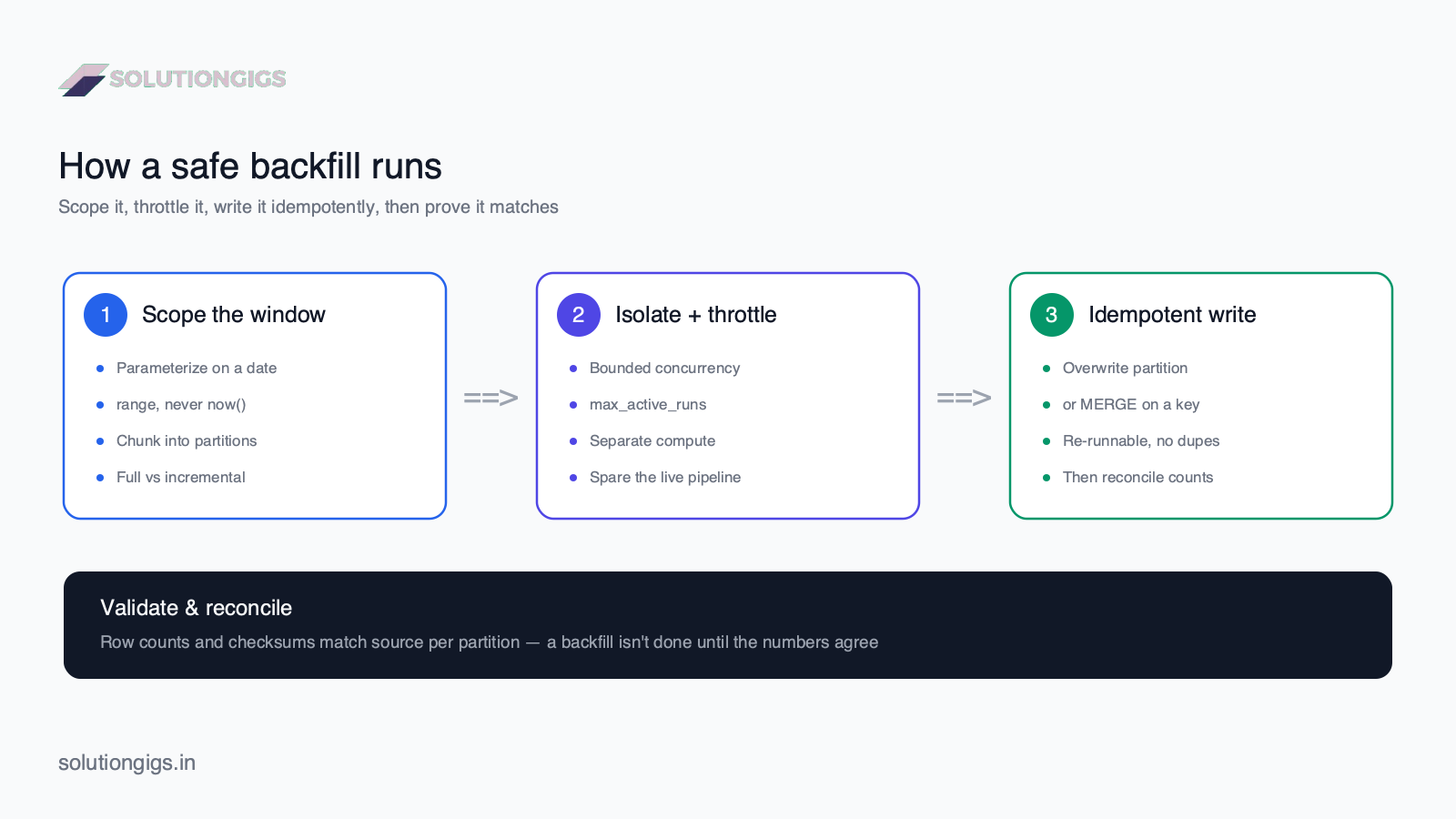
A safe backfill is four steps in sequence: make it idempotent, scope it, throttle it, then reconcile it. Skip any one and you get either corrupted data or a production outage. Here's the whole flow, then each step in detail.
Step 1 — Make every run idempotent (the non-negotiable)
Before you backfill anything, the pipeline must produce the same result no matter how many times a given date is run. This is the prerequisite that makes the other three steps safe. An idempotent pipeline lets a backfill overlap existing data, retry after a crash, and re-run a date twice — all without creating a single duplicate.
For batch, the workhorse is deterministic partition overwrite: tie each run to a fixed date and replace that partition instead of appending to it.
# Re-running 2026-03-14 replaces the 2026-03-14 partition with an
# identical result — so a backfill can re-run any date, any number
# of times, and never create duplicates.
spark.conf.set("spark.sql.sources.partitionOverwriteMode", "dynamic")

(events_for_day                       # filtered to ONE event_date
   .write
   .mode("overwrite")                 # overwrite, never append
   .partitionBy("event_date")
   .parquet("s3://lake/events/"))
When you can't overwrite a whole partition — slowly changing dimensions, CDC targets, or upserts — MERGE on a natural key instead. Re-applying the same rows converges to one row:
-- Iceberg / Delta / Snowflake all support MERGE. Backfilling the
-- same source twice is a no-op because the ON clause matches.
MERGE INTO orders t
USING staged_orders s
ON  t.order_id = s.order_id
WHEN MATCHED     THEN UPDATE SET *
WHEN NOT MATCHED THEN INSERT *;
If you take nothing else from this guide: never backfill a pipeline that appends. Fix the write first. See the full pattern set — overwrite, MERGE, idempotency keys, and the outbox — in the idempotent pipelines guide.
Step 2 — Scope the backfill to a parameterized date range
The job must be a pure function of the date it's given — never of now(). If any logic reads the current wall-clock time (a CURRENT_DATE filter, a "last 7 days" window, a random UUID), then running it for a past date produces the wrong data or a non-deterministic key, and idempotency breaks. Pass the logical date in and derive everything from it.
# The date is an input, not read from the clock. This is what makes
# a single job reusable for today's run AND any historical backfill.
def run_for_date(logical_date: str):
    df = (spark.read.parquet("s3://raw/events/")
             .where(F.col("event_date") == logical_date))     # scoped by param
    result = transform(df)
    (result.write.mode("overwrite")
           .partitionBy("event_date")
           .parquet("s3://lake/events/"))
Then decide full vs incremental backfill:
- Full backfill — reload the entire history in one sweep. Correct for a new table, a schema change, or when the source's own history changed. Expensive; run it deliberately.
- Incremental / targeted backfill — re-run only the affected window (the two months a bug touched, the day an outage covered). Cheaper and lower-risk. Prefer this whenever you can bound the blast radius.
Step 3 — Chunk and throttle so you don't take prod down
A backfill reads and writes orders of magnitude more data than a normal run — treat it like a load test against your own systems. Three years of daily partitions is 1,000+ job runs. Fire them all at once and you'll exhaust source API rate limits, saturate the warehouse, and starve the live pipeline that shares the cluster.
Control it on three axes:
- Chunk by partition. Loop over dates and process one partition (or a small batch of partitions) per run, so each unit is small, observable, and independently retryable.
- Bound concurrency. Cap how many partitions run in parallel. In Airflow, set
max_active_runsand pool slots; in a script, use a small worker pool. Unbounded parallelism is how a backfill DDoSes your own database. - Isolate the compute. Run heavy backfills on a separate cluster, a lower-priority queue, or during off-peak hours — so the live pipeline keeps meeting its SLA while history rebuilds behind it.
# Bounded, resumable backfill: one partition at a time, capped
# concurrency, and a short pause so the source and warehouse breathe.
from concurrent.futures import ThreadPoolExecutor
import time

dates = pd.date_range("2024-01-01", "2024-03-31", freq="D").strftime("%Y-%m-%d")

with ThreadPoolExecutor(max_workers=4) as pool:   # cap parallelism
    for d in dates:
        pool.submit(run_for_date, d)
        time.sleep(0.5)                            # gentle throttle on submit
Soft rule from production: size a backfill so it uses the spare capacity of your systems, not all of it. If the backfill and the live pipeline are fighting for the same resources, the backfill loses — pause it, isolate it, and resume. See how SolutionGigs can match you with a data engineer who's run large backfills without breaking SLAs.
Step 4 — Validate and reconcile before you call it done
A backfill isn't finished when the jobs turn green — it's finished when the numbers match. The whole point was to correct the historical record, so prove it's correct. For each backfilled partition, reconcile the output against a source of truth:
- Row counts per partition equal the source's row counts.
- Aggregate checksums (a
SUMof key measures, or a hash of sorted rows) match expected values. - No gaps and no overlaps — every date in the window has exactly one populated partition.
-- Reconcile: backfilled target vs source, per day. Any nonzero
-- diff is a partition to investigate before declaring success.
SELECT s.event_date,
       s.src_rows,
       t.tgt_rows,
       s.src_rows - t.tgt_rows AS diff
FROM   (SELECT event_date, COUNT(*) src_rows FROM raw.events  GROUP BY event_date) s
JOIN   (SELECT event_date, COUNT(*) tgt_rows FROM lake.events GROUP BY event_date) t
  USING (event_date)
WHERE  s.src_rows <> t.tgt_rows;
Fold this into your automated data quality tests so every backfill is verified the same way, every time.
Backfilling in Apache Airflow: catchup vs backfill
Airflow gives you two ways to run history — automatic catchup and manual backfill — and confusing them is a classic footgun. Airflow parameterizes every task run by its logical interval, which is exactly what makes both possible.
Catchup is automatic. With catchup=True, the moment you deploy a DAG with a start_date in the past, the scheduler queues a run for every missed interval up to now. That's occasionally what you want — and frequently a nasty surprise that launches hundreds of runs at once. Most teams set catchup=False and trigger history explicitly.
Backfill is manual and targeted. You run it on demand for a specific range:
# Re-run a specific window on demand — the safe, explicit way.
airflow dags backfill \
  --start-date 2024-01-01 \
  --end-date   2024-03-31 \
  daily_events_dag
Two DAG settings keep either mode from hurting you:
max_active_runs— caps how many intervals run in parallel (Step 3's throttle, built in).depends_on_past— forces each interval to wait for the previous one to succeed. Useful for stateful chains, but it serializes a backfill, so weigh it against speed.
The rule holds here too: Airflow will happily launch the runs, but idempotent tasks are what make catching up or backfilling safe. (Airflow: backfill & catchup docs.)
Common backfilling mistakes (and how to avoid them)
- Appending in a backfill. The number-one cause of double-counted dashboards. If the write is
append, overlapping an existing period duplicates it. Overwrite the partition or MERGE on a key instead. - Reading
now()inside the job. A "last 7 days" filter or aCURRENT_DATEclause makes a past-date run produce present-day data. Parameterize on the logical date and derive every window from it. - Running the whole history at once. Firing 1,000 partitions in parallel exhausts source rate limits and starves production. Chunk, cap concurrency, and isolate the compute.
- Non-deterministic keys. Generating a UUID or timestamp at write time means the "same" row gets a new key on re-run, defeating dedup. Derive keys from the data.
- Backfilling downstream but not upstream (or vice versa). If you fix a fact table but not the aggregates built on it, the numbers won't reconcile. Backfill the whole dependency chain, in order.
- Skipping reconciliation. Green jobs aren't proof of correct data. Always compare counts and checksums against a source of truth before declaring the backfill done.
- No resume plan. A backfill that dies at partition 700 of 1,000 and can only restart from zero is a nightmare. Make each partition independently retryable and track progress.
Frequently Asked Questions
What is backfilling in data engineering?
Backfilling is running a data pipeline over historical time periods to populate or repopulate data that is missing, wrong, or newly required. You backfill when you add a new table or column, fix a transformation bug, recover from an outage, or onboard a new source with history. A safe backfill re-runs each historical partition idempotently, so it fills the gap without creating duplicate rows or double-counted metrics.
How do you backfill a data pipeline safely?
Make each run idempotent first: parameterize the job on a date or partition and overwrite that partition (or MERGE on a key) instead of appending. Then run the history in chunks with bounded concurrency so you don't overload the source or warehouse, isolate the backfill from the live pipeline, and reconcile row counts per partition when it finishes. Idempotency makes a backfill safe to retry; throttling keeps production alive while it runs.
What is the difference between a backfill and a reprocess?
A backfill fills periods that were never processed — a new table, a new column, or a gap left by an outage. A reprocess re-runs periods that were already processed, usually to correct a logic bug or a bad source. Mechanically they are nearly identical: both re-run the pipeline over a past date range. What matters is whether the target already holds rows for those dates, because that determines whether you must overwrite or MERGE to avoid duplicates.
What is the difference between catchup and backfill in Airflow?
Catchup is automatic: with catchup=True, Airflow schedules a run for every missed interval between the DAG's start_date and now. Backfill is manual: you run "airflow dags backfill" for a specific date range on demand. Most teams set catchup=False to avoid a flood of runs when a DAG is deployed and trigger targeted backfills explicitly instead. Both rely on the same interval-parameterized task logic, so an idempotent DAG handles either safely.
Why do backfills cause duplicate data?
Backfills duplicate data when the pipeline appends rows instead of replacing them. If the backfill window overlaps periods an incremental load already ingested, appending writes those rows a second time. The fix is idempotency: overwrite the whole partition for each date, or MERGE on a natural key so re-applying the same source rows is a no-op. A backfill over an idempotent pipeline can overlap freely without ever creating duplicates.
Should you backfill in the same pipeline as production?
Prefer to isolate a large backfill from the live pipeline. Backfills scan and write far more data than a normal run, so sharing a cluster or warehouse can starve production jobs, blow through source API rate limits, and spike costs. Cap concurrency with Airflow's max_active_runs, run on separate compute or a lower-priority queue, and schedule heavy backfills for off-peak hours so the live pipeline keeps meeting its SLA.
How long should a backfill take?
There's no fixed answer — it depends on the window size, partition granularity, and how much spare capacity you throttle it to. The right frame isn't "as fast as possible" but "fast enough without hurting production." A well-scoped incremental backfill of a few weeks can finish in minutes; a full multi-year reload runs for hours or days by design, chunked and isolated so the live pipeline keeps meeting its SLA the whole time.
Conclusion
Backfilling is where a pipeline's design quality gets tested in public. A well-built pipeline makes backfilling a non-event: you point it at the past, it overwrites each partition idempotently, and the numbers reconcile. A poorly-built one turns the same request into a double-counted dashboard and a production outage. The difference is never luck — it's whether you did the four things in order.
So make them a checklist you run every time. First, idempotency — overwrite a partition or MERGE on a key, never append. Second, scope — parameterize on the logical date, decide full vs incremental, and read nothing from the clock. Third, throttle — chunk by partition, cap concurrency, isolate the compute, and let the backfill use spare capacity, not all of it. Fourth, reconcile — counts and checksums against a source of truth, because green jobs aren't proof of correct data. Do those four and backfilling stops being the scary part of the job. Pick one pipeline you own and ask the only question that matters: if I had to re-run all of last year tonight, would anything break?
Facing a backfill you're not sure is safe to run — or a pipeline that double-counts every time you re-run it? Get matched with a vetted data engineer on SolutionGigs — it's free to post your project.

Mohammed Yaseen
Founder, SolutionGigs
Mohammed builds Spark and Kafka pipelines on AWS EMR processing hundreds of millions of events a day, where backfilling years of history without double-counting or breaking the live SLA is a routine, high-stakes part of the job. LinkedIn →