
Spark Out of Memory Errors: Causes and Fixes
A Spark out of memory error is a diagnosis problem before it's a config problem — the same OutOfMemoryError can mean data skew, an overflowing off-heap region, or a collect() that dragged a billion rows into the driver. Learn to tell driver OOM from executor OOM, read the exact error message, and fix it with the right knob — partitions, memoryOverhead, or executor memory — with real PySpark code.

Quick Answer: A Spark out of memory (OOM) error happens when a driver or executor JVM exceeds its configured memory budget. The primary causes are data skew, undersized shuffle partitions, or pulling big DataFrames into the driver with collect(). Fix it by increasing partitions, raising off-heap memory overhead, and avoiding driver-side collection.
Almost every Spark engineer meets OutOfMemoryError early, reacts by bumping --executor-memory to a bigger number, and moves on — until the job fails again at 2× the cost. Having tuned Spark on AWS EMR across pipelines processing hundreds of millions of events per day, I've learned that an OOM is a symptom with at least five different root causes, each needing a different fix. This guide is the diagnostic playbook: how to tell driver OOM from executor OOM, how to read the exact error message, the Spark executor memory model in one diagram, and the fixes in the order you should actually try them. It pairs with our deep-dives on Spark data skew and the Spark small files problem, which are two of the biggest hidden triggers of OOM.
What is an out of memory error in Spark?
A Spark out of memory error is a failure of an individual JVM process — either the driver coordinator or an executor worker — when required data exceeds available heap or container limits. It manifests as either a JVM java.lang.OutOfMemoryError: Java heap space or a cluster manager Container killed by YARN for exceeding memory limits.
The most important thing to understand before touching a single config is where the memory goes inside an executor. Each region is controlled by a different setting, and each corresponds to a different kind of OOM — so identifying the region tells you which knob to turn.
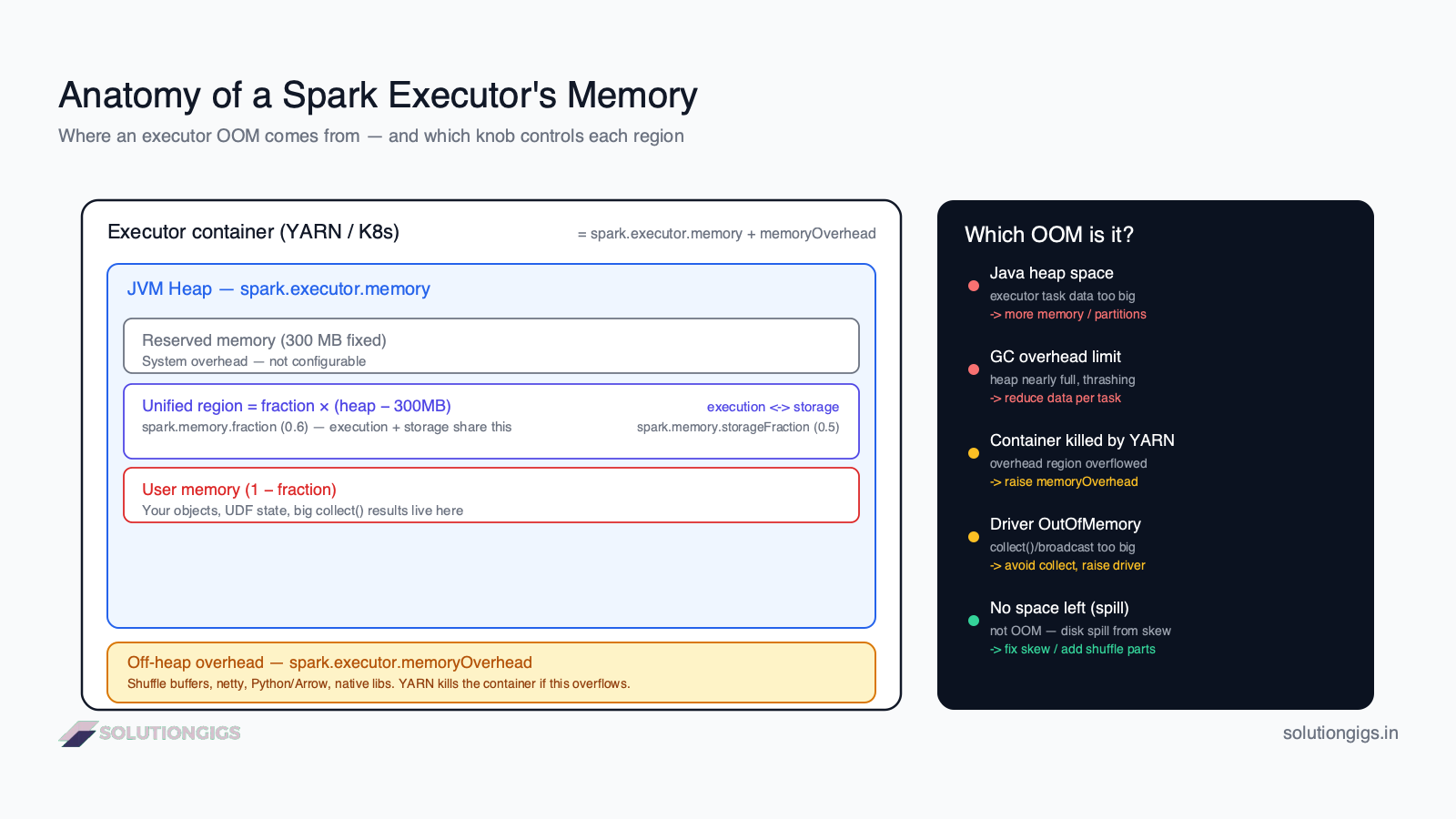
An executor's container memory has two big parts: the JVM heap (spark.executor.memory) and the off-heap overhead (spark.executor.memoryOverhead). Inside the heap, Spark carves out a 300 MB reserved slice, a unified region shared by execution and storage (governed by spark.memory.fraction, default 0.6), and user memory for your own objects. A "Java heap space" error means the heap filled up; a "Container killed by YARN" error means the overhead overflowed. Same word — OOM — completely different fix. (Getting the split right in the first place is a sizing question — see Spark executor tuning for how many cores and how much memory each executor should get.)
Driver OOM vs executor OOM: identify this first
Before any config change, determine whether the driver or an executor ran out of memory — the fixes have almost nothing in common. This single distinction resolves more than half of misdiagnosed OOMs.
| OOM Error Type | Log Error Message | Primary Root Cause | Exact Configuration Fix |
|---|---|---|---|
| Driver Heap OOM | java.lang.OutOfMemoryError: Java heap space |
Running collect() or toPandas() on large data |
Stop collecting; raise spark.driver.memory |
| Executor Heap OOM | java.lang.OutOfMemoryError: Java heap space |
Data skew or too few shuffle partitions | Repartition data; increase spark.sql.shuffle.partitions |
| YARN Container Kill | Container killed by YARN for exceeding memory limits |
PySpark / Arrow off-heap memory overflow | Increase spark.executor.memoryOverhead |
| Broadcast Join OOM | Total size of serialized results is bigger than spark.driver.maxResultSize |
Table exceeds auto-broadcast threshold | Increase spark.driver.maxResultSize or disable broadcast |
Executor OOM happens on a worker JVM while it processes a partition. Signs: failed tasks, stages that retry, "Lost executor", or "Container killed by YARN for exceeding memory limits" in the logs. The cause is data-side — a partition too big for the executor to hold.
Driver OOM happens on the single coordinator JVM. Signs: the error appears in the driver stderr, often right after an action, with no executor loss. The cause is almost always your code pulling data back to the driver:
# Driver-OOM landmines — each pulls the full dataset into ONE JVM
big_df.collect()          # materializes every row on the driver
big_df.toPandas()         # same, then converts to a pandas frame
list(big_df.toLocalIterator())  # safer, but still risky at scale
print(big_df.rdd.collect())     # the classic accidental OOM
If the stack trace is in the driver, no amount of --executor-memory will help. Fix the code (write to storage instead of collecting), or if the driver genuinely needs more room (large broadcast joins), raise spark.driver.memory and spark.driver.maxResultSize.
Fast rule: OOM right after
collect(),toPandas(),show()on a huge frame, or a broadcast → driver. OOM with "Container killed by YARN" or "Lost executor" mid-stage → executor.
What causes Spark out of memory errors? (5 root causes)
Spark OOMs trace back to five recurring causes — and only one of them is genuinely "not enough RAM". Knowing which one you have is the whole game.
- Too much data per task. With too few partitions (or a huge input split), each task must hold more rows than the heap allows.
spark.sql.shuffle.partitionsdefaults to 200 — fine for tens of GB, far too few for terabytes. - Data skew. One hot key funnels a disproportionate share of rows into a single partition, so one task OOMs while the rest finish instantly. This is the most common hidden cause and the one most often misread as "need more memory".
- Overhead / off-heap overflow. Shuffle buffers, netty network buffers, and especially PySpark's Python + PyArrow processes live outside the JVM heap. When they exceed
spark.executor.memoryOverhead, YARN kills the whole container even though the heap had room. - Driver-side collection.
collect(),toPandas(), oversized broadcasts, or unbounded accumulators pull data into the single driver JVM until it dies. - Memory-hungry operations. Wide aggregations,
explode()on large arrays, caching datasets you only read once, or many concurrent tasks per executor each competing for the same heap.
Rule of thumb: if the job OOMs on one task while others succeed, suspect skew or partitioning first. If every task struggles, suspect undersized executors or too many cores per executor.
How to read the Spark OOM error message
The exact wording of the error tells you the region that overflowed — read it before changing any config. Here are the messages you'll actually see and what each one means.
| Error message | What overflowed | The right fix |
|---|---|---|
OutOfMemoryError: Java heap space |
Executor/driver JVM heap | More partitions, fix skew, then more memory |
OutOfMemoryError: GC overhead limit exceeded |
Heap nearly full; JVM thrashing on GC | Reduce data per task; more memory a last resort |
Container killed by YARN ... exceeding memory limits |
Off-heap overhead region | Raise spark.executor.memoryOverhead |
OutOfMemoryError: Requested array size exceeds VM limit |
A single object > 2 GB (often a skewed partition) | Fix skew / repartition |
| Driver stderr OOM after an action | Driver heap | Stop collecting; raise spark.driver.memory |
Total size of ... broadcast larger than spark.driver.maxResultSize |
Result pulled to driver too big | Don't collect; raise maxResultSize deliberately |
Note the trap: "Container killed by YARN" is not a heap error. Raising spark.executor.memory for it can even make things worse, because on a fixed-size container a bigger heap leaves less room for the overhead region that actually overflowed.
How to fix Spark out of memory errors (5 Steps)
To fix Spark out of memory errors in production pipelines, follow these five steps in order:
- Reduce Data per Task (Shuffle Partitions): Increase
spark.sql.shuffle.partitionsor callrepartition()so individual tasks process manageable 128MB–200MB chunks instead of oversized data blocks. - Eliminate Data Skew with AQE: Enable Adaptive Query Execution (
spark.sql.adaptive.skewJoin.enabled=true) or add salting keys to prevent straggler tasks from overflowing executor memory. - Raise Off-Heap Memory Overhead: For "Container killed by YARN" errors, configure
spark.executor.memoryOverheadto at least 15%–25% of executor memory to accommodate PySpark and PyArrow buffers. - Stop Driver-Side Data Collection: Replace dangerous
collect()andtoPandas()calls with direct distributed writes to storage (df.write.parquet()) or bounded sampling (df.limit()). - Right-Size Executor Cores & Heap: Adjust
spark.executor.memoryto 8GB–16GB with 4–5 cores per executor to maximize throughput without triggering excessive Java garbage collection pauses.
Fix 1 — Reduce data per task (partitions + skew)
The number-one executor OOM fix is making each partition smaller, not making the executor bigger. More, smaller partitions means each task holds less data at once. Aim for partitions in the ~128–200 MB range.
# Raise shuffle parallelism for large jobs (default is only 200)
spark.conf.set("spark.sql.shuffle.partitions", 800)

# Or explicitly repartition a skewed/oversized DataFrame before a wide op
df = df.repartition(800, "join_key")
Enable Adaptive Query Execution (AQE) so Spark right-sizes shuffle partitions and splits skewed ones automatically at runtime (on by default in Spark 3.2+):
spark.conf.set("spark.sql.adaptive.enabled", "true")
spark.conf.set("spark.sql.adaptive.skewJoin.enabled", "true")
If one task OOMs while the rest fly, it's skew — read our data skew guide for salting and broadcast-join fixes. This is the highest-leverage change you can make.
Fix 2 — Fix "Container killed by YARN": raise memory overhead
If the message says the container exceeded its limit, raise the off-heap overhead, not the heap. This is the correct fix for PySpark jobs, heavy shuffles, and native-library workloads.
# Explicit overhead (older style)
spark.conf.set("spark.executor.memoryOverhead", "2g")

# Or as a factor of executor memory (Spark 3.3+)
spark.conf.set("spark.executor.memoryOverheadFactor", "0.2")  # 20%
The default overhead is ~10% of executor memory (min 384 MB), which is frequently too small for PySpark because the Python interpreter and PyArrow buffers run outside the JVM. If you use Python UDFs or mapInPandas, budget 15–25% overhead.
Fix 3 — Stop driver OOMs at the source
The cure for driver OOM is architectural: don't move big data to the driver. Replace collection with distributed writes.
# ❌ Pulls the whole result into the driver JVM
result = big_df.collect()

# ✅ Write in parallel from the executors — no driver bottleneck
big_df.write.mode("overwrite").parquet("s3://bucket/output/")

# ✅ Only need a peek? Bound it.
sample = big_df.limit(1000).toPandas()
If a broadcast join is the culprit, confirm the broadcast table is truly small (under a few hundred MB) — Spark auto-broadcasts under spark.sql.autoBroadcastJoinThreshold. When the driver legitimately needs headroom, size it explicitly: spark.driver.memory=8g and a matching spark.driver.maxResultSize.
Fix 4 — Right-size executor memory and cores (last, not first)
Only after partitions, overhead, and driver code are handled should you add executor heap — and add cores carefully. A common mistake is one giant executor with many cores: all those concurrent tasks share the same heap, so more cores means more OOM risk, not less.
spark-submit \
  --executor-memory 8g \
  --executor-cores 4 \       # 4–5 cores per executor is a good sweet spot
  --conf spark.executor.memoryOverhead=2g \
  your_job.py
Prefer more medium executors (e.g. 8 GB / 4 cores) over fewer huge ones (64 GB / 32 cores). Medium executors garbage-collect faster and isolate failures. Also drop .cache()/.persist() on any dataset you read only once — cached blocks sit in the storage region and squeeze out execution memory.
Fix 5 — Tune memory fractions (advanced, rarely needed)
If you've done everything above and still spill or OOM, adjust how the heap is split — but this is a fine-tuning step, not a starting point. Raising spark.memory.fraction gives execution and storage more of the heap at the expense of user memory:
spark.conf.set("spark.memory.fraction", "0.7")        # default 0.6
spark.conf.set("spark.memory.storageFraction", "0.3")  # shrink cache, favor execution
Most teams never need to touch these. Reach for them only when profiling shows a specific execution-vs-storage imbalance — otherwise the defaults are well-chosen.
Which fix should you use? (decision guide)
Match the symptom to the fix — the Spark UI and the error text tell you which row you're on.
| Symptom | Most likely cause | Fix to try first |
|---|---|---|
Java heap space, one task fails |
Skew / few partitions | Fix 1 — partitions + AQE skew join |
Container killed by YARN |
Overhead overflow | Fix 2 — raise memoryOverhead |
| OOM in PySpark with Python UDFs | Python/Arrow off-heap | Fix 2 — 15–25% overhead |
OOM right after collect()/toPandas() |
Driver collection | Fix 3 — write to storage |
| Every task struggles, heavy GC | Undersized / over-cored executors | Fix 4 — memory + fewer cores |
| Spill + slowness, but no crash | Skew (not truly OOM) | Fix skew |
The 90% path: enable AQE, right-size shuffle partitions, raise overhead for PySpark, and stop collecting to the driver. That combination clears the vast majority of production OOMs without over-provisioning a single executor.
Common mistakes when fixing Spark OOM errors
- Raising
spark.executor.memoryfor a "Container killed by YARN" error. That's an overhead overflow — a bigger heap in a fixed container leaves less room for overhead and can worsen it. RaisememoryOverheadinstead. - Fixing an executor OOM by giving the driver more memory (or vice versa). Always confirm which JVM died first. The two failures are unrelated.
- Throwing hardware at skew. A bigger executor just gives the one straggler task a roomier place to be slow; the other executors still idle. Skew is a distribution problem — fix the distribution.
- One massive executor with 32 cores. All tasks share that heap. Prefer several 4–5 core executors so concurrent tasks don't collide.
- Caching everything.
.cache()on data you scan once wastes the storage region and starves execution memory, causing the OOM you're trying to prevent. - Ignoring overhead in PySpark. Python and PyArrow live off-heap; default overhead is often too small for UDF-heavy jobs.
- Reaching for a bigger instance type first. It is the fastest way to make an OOM disappear and the slowest to notice: instance size sets DBUs consumed per hour, so you have permanently raised the cost of every future run of that job to fix a one-off failure. Try the spill, partition and overhead fixes above first, then size up only if they genuinely fail — and see how to reduce Databricks costs for what that upsize actually costs per hour.
If you're firefighting a Spark pipeline that OOMs unpredictably, the error message is usually pointing at the symptom rather than the cause. Paste me the stack trace and your executor config.
Frequently Asked Questions
What causes out of memory errors in Spark?
Spark OOMs occur when one JVM — the driver or a single executor — must hold more data than its heap allows. The usual causes are too much data per task (few partitions or skew), the off-heap overhead region overflowing (shuffle buffers, Python/Arrow), the driver collecting a large result, or an oversized broadcast. It's a distribution and sizing problem far more often than a genuine total-RAM shortage.
What is the difference between driver OOM and executor OOM in Spark?
An executor OOM happens on a worker JVM while processing a partition — you see failed tasks, retried stages, or "Container killed by YARN". A driver OOM happens on the single coordinator JVM, almost always from collect(), toPandas(), or a huge broadcast. Executor OOM is fixed with partitions, overhead, and memory; driver OOM is fixed by not collecting large data and raising spark.driver.memory.
How do I fix java.lang.OutOfMemoryError: Java heap space in Spark?
First shrink the data per task: raise spark.sql.shuffle.partitions or repartition so partitions are smaller, and fix any data skew feeding one giant partition. Enable AQE so Spark splits skewed partitions automatically. Only if partitions are already small should you raise spark.executor.memory. Avoid caching read-once datasets and never collect() a large DataFrame. Adding memory without fixing partitioning just delays the same error.
What does 'Container killed by YARN for exceeding memory limits' mean?
It means the whole executor container used more physical memory than YARN granted it, so YARN killed it — this is not a JVM heap error. The overflow is usually the off-heap overhead region: shuffle buffers, netty buffers, or PySpark's Python/PyArrow processes. Fix it by raising spark.executor.memoryOverhead (or spark.executor.memoryOverheadFactor), not spark.executor.memory.
Does increasing executor memory always fix Spark OOM errors?
No. If the real cause is skew, too few partitions, a driver collect(), or overhead overflow, more executor memory just postpones the crash or wastes money. Bigger executors also mean fewer of them and heavier garbage collection. Diagnose which JVM died and why in the Spark UI, then turn the knob that matches the cause rather than blindly scaling RAM.
What is spark.executor.memoryOverhead and when should I increase it?
It's off-heap memory reserved on top of the JVM heap for shuffle buffers, native libraries, and Python/Arrow processes, defaulting to ~10% of executor memory (min 384 MB). Increase it when you see "Container killed by YARN for exceeding memory limits" or when running heavy PySpark UDFs, since Python runs outside the JVM heap and draws on overhead memory. Budget 15–25% for UDF-heavy PySpark jobs.
How do I avoid driver out of memory errors in PySpark?
Never pull a large dataset to the driver. Replace collect() and toPandas() on big DataFrames with df.write to storage, or use take(n)/limit(n) for a sample. Watch for accidental large broadcasts and unbounded accumulators. If the driver truly needs more memory (large broadcast joins), raise spark.driver.memory and spark.driver.maxResultSize deliberately.
Conclusion
A Spark out of memory error is a diagnosis problem before it's a configuration problem. The same OutOfMemoryError can mean a skewed partition, an overflowing off-heap region, or a collect() that dragged a billion rows into the driver — and each needs a different, often free, fix. The engineers who resolve OOMs quickly don't reach for --executor-memory first; they ask two questions: which JVM died (driver or executor), and what does the exact message say (heap, GC, or "container killed by YARN"). Those two answers point straight to the right row in the decision table above.
Climb the ladder in order: right-size partitions and fix skew, raise overhead for "container killed by YARN" and PySpark, stop collecting to the driver, and only then add executor heap — with a sensible 4–5 cores per executor. Most production OOMs die on the first two rungs, and the cluster gets cheaper, not bigger, in the process. Open the Spark UI on your failing job right now: check whether one task's input dwarfs the median, and read the failure message word for word. That five-minute diagnosis usually saves both the job and the bill.
Interviewers use this exact question as a trap — "the job OOMs, do you raise executor memory?" — because the reflex answer is wrong. The diagnosis-first version of the answer is in PySpark interview questions and answers.
Stuck on a Spark pipeline that keeps running out of memory? Send me the failure and I'll tell you which of the five root causes above you're actually hitting — before you spend another day raising executor.memory.
And before assuming memory is the real cause, confirm the cluster actually started - a compute-layer termination code produces the same red badge. Our guide to diagnosing a failed Databricks job covers the routing model.
Mohammed Yaseen
Founder, SolutionGigs
Mohammed tunes Spark pipelines on AWS EMR processing hundreds of millions of events per day, where diagnosing driver vs executor OOM and right-sizing memory is a routine performance and cost win. LinkedIn →
Try Free Parquet to CSV Converter
Free, no signup — right in your browser.
Try Free Parquet to CSV Converter →More in Data Engineering

AWS EMR Troubleshooting: How to Diagnose a Failed Cluster
An Amazon EMR job fails at one of four stages - provisioning, bootstrap, step or YARN container - and each writes to a different log. Map the stage first. This guide gives you every stage's log path, then names the three most-repeated EMR fixes on the internet that are obsolete or actively harmful: EMRFS consistent view, redundant since S3 went strongly consistent in December 2020 and still billing you for a DynamoDB table; disabling the YARN vmem check, which the error message itself recommends but which only removes the detector node-wide; and raising fs.s3.maxRetries for 503 Slow Down, when the S3 quota is per prefix. Plus the memoryOverhead ceiling that turns a crash into an indefinite ACCEPTED hang, and the EMR release-support clock that expired on 7.2.0 in July 2026.
Spark Executor Tuning: Cores, Memory & How Many Executors
Ask three data engineers how to size a Spark cluster and you'll get three answers — and usually a job that crawls or dies with 'Container killed for exceeding memory limits.' This guide replaces the guesswork with four arithmetic steps: how many cores per executor (and why 5), how much memory, how to calculate the executor count, plus memoryOverhead, fat vs thin executors, dynamic allocation, and a fully worked sizing example you can copy.
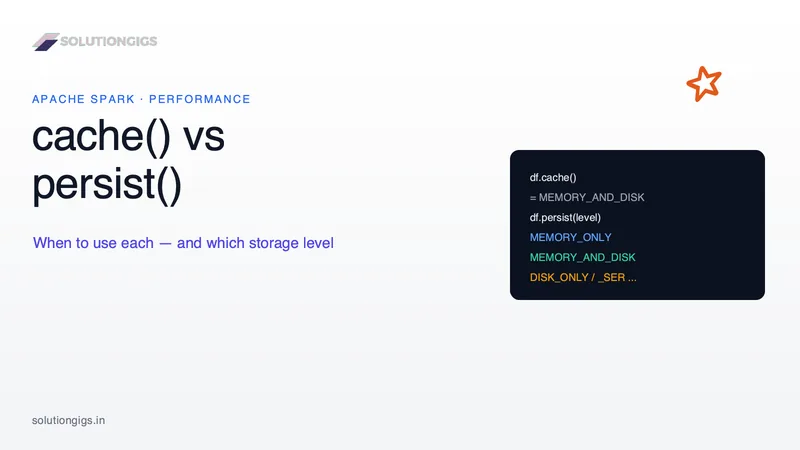
Spark cache() vs persist(): When to Use Each
cache() vs persist() is one of the most-asked — and most-misused — Spark features. The one-liner "cache keeps it in memory" hides two things that bite in production: which storage level you actually get (cache() is MEMORY_AND_DISK for DataFrames but MEMORY_ONLY for RDDs), and when caching helps at all (far less often than people think). This guide covers every StorageLevel, the DataFrame vs RDD gotcha, lazy evaluation, unpersist(), and a decision rule — with real PySpark.