
Apache Iceberg v3: What Actually Changed, and When to Upgrade
Apache Iceberg v3 adds deletion vectors, row lineage, the variant type and geospatial types — and the upgrade is one line of SQL with no way back. This guide covers what each feature actually changes, the engine support matrix as of August 2026 (including the Trino and Athena gaps that block most fleets), what the widely-quoted AWS benchmark really measured, and a migration runbook. With two interactive tools: a delete-metadata explorer and a readiness checker for your own engines.

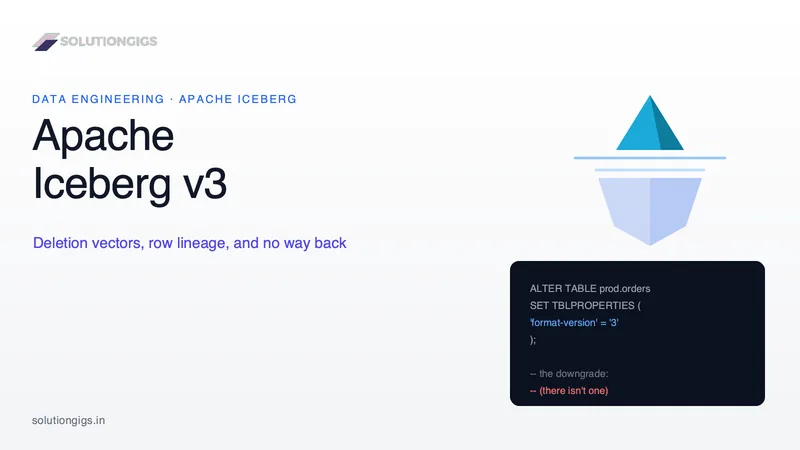
Quick Answer: Apache Iceberg v3 is the third version of the Iceberg table spec, production-ready as of Iceberg 1.11.0 in May 2026. It adds deletion vectors (one compressed bitmap per data file instead of accumulating position delete files), row lineage (_row_id and _last_updated_sequence_number for native change tracking), the variant type for semi-structured data, geometry/geography types, nanosecond timestamps, column default values and multi-argument partition transforms. Upgrading is a single metadata-only ALTER TABLE ... SET TBLPROPERTIES ('format-version' = '3') that rewrites no data — and is irreversible. The decision is therefore not about the features. It is about whether every engine that reads that table already supports v3.
Here is the whole problem with Iceberg v3 in two lines of SQL.
-- The upgrade
ALTER TABLE prod.db.orders SET TBLPROPERTIES ('format-version' = '3');

-- The downgrade
-- (there isn't one)
The first line takes milliseconds, rewrites zero bytes of data, and is genuinely one of the cheapest format migrations our industry has produced. The second line does not exist — the Iceberg specification has no downgrade path, and no engine implements one. Everything difficult about v3 lives in the gap between those two facts.
Most of what has been written about v3 since the spec was approved covers the feature list. That part is easy and mostly identical everywhere. What is much harder to find, and what actually determines whether you should run that ALTER TABLE on Monday, is the honest state of engine support, what the widely-quoted benchmark actually measured, and which of your tables are worth the one-way trip. That is what this guide is for.
If you have not built an Iceberg table yet, start with our Apache Iceberg table guide with PySpark{target="_blank" rel="noopener"}. If you have tables running and want the operational side, Apache Iceberg in production covers the failure modes this post assumes you already know about.
What Iceberg v3 adds, in one table
Iceberg v3 is seven additions to the table spec, and only two of them change how the format behaves at runtime. The rest are type-system and schema features you opt into per column.
| Feature | What it is | Why it exists |
|---|---|---|
| Deletion vectors | One compressed bitmap per data file, stored as a delete-vector-v1 blob in a Puffin file |
Position delete files in v2 accumulate with every merge-on-read operation and slow reads until compaction |
| Row lineage | _row_id and _last_updated_sequence_number tracked for every row |
Lets an engine identify the same logical row across snapshots — the basis for incremental refresh and CDC |
variant type |
Native semi-structured type with a binary encoding, plus optional shredding | JSON-in-a-string columns can't be predicate-pushed; every query re-parses them |
| Geospatial types | geometry(C) for planar data, geography(C, A) for earth-curvature data |
Spatial data previously needed WKB blobs and engine-specific extensions |
| Nanosecond timestamps | timestamp_ns, timestamptz_ns |
v1 and v2 cap at microseconds — too coarse for trading systems and distributed tracing |
| Column default values | initial-default (fixed at add time) and write-default (evolvable) |
Adding a required column to an existing table previously meant a full rewrite |
| Multi-argument transforms | Partition fields with a source-ids list rather than a single source-id |
Compound partition expressions spanning more than one column |
Two more things landed that are worth naming even though they are less visible: an unknown primitive type used when a more specific type is not yet known (it must be optional and null-defaulted), and the foundations for table encryption keys, which are specified but not widely deployed.
The version history matters for planning. The v3 spec work matured across Iceberg 1.10, released September 2025{target="_blank" rel="noopener"}, and reached full production stability with Iceberg 1.11.0 in May 2026, which is also when variant shredding and native geospatial types became usable. If someone in your organisation evaluated v3 in early 2025 and concluded it was not ready, they were right at the time and the conclusion has expired.
How deletion vectors actually work
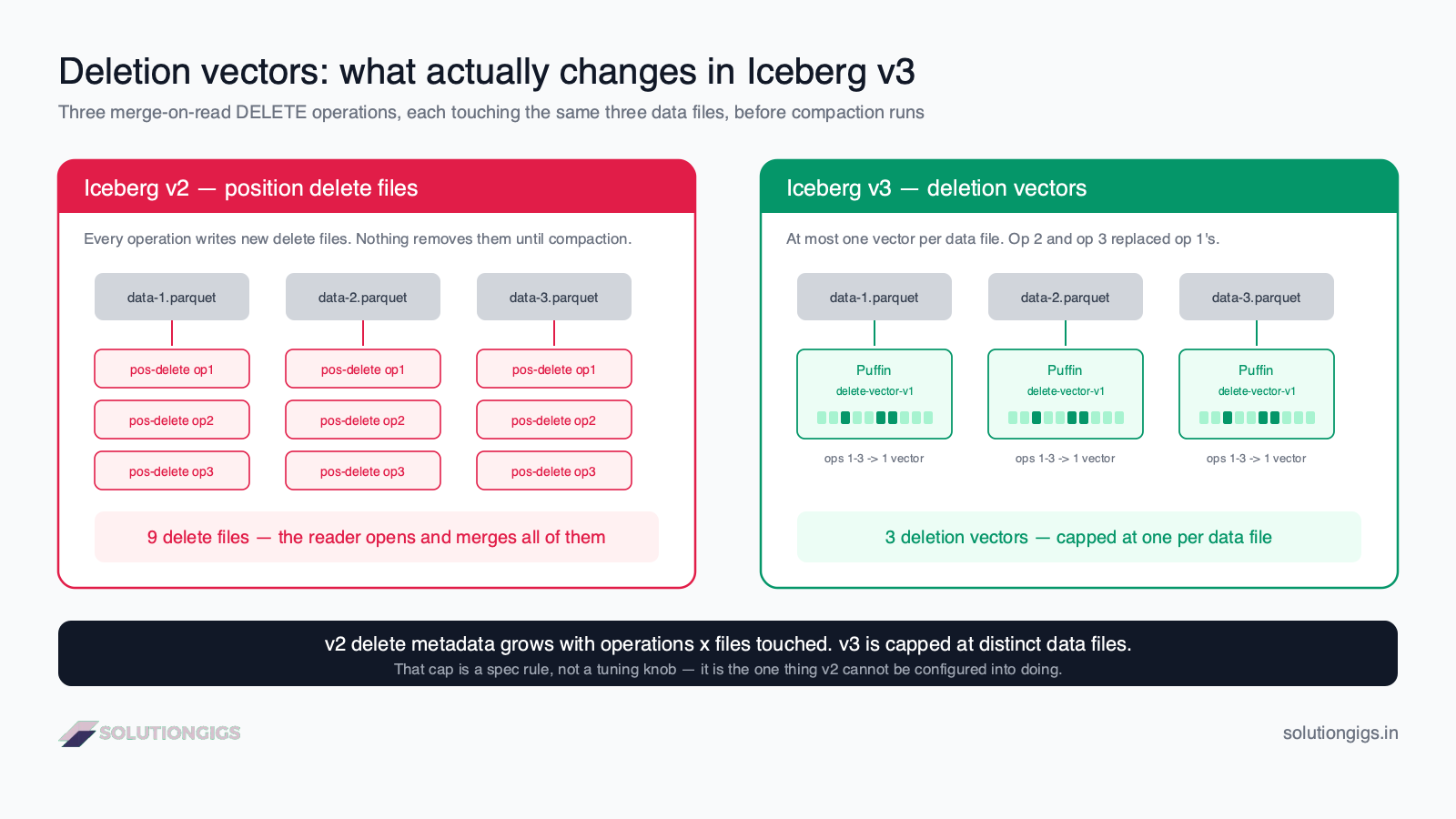
A deletion vector is a compressed bitmap that marks deleted row positions inside exactly one data file, and the spec permits at most one of them per data file in a snapshot. That single constraint — one, not many — is the entire mechanical difference from v2, and everything else about deletion vector performance follows from it.
What v2 does
In merge-on-read mode, a v2 DELETE or MERGE does not rewrite data files. It writes a position delete file — a Parquet file listing (file_path, position) pairs for the rows that are now gone. The data file is untouched; the reader applies the deletes at scan time.
That works. The problem is that it works again on the next operation, and the one after. Ten CDC micro-batches touching the same fifty data files produce delete files ten times over, and every one of them has to be opened, parsed and merged on every subsequent read until compaction removes them. This is the merge-on-read tax described in the Iceberg table maintenance guide — delete files are the fastest-growing category of metadata debt in a mutation-heavy table.
What v3 does instead
v3 replaces that with a Roaring-style bitmap stored in a Puffin{target="_blank" rel="noopener"} file. The spec requires the manifest entry to carry referenced_data_file (the fully qualified URI of the data file it applies to) plus content_offset and content_size_in_bytes, which must exactly match the offset and length recorded in the Puffin footer. The reader therefore seeks straight to the blob rather than scanning a file.
The consequence that matters: because there can be at most one vector per data file, the second delete against a data file replaces the first vector rather than adding a second file. Delete metadata stops being a function of how many operations you ran and becomes a function of how many distinct data files have deletes in them. In a table receiving continuous CDC, those two numbers diverge fast.
Explorer · delete metadata
Why one vector per file changes the arithmetic
In v2, every merge-on-read operation adds position delete files and they accumulate until compaction. In v3 a data file may carry at most one deletion vector, so the next delete against that file replaces it. Set your own numbers and watch the two lines stop tracking each other.
v2 delete files
1.2k
2.0 MB
v3 deletion vectors
400
186 KB
Fewer artifacts to open
2.9x
Per scan, before compaction runs
Metadata saved
1.8 MB
91% smaller
Iceberg v2 — position delete files1.2k files
Iceberg v3 — deletion vectors400 files
Every one of those 96 operations still has to be applied, but they are collapsing into 400 vectors because the hot files keep being re-hit and each new vector replaces the last. A reader opens 1.2k delete artifacts on v2 and 400 on v3 — 2.9x fewer. This ratio is the whole argument for v3, and it grows every hour you go without compacting.
That divergence is the real argument for v3, and it is structural rather than a matter of tuning. You cannot configure v2 into behaving this way.
Merge-on-read is still merge-on-read
One honest caveat, because the marketing tends to blur it. Deletion vectors make merge-on-read cheaper; they do not make it free, and they do not remove the need for compaction. Readers still apply deletes at scan time, and data files whose rows are mostly deleted still need rewrite_data_files to reclaim the space and the scan time. What changes is the slope of the curve between compaction runs, not the need to run it.
If you have not chosen between copy-on-write and merge-on-read yet, that decision is unchanged by v3 in kind but shifted in degree: the threshold at which merge-on-read becomes worth its complexity moves downward, because the ongoing cost is lower.
The benchmark everyone quotes, and what it measured
The numbers circulating for v3 deletion vectors come from a single AWS benchmark on a 10,000-row table, and they are directionally right but far too small to plan capacity from. Since almost every article on this topic quotes them without saying that, here is the whole test.
AWS ran it on Amazon EMR 7.10.0 with Spark 3.5.5 and Iceberg 1.9.2{target="_blank" rel="noopener"}, compacting first with rewrite_data_files, then deleting 100 rows with id BETWEEN 1000 AND 1099.
| Metric | Iceberg v2 | Iceberg v3 | Change |
|---|---|---|---|
| Delete runtime | 3.126 s | 1.407 s | 55% faster |
| Delete file size | 1,801 bytes (Parquet) | 475 bytes (Puffin) | 74% smaller |
| Full table read | baseline | — | 28.5% faster |
Filtered read (age > 30) |
baseline | — | 23% faster |
Read those honestly:
- 10,000 rows is a laptop-sized table. At that scale a large share of both runtimes is Spark job overhead, which is identical in both versions. A test that isolated pure delete-write cost would likely show a larger relative gap, not a smaller one.
- It is a single delete. The strongest property of deletion vectors — that delete metadata stops growing with operation count — is precisely the thing one delete cannot demonstrate.
- The file-size number is the most transferable. 475 bytes of Puffin against 1,801 of Parquet is a format-level fact about encoding overhead, and it holds at any scale.
- Databricks and Snowflake separately claim up to 10× faster DML for deletion vectors against copy-on-write. That is a different comparison — vectors versus full file rewrites, not versus position deletes — and it is a vendor claim, so treat it as a ceiling rather than an expectation.
Our own read, from running mutation-heavy Iceberg tables: the delete operation getting faster is the least interesting part. The part you feel in production is the read path staying flat over a week of CDC instead of degrading between compaction runs.
Row lineage: CDC without a CDC tool
Row lineage gives every row a table-unique _row_id and a _last_updated_sequence_number, so an engine can recognise the same logical row across snapshots without you maintaining a surrogate key. This is the feature with the largest architectural consequences and the least coverage.
The spec's mechanics are unusual and worth understanding, because they explain why the feature is nearly free:
- Writers do not assign row IDs. They write
nullfor both fields. - The reader derives
_row_idas the manifest'sfirst_row_idplus the row's position in its data file. The identifier is computed, not stored. - The table carries a
next-row-idfield which must advance when a new snapshot is committed; each snapshot recordsfirst-row-idandadded-rows. - When an existing row is moved — by compaction, for example — its non-null
_row_idis carried over, and_last_updated_sequence_numberis only nulled if the row's data actually changed.
That last rule is the important one. Compaction does not count as an update. A row rewritten by rewrite_data_files keeps its identity and its last-updated sequence number, which is exactly what you need for a downstream consumer to distinguish "this row changed" from "this file got reorganised" — a distinction that costs real money in every incremental pipeline that currently cannot make it.
What it lets you build
Query the two fields directly and you have change detection built into the table:
-- Rows that changed since the sequence number you last processed
SELECT _row_id, _last_updated_sequence_number, *
FROM prod.db.orders
WHERE _last_updated_sequence_number > 8412;
For teams running materialized views or incremental models, this replaces a hash-comparison or an updated_at column that someone has to maintain correctly on every write path. For teams running a Debezium and Kafka CDC pipeline, it does not replace the source-database capture — nothing in Iceberg can see a change that never landed in the table — but it does replace the bookkeeping on the lakehouse side of that pipeline.
What it does not give you
Three limits worth stating plainly, because the "CDC built into the format" framing oversimplifies:
- No before-image. You learn that a row changed and at which sequence number. You do not get the previous values. If you need old-versus-new, you still need SCD Type 2 with Iceberg MERGE or a comparison against a historical snapshot.
- Nothing is retroactive. Upgrading a table initialises
next-row-idto 0, and existing snapshots have no row IDs. Lineage starts at your first v3 commit, not at the table's creation. - The reader has to support it. Row lineage is computed at read time from manifest metadata. An engine that does not implement it does not return the fields, and as of August 2026 that is more engines than implement it.
Variant, geospatial and the type-system additions
The v3 type additions are opt-in per column, which makes them the safest part of the release — a table using none of them behaves exactly as it did.
The variant type
variant stores semi-structured data in a binary encoding rather than as a JSON string, keeping typed leaf values and structural metadata. The practical difference is predicate pushdown: a query filtering on a nested field can skip files, where a JSON-in-a-string column forces a parse of every row.
Shredding takes it further by extracting frequently-accessed fields into separate typed columns underneath, giving those fields columnar performance while the rest stays flexible. Shredding requires Spark 4.1+ or Flink 2.1+; Snowflake explicitly does not support nested variant.
This is the feature most likely to change how you model event data. A raw events table that today has a payload STRING column parsed by every downstream query is the canonical candidate.
Geospatial types
geometry(C) handles planar coordinates; geography(C, A) accounts for the curvature of the earth, taking both a coordinate reference system and an edge-interpolation algorithm. Iceberg can now maintain bounding boxes for spatial columns, which means partition and file pruning on geography — previously the preserve of PostGIS or engine-specific extensions.
Engine support here is the thinnest of any v3 feature. Databricks does not support geospatial types; most cloud engines do not either.
Nanosecond timestamps and default values
timestamp_ns and timestamptz_ns extend precision from microseconds to nanoseconds. Real use cases are narrow — high-frequency trading, distributed tracing, hardware telemetry — but where they apply, microsecond truncation was a correctness bug, not an inconvenience.
Column defaults split into two fields with different rules: initial-default is set when a field is added, applies to every pre-existing row, and can never change; write-default starts equal to it and can evolve. Required fields must have both non-null. This is what finally makes "add a NOT NULL column to a 40 TB table" a metadata operation.
Engine support: the matrix that decides your upgrade
This is the section that determines whether you upgrade, because Iceberg's value proposition is that many engines read one table — and a v3 table is unreadable to a v2-only engine. The writer makes the decision; every reader pays for it.
Support as of August 2026. Verify against your own versions before acting — this is the fastest-moving table in this article.
| Engine | Read v3 | Write / row-level DML | Notes |
|---|---|---|---|
| Apache Spark 4.0+ | Yes | Yes | Reference implementation. Shredded variant needs 4.1+ |
| Amazon EMR 7.12+ | Yes | Yes | Deletion vectors and row lineage supported since November 2025 |
| AWS Glue / S3 Tables / Glue Data Catalog | Yes | Yes | Same November 2025 announcement |
| Databricks Runtime 18.0+ | Yes | Yes | Unity Catalog required. No geospatial types |
| Snowflake | Yes | Yes | GA 7 May 2026. No in-place v2→v3 upgrade — see below |
| Apache Flink 2.x + Iceberg 1.10+ | Yes | Yes | Deletion vectors and DV compaction supported; nanosecond timestamps need Flink 2.1+ |
| Starburst Enterprise 476-e / Galaxy | Yes | Yes | Fuller v3 support than open-source Trino |
| Trino (open source) | Experimental | No | Docs: "Version 3 support is experimental; row-level updates, deletes, and OPTIMIZE are not supported." Default is still v2 |
| PyIceberg | Yes (0.11+) | Not for deletion vectors | v3 read support shipped; DV writes are out of scope so far |
| Amazon Athena | No public v3 support announced | No | Check current docs — this is the one that most often blocks an AWS shop |
Three readings of that table are worth making explicit.
First, the split that matters is not read versus write — it is read versus row-level DML. Trino is the clearest case: the connector documentation{target="_blank" rel="noopener"} confirms v3 tables can be queried experimentally, but UPDATE, DELETE and OPTIMIZE are unsupported, and tables using column defaults or encryption are unsupported entirely. A dashboard fleet on Trino might survive a v3 upgrade. A Trino-based maintenance job will not.
Second, "AWS supports v3" is not one fact. EMR, Glue, S3 Tables and SageMaker got deletion vectors and row lineage in November 2025. Athena is a separate service with a separate engine, and it is the one most likely to be sitting quietly in someone's BI stack.
Third, Snowflake supports v3 but not the upgrade. Per Snowflake's own documentation{target="_blank" rel="noopener"}, you create a v3 table with ICEBERG_VERSION = 3 (or set ICEBERG_VERSION_DEFAULT), but in-place upgrade of an existing table is not supported. If an external engine upgrades a table Snowflake reads, you must run CREATE OR REPLACE ICEBERG TABLE after that engine commits a new snapshot. Snowflake also does not support nested variant, multi-argument transforms, table encryption keys or the UNKNOWN type, and turns off append-only streams on externally managed v3 tables, schema inference, dbt Projects on Snowflake and Snowpipe Streaming classic.
Checker · nothing is stored
Can you actually upgrade this table to v3?
The upgrade is one line and there is no downgrade, so the binding constraint is the least-capable engine that reads the table. Tick every reader — BI tools and notebooks included — and pick what the table does.
What does this table do?
The deletion-vector workload. Every engine that mutates rows must write v3.
Every engine that reads or writes this table
Verdict
Wait
2 engines on the table
Hard blockers
1
Cannot do this workload on v3
Caveats
0
Works, with a version or feature limit
Do not upgrade this table. Trino (open source) is on your list and cannot do this workload on a v3 table. There is no downgrade in the Iceberg spec, so this is not a "try it and see" — either move that engine off the table first, or leave the table on v2 until the engine catches up.
Trino (open source)Blocks
The connector docs call v3 support experimental and state that row-level updates, deletes and OPTIMIZE are not supported. Tables using column defaults or encryption are not supported at all. Default format version is still 2.
Spark 4.0+Ready
The v3 reference implementation — if something works anywhere, it works here first.
Upgrading a table: the command, and the blast radius
The upgrade is a metadata-only property change that rewrites no data files and leaves existing v2 position delete files readable. Convergence happens naturally: as writers touch files, old position deletes get folded into new deletion vectors.
-- Spark SQL
ALTER TABLE prod.db.orders SET TBLPROPERTIES ('format-version' = '3');

-- Trino
ALTER TABLE prod.db.orders SET PROPERTIES format_version = 3;

-- New table, Spark SQL
CREATE TABLE prod.db.orders (...)
USING iceberg
TBLPROPERTIES (
  'format-version'      = '3',
  'write.delete.mode'   = 'merge-on-read',
  'write.update.mode'   = 'merge-on-read',
  'write.merge.mode'    = 'merge-on-read'
);
Note that the delete mode still has to be set explicitly. format-version = 3 alone gives you nothing at runtime if the table is copy-on-write — deletion vectors only exist on the merge-on-read path. This is the single most common misunderstanding we have seen: teams flip the format version, measure no change, and conclude v3 is overhyped.
A migration runbook that survives contact with a real fleet
- Inventory every reader, not every writer. Query engines, BI tools with embedded engines, notebook environments, PyIceberg scripts, the maintenance jobs, and anything that reads through the catalog. The writers are easy to enumerate and are not the risk.
- Pick one table that hurts. High mutation rate, merge-on-read already, ideally not on a customer-facing dashboard. A CDC landing table is the archetype.
- Tag it first.
ALTER TABLE ... CREATE TAG pre_v3 RETAIN 90 DAYS. You cannot downgrade the format, but you can still time-travel, and a tag survives snapshot expiry. - Upgrade, then run one real DML operation to force the first v3 snapshot. Until a writer commits, nothing changes.
- Read it from every engine on your inventory list — including the ones you are confident about. This is the step that catches the BI tool nobody remembered.
- Watch for two weeks. Delete file counts, read latency, compaction frequency and cost. Two weeks covers a full maintenance cycle.
- Only then widen. Table by table, in mutation-rate order.
Step 5 is where the value of this list is concentrated. Everything else you would have thought of.
Should you upgrade? By table archetype
| Table type | Verdict | Why |
|---|---|---|
| CDC landing table, merge-on-read, Spark/Flink writers | Upgrade now | This is the workload v3 was designed for; delete metadata stops growing with operation count |
| Slowly-changing dimension with frequent MERGEs | Upgrade now | Same mechanism, and row lineage removes surrogate-key bookkeeping |
| Raw event table with a JSON payload column | Consider — for variant, not deletes | The gain is predicate pushdown; needs Spark 4.1+ for shredding to pay off |
| Append-only fact table, no deletes | No hurry | Nothing v3 adds applies. Upgrade when the fleet has moved, not before |
| Copy-on-write dimension, rare updates | No hurry | Deletion vectors do not exist on the copy-on-write path |
| Anything Athena or open-source Trino reads or mutates | Wait | The upgrade is a breaking change with no downgrade |
| Table with a reader you cannot enumerate | Wait | The one-way nature makes unknown readers an unbounded risk |
Reader poll
Where are you with Apache Iceberg v3?
Pick one to see how everyone else answered.
Common mistakes with Iceberg v3
Every one of these has a specific cost, and most of them are invisible until the table is already upgraded.
| Mistake | What happens | Do this instead |
|---|---|---|
Setting format-version = 3 and expecting faster deletes |
Nothing changes on a copy-on-write table | Set write.delete.mode, write.update.mode and write.merge.mode to merge-on-read |
| Enumerating writers instead of readers | The BI tool nobody listed fails on Monday | Inventory readers first; they carry all the risk |
| Assuming "AWS supports v3" | Athena is a different engine from EMR and Glue | Check per service, per version |
| Treating it as reversible | There is no downgrade in the spec | Tag before upgrading; test on a non-critical table |
| Upgrading a table Snowflake reads and stopping there | Snowflake does not pick up the change | CREATE OR REPLACE ICEBERG TABLE after the external engine commits |
| Dropping compaction because "v3 handles deletes" | Space and scan cost still accumulate in the data files | Keep table maintenance running; the slope changed, not the need |
| Expecting row lineage on historical data | next-row-id starts at 0 on upgrade |
Lineage begins at the first v3 commit |
| Planning capacity from the 55% benchmark | It is a 10,000-row single-delete test | Measure on your own table for two weeks |
Where v3 sits against Delta Lake
v3 is also a convergence release. Deletion vectors are the mechanism Delta Lake has used for row-level deletes for years, and Databricks has been explicit that v3's deletion vectors, row lineage and variant type are designed to be compatible across Delta Lake, Parquet and Spark implementations.
That matters for anyone still weighing Delta Lake against Iceberg: one of the more concrete technical differences between the two formats just narrowed considerably. The remaining differences are increasingly about catalogs, governance and vendor gravity rather than the file layout — which is roughly where that comparison was heading anyway.
What we would do
Our own position, stated plainly so you can disagree with it: v3 is ready, and most fleets should still be mostly v2 at the end of 2026.
Both halves of that are true at once. The format is stable, the reference implementation is solid, and the deletion-vector mechanism is a real structural improvement rather than a tuning knob. But Iceberg's whole premise is that many engines read one table, and a format upgrade is the one change that trades that premise away until the slowest engine in your stack catches up. The correct shape is a small, deliberate v3 set — the CDC and mutation-heavy tables where the gain is largest — and a large v2 remainder that moves when Athena, open-source Trino and PyIceberg writes make the decision boring.
The teams that will regret this year are not the ones who waited. They are the ones who ran the ALTER TABLE across a schema because it was one line and looked free.
Learn Iceberg hands-on
If you want to work through snapshots, time travel and MERGE INTO interactively rather than reading about them, our free Apache Iceberg course runs real SQL in the browser — no cluster, no signup. It covers the v2 foundations that everything above assumes.
Frequently Asked Questions
What is Apache Iceberg v3?
Apache Iceberg v3 is version 3 of the Iceberg table specification. It adds deletion vectors, row lineage, the variant type for semi-structured data, geometry and geography types, nanosecond timestamps, column default values and multi-argument partition transforms. The v3 feature set reached production maturity in the Apache Iceberg 1.11.0 release in May 2026, after maturing through 1.10 in September 2025.
What are deletion vectors in Apache Iceberg v3?
A deletion vector is a compressed bitmap, stored as a delete-vector-v1 blob in a Puffin file, marking which row positions inside one data file are deleted. The spec allows at most one per data file in a snapshot, so a repeat delete against the same file replaces the existing vector rather than adding another delete file. In v2 each merge-on-read operation added position delete files that accumulated until compaction.
How do I upgrade an Iceberg table to v3?
Run ALTER TABLE db.orders SET TBLPROPERTIES ('format-version' = '3') in Spark SQL, or ALTER TABLE t1 SET PROPERTIES format_version = 3 in Trino. It is metadata-only — no data files are rewritten and existing v2 position delete files stay readable. The command is not the hard part. Every engine that reads the table must already support v3, because a v2-only reader will fail on a table it read fine yesterday.
Can you downgrade an Iceberg table from v3 to v2?
No. The Apache Iceberg specification does not support downgrading format versions and no engine implements it. The only route back is creating a new v2 table and copying the data with CTAS, which loses snapshot history, tags and branches. Treat the upgrade as one-way, tag the table before you run it, and test on something non-critical first.
Does Trino support Iceberg v3?
Only partially. The Trino Iceberg connector documentation states that format version 3 support is experimental, that row-level updates, deletes and OPTIMIZE are not supported on v3 tables, and that tables using column defaults or encryption are unsupported. The default format version is still 2. Starburst Enterprise and Galaxy ship fuller v3 support, so confirm which you run before upgrading a table Trino touches.
Is Iceberg v3 faster than v2?
For row-level deletes on merge-on-read tables, yes. AWS measured a delete at 1.407 seconds on v3 against 3.126 on v2, with the delete file dropping from 1,801 bytes of Parquet to 475 of Puffin, and reads 23–28% faster. That test used 10,000 rows, so treat it as directional. The compounding gain is structural: v3 caps delete metadata at one vector per data file while v2 grows it with every operation.
What is row lineage in Iceberg v3?
Row lineage gives every row a _row_id, unique within the table and assigned when the row is first added, and a _last_updated_sequence_number recording the commit that last changed it. Writers leave both null; readers derive them from the manifest's first_row_id plus row position. Compaction preserves both, so a consumer can tell a genuine change from a file reorganisation — the basis for incremental refresh without external CDC tooling.
Should I upgrade my Iceberg tables to v3 now?
Upgrade the tables that hurt: high-mutation merge-on-read tables written by Spark, Flink or EMR whose readers are all v3-capable. Leave anything read by Athena, open-source Trino or PyIceberg writers alone, because the upgrade is breaking and irreversible. Most fleets in 2026 should end up with a small deliberate v3 set and a much larger v2 remainder.
Conclusion
Apache Iceberg v3 is a good release that asks an awkward question. Deletion vectors fix the structural weakness in merge-on-read — delete metadata that grew with every operation instead of with the data — and row lineage quietly removes a whole category of bookkeeping from incremental pipelines. Variant, geospatial types and column defaults are real wins for the workloads that need them, and they cost nothing if you don't.
The awkward question is that the format's central promise is interoperability, and this upgrade is the one change that suspends it. ALTER TABLE ... SET TBLPROPERTIES ('format-version' = '3') is a millisecond of metadata and a permanent decision about who can still read your table. Enumerate the readers, upgrade the tables where mutation volume makes the gain real, tag before you go, and let the rest of the fleet wait for the engines to catch up. That is not caution for its own sake — it is the same reasoning that made you choose an open table format in the first place.
Working through a lakehouse migration and want a second opinion on the sequencing? Tell us what you're migrating — and if you want the hands-on version of everything above, the free Iceberg course runs real SQL in your browser.
Mohammed Yaseen
Founder, SolutionGigs
Mohammed builds and runs Iceberg lakehouses on Spark, Kafka and EMR, and has spent more time than he would like reading manifest metadata to work out why a table got slow. LinkedIn →
Learn Apache Iceberg — Free Course
Free, no signup — right in your browser.
Learn Apache Iceberg — Free Course →More in Data Engineering
Apache Iceberg in Production: How to Test It Before It Breaks You
Iceberg tutorials stop at CREATE TABLE. Production starts at the second writer, the 40th day of a streaming job, and the snapshot expiry that deleted your rollback. This guide covers the four levels of Iceberg testing with runnable pytest fixtures, then walks nine production failure modes in the order they actually bite — commit conflicts, small files, retention, metadata bloat, write amplification, schema and partition evolution, the catalog as a single point of failure, and cost — with the exact table properties that prevent each one, plus a launch checklist.
Data Mesh Architecture: What It Is and When It Actually Works
Data mesh is an operating model, not an architecture you can install — it moves data ownership to the business domains and holds them to a product standard. This guide skips the hype and answers the question every other one dodges: should you actually do this? Inside: the four principles stated plainly, an honest verdict on what survived after five years of real adoption (the data product model went mainstream; full decentralization mostly didn't), the 8-item spec a dataset must meet to be a data product, a readiness gate scored on six signals, the data mesh vs data fabric vs lakehouse table, the hybrid shape teams actually run, and a 90-day path that starts with one product instead of a domain-boundary workshop.
Databricks Job Failed: How to Find the Real Cause
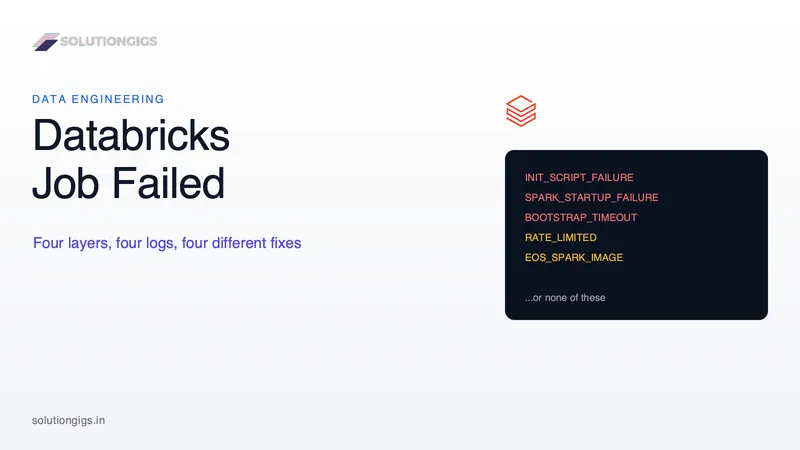
A failed Databricks job is really one of four different failures, each with its own log, its own fix and its own owner. Route it before you debug it. This guide gives you the 60-second routing model instead of another alphabetical error-code list, plus three traps that cost real money: the Repair run button that silently duplicates data because Databricks does not make tasks idempotent, the retry policy that bills 5.2x a clean run with 35% of it an idle cluster, and the concurrency default that skips runs without ever firing an alert. Includes the Databricks Runtime 13.3 LTS end-of-support date and the system table queries that find your real top failure causes.