
Apache Iceberg Table Maintenance: Compaction, Snapshots & Orphans
Last Updated: July 2026 | 14 min read
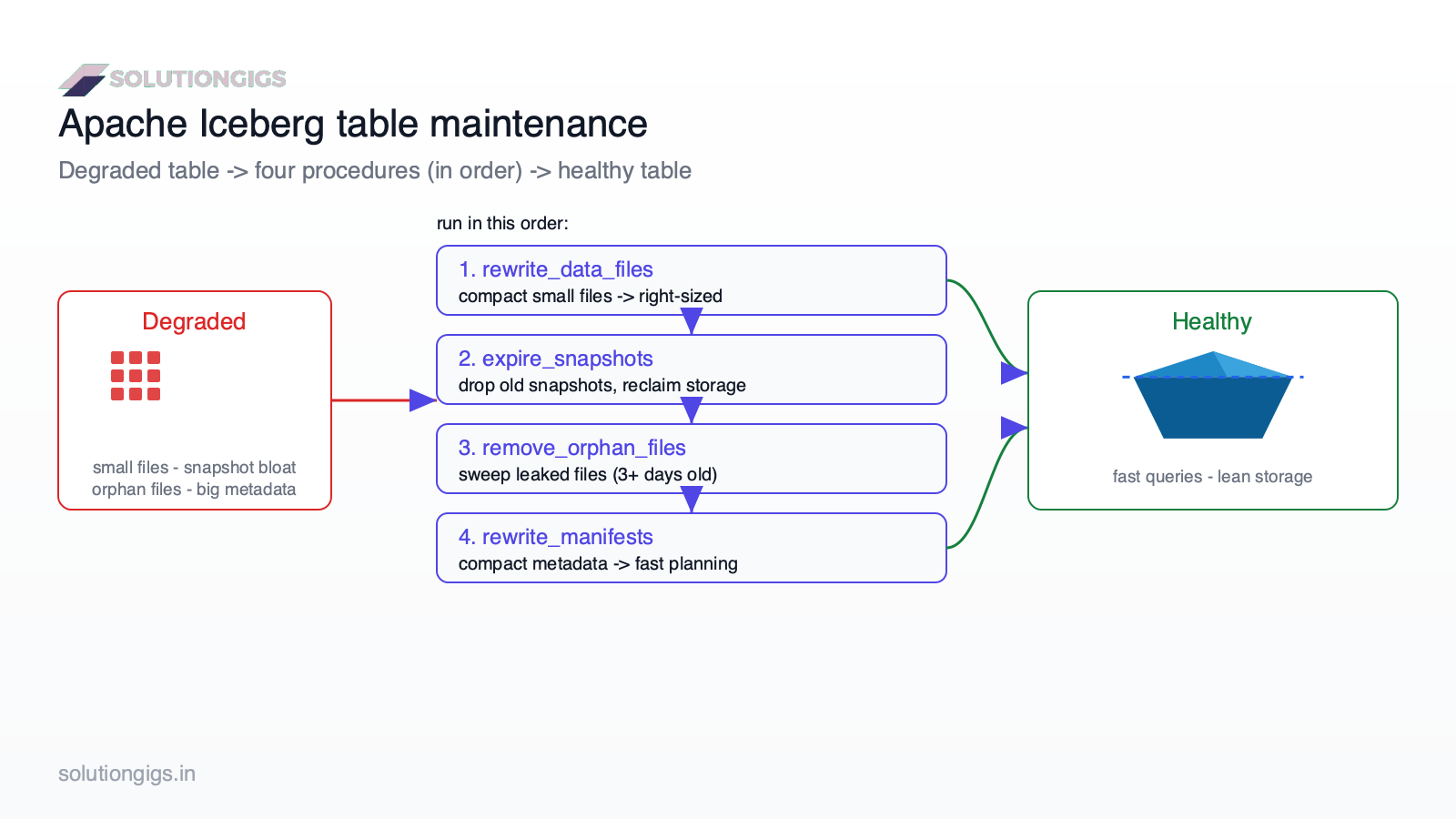
Quick Answer: Apache Iceberg tables degrade over time because every write creates new small files and a new snapshot — so queries slow down and storage costs creep up. Maintenance reverses this with four jobs: rewrite_data_files (compaction) merges small files into right-sized ones, expire_snapshots drops old snapshots and reclaims their storage, remove_orphan_files deletes leaked files from failed writes, and rewrite_manifests compacts the metadata layer. Run them in that order, on a cadence matched to how often the table is written.
Your Iceberg table was fast for the first month. Now the same query takes 4× longer, your S3 bill quietly doubled, and nobody changed the code. Nothing is broken — the table just accumulated the cost of every write: thousands of tiny files, a snapshot for every commit, and manifest metadata Spark has to scan before it reads a single row. This is the unglamorous, essential half of running a lakehouse. This guide covers the four maintenance procedures, the exact Spark SQL, the order they must run in, and the retention gotchas that can silently delete your ability to roll back. It's the operational companion to our Iceberg table guide and SCD Type 2 with Iceberg.
Why Iceberg tables degrade
Every Iceberg write — append, MERGE INTO, streaming micro-batch — adds new data files and commits a new immutable snapshot, so without maintenance the file count, snapshot chain, and metadata all grow without bound. Three separate things rot:
- Small files. Frequent writes (streaming, CDC, per-batch MERGE) each land a handful of tiny files. Reads then pay per-file open overhead — the classic small files problem, now at the table-format layer.
- Snapshot bloat. Iceberg keeps a snapshot per commit for time travel. Retain them forever and the metadata — plus all the old data files those snapshots still reference — never gets reclaimed.
- Manifest sprawl. The manifest files that track which data files belong to the table multiply, making query planning slow before any data is read.
The four maintenance jobs
Iceberg exposes maintenance as callable Spark procedures: rewrite_data_files, expire_snapshots, remove_orphan_files, and rewrite_manifests. Here's what each does and when it matters.
| Procedure | Fixes | Reclaims storage? | Touches time travel? |
|---|---|---|---|
rewrite_data_files |
Small files → right-sized | No (rewrites) | No |
expire_snapshots |
Snapshot + old-file bloat | Yes | Yes |
remove_orphan_files |
Leaked files from failed writes | Yes | No |
rewrite_manifests |
Slow query planning | No | No |
1. Compaction — rewrite_data_files
Compaction merges many small files into fewer, larger files sized for efficient reads, without changing the table's data or its snapshot history. This is the single highest-impact maintenance job for query speed.
CALL lake.system.rewrite_data_files(
  table => 'db.events',
  strategy => 'binpack',                       -- pack small files to target size
  options => map('target-file-size-bytes','536870912')   -- 512 MB
);
For tables you filter by a sort column, use strategy => 'sort' to co-locate related rows and improve data skipping. Compaction on very large tables is expensive, so scope it with a where filter to only the recently-written partitions:
CALL lake.system.rewrite_data_files(
  table => 'db.events',
  where => 'event_date >= current_date - interval 2 days'
);
2. Snapshot expiration — expire_snapshots
expire_snapshots deletes snapshots older than a retention window and physically removes the data files that only those expired snapshots referenced — this is what actually reclaims storage after compaction. Compaction alone doesn't shrink your bucket; the old small files stay alive inside old snapshots until you expire them.
CALL lake.system.expire_snapshots(
  table => 'db.events',
  older_than => TIMESTAMP '2026-07-15 00:00:00',   -- keep ~7 days
  retain_last => 5                                  -- always keep >=5 snapshots
);
This is the dangerous one. Expiring a snapshot permanently removes your ability to time-travel or roll back to it. Never expire everything — keep a retention window (7 days is common) so recent rollbacks still work. Pair
older_thanwithretain_lastso a quiet table never loses all its history.
3. Orphan file removal — remove_orphan_files
remove_orphan_files deletes files sitting in the table's storage location that no snapshot references at all — the debris left by failed, aborted, or killed write jobs. These files are invisible to Iceberg but still cost you storage.
CALL lake.system.remove_orphan_files(
  table => 'db.events',
  older_than => TIMESTAMP '2026-07-19 00:00:00'    -- conservative: >3 days old
);
Never lower the age threshold to "now." A file being written by an in-flight job also looks unreferenced until its write commits — an aggressive orphan sweep can delete data out from under a running pipeline. Keep the default ~3-day threshold and run it during a quiet window, not during active writes.
4. Manifest rewrite — rewrite_manifests
rewrite_manifests compacts the metadata manifest layer so Spark scans fewer, larger manifests during query planning. It's the lightest job and matters most on tables with many partitions and frequent commits.
CALL lake.system.rewrite_manifests(table => 'db.events');
The order matters
Run compaction → expire_snapshots → remove_orphan_files. The sequence is not arbitrary:
- Compact first.
rewrite_data_fileswrites new files and leaves the old small files referenced only by older snapshots. - Then expire snapshots. This drops those older snapshots and physically deletes the pre-compaction files — reclaiming the storage.
- Then remove orphans. Finally sweep anything truly leaked by failed jobs.
Running orphan removal before expiring snapshots does almost nothing useful, because the pre-compaction files are still referenced by retained snapshots at that point — they aren't orphans yet.
A maintenance cadence that works
Match frequency to write volume: high-churn streaming and CDC tables need daily compaction and expiration; slow dimension tables need far less. A cadence we run in production:
| Table type | Compaction | Expire snapshots | Orphan removal | Manifests |
|---|---|---|---|---|
| Streaming / CDC (frequent commits) | Daily | Daily (7-day retention) | Weekly | Weekly |
| Batch fact (hourly/daily loads) | Daily | Daily (7-day retention) | Weekly | Weekly |
| SCD / dimension (slow updates) | Weekly | Weekly | Monthly | Monthly |
Automate it. Most teams schedule these procedures from Airflow or a cron-driven Spark job right after the main load finishes — the same discipline as any idempotent data pipeline: safe to re-run, scoped to recent partitions, and observable.
Common mistakes (and how to avoid them)
- Compacting but never expiring. Your queries speed up but storage keeps growing — compaction rewrites, only
expire_snapshotsreclaims. Run both. - Expiring all snapshots. You lose time travel and rollback. Always keep a retention window.
- Aggressive orphan removal during writes. Can delete in-flight data. Keep the ~3-day threshold; run in a quiet window.
- Full-table compaction every run. Expensive and mostly wasted. Scope with a
whereon recent partitions. - Ignoring manifests on wide tables. Slow planning persists even after compaction. Add
rewrite_manifestsfor many-partition tables. - No target file size. Binpack to a real target (256–512 MB) or you'll re-fragment; this ties back to your partitioning strategy.
- Running maintenance and heavy queries on the same cluster. Compaction is I/O heavy — isolate it or schedule it off-peak.
See how SolutionGigs can help
Iceberg tables getting slow and expensive, and not sure whether the fix is compaction, expiration, partitioning, or all three? SolutionGigs connects you with vetted data engineers who run production lakehouse maintenance at scale. See how SolutionGigs can help →
Frequently Asked Questions
Why do Apache Iceberg tables slow down over time?
Every write — especially streaming appends and MERGE INTO — creates new data files and a new snapshot. Over time that leaves thousands of small files, a long chain of retained snapshots, and bloated manifests, so queries open many tiny files and scan large metadata. Planning and read time climb. Regular compaction, snapshot expiration, orphan cleanup, and manifest rewrites reverse the degradation.
What are the main Iceberg maintenance jobs?
Four: rewrite_data_files compacts small files into right-sized ones; expire_snapshots deletes old snapshots and their unreferenced data files to reclaim storage; remove_orphan_files deletes leaked files from failed writes; and rewrite_manifests compacts the metadata layer so planning stays fast. Compaction and snapshot expiration have the biggest impact and should run regularly.
Does expire_snapshots delete my data?
It deletes data files no longer referenced by any retained snapshot, and it removes time travel to those expired snapshots — but it never touches the current table state. The risk is expiring snapshots you still need for audits or rollback. Use a retention window (for example keep 7 days) plus retain_last, rather than expiring everything, so recent time travel and rollback still work.
Is it safe to run remove_orphan_files?
Yes, with a conservative age threshold and not during active writes. It deletes files in the table location that no snapshot references — but a file being written by an in-flight job also looks unreferenced until it commits. Keep the default older-than threshold of about 3 days so in-progress and recently committed files are never deleted, and prefer a quiet window.
How often should I run Iceberg maintenance?
Match cadence to write volume. Streaming and CDC tables: compaction and expiration daily (7-day retention), orphan removal and manifest rewrite weekly. Batch fact tables: similar. Slow dimension/SCD tables: weekly-to-monthly. The more frequently a table commits, the more often it needs compaction and snapshot expiration.
What order should Iceberg maintenance procedures run in?
Compaction first, then expire_snapshots, then remove_orphan_files. Compaction writes new files and leaves the old ones inside old snapshots; expiring snapshots drops those and reclaims their storage; orphan removal finally sweeps anything truly leaked. Running orphan removal before expiring snapshots is wasteful, since pre-compaction files are still referenced by retained snapshots then.
Do Delta Lake and Hudi need the same maintenance?
Yes — the concepts are universal to open table formats. Delta Lake uses OPTIMIZE (compaction), VACUUM (reclaim old files, analogous to expiration + orphan cleanup), and Z-ordering; Apache Hudi has clustering and cleaning. The names differ but the goals are identical: fewer, larger files; bounded retention; reclaimed storage. If you're choosing a format, see our Delta Lake vs Iceberg comparison.
Conclusion
Iceberg gives you ACID tables on object storage — but it doesn't keep them fast for free. Left alone, every write compounds into small files, snapshot bloat, and metadata sprawl until queries crawl and your storage bill climbs. Maintenance is the routine, boring work that keeps a lakehouse healthy.
The playbook:
- Compact with
rewrite_data_filesto a real target size, scoped to recent partitions. - Expire snapshots to actually reclaim storage — compaction alone won't — but always keep a retention window.
- Remove orphans with a conservative age threshold, in a quiet window.
- Rewrite manifests on wide, high-commit tables to keep planning fast.
- Run them in order (compact → expire → orphans), on a cadence matched to write volume, automated from your scheduler.
Do this and your Iceberg tables stay as fast in month twelve as they were in month one. For the build side, pair this with our Iceberg tables guide and SCD Type 2 with Iceberg MERGE. And if you'd like an expert to audit your lakehouse before costs run away, get matched with a vetted data engineer on SolutionGigs — it's free to post your project.

Mohammed Yaseen
Founder, SolutionGigs
Mohammed runs Apache Iceberg lakehouse pipelines on AWS at Telemetrix, scheduling compaction and snapshot expiration across tables ingesting hundreds of millions of rows a day from Kafka. He's watched an un-maintained table quietly double its S3 bill — and fixed it with the exact procedures in this guide. LinkedIn →