
Apache Iceberg in Production: How to Test It Before It Breaks You
Iceberg tutorials stop at CREATE TABLE. Production starts at the second writer, the 40th day of a streaming job, and the snapshot expiry that deleted your rollback. This guide covers the four levels of Iceberg testing with runnable pytest fixtures, then walks nine production failure modes in the order they actually bite — commit conflicts, small files, retention, metadata bloat, write amplification, schema and partition evolution, the catalog as a single point of failure, and cost — with the exact table properties that prevent each one, plus a launch checklist.

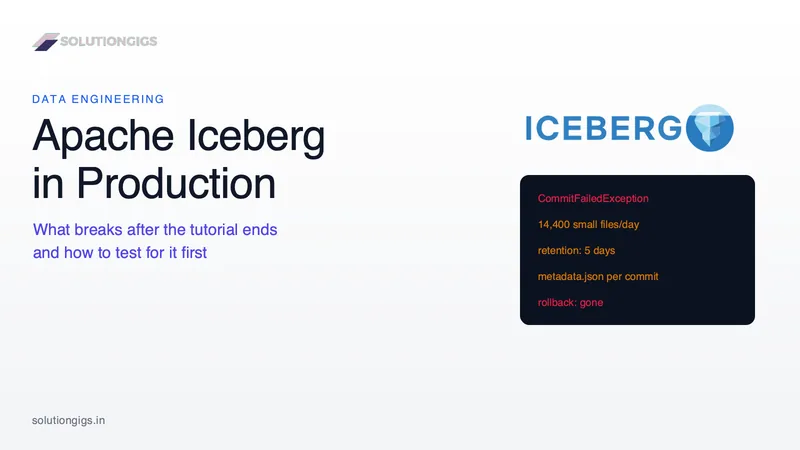
Quick Answer: Apache Iceberg pipelines fail in production for reasons no tutorial reproduces: concurrent commits rejected by the catalog's compare-and-swap, tables that quietly accumulate hundreds of thousands of small files, snapshot expiry that deletes the rollback you needed, and schema changes the format allows but your consumers do not survive. Test at four levels — pure logic, local Spark on a temp-directory catalog, PyIceberg on SQLite, and a docker-compose REST catalog — then ship behind write-audit-publish with compaction, retention and monitoring configured before the first load, not after the first incident.
Every Iceberg tutorial ends at the same place: a CREATE TABLE, an INSERT, a SELECT ... VERSION AS OF, and a sentence about how ACID transactions on a data lake used to be impossible. All of it is true. None of it is what breaks.
What breaks is the second writer. The 40th day of a streaming job. The MERGE INTO that ran twice because Airflow retried the task. The expire_snapshots that ran on schedule the morning after a bad load, taking the rollback with it. The column somebody renamed on Tuesday that broke seven dashboards on Wednesday. None of those appear in a quickstart, because a quickstart has one writer, thirty rows, no maintenance and no consumers.
This guide is the other half. It is written for the engineer who has already got Iceberg working on a laptop and now has to convince themselves — and a reviewer — that it will survive a year of production traffic. It covers how to test Iceberg properly (with runnable fixtures, not advice), then walks the failure modes in the order they actually bite, with the exact table properties, procedures and monitoring queries that prevent each one.
If you are still at the "what is this format" stage, read our Apache Iceberg table guide with PySpark first and come back. If you have not chosen a catalog yet, Iceberg catalogs compared is the decision this guide assumes you have already made.
Why Iceberg is harder to productionise than it looks
Iceberg moves the hard parts of a data lake from "impossible" to "your responsibility." That is a genuine upgrade, and it is also the whole problem: a Hive table had no snapshots to expire, no manifests to merge and no commit conflicts to lose, because it had no transactions at all.
Here is the gap between what a tutorial exercises and what production exercises, laid out honestly.
| Dimension | In the tutorial | In production |
|---|---|---|
| Writers | One | Streaming job + backfill + compaction + a human running a fix |
| Commit rate | A handful | Thousands per day, all competing for one metadata pointer |
| Table size | 30 rows | 10⁹ rows across 200,000 files |
| Maintenance | Never mentioned | Four separate scheduled jobs, ordered, with retention policy |
| Failure | Rerun the cell | Idempotency, partial commits, replay, rollback window |
| Schema | Fixed | Evolving under six consumers who never read your Slack message |
| Catalog | type=hadoop, a local folder |
A network service that is now a single point of failure for all writes |
| Cost | Free | Storage of every expired-but-not-deleted snapshot, plus scan planning |
Every row of that table is a section below. The two that surprise people most are the last two: the catalog becomes the availability ceiling for every write in the lakehouse, and an unmaintained Iceberg table costs more than the Hive table it replaced, because it keeps history the Hive table simply overwrote.
Scorecard · nothing is stored
How production-ready is your Iceberg table?
Sixteen decisions, each with a specific failure behind it. Tick what you have already done — the score matters less than the list of boxes you cannot tick, and every one links to the section that explains what happens when it is missing.
Ready
0%
0 of 16 decisions made
Open gaps
16
Each one is a known failure mode
Biggest risk now
Recovery
The rollback expires before anyone notices the bad load
Recovery
Maintenance
Concurrency
Correctness
Platform
This is roughly where a working proof of concept sits. It is not a criticism — it is the honest starting point, and the list below is the shortest path from here to a table you can leave running.
The one mechanism you must understand first
Every Iceberg write ends with an atomic compare-and-swap on a single pointer held by the catalog, and almost every production failure in this guide is a consequence of that one design choice. Two minutes here saves an hour of confusion later.
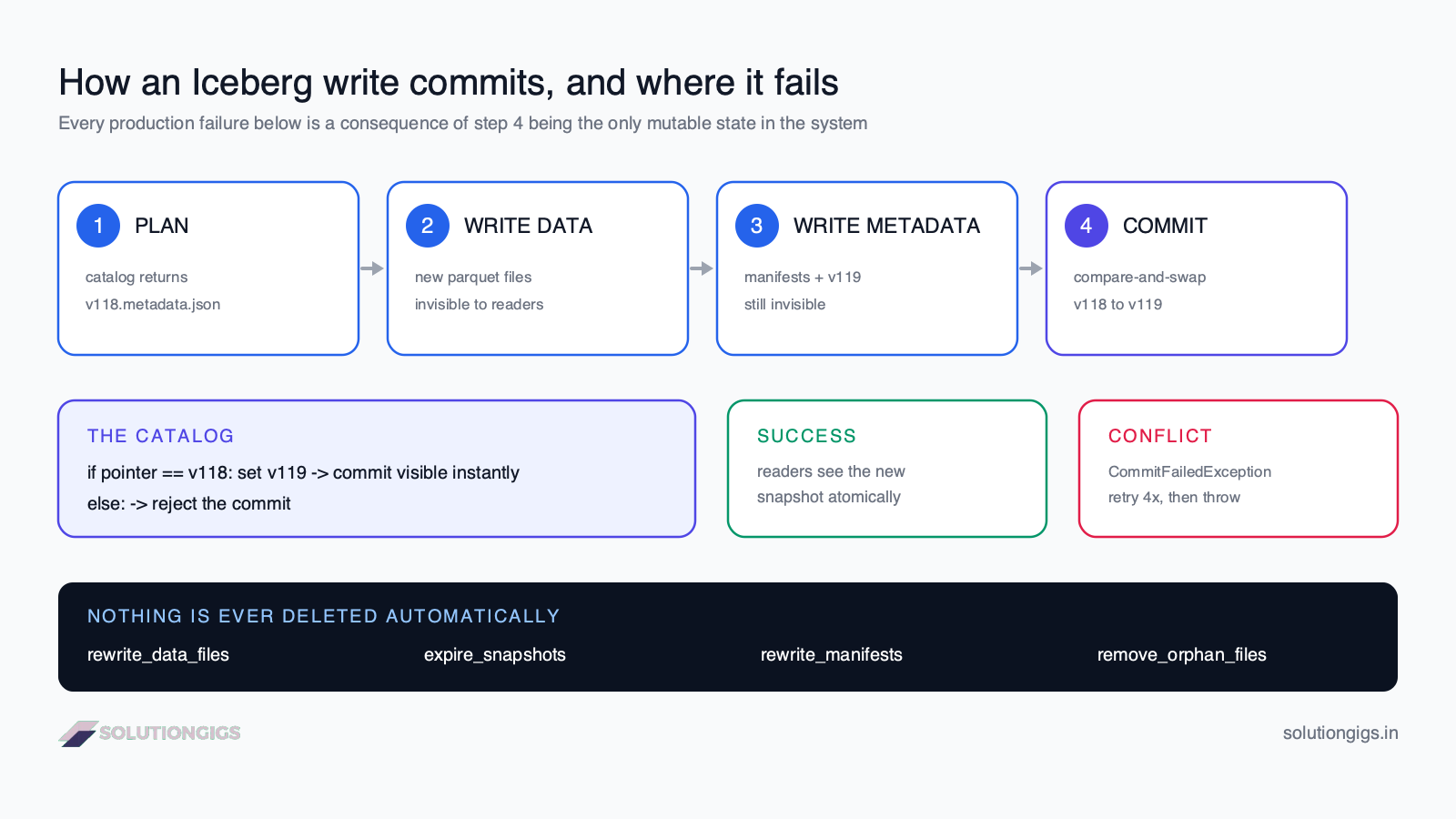
A write proceeds in four phases:
- Plan. The engine asks the catalog to load the table and receives the location of the current metadata file — say
v118.metadata.json. - Write data. New Parquet files land in object storage. Nothing references them yet, so no reader can see them. If the job dies here, you have wasted storage and nothing else.
- Write metadata. The engine writes new manifest files, a manifest list, and
v119.metadata.jsoncontaining a new snapshot. - Commit. The engine tells the catalog: swap the pointer from
v118tov119. The catalog checks that the current value really is stillv118. If it is, the swap succeeds and every reader sees the new data instantly. If another writer got there first, the catalog rejects it and the engine must re-plan and retry.
Three consequences fall straight out of this, and they explain most of what follows:
- Nothing is mutable except one string. Data files, manifests and metadata files are all immutable. This is why time travel is free and why deletion is a separate, dangerous operation rather than a side effect of writing.
- Contention lands entirely on step 4. Two writers can happily do steps 1–3 in parallel for twenty minutes and then fight over a millisecond. That is why commit conflicts show up as late failures on expensive jobs — the worst possible shape.
- Every commit adds files and adds a snapshot, forever. Iceberg never cleans up on its own. Maintenance is not an optimisation; it is a required component of the system.
The mental model that helps most: an Iceberg table is a git repository. Data files are blobs, manifests are trees, snapshots are commits, and the catalog is the ref that
mainpoints at.expire_snapshotsisgit gc. Time travel isgit checkout <sha>. A commit conflict is a non-fast-forward push. Once you hold that model, the failure modes stop being surprising.
Part 1 — How to test an Iceberg pipeline
The four sections below are a ladder. Each rung is faster than the one above it and proves something the one above it cannot.
The four levels of Iceberg testing
Most teams have exactly one kind of Iceberg test — an integration test against a shared dev table — and it is the slowest, flakiest and least informative of the four. Here is the ladder that actually works, with what each level costs and what it can prove.
| Level | What it runs against | Speed | Catches | Cannot catch |
|---|---|---|---|---|
| L1 — Pure logic | No Iceberg at all; DataFrames in and out | ~50 ms | Business rules, joins, null handling, dedup logic | Anything about the table format |
| L2 — Local Spark + Iceberg | Real Iceberg on a pytest tmp_path, type=hadoop |
2–5 s | Snapshots, MERGE INTO, time travel, schema evolution, partitioning |
REST catalog semantics, object-store behaviour |
| L3 — PyIceberg + SQLite | Real Iceberg catalog, no JVM | ~200 ms | Catalog operations, metadata, table properties, commit conflicts | Spark-specific write paths |
| L4 — Docker REST + MinIO | apache/iceberg-rest-fixture + S3-compatible store |
20–60 s | Real commit protocol, credentials, multi-engine reads, S3 paths | Production scale and real concurrency |
The rule that keeps the suite fast: push every assertion to the lowest level that can make it. If a test is really about "does the dedup keep the latest record per key", it belongs at L1 and should never start a Spark session. Reserve L2 for assertions that are genuinely about Iceberg — that the MERGE produced one snapshot and not two, that time travel returns the pre-load state, that adding a column did not rewrite files.
Level 1 — test the transform, not the table
The single highest-leverage change most pipelines need is separating "compute the new rows" from "write the new rows." Once those are separate functions, 80% of your logic is testable in milliseconds with no Iceberg dependency at all.
# src/transforms.py  — no Iceberg, no I/O, trivially testable
from pyspark.sql import DataFrame, Window
from pyspark.sql import functions as F

def latest_per_key(df: DataFrame, key: str, ts: str) -> DataFrame:
    """Collapse a CDC batch to one row per key: the newest event wins."""
    w = Window.partitionBy(key).orderBy(F.col(ts).desc())
    return (df.withColumn("_rn", F.row_number().over(w))
              .filter(F.col("_rn") == 1)
              .drop("_rn"))
# tests/test_transforms.py
def test_latest_per_key_keeps_newest(spark):
    src = spark.createDataFrame(
        [(1, "old", "2026-08-01"), (1, "new", "2026-08-02"), (2, "only", "2026-08-01")],
        "id int, val string, ts string",
    )
    out = {r.id: r.val for r in latest_per_key(src, "id", "ts").collect()}
    assert out == {1: "new", 2: "only"}
That test would have caught the single most common real-world MERGE bug: a source batch containing two updates for the same key, which makes Iceberg throw Cannot write delete files in a v1 table or, worse, non-deterministically pick one — because MERGE INTO requires at most one source row per target row.
Level 2 — real Iceberg in a temp directory
This is the fixture worth copying into your repo today. It gives you a genuine Iceberg catalog with real snapshots, real manifests and real MERGE INTO, in a directory pytest throws away after the test.
# tests/conftest.py
import pytest
from pyspark.sql import SparkSession

ICEBERG_JAR = "org.apache.iceberg:iceberg-spark-runtime-3.5_2.12:1.10.0"

@pytest.fixture(scope="session")
def spark(tmp_path_factory):
    warehouse = tmp_path_factory.mktemp("warehouse")
    return (
        SparkSession.builder
        .master("local[2]")
        .appName("iceberg-tests")
        .config("spark.jars.packages", ICEBERG_JAR)
        .config("spark.sql.extensions",
                "org.apache.iceberg.spark.extensions.IcebergSparkSessionExtensions")
        .config("spark.sql.catalog.test", "org.apache.iceberg.spark.SparkCatalog")
        .config("spark.sql.catalog.test.type", "hadoop")
        .config("spark.sql.catalog.test.warehouse", str(warehouse))
        # keep tests fast and deterministic
        .config("spark.sql.shuffle.partitions", "2")
        .config("spark.ui.enabled", "false")
        .getOrCreate()
    )

@pytest.fixture
def orders_table(spark):
    """A fresh Iceberg table per test — no cross-test contamination."""
    spark.sql("CREATE NAMESPACE IF NOT EXISTS test.db")
    spark.sql("DROP TABLE IF EXISTS test.db.orders PURGE")
    spark.sql("""
        CREATE TABLE test.db.orders (
            order_id BIGINT, customer_id BIGINT, amount DECIMAL(10,2),
            status STRING, updated_at TIMESTAMP)
        USING iceberg
        PARTITIONED BY (days(updated_at))
        TBLPROPERTIES ('format-version'='2')
    """)
    yield "test.db.orders"
Why
type=hadoopis fine here and forbidden in production. The Hadoop catalog stores the metadata pointer as a file and relies on atomic rename, which local filesystems provide and Amazon S3 does not. In a single-process test that is perfectly safe and needs zero infrastructure. In production it can silently corrupt a table under concurrent writes — which is exactly why the catalog you pick for production is a correctness decision, not a convenience one.
Now the tests that only Iceberg can fail:
# tests/test_iceberg_semantics.py
def snapshots(spark, table):
    return spark.sql(f"SELECT * FROM {table}.snapshots ORDER BY committed_at").collect()

def test_merge_is_idempotent(spark, orders_table):
    """Running the same MERGE twice must not double-count or create new rows."""
    spark.sql(f"INSERT INTO {orders_table} VALUES "
              "(1, 100, 50.00, 'NEW', TIMESTAMP '2026-08-01 10:00:00')")

    def run_merge():
        spark.sql("CREATE OR REPLACE TEMP VIEW batch AS SELECT * FROM VALUES "
                  "(1, 100, 75.00, 'PAID', TIMESTAMP '2026-08-02 10:00:00') "
                  "AS t(order_id, customer_id, amount, status, updated_at)")
        spark.sql(f"""
            MERGE INTO {orders_table} t USING batch s ON t.order_id = s.order_id
            WHEN MATCHED AND s.updated_at > t.updated_at THEN UPDATE SET *
            WHEN NOT MATCHED THEN INSERT *
        """)

    run_merge()
    first = spark.table(orders_table).collect()
    run_merge()                       # replay — Airflow retried the task
    second = spark.table(orders_table).collect()

    assert first == second, "MERGE is not idempotent — a retry changed the table"
    assert spark.table(orders_table).count() == 1

def test_time_travel_returns_pre_load_state(spark, orders_table):
    spark.sql(f"INSERT INTO {orders_table} VALUES "
              "(1, 100, 10.00, 'NEW', TIMESTAMP '2026-08-01 10:00:00')")
    before = snapshots(spark, orders_table)[-1].snapshot_id

    spark.sql(f"DELETE FROM {orders_table} WHERE order_id = 1")   # the bad load
    assert spark.table(orders_table).count() == 0

    restored = spark.sql(
        f"SELECT * FROM {orders_table} VERSION AS OF {before}")
    assert restored.count() == 1, "rollback target is gone"

def test_adding_a_column_rewrites_nothing(spark, orders_table):
    spark.sql(f"INSERT INTO {orders_table} VALUES "
              "(1, 100, 10.00, 'NEW', TIMESTAMP '2026-08-01 10:00:00')")
    files_before = spark.sql(f"SELECT file_path FROM {orders_table}.files").count()

    spark.sql(f"ALTER TABLE {orders_table} ADD COLUMN discount DECIMAL(10,2)")

    files_after = spark.sql(f"SELECT file_path FROM {orders_table}.files").count()
    assert files_before == files_after, "schema change unexpectedly rewrote data"
    assert spark.table(orders_table).filter("discount IS NULL").count() == 1
Those three tests encode the three Iceberg promises your pipeline actually depends on: replay safety, a usable rollback window, and metadata-only schema change. If a dependency upgrade ever breaks one of them, you want to find out in CI in four seconds.
Level 3 — PyIceberg on SQLite, when you cannot afford a JVM
Not every pipeline is Spark, and even when it is, JVM startup dominates a fast feedback loop. PyIceberg{target="_blank" rel="noopener"} gives you a real Iceberg catalog in pure Python. Its SqlCatalog backed by a SQLite file is the fastest genuine Iceberg environment that exists.
# tests/conftest.py  (PyIceberg variant)
import pytest, pyarrow as pa
from pyiceberg.catalog.sql import SqlCatalog

@pytest.fixture
def catalog(tmp_path):
    warehouse = tmp_path / "warehouse"
    warehouse.mkdir()
    cat = SqlCatalog(
        "test",
        **{
            "uri": f"sqlite:///{tmp_path}/catalog.db",   # a file, not :memory:
            "warehouse": f"file://{warehouse}",
        },
    )
    cat.create_namespace("db")
    return cat

def test_append_creates_exactly_one_snapshot(catalog):
    schema = pa.schema([("order_id", pa.int64()), ("amount", pa.float64())])
    tbl = catalog.create_table("db.orders", schema=schema)

    tbl.append(pa.Table.from_pylist([{"order_id": 1, "amount": 10.0}], schema=schema))
    tbl.append(pa.Table.from_pylist([{"order_id": 2, "amount": 20.0}], schema=schema))

    assert len(tbl.history()) == 2
    assert tbl.scan().to_arrow().num_rows == 2
Use a SQLite file, not
:memory:. SQLAlchemy hands out a fresh connection per checkout, and each new connection to:memory:gets its own empty database — so your table exists in one connection and vanishes in the next. A file undertmp_pathcosts nothing and behaves.
PyIceberg tests are also the cheapest place to assert on table properties, which is where a surprising amount of production behaviour is configured:
def test_table_ships_with_production_properties(catalog):
    tbl = catalog.load_table("db.orders")
    props = tbl.properties
    assert props["write.metadata.delete-after-commit.enabled"] == "true"
    assert props["history.expire.max-snapshot-age-ms"] == "1296000000"   # 15 days
That test is worth more than it looks. Both of those properties default to values that cause production incidents, and both are the kind of thing that gets set once by hand and then forgotten on the next table someone creates.
Level 4 — the real commit path, in docker-compose
L2 and L3 both cheat: they use a catalog that never speaks HTTP and a filesystem that is not S3. For the handful of tests that must exercise the genuine REST commit protocol, credential handling and object-store paths, Apache publishes a purpose-built fixture image.
# docker-compose.test.yml
services:
  rest:
    image: apache/iceberg-rest-fixture
    ports: ["8181:8181"]
    environment:
      CATALOG_WAREHOUSE: s3://warehouse/
      CATALOG_IO__IMPL: org.apache.iceberg.aws.s3.S3FileIO
      CATALOG_S3_ENDPOINT: http://minio:9000
      CATALOG_S3_PATH__STYLE__ACCESS: "true"
      AWS_ACCESS_KEY_ID: minio
      AWS_SECRET_ACCESS_KEY: minio123
      AWS_REGION: us-east-1
    depends_on: [minio]

  minio:
    image: minio/minio
    command: server /data --console-address ":9001"
    ports: ["9000:9000", "9001:9001"]
    environment:
      MINIO_ROOT_USER: minio
      MINIO_ROOT_PASSWORD: minio123

  mc:                       # creates the bucket once, then exits
    image: minio/mc
    depends_on: [minio]
    entrypoint: >
      /bin/sh -c "until (mc alias set m http://minio:9000 minio minio123) do sleep 1; done;
                  mc mb -p m/warehouse; exit 0"
# tests/test_rest_catalog.py
from pyiceberg.catalog.rest import RestCatalog

def rest_catalog():
    return RestCatalog("test", **{
        "uri": "http://localhost:8181",
        "s3.endpoint": "http://localhost:9000",
        "s3.access-key-id": "minio",
        "s3.secret-access-key": "minio123",
    })
Keep this level small and deliberate — a handful of tests, run in CI, not on every save. Its job is to prove that the thing you configured is the thing that connects, not to re-test business logic you already covered at L1.
Testing what unit tests never reach
The tests above prove your pipeline is correct in isolation. Production failures are almost never about isolation. These five scenarios are the ones that separate a pipeline that survives from one that pages you.
1. Force a commit conflict on purpose
You cannot claim to handle concurrency if you have never seen the exception. This test manufactures one deterministically by holding a stale table reference across another writer's commit.
// Java/Scala — the clearest way to force the failure
Table table = catalog.loadTable(TableIdentifier.of("db", "orders"));

AppendFiles a = table.newAppend().appendFile(FILE_A);   // planned against v118
AppendFiles b = table.newAppend().appendFile(FILE_B);   // also planned against v118

a.commit();                       // succeeds: v118 -> v119
assertThrows(CommitFailedException.class, b::commit);   // rejected: expected v118
In PySpark the equivalent is two threads running MERGE INTO against overlapping keys with commit.retry.num-retries set to 0 so the retry does not mask the conflict:
spark.sql(f"ALTER TABLE {t} SET TBLPROPERTIES ('commit.retry.num-retries'='0')")
Then assert your job's error handling does the right thing — which for a scheduled batch job usually means fail loudly and let the orchestrator retry the whole task, not swallow it.
2. Prove replay safety, not just correctness
Every orchestrator retries. Every streaming source occasionally redelivers. A pipeline that is correct once and wrong twice is a pipeline that will be wrong.
Run every write test twice and assert the table is byte-identical the second time. The test_merge_is_idempotent test above is the template; apply it to your INSERT OVERWRITE partitions, your DELETE + INSERT patterns, and anything that computes a window from current_timestamp() — that last one is the classic non-idempotent trap, because a replay computes a different window than the original run.
3. Schema-evolution contract tests
Iceberg will happily let you drop a column that six dashboards depend on. So assert the contract:
REQUIRED = {"order_id": "bigint", "customer_id": "bigint",
            "amount": "decimal(10,2)", "status": "string"}

def test_published_schema_is_backward_compatible(spark, orders_table):
    actual = {f.name: f.dataType.simpleString()
              for f in spark.table(orders_table).schema.fields}
    for col, typ in REQUIRED.items():
        assert col in actual, f"BREAKING: consumer column {col} was removed"
        assert actual[col] == typ, f"BREAKING: {col} changed to {actual[col]}"
Run it against production metadata in CI, not just against the test table. It costs one catalog call and it converts an incident into a failed pull request.
4. Late and out-of-order data
Partitioned by days(event_ts) and fed by anything real, your table will receive yesterday's events tomorrow. Two things to assert: that late rows land in the correct historical partition (they will — this is what hidden partitioning is for), and that landing them does not rewrite the entire historical partition under copy-on-write. The second one is a cost bug that only shows up on real data volumes.
5. Test data that looks like production
Fixtures of three clean rows pass every test and predict nothing. A useful Iceberg fixture deliberately contains: a skewed key holding 60% of rows, duplicate keys in one source batch, nulls in every nullable column, one row whose timestamp is 90 days old, a unicode string, and a decimal at the precision boundary. Generate it once, commit it, and reuse it everywhere.
Putting it in CI
# .github/workflows/pipeline.yml
name: pipeline
on: [pull_request]

jobs:
  fast:                       # L1 + L3 — must stay under a minute
    runs-on: ubuntu-latest
    steps:
      - uses: actions/checkout@v4
      - uses: actions/setup-python@v5
        with: { python-version: "3.11" }
      - run: pip install -r requirements-dev.txt
      - run: pytest tests/unit tests/pyiceberg -q

  iceberg:                    # L2 — real Spark + Iceberg
    runs-on: ubuntu-latest
    steps:
      - uses: actions/checkout@v4
      - uses: actions/setup-java@v4
        with: { distribution: temurin, java-version: "17" }
      - uses: actions/cache@v4     # the Iceberg runtime jar is ~40 MB
        with:
          path: ~/.ivy2
          key: ivy-${{ hashFiles('requirements-dev.txt') }}
      - run: pytest tests/iceberg -q

  integration:                # L4 — REST catalog + MinIO, PRs to main only
    if: github.base_ref == 'main'
    runs-on: ubuntu-latest
    steps:
      - uses: actions/checkout@v4
      - run: docker compose -f docker-compose.test.yml up -d --wait
      - run: pytest tests/integration -q
      - run: docker compose -f docker-compose.test.yml down -v
Two details that matter more than the YAML: cache the Ivy directory (otherwise every run downloads the Iceberg runtime jar and your "fast" job takes four minutes), and keep L4 off the inner loop so nobody learns to ignore a red build.
Part 2 — What actually breaks in production
The rest of this guide is a field catalogue: nine failure modes, in roughly the order teams hit them, each with the symptom, the mechanism, and the fix.
Failure 1 — CommitFailedException under concurrent writes
CommitFailedException: Cannot commit changes based on stale table metadata means another writer swapped the metadata pointer while your job was working, so the compare-and-swap was rejected. It is not corruption and it is not a bug — it is optimistic concurrency doing its job.
The confusing part is that Iceberg already retried before you saw it. The defaults, straight from the Iceberg configuration reference{target="_blank" rel="noopener"}:
| Property | Default | What it controls |
|---|---|---|
commit.retry.num-retries |
4 |
Attempts before the exception surfaces |
commit.retry.min-wait-ms |
100 |
First backoff |
commit.retry.max-wait-ms |
60000 (1 min) |
Backoff ceiling |
commit.retry.total-timeout-ms |
1800000 (30 min) |
Total time spent retrying |
So a CommitFailedException in your logs means five commit attempts already lost the race. That is a throughput signal, not a transient blip.
The distinction that decides your fix
There are two kinds of conflict and only one of them is fixable with configuration. Getting this wrong is why teams raise num-retries to 50 and watch the job get slower instead of greener.
| Catalog conflict | Validation conflict | |
|---|---|---|
| Exception | CommitFailedException |
ValidationException |
| Cause | Someone else committed first; your change is still valid | Someone else changed the rows or files your operation depends on |
| Typical source | Two appends to different partitions | Two MERGEs or DELETEs touching the same keys |
| Does retrying help? | Yes — re-plan against the new snapshot and commit | No — the retry re-validates and fails again |
| Fix | Tune retry properties; reduce commit frequency | Change what the writers touch; or relax isolation |
Use this widget to work through the mechanism — pick two operations and watch the compare-and-swap resolve.
Simulator · no data leaves your browser
Will these two writers conflict?
Both writers plan against snapshot v118. Writer A commits first and wins the compare-and-swap. Writer B then retries — and what happens next depends entirely on what B has to re-validate.
Writer A (commits first)
Writer B (loses the race)
Writer A
commits
INSERT INTO db.orders SELECT * FROM batch
Writer B, first attempt
rejected
CommitFailedException — pointer moved past v118
Writer B, after retry
fails
ValidationException
B fails — serializable rejects the new files
org.apache.iceberg.exceptions.ValidationException
Under serializable isolation a MERGE fails if ANY new data file appeared in the partitions it scanned, because those rows might have changed its decision. Writer A added files there. Retrying re-validates and fails again.
What to do: Either separate the write spaces, or drop to snapshot isolation with write.merge.isolation-level = snapshot — accepting that rows arriving mid-operation will not be considered by it.
CommitFailedException means you lost a race and retrying is the answer. ValidationException means the conflict is semantic — no retry setting will ever fix it.The fixes, in the order to try them
1. Reduce the number of commits, not the number of writers. A Spark Structured Streaming job with a 10-second trigger makes 8,640 commits a day per table. Raising the trigger to 60 seconds cuts that by 6× and usually costs nothing your SLA notices. This is the single highest-leverage change and almost nobody makes it first.
2. Partition the write space so writers never overlap. If your backfill writes only event_date < today and your stream writes only event_date = today, they can never produce a validation conflict — because Iceberg validates against the files each operation touched. Making that separation explicit in the job (rather than incidentally true) is what turns "usually fine" into "structurally fine."
3. Tune the retry envelope for genuine catalog contention.
ALTER TABLE prod.db.orders SET TBLPROPERTIES (
  'commit.retry.num-retries'      = '10',
  'commit.retry.min-wait-ms'      = '250',
  'commit.retry.max-wait-ms'      = '20000',
  'commit.retry.total-timeout-ms' = '900000'
);
Note that a lower max-wait-ms is often better than a higher num-retries: with the 60-second default ceiling, four retries can spend two minutes sleeping before the fifth attempt.
4. Relax isolation only when you understand what you are giving up. Row-level operations default to serializable:
ALTER TABLE prod.db.orders SET TBLPROPERTIES (
  'write.merge.isolation-level'  = 'snapshot',
  'write.delete.isolation-level' = 'snapshot'
);
Under serializable, a MERGE fails if any new file appeared in the partitions it scanned. Under snapshot, it fails only if the specific files it read were rewritten. That is a genuine correctness trade: an append that arrives mid-MERGE will simply not be considered by that MERGE. For append-only fact tables with a stream and a nightly upsert, snapshot is usually the right call. For a dimension table where the MERGE decides between insert and update, keep serializable.
5. Schedule maintenance out of the write window. Compaction is a writer too, and it rewrites files, so it conflicts with everything. Running rewrite_data_files at 03:00 while the nightly load runs at 03:00 is a self-inflicted incident.
The pattern that removes the whole problem class: one writer per table. If every table has exactly one process authorised to commit, and everything else routes through it, concurrency conflicts stop being possible. It sounds restrictive until you price the alternative in on-call hours.
Failure 2 — the small files problem, and the maintenance debt
Every commit writes at least one file per partition it touches, so file count grows with commit frequency, not with data volume. This is the failure mode that catches literally every streaming Iceberg deployment, and it is silent until it isn't.
The arithmetic is unforgiving. A Flink or Spark Structured Streaming job checkpointing every 60 seconds into 10 active partitions produces 10 files a minute — 14,400 files a day, most of them a few megabytes, against a target file size of 512 MB. After a month the table has 400,000 files and query planning alone — before any data is read — takes minutes, because the engine must open manifests describing all of them.
Why the files are small in the first place
Three separate causes, each with a different fix:
| Cause | Symptom | Fix |
|---|---|---|
| Commit frequency | Files ≈ trigger interval × partitions | Longer trigger; buffer upstream |
| Shuffle partitions | 5 GB write → exactly 200 files of 25 MB | Set spark.sql.shuffle.partitions to match data volume, or enable AQE coalescing |
| Write distribution | Many tiny files spread across partitions | write.distribution-mode (see below) |
Since Iceberg 1.2.0 the default write.distribution-mode for Spark is hash, which shuffles rows by partition value so each Spark task writes to few partitions. Before that the default was none, which required you to sort manually and produced one file per (task × partition) otherwise. If you are running an older table created under the old default, or you explicitly set none to avoid a shuffle, that is very likely your small-files source.
-- Target file size and distribution are the two write-side levers
ALTER TABLE prod.db.events SET TBLPROPERTIES (
  'write.target-file-size-bytes' = '536870912',   -- 512 MB (the default)
  'write.distribution-mode'      = 'hash'
);
The
write.spark.fanout.enabledtrap. Setting it totruelets Spark write to many partitions from one task without pre-sorting, which is genuinely useful for streaming. The cost is that every output file handle stays open until the task finishes — so a task hitting 500 partitions holds 500 open writers and the executor dies with an OOM that looks nothing like a partitioning problem. Default isfalse; turn it on deliberately, and only with a partition scheme you have bounded.
Compaction is not optional infrastructure
-- Bin-pack small files into target-sized ones
CALL prod.system.rewrite_data_files(
  table => 'db.events',
  strategy => 'binpack',
  options => map(
    'min-input-files',   '20',      -- don't bother for a handful
    'target-file-size-bytes', '536870912',
    'partial-progress.enabled', 'true',   -- commit as you go; survivable if it dies
    'max-concurrent-file-group-rewrites', '10'
  )
);
partial-progress.enabled deserves a sentence of its own: without it, a compaction of a large table is a single enormous commit that either lands or is entirely wasted — and while it runs, everything it will rewrite is a conflict candidate. With it, the rewrite lands in chunks.
A cadence that works in practice, and which we run for client lakehouses:
| Job | Cadence | Why |
|---|---|---|
rewrite_data_files |
Hourly for streaming tables, daily for batch | Keeps planning fast; must outpace ingestion |
rewrite_manifests |
Daily | Manifest count grows even when file count doesn't |
expire_snapshots |
Daily | Actually deletes the files compaction orphaned |
remove_orphan_files |
Monthly | Catches files from failed jobs; the riskiest of the four |
The order matters and the full reasoning is in our Iceberg table maintenance guide — the one-line version is that compaction without snapshot expiry makes storage worse, not better, because the pre-compaction files stay referenced by old snapshots and you now pay for both copies.
Failure 3 — snapshot expiry deleted your rollback
Iceberg's default snapshot retention is 5 days, and the default is why teams discover on a Monday that they cannot roll back Thursday's bad load.
history.expire.max-snapshot-age-ms   = 432000000   (5 days)
history.expire.min-snapshots-to-keep = 1
Five days is a storage-cost default, not a data-recovery default. The number you actually need is your worst realistic time-to-detection — how long a subtly wrong number can sit in a dashboard before somebody notices. For most teams that is measured in weeks, not days, because the loads that go wrong quietly are exactly the ones nobody is watching.
Explorer · recovery window
Will your rollback still be there when you need it?
A bad load lands on day 0. Nobody notices for a while — dashboards look plausible, the numbers are only slightly wrong. Set your real retention and your real time-to-detection and see whether the snapshot you need still exists.
Rollback available
No
5-day window
Margin
-4 days
Retention minus detection time
Recommended retention
18 days
2× detection time, floor of 15
The snapshot from before the bad load expired on day 5. You noticed on day 9. There is no rollback: the data files it referenced were deleted by expire_snapshots and the only recovery left is re-running the source, if the source still has it.
Your current setting, as Iceberg wants it
ALTER TABLE prod.db.orders SET TBLPROPERTIES (
  'history.expire.max-snapshot-age-ms'   = '432000000',   -- 5 days
  'history.expire.min-snapshots-to-keep' = '10'
);history.expire.max-snapshot-age-ms is 5 days. That is a storage-cost default, not a data-recovery default — set it from how long a subtle bug can hide in your dashboards.ALTER TABLE prod.db.orders SET TBLPROPERTIES (
'history.expire.max-snapshot-age-ms' = '1296000000', -- 15 days
'history.expire.min-snapshots-to-keep' = '10'
);
Tags are the right tool for recovery points
Retention is a blunt instrument. If you need "the state at every month-end for two years" you do not want 730 days of every snapshot — you want two dozen tags.
-- Pin a known-good state before a risky migration
ALTER TABLE prod.db.orders CREATE TAG pre_migration_2026_08
  RETAIN 365 DAYS;

-- Later: find what the tag points at...
SELECT snapshot_id FROM prod.db.orders.refs WHERE name = 'pre_migration_2026_08';

-- ...and roll back to it. Spark procedures take literals, not subqueries.
CALL prod.system.rollback_to_snapshot('db.orders', 7412063118004162715);
Tags carry their own max-ref-age-ms and survive expire_snapshots, which is precisely the guarantee you want from a recovery point. Note that the main branch never expires — only other refs do.
Rollback is not the same as time travel.
VERSION AS OFreads an old snapshot without changing the table;rollback_to_snapshotmakes an old snapshot current, creating a new commit that consumers will see. In an incident you almost always want to read first, confirm, then roll back — and to tell downstream consumers, because their incremental reads will see the table go backwards.
Failure 4 — metadata bloat nobody is looking at
Data files get all the attention, but Iceberg's metadata grows independently and by default it is never cleaned up at all.
Three separate accumulations:
1. metadata.json files. Every single commit writes a new one, and Iceberg keeps them forever unless you tell it not to:
write.metadata.delete-after-commit.enabled = false   ← the default
write.metadata.previous-versions-max       = 100
That default means a table with 8,640 commits a day has 8,640 metadata JSON files after 24 hours, each one listing every snapshot. They are small individually and enormous in aggregate — and because each one embeds the snapshot log, the file itself grows over time too. On any high-commit table, this is a mandatory change:
ALTER TABLE prod.db.events SET TBLPROPERTIES (
  'write.metadata.delete-after-commit.enabled' = 'true',
  'write.metadata.previous-versions-max'       = '50'
);
2. Manifest files. Iceberg merges these automatically once enough accumulate — commit.manifest-merge.enabled is true, merging at commit.manifest.min-count-to-merge = 100 into targets of commit.manifest.target-size-bytes = 8 MB. On very high commit rates the merging itself becomes a cost, and some teams disable automatic merging and run rewrite_manifests on a schedule instead. Do that only if you have measured the commit latency, not on principle.
3. Delete files under merge-on-read, covered next.
Monitor all three with the metadata tables — this query is worth putting on a dashboard:
SELECT
  (SELECT COUNT(*) FROM prod.db.events.files)          AS data_files,
  (SELECT COUNT(*) FROM prod.db.events.delete_files)   AS delete_files,
  (SELECT COUNT(*) FROM prod.db.events.manifests)      AS manifests,
  (SELECT COUNT(*) FROM prod.db.events.snapshots)      AS snapshots,
  (SELECT ROUND(AVG(file_size_in_bytes)/1048576, 1)
     FROM prod.db.events.files)                        AS avg_file_mb;
If avg_file_mb is trending down or data_files is growing faster than your data, compaction is losing the race. That is a capacity signal you can alert on weeks before anyone complains about query latency.
Failure 5 — copy-on-write write amplification (and its merge-on-read mirror)
Iceberg defaults every row-level operation to copy-on-write, which rewrites the entire data file containing a changed row. Updating one row in a 512 MB file rewrites 512 MB.
write.delete.mode = copy-on-write
write.update.mode = copy-on-write
write.merge.mode  = copy-on-write
For a nightly dimension load touching 2% of rows, that is fine and readers pay nothing. For CDC ingestion updating 5% of a billion-row table every hour, it is catastrophic — the job spends its entire runtime rewriting files whose contents did not change.
Merge-on-read moves the cost: instead of rewriting data files, Iceberg writes small delete files that mark rows as removed, and readers apply them at query time.
| Copy-on-write | Merge-on-read | |
|---|---|---|
| Write cost | High — rewrites whole files | Low — writes small delete files |
| Read cost | None | Merges deletes on every scan |
| Best for | Infrequent updates, read-heavy tables | CDC, frequent upserts, write-heavy tables |
| Failure mode | Job runtime explodes | Read latency degrades as delete files pile up |
| Requires | Nothing | Aggressive, reliable compaction |
ALTER TABLE prod.db.orders SET TBLPROPERTIES (
  'write.delete.mode' = 'merge-on-read',
  'write.update.mode' = 'merge-on-read',
  'write.merge.mode'  = 'merge-on-read'
);
Merge-on-read is a promise to run compaction. If you switch a table to MOR and do not schedule rewrite_data_files (which also rewrites delete files into the data), you have simply moved the problem from your writers to your readers, and readers are the ones with users attached.
Equality deletes are the sharp edge
There are two delete-file flavours and the difference matters enormously. Position deletes say "row 47 of file X is gone" — cheap to apply. Equality deletes say "every row where order_id = 1234 is gone" — the reader must evaluate that predicate against candidate files. Flink CDC writes equality deletes by default, and a table accumulating them gets slower in a way that no amount of data-file compaction fixes, because the deletes must be resolved before the data is even readable.
Iceberg spec v3, whose implementation landed in Iceberg 1.10{target="_blank" rel="noopener"}, replaces position deletes with deletion vectors — one bitmap per data file rather than a proliferation of small delete files — which removes much of this pain. Before you upgrade a production table to format-version = 3, confirm every engine that reads it supports v3, because an older reader will fail on a table it previously read fine. That is the general rule for format upgrades: the writer decides, the readers pay. Our guide to Apache Iceberg v3 covers the engine support matrix, what the AWS deletion-vector benchmark actually measured, and a migration runbook for making that upgrade safely.
Failure 6 — schema evolution that the format allows and your consumers don't survive
Iceberg tracks columns by ID, not by name or position, which is what makes safe evolution possible — and what makes unsafe evolution silent.
Because names are just labels over stable IDs, Iceberg happily performs operations that no consumer expects:
| Operation | Iceberg says | Your consumers say |
|---|---|---|
ADD COLUMN |
Safe, metadata-only, old rows read NULL |
Fine |
DROP COLUMN |
Allowed instantly, no rewrite | Every query naming it breaks |
RENAME COLUMN |
Allowed, data untouched | Every query naming it breaks |
ALTER COLUMN ... TYPE bigint (from int) |
Allowed — widening | Fine |
ALTER COLUMN ... TYPE int (from bigint) |
Rejected — narrowing loses data | n/a |
Add a NOT NULL column |
Rejected — existing rows would violate it | n/a |
| Reorder columns | Allowed | Positional readers (SELECT * into a fixed struct) break |
The two that cause real incidents are DROP and RENAME, and the fix is organisational rather than technical: treat the table schema as a published API. Concretely, that means the contract test from Part 1 running in CI against production metadata, a deprecation window where a renamed column exists under both names, and a view layer for consumers who should not be coupled to physical column names in the first place:
-- Consumers read the view; you are free to reshape the table underneath it
CREATE OR REPLACE VIEW prod.db.orders_v1 AS
SELECT order_id, customer_id, amount AS order_amount, status
FROM prod.db.orders;
Column IDs are also why you must never recreate a table to "fix" its schema.
DROP TABLE+CREATE TABLEassigns fresh IDs, so any snapshot, tag or external reference to the old table is meaningless. Migrations happen withALTER TABLE, always.
Failure 7 — partition evolution that doesn't do what you assumed
Changing an Iceberg table's partition spec affects only data written after the change. Existing files keep their old layout, forever, unless you rewrite them.
This is the correct design — rewriting a petabyte because someone changed a partition key would be worse — but it produces two surprises.
First, a table can hold data under several partition specs at once, and Iceberg plans across all of them transparently. That is the feature. Second, the performance improvement you changed the spec for applies only to new data, so the query you were trying to speed up may not get faster for months. If you need it now, rewrite:
-- Change the layout going forward
ALTER TABLE prod.db.events REPLACE PARTITION FIELD days(event_ts) WITH hours(event_ts);

-- ...then rewrite historical data into the new spec, oldest partitions first
CALL prod.system.rewrite_data_files(
  table => 'db.events',
  where => 'event_ts < TIMESTAMP \'2026-08-01 00:00:00\'',
  options => map('partial-progress.enabled', 'true')
);
The other partition-evolution failure is over-partitioning: hours(event_ts) on a table receiving 200 MB a day produces 24 files of 8 MB per day and a small-files problem you created deliberately. The heuristic we use: a partition should hold at least one target-sized file (512 MB) of data. If it doesn't, partition more coarsely and let Iceberg's file-level column statistics do the pruning — which is what hidden partitioning is designed to make possible.
Failure 8 — the catalog is now a single point of failure
No catalog, no commits — for every engine, every table, at once. Teams that ran Hive Metastore for years already know this; teams arriving from plain Parquet-on-S3 usually do not, because there was previously nothing to be unavailable.
The operational implications, in priority order:
- Size and monitor it as production infrastructure. Commit latency is catalog latency. Alert on p99 commit duration, not just on errors.
- Never run
HadoopCatalogon object storage in production. It depends on atomic rename, which S3 does not provide, so concurrent commits can corrupt the table with no error raised. It is excellent for tests (Part 1 uses it) and unsafe everywhere else. - Exactly one catalog may own writes for a table. Registering the same table in two catalogs gives you two independent compare-and-swap domains that cannot see each other, and one will overwrite the other's snapshots silently. This is the most destructive mistake in the whole topic and we cover it in depth in Iceberg catalogs compared.
- Watch for catalog-side throttling. AWS Glue applies API rate limits per account and region; a fleet of streaming jobs committing every 10 seconds will find them. The fix is the same as Failure 1's: commit less often.
Failure 9 — the cost surprises
An unmaintained Iceberg table costs more than the Hive table it replaced, and the bill arrives from three directions at once.
| Cost | Cause | Control |
|---|---|---|
| Storage | Every expired-but-not-deleted snapshot still references its data files | expire_snapshots daily; retention set deliberately |
| Duplicate storage | Compaction writes new files while old snapshots still reference the old ones | Expiry must follow compaction, not precede it |
| Object-store requests | Scan planning reads manifests; small files multiply GET requests | Compaction; fewer, larger files |
| Compute | Query planning over hundreds of thousands of files | Compaction; rewrite_manifests |
| Catalog | Per-request pricing on managed catalogs at high commit rates | Fewer commits |
The pattern worth internalising: almost every Iceberg cost problem is a file-count problem, and almost every file-count problem is a commit-frequency problem. Fix commit frequency first and three line items improve at once.
Deploying safely: write-audit-publish
Write-audit-publish is the deployment pattern that makes an Iceberg pipeline safe to run unattended, and it is the single most under-used feature in the format. The job writes to a branch, quality checks run against that branch, and only a passing run publishes to main. Readers never see unvalidated data, and a failed run leaves production byte-identical.
-- Once, on the table
ALTER TABLE prod.db.orders SET TBLPROPERTIES ('write.wap.enabled' = 'true');
# In the job
spark.conf.set("spark.wap.branch", "audit")     # every write goes to the branch

spark.sql("""
    MERGE INTO prod.db.orders t USING staged s ON t.order_id = s.order_id
    WHEN MATCHED THEN UPDATE SET *
    WHEN NOT MATCHED THEN INSERT *
""")

# --- audit the branch, not production ---
checks = spark.sql("""
    SELECT
      COUNT(*)                                              AS rows,
      COUNT(*) FILTER (WHERE amount < 0)                    AS negative_amounts,
      COUNT(*) - COUNT(DISTINCT order_id)                   AS duplicate_ids,
      COUNT(*) FILTER (WHERE customer_id IS NULL)           AS orphan_orders
    FROM prod.db.orders VERSION AS OF 'audit'
""").first()

assert checks.negative_amounts == 0, f"{checks.negative_amounts} negative amounts"
assert checks.duplicate_ids == 0,    f"{checks.duplicate_ids} duplicate order_ids"
assert checks.orphan_orders == 0,    f"{checks.orphan_orders} orders with no customer"
assert checks.rows > 0,              "empty load — upstream is probably broken"

# --- publish only if every assertion held ---
spark.sql("CALL prod.system.fast_forward('db.orders', 'main', 'audit')")
Three things make this better than a post-load check:
- Bad data never becomes visible. A post-hoc check tells you production is already wrong; WAP prevents it from ever being wrong.
- The rollback is free. A failed run leaves
mainuntouched — there is nothing to undo. - The audit query runs against the real, merged table state, not against the staging batch, so it catches interaction bugs a batch-level check cannot.
The gap to know about: branches live inside one table's metadata, so publishing eight related tables is eight separate fast-forwards and a reader can still catch a half-published state. If cross-table atomicity is your requirement, that is the case for a catalog like Nessie.
What to monitor once it is live
Six signals. If you only build one dashboard for your lakehouse, build this one.
| Signal | Query source | Alert when |
|---|---|---|
| Snapshot age | .snapshots — max committed_at |
No new snapshot in > 2× expected interval (the load silently stopped) |
| File count & avg size | .files |
Avg file size trending down, or count growing faster than rows |
| Delete file count | .delete_files |
Growing between compactions (MOR tables) |
| Commit latency | Engine metrics / catalog logs | p99 rising — catalog contention or throttling |
| Snapshot count | .snapshots |
Above expected retention — expiry is not running |
| Rollback window | .snapshots — min committed_at |
Oldest snapshot newer than your detection SLA |
-- "Is my rollback window still what I think it is?"
SELECT
  MIN(committed_at)                                       AS oldest_snapshot,
  MAX(committed_at)                                       AS newest_snapshot,
  DATEDIFF(CURRENT_DATE(), TO_DATE(MIN(committed_at)))    AS rollback_days,
  COUNT(*)                                                AS snapshot_count
FROM prod.db.orders.snapshots;
That last one is the query we have seen prevent the most damage, because the answer changes silently — a retention property edited six months ago, or an expire_snapshots job someone added "for cost reasons," and your recovery window quietly went from 15 days to 5.
The Iceberg production launch checklist
Copy this into the ticket. Nothing goes live until every line is either checked or explicitly waived with a reason.
Table configuration
-
format-versionchosen deliberately (2 is the default; 3 only if every reader supports it) -
write.target-file-size-bytesset and matched to partition volume -
write.distribution-mode=hash(orrangewith a sort order) -
write.metadata.delete-after-commit.enabled=true -
history.expire.max-snapshot-age-msset from your detection SLA, not left at 5 days - COW vs MOR chosen from the update rate, and MOR paired with scheduled compaction
- Partition spec gives ≥ one target-sized file per partition
Correctness
- Every write path is idempotent and has a replay test
-
MERGEsource is deduplicated before it reaches the MERGE - Schema contract test runs in CI against production metadata
- Time-travel/rollback tested end to end at least once, by a human, on a real table
Concurrency
- Writers enumerated; overlapping write spaces eliminated or accepted knowingly
- Isolation level chosen per operation, not inherited
- Retry envelope tuned; behaviour on exhaustion decided (fail loudly, usually)
- Maintenance scheduled outside the write window
Operations
- All four maintenance jobs scheduled, in the right order, and monitored
-
remove_orphan_filesolder_than> longest job runtime, and monthly at most - Catalog treated as production infrastructure: HA, backups, latency alerts
- Exactly one catalog owns writes for every table
- The six monitoring signals above are on a dashboard with alerts
- Write-audit-publish in place for anything a human is not watching
Recovery
- Tags created before every migration or risky backfill
- Rollback runbook written, including how to notify downstream consumers
- Storage cost of the chosen retention window calculated and approved
Common mistakes, and what to do instead
| Mistake | Why it hurts | Do this instead |
|---|---|---|
| Testing only against a shared dev table | Slow, flaky, and cross-contaminated between runs | Ladder of L1–L4; a fresh table per test at L2 |
| Leaving retention at the 5-day default | Rollback gone before detection | Set from your detection SLA; add tags |
| Compaction without snapshot expiry | Storage doubles instead of shrinking | Expiry follows compaction, daily |
Raising num-retries for a validation conflict |
Retries re-validate and fail again, slower | Diagnose the exception type first |
| Switching to merge-on-read without compaction | Moves cost onto readers, who have users | MOR is a commitment to compact |
remove_orphan_files with a short older_than |
Deletes files an in-flight job is writing | Longer than your longest job; monthly |
| Recreating a table to change its schema | Fresh column IDs invalidate all history | ALTER TABLE, always |
HadoopCatalog on S3 in production |
No atomic rename; concurrent commits corrupt | A real catalog service |
| Renaming a column without a deprecation window | Silently breaks every consumer query | Contract test + view layer |
| One giant compaction commit | Conflicts with everything, all-or-nothing | partial-progress.enabled = true |
Learn Iceberg hands-on
If you want to work through these mechanics interactively rather than read about them, our Apache Iceberg course walks the whole format — tables, time travel, MERGE INTO, schema and partition evolution, branching and maintenance — with runnable examples and predict-the-output exercises. It is free and needs no signup.
And if you are running an Iceberg lakehouse that has started to feel slower and more expensive than it should, that is usually four scheduled jobs and half a dozen table properties away from fixed. Tell us what you are seeing and we will tell you which one it is.
Frequently Asked Questions
How do you test Apache Iceberg tables locally?
Run a real Iceberg catalog against a temporary directory. For JVM tests, point a local Spark session at SparkCatalog with type=hadoop and a pytest tmp_path warehouse — you get genuine snapshots, MERGE INTO and time travel in about two seconds per test. For Python-only tests, PyIceberg's SqlCatalog on a SQLite file is faster still, with no JVM. Reserve a docker-compose stack with apache/iceberg-rest-fixture and MinIO for tests that must exercise the real REST commit path.
What causes CommitFailedException in Apache Iceberg?
It means your writer tried to swap the table's metadata pointer but another writer swapped it first, so the compare-and-swap was rejected. Iceberg already retried four times by default (commit.retry.num-retries). If retries are exhausted, that is a throughput problem and the retry envelope needs tuning. If you see ValidationException instead, the conflict is semantic — two writers touched the same rows — and no retry setting will fix it; you must change what the writers touch or relax the isolation level.
Why do Iceberg tables get slower over time?
Because every write adds files and every commit adds a snapshot, and nothing removes them unless you run maintenance. A streaming job checkpointing every minute into ten partitions creates 14,400 files a day. Query planning then opens thousands of manifest entries before reading a single byte of data. Schedule rewrite_data_files, expire_snapshots, rewrite_manifests and remove_orphan_files from day one, not after the table gets slow.
What is the safe snapshot retention period for Iceberg?
The default is 5 days (history.expire.max-snapshot-age-ms = 432000000), and that default is why teams find they cannot roll back last week's bad load. Set retention from your worst realistic time-to-detection rather than from storage cost: if a data bug can sit unnoticed for two weeks, keep 15+ days. Protect specific recovery points with tags, which carry their own retention and survive expiry.
Should I use copy-on-write or merge-on-read in Iceberg?
Use copy-on-write — the default — when updates are infrequent and read latency matters, because readers never pay a merge cost. Switch to merge-on-read when you upsert often, as in CDC ingestion, because copy-on-write rewrites every data file containing a changed row and that amplification dominates job runtime. Merge-on-read moves the cost to readers, so it only works with frequent, reliable compaction.
Can Iceberg schema evolution break downstream consumers?
Yes. Iceberg guarantees the table stays readable, not that your consumers stay correct. Adding a column is safe. Dropping or renaming one breaks every query that names it, and Iceberg allows it instantly with no warning. Type promotion is one-way — int to bigint is fine, the reverse is rejected. Treat the schema as a published API and enforce it with a contract test in CI.
How do you deploy Iceberg changes safely to production?
Use write-audit-publish. Set write.wap.enabled=true on the table, have the job write to a branch by setting spark.wap.branch, run data-quality checks against that branch, then call system.fast_forward to publish to main. Readers never see the data until the checks pass, and a failed run leaves production untouched — which is what makes an Iceberg pipeline safe to run unattended.
Is remove_orphan_files safe to run?
Only with a conservative older_than. It deletes any file under the table location that no snapshot references, and a file being written right now by an in-flight job looks exactly like an orphan — which is why the default threshold is 3 days. Never set it below your longest job runtime plus a margin, never point it at a location shared by two tables, and run it monthly rather than nightly.
Does any of this differ for Delta Lake?
The failure classes are the same — optimistic concurrency, small files, retention, write amplification — because both formats solve the same problem the same way. The property names, procedures and defaults differ, and Delta's ecosystem gravity is Databricks where Iceberg's is engine-neutral. Our Delta Lake vs Iceberg comparison covers the choice itself; if you have already chosen Iceberg, this guide is the operational half.
Conclusion
Apache Iceberg is not fragile. It is unfamiliar in a specific way: it gives a data lake real transactions, real history and real schema evolution, and it hands the operational cost of all three to you. Every failure in this guide is a consequence of that trade, and every one of them is preventable with configuration you can set before the first row lands.
The short version, if you take nothing else away. Test at four levels and push each assertion to the cheapest one that can make it — a two-second Spark test on a temp-directory catalog will catch more real Iceberg bugs than any amount of staring at a shared dev table. Commit less often, because file count, cost, conflicts and metadata bloat all trace back to commit frequency. Set retention from your detection time, not from the 5-day default. Schedule all four maintenance jobs on day one, in the right order. And ship behind write-audit-publish, so bad data never becomes visible in the first place.
Do those five things and the failure modes in Part 2 mostly stop happening to you. Skip them and you will meet every one, roughly in the order they are written.
Start with the checklist above — it is the fastest way to find out which of these you have already, and which one is going to page you. If you want the mechanics hands-on, the free Iceberg course on SolutionGigs covers the format end to end, and our data engineering guides go deeper on maintenance, catalogs and partitioning.
Mohammed Yaseen
Founder, SolutionGigs
Mohammed builds and operates Spark and Iceberg lakehouses on AWS, and has spent more nights than he would like debugging commit conflicts and small-files problems on tables that worked perfectly in dev. LinkedIn →
Learn Apache Iceberg — Free Course
Free, no signup — right in your browser.
Learn Apache Iceberg — Free Course →More in Data Engineering
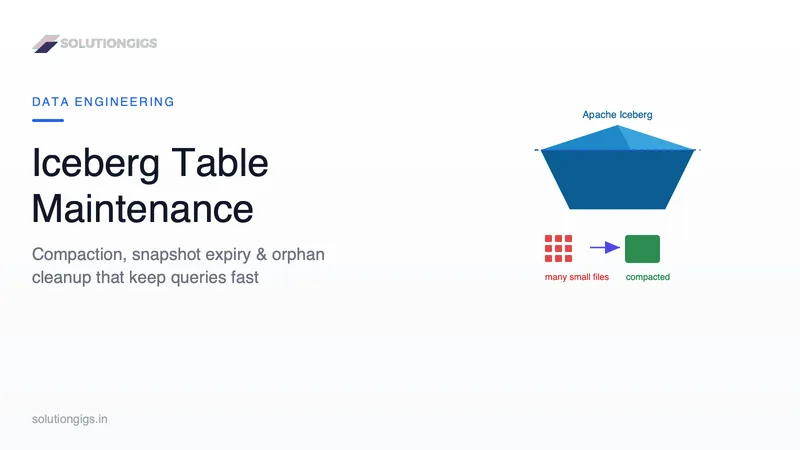
Apache Iceberg Table Maintenance: Compaction & Cleanup
Your Iceberg table was fast for the first month. Now the same query takes 4x longer and your S3 bill quietly doubled — and nobody changed the code. The table just accumulated the cost of every write: thousands of small files, a snapshot per commit, and bloated metadata. This guide covers the four maintenance jobs (compaction, expire_snapshots, remove_orphan_files, rewrite_manifests), the exact Spark SQL, the order they must run in, and the retention gotchas that can silently delete your ability to roll back.
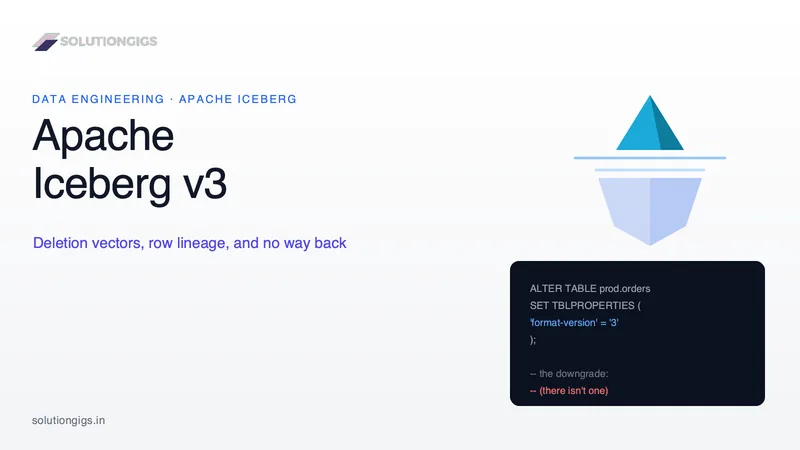
Apache Iceberg v3: What Actually Changed, and When to Upgrade
Apache Iceberg v3 adds deletion vectors, row lineage, the variant type and geospatial types — and the upgrade is one line of SQL with no way back. This guide covers what each feature actually changes, the engine support matrix as of August 2026 (including the Trino and Athena gaps that block most fleets), what the widely-quoted AWS benchmark really measured, and a migration runbook. With two interactive tools: a delete-metadata explorer and a readiness checker for your own engines.
How to Become a Data Engineer: Skills, Roadmap & Salary
How to become a data engineer: the four real entry paths, a six-month roadmap with stop conditions, current US and India salary data, and the honest catch. Demand is real - Robert Half puts the US starting midpoint at $156,250 and 78% of tech leaders are adding headcount - but entry-level hiring is down about 65% against 2019, which is why finishing a course and getting no callbacks are both normal. Inside: what the primary sources actually say (including the BLS stat every guide miscites), the four doors into the field and which is shortest, a three-tier skill order, a month-by-month roadmap with stop conditions, US and India salary tables with collection dates, and the portfolio bar that gets callbacks.