
Apache Iceberg Hidden Partitioning: How It Actually Works
Last Updated: August 2026 | 10 min read
Quick Answer: Apache Iceberg hidden partitioning lets you partition a table by a transform of a column — like days(order_ts) or bucket(16, customer_id) — while analysts keep querying the plain column. Iceberg stores the partition value in metadata and derives it automatically from a normal predicate such as WHERE order_ts >= '2026-01-01', so files are pruned correctly with no extra partition column, no dt= folders, and no accidental full-table scans. And because the partition spec lives in metadata, you can even change it later without rewriting a single data file.
Partitioning is the oldest performance trick in the data lake, and for a decade it was also the most error-prone. Apache Iceberg hidden partitioning removes the foot-guns: it decouples how a table is physically laid out from how people query it. If you have ever debugged a query that scanned 4 TB because someone forgot WHERE dt='...', this is the feature you came for. This guide covers what hidden partitioning is, the transforms Iceberg gives you, how pruning works under the hood, and partition evolution — the trick that makes Iceberg partitioning genuinely different from everything before it.
What is hidden partitioning?
Hidden partitioning means the engine applies the partition logic, not the analyst. You declare a partition transform once at table-creation time, and from then on Iceberg computes and stores the partition value for every row — while every query still references the original, untransformed column.
Compare the two worlds. In a Hive-style table you physically bucket data into directories and add a synthetic column:
-- Hive-style: the analyst must know the physical layout
SELECT * FROM orders
WHERE dt = '2026-01-15'          -- forget this line = full table scan
  AND order_ts >= '2026-01-15';
In Iceberg you partition by a transform of the real timestamp, and the query never mentions a partition column at all:
-- Iceberg hidden partitioning: query the natural column
CREATE TABLE db.orders ( order_id BIGINT, customer_id BIGINT, order_ts TIMESTAMP, amount DOUBLE )
USING iceberg
PARTITIONED BY (days(order_ts));

SELECT * FROM db.orders
WHERE order_ts >= TIMESTAMP '2026-01-15'
  AND order_ts <  TIMESTAMP '2026-01-16';   -- Iceberg prunes to one day's files
There is no dt column, no dt=2026-01-15/ folder to remember, and no way to "forget the partition filter." The partition value (2026-01-15) is derived from your predicate on order_ts. That single design choice eliminates the most common performance bug in data lakes.
How hidden partitioning works under the hood
When you write a row, Iceberg runs the partition transform and records the result in the manifest — the metadata file that lists data files along with per-column and per-partition statistics. At read time, the planner takes your predicate, applies the same transform, and skips any manifest or data file whose partition range can't match. This is file pruning, and it happens before a single byte of data is read.
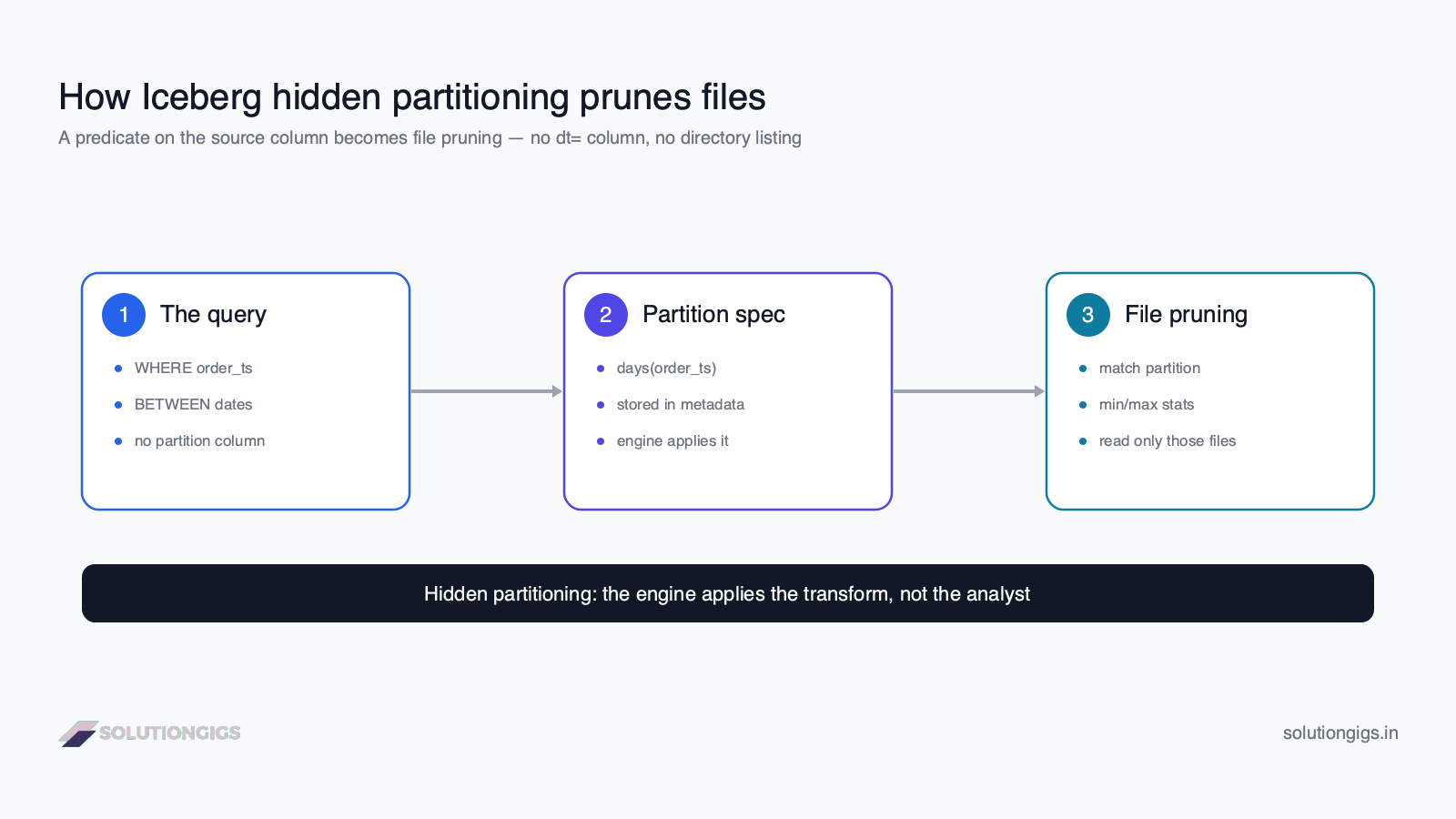
The flow has three stages:
- The query filters on the natural column —
WHERE order_ts BETWEEN …. The analyst writes nothing about partitions. - The partition spec stored in table metadata says the table is partitioned by
days(order_ts). Iceberg applies that transform to the predicate's bounds. - Pruning compares the derived partition value against the min/max partition stats in each manifest and data file, and reads only the matching ones.
Because pruning is driven by metadata statistics rather than a directory listing, it works on object stores like S3 without the slow, eventually-consistent LIST calls that plague Hive tables. (Skipping files is only half the story — Iceberg also keeps column-level statistics for finer-grained data skipping within the surviving files.)
The Iceberg partition transforms
A transform is the function Iceberg applies to a column to compute its partition value. Choosing the right one is the whole game.
| Transform | Example | Best for | Notes |
|---|---|---|---|
identity |
identity(country) |
Low-cardinality categoricals | The value itself; same as a classic partition column |
year / month / day / hour |
days(order_ts) |
Time-series data | The most common choice; partitions a date/timestamp without a derived column |
bucket(N, col) |
bucket(16, customer_id) |
High-cardinality keys | Hashes into N buckets; controls partition count and helps joins/equality filters |
truncate(L, col) |
truncate(10, zipcode) |
Prefix grouping | Groups strings/numbers by a leading prefix or width |
Two rules of thumb from production:
- Use time transforms (
days,hours) for anything with an event timestamp. They give you natural time-range pruning, which is what 90% of analytical queries filter on. - Use
bucket(N, …)for high-cardinality keys, neveridentity. Partitioning byidentity(customer_id)on a million customers creates a million partitions and a catastrophic small-files problem.bucket(16, customer_id)gives you 16 even partitions and still prunes an equality filter (WHERE customer_id = 123) to a single bucket.
You can also combine transforms — PARTITIONED BY (days(order_ts), bucket(16, customer_id)) — to prune on both time and key. For a deeper treatment of choosing partition granularity, file sizes, and bucketing vs Z-ordering, see our guide to data partitioning strategies.
Partition evolution: change partitioning without a rewrite
This is the feature that has no equivalent in the Hive world. Because the partition spec is metadata, not a folder layout, you can change how a table is partitioned without rewriting existing data.
-- Started with daily partitions; traffic grew, switch to hourly for new data
ALTER TABLE db.orders ADD PARTITION FIELD hours(order_ts);
ALTER TABLE db.orders DROP PARTITION FIELD days(order_ts);
Old data files keep the partition spec they were written with; new files use the new spec. Iceberg records the spec ID each file used and plans queries across both layouts transparently — a WHERE order_ts … filter still prunes correctly whether the file was written under the daily or the hourly spec. No downtime, no giant backfill, no INSERT OVERWRITE of the whole table.
From experience: on Telemetrix, our infrastructure-monitoring platform, an events table was originally partitioned by
days(event_ts). As device volume climbed, individual daily partitions ballooned past the ideal file size. In a Hive table, re-partitioning to hourly would have meant a multi-hour, high-risk rewrite of years of history. In Iceberg it was twoALTER TABLEstatements that took milliseconds — only new data landed in hourly partitions, and every historical query kept working. That single capability is worth the migration on its own.
Partition evolution pairs naturally with regular Iceberg table maintenance: if you do want old data re-laid-out under the new spec, a scheduled compaction (rewrite_data_files) can rewrite it on your terms, in the background, instead of blocking a release.
Hidden partitioning vs Hive-style partitioning
| Dimension | Hive-style partitioning | Iceberg hidden partitioning |
|---|---|---|
| Partition definition | Physical folders (dt=.../) + extra column |
Transform of a real column, stored in metadata |
| Query must filter on | The derived partition column (dt) |
The natural column (order_ts) |
| Forgot the partition filter? | Full-table scan | Still prunes — no separate column to forget |
| Query planning | Directory LIST (slow on S3) |
Metadata + statistics (no listing) |
| Change the partitioning | Rewrite the entire table | ALTER TABLE ADD/DROP PARTITION FIELD, no rewrite |
| Skew from bad key choice | Manual; hard to fix later | bucket() transform + evolution |
The verdict: Hive partitioning couples physical layout to every query and freezes your decision at table-creation time. Iceberg decouples them and lets you change your mind. If you're weighing table formats overall, our Delta Lake vs Iceberg comparison puts partitioning in the wider context of the two leading lakehouse formats.
Common mistakes to avoid
- Partitioning by a high-cardinality column with
identity.identity(user_id)oridentity(order_id)creates a partition per value and a small-files disaster. Usebucket(N, …)instead. - Over-partitioning on time.
hours(order_ts)on a low-volume table produces thousands of tiny partitions. Start withdays, and evolve tohoursonly when daily files exceed your target size. - Assuming old files re-partition automatically. Partition evolution changes the spec for new writes; existing files are untouched until you compact them. Plan a
rewrite_data_filesif you need the history re-laid-out. - Filtering on a function of the column that hides the transform.
WHERE date(order_ts) = '2026-01-15'can defeat pruning depending on engine support; prefer range predicates on the raw column (order_ts >= … AND order_ts < …). - Ignoring file size. Hidden partitioning controls which files are read, not how big they are. Keep partitions in the hundreds-of-MB-to-GB range and run maintenance — see Iceberg table maintenance.
Learn Iceberg hands-on
Reading about pruning is one thing; watching a table version itself is another. Our free, no-signup interactive Apache Iceberg course lets you run Iceberg Spark SQL live in your browser — create tables, write data, time-travel across snapshots, MERGE, and evolve schema and partitions — with editable examples for every concept in this article. It's the fastest way to build the intuition behind hidden partitioning and partition evolution.
Frequently Asked Questions
What is hidden partitioning in Apache Iceberg?
Hidden partitioning is Iceberg's ability to partition a table using a transform of a column — such as days(order_ts) or bucket(16, customer_id) — while analysts keep querying the plain column. Iceberg stores the partition value in metadata and derives it automatically from a normal predicate like WHERE order_ts >= '2026-01-01'. There's no extra partition column and no dt= folder to filter on, so queries prune files correctly without anyone knowing the physical layout.
How is Iceberg partitioning different from Hive partitioning?
In Hive, partitioning is a physical folder layout (dt=2026-01-01/) plus an extra column; a query that forgets WHERE dt='...' scans the whole table. In Iceberg, partitioning is a metadata property expressed as a transform of a real column. The engine applies the transform and prunes files from a normal predicate on the source column — no separate partition column, no folder convention, and no accidental full-table scan.
What are Iceberg partition transforms?
Partition transforms are functions Iceberg applies to a column to produce the partition value: identity (the value itself), year/month/day/hour (time bucketing of a date or timestamp), bucket(N, col) (hash into N buckets for high-cardinality keys), and truncate(L, col) (prefix of a string or number). You declare them in PARTITIONED BY, and Iceberg records the transform and its result in table metadata so queries can prune on them.
Can you change partitioning in Iceberg without rewriting data?
Yes. Iceberg supports partition evolution: ALTER TABLE ... ADD PARTITION FIELD and DROP PARTITION FIELD change the partition spec without rewriting existing data files. Old files keep their old partitioning and new files use the new spec; Iceberg tracks which spec each file used and plans queries across both. This is impossible in Hive, where changing partitioning means rewriting the whole table.
Does an Iceberg query need to filter on the partition column?
No — that's the whole point of hidden partitioning. You filter on the ordinary source column (for example WHERE order_ts BETWEEN '2026-01-01' AND '2026-01-31') and Iceberg applies the partition transform (days(order_ts)) internally to prune files. There's no derived partition column to remember, which removes an entire class of accidental full-scan bugs.
What is bucket partitioning in Iceberg?
bucket(N, col) hashes a column into N fixed buckets and partitions by the bucket number. It's used for high-cardinality keys like customer_id where identity partitioning would create millions of tiny partitions. Bucketing spreads data evenly into a controlled number of partitions, which helps joins and equality filters (WHERE customer_id = 123 prunes to one bucket) while avoiding a small-files explosion.
Which engines support Iceberg hidden partitioning?
Hidden partitioning is part of the Iceberg table spec, so any spec-compliant engine honors it — Apache Spark, Trino, Flink, Dremio, and Snowflake all apply partition transforms and prune correctly. Partition evolution is likewise a metadata operation defined by the spec, though the exact ALTER TABLE syntax for adding or dropping a partition field is most complete in Spark SQL with the Iceberg extensions enabled.
Conclusion
Apache Iceberg hidden partitioning fixes the two things that always broke Hive-style partitioning: it stops queries from needing to know the physical layout, and it stops your table-creation decision from being permanent. You partition by a transform of a real column, the engine applies it, and pruning happens from ordinary predicates — so nobody forgets a dt= filter and nobody triggers a 4 TB scan by accident. Then partition evolution lets you change the layout later with two ALTER TABLE statements and zero rewrite. Together they make partitioning a decision you can get approximately right and refine over time, instead of one you have to nail on day one.
The fastest way to internalize it is to run it. Try our free, no-signup interactive Apache Iceberg course to create tables, evolve partitions, and time-travel live in your browser — and if you're building a lakehouse and want a hand, SolutionGigs can help. It's free to get started.

Mohammed Yaseen
Founder, SolutionGigs
Mohammed builds data platforms on Spark, Kafka and lakehouse table formats like Apache Iceberg, and writes about the partitioning and maintenance patterns that keep them fast in production. LinkedIn →