
Midjourney: Is It Free? + 10 Best Free AI Image Generators
Is Midjourney free in 2026? Honest answer: no. But here are 10 free AI image generators that actually work — DALL-E 3, Ideogram, Adobe Firefly, Leonardo AI, Stable Diffusion, NVIDIA Canvas. Full prompt guide included.

Quick Answer
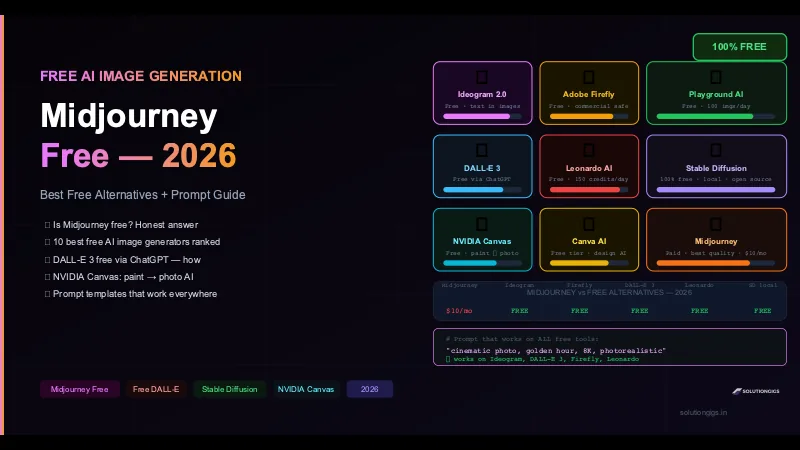
Midjourney is not free in 2026. The free trial was removed in 2023 and never returned. The cheapest plan is $10/month. But here's what is actually free: DALL-E 3 (via ChatGPT free plan), Ideogram 2.0 (free with watermark), Adobe Firefly (free tier, commercially safe), Leonardo AI (150 credits/day free), and Stable Diffusion (100% free, runs locally, no watermark, no limits). This guide ranks all 10 and shows exactly how to use each one.
Millions of people search "Midjourney free" every month. Most land on the same disappointment: the free trial is gone, has been gone since 2023, and Midjourney has no plans to bring it back.
The good news: the free AI image generation ecosystem in 2026 is genuinely excellent. Several tools now produce images that compete with Midjourney's quality — at zero cost.
This guide answers the question honestly, then gives you the complete list of what actually works for free.
Is Midjourney Free in 2026? The Honest Answer
No. Midjourney has no free plan, no free trial, and no free workaround.
Here is the full history so you're not wasting time chasing outdated information:
- March 2023: Midjourney removed its free trial (25 free images) after a flood of fake images went viral online
- 2024: Multiple "free Midjourney" tricks circulated (expired invite links, Discord bots) — all patched within days
- 2026: The situation is unchanged. There is no legitimate free tier
Current Midjourney pricing:
| Plan | Price | Fast GPU hours | Commercial rights |
|---|---|---|---|
| Basic | $10/month | 3.3 hours | ✅ Yes |
| Standard | $30/month | 15 hours | ✅ Yes |
| Pro | $60/month | 30 hours | ✅ Yes |
| Mega | $120/month | 60 hours | ✅ Yes |
Two things people get wrong about this table. Every paid plan includes commercial rights — you can sell prints, merchandise, and client work on the $10 Basic plan. The exception is revenue-based, not plan-based: businesses earning over $1 million in gross annual revenue must be on Pro or Mega. Free trial usage is the genuinely restricted tier — those images fall under a non-commercial CC BY-NC 4.0 licence and cannot be sold.
The second gotcha is that plans are metered in fast GPU hours, not image counts. Midjourney documents the burn: a standard V8 prompt (four images) costs 0.8 GPU minutes, an --hd prompt 1.3, so Basic's 3.3 hours is about 247 prompts or 988 images — far more than the "200 images" figure most guides still repeat. Extra fast hours cost $4 each and don't expire. For the full plan mechanics, Relax and Stealth rules and a calculator for your own volume, see our complete Midjourney AI guide. Separately, note that under current US law AI-generated output without meaningful human authorship cannot be registered for copyright — Midjourney granting you usage rights is not the same as you owning a copyright.
Is Midjourney worth paying for? Yes — its quality, coherence, and aesthetic control remain among the best in the industry. But for free alternatives, read on.
The 10 Best Free AI Image Generators in 2026
1. DALL-E 3 (Free via ChatGPT)
Best for: Precise prompt following, accurate text in images, realistic photos
DALL-E 3 is OpenAI's image model — the same one powering the image generation in ChatGPT. Access it free through ChatGPT's free plan.
How to use DALL-E 3 for free:
- Go to chatgpt.com → sign up (free)
- Start a new chat
- Type: "Generate an image of [your description]"
- ChatGPT calls DALL-E 3 automatically
Free limits: Free users get a limited number of image generations per day before hitting a rate limit. The exact count varies but is typically 2–4 per session before being asked to wait.
What makes it stand out:
- Best at following complex, detailed prompts word-for-word
- Handles text in images far better than Midjourney
- No watermark on generated images
- Images are yours to use (OpenAI's terms grant usage rights)
Example prompt:
A photorealistic Indian street food market at golden hour,
vendor serving samosas, steam rising, warm amber light,
DSLR photography style, f/2.8, 85mm lens, sharp focus,
vibrant colours — no text, no watermark
2. Ideogram 2.0 — Best for Text in Images
Best for: Posters, banners, social graphics, anything needing readable text
Ideogram is the only free AI image generator that reliably renders legible text inside images — a problem that plagued Midjourney and DALL-E for years.
Free tier: Unlimited slow-mode generations with a watermark. The watermark is small and placed in a corner — usable for personal projects.
How to use Ideogram free:
- Go to ideogram.ai → sign up with Google
- Type your prompt in the text box
- Select a style (Realistic, Design, Anime, 3D)
- Generate — images appear in 15–30 seconds
Example prompt for a social media post:
Modern tech company LinkedIn post banner,
headline text "Scale with AI",
dark navy background, purple accent,
clean sans-serif font, professional design
Ideogram renders the actual text "Scale with AI" correctly in the image — something Midjourney still struggles with.
3. Adobe Firefly — Best for Commercial-Safe Images
Best for: Designers, marketers, agencies needing commercial rights
Adobe Firefly is built on a dataset of licensed images, which means every image it generates is commercially safe — no copyright concerns, no licensing headaches.
Free tier: 25 "generative credits" per month. More than enough for regular personal use.
How to use Adobe Firefly free:
- Go to firefly.adobe.com → sign in with a free Adobe account
- Choose "Text to Image"
- Write your prompt
- Use "Content type", "Style", and "Effects" filters to refine
Pro tip: Firefly integrates directly into Photoshop (Generative Fill) if you have a Creative Cloud subscription. The standalone site is free.
What makes it stand out:
- No copyright risk — trained on Adobe Stock and public domain content only
- Excellent for product photography, marketing visuals, and editorial images
- The "Generative Fill" feature (extend/edit existing images) is world-class
4. Leonardo AI — Best for Volume and Consistency
Best for: Game assets, character consistency, high-volume generation
Leonardo AI gives you 150 free credits per day — roughly 30–50 image generations. That's more free generation than almost any competitor.
How to use Leonardo AI free:
- Go to leonardo.ai → sign up (free)
- Choose a model (Leonardo Diffusion XL for photorealism, Leonardo Anime XL for anime)
- Set dimensions (1:1, 16:9, 9:16 for social)
- Write prompt + negative prompt → Generate
Negative prompt tip:
Positive: professional headshot, business attire, soft studio lighting,
          sharp focus, 4K, high detail

Negative: blurry, low quality, extra fingers, deformed hands,
          watermark, text, ugly, bad anatomy
What makes it stand out:
- Best for maintaining consistent character appearances across multiple images
- Huge model library — photorealism, anime, concept art, fantasy, product shots
- Advanced controls: ControlNet, image-to-image, inpainting
5. Stable Diffusion — 100% Free, No Limits, No Watermark
Best for: Power users who want total control and unlimited generations
Stable Diffusion is open-source. When you run it locally, you have:
- Unlimited generations (no credits, no rate limits)
- No watermark on any output
- Full commercial rights (depending on model licence)
- 100% private — no images sent to any server
Setup (automatic1111 — most popular interface):
# Prerequisites: Python 3.10, git, NVIDIA GPU (8GB+ VRAM) or Apple M-series

# Clone
git clone https://github.com/AUTOMATIC1111/stable-diffusion-webui
cd stable-diffusion-webui

# Download a model (place in models/Stable-diffusion/)
# Recommended: DreamShaper XL or RealVisXL from CivitAI

# Run
./webui.sh          # macOS / Linux
webui-user.bat      # Windows
Opens at http://localhost:7860 — a full web UI in your browser.
No GPU? Use Google Colab for free:
# Google Colab — free T4 GPU, runs Stable Diffusion in ~5 minutes
# Search "Stable Diffusion Colab notebook" — dozens of ready-to-run notebooks exist

from diffusers import StableDiffusionXLPipeline
import torch

pipe = StableDiffusionXLPipeline.from_pretrained(
    "stabilityai/stable-diffusion-xl-base-1.0",
    torch_dtype=torch.float16
).to("cuda")

image = pipe(
    prompt="cinematic portrait of a woman, golden hour, 8K, photorealistic",
    negative_prompt="blurry, low quality, extra limbs",
    width=1024,
    height=1024,
    num_inference_steps=30
).images[0]

image.save("output.png")
What makes it stand out:
- No API cost whatsoever
- Community has built thousands of fine-tuned models (photorealism, anime, architecture, fashion)
- Advanced features: ControlNet (pose control), LoRA (character/style injection), inpainting, outpainting
6. NVIDIA Canvas — Free AI Painting
Best for: Landscape art, environment concept art, creative exploration
NVIDIA Canvas is a completely different product from the others. It's not a text-to-image tool — it's an AI-assisted painting app that transforms rough brush strokes into photorealistic landscapes in real time.
You paint with simple colour blobs:
- Blue at the top → Canvas renders a realistic sky
- Green below → turns into grass, trees, or mountains
- Brown at the base → becomes rocky terrain or dirt path
Every stroke updates the photorealistic preview in real time as you paint.
Requirements: NVIDIA GPU (GTX 1080 or better) · Windows only · Free download from NVIDIA's website
How to use NVIDIA Canvas:
- Download from nvidia.com/canvas (free)
- Install and open
- Select a "Material" (Sky, Cloud, Mountain, Grass, Water, Snow, Rock...)
- Paint rough shapes on the left canvas
- The right panel shows the AI-generated photorealistic version updating live
- Export as PNG or send to Photoshop
Best use case: Concept artists and game developers use it to rough out environment compositions in seconds before committing to detailed work.
7. Playground AI — Best Free All-Rounder
Best for: High quality, daily free use, beginners
Playground AI gives you 100 free images per day at high quality with no watermark. It's one of the most generous free tiers available.
- Models available free: Playground v2.5, Stable Diffusion XL, DALL-E 2
- Image sizes up to 1024×1024
- Negative prompts supported
- Simple, clean interface — easiest for beginners
Go to: playgroundai.com → sign up → start generating
8. Canva AI (Magic Media)
Best for: Non-designers who need social media visuals quickly
If you already use Canva for design, Magic Media (their AI image generator) is built right in. The free Canva plan includes 50 lifetime AI image credits.
How to use:
- Open any Canva design
- Click Apps → Magic Media (or press the AI button)
- Type your prompt
- The image appears directly in your design canvas — no exporting needed
Best for: Instagram posts, LinkedIn banners, presentation slides, thumbnails — any use case where you're already designing in Canva.
9. Microsoft Designer / Bing Image Creator
Best for: Windows users, Microsoft 365 subscribers
Microsoft's Bing Image Creator uses DALL-E 3 under the hood and is free with a Microsoft account. You get 15 "boosts" (fast generations) per week — after that, generations are slower but still free.
How to use:
- Go to bing.com/images/create
- Sign in with a Microsoft account
- Type your prompt → Generate
Integrated into Microsoft Edge browser and Copilot on Windows 11 — if you're already in the Microsoft ecosystem, this is the zero-friction option.
10. Craiyon (formerly DALL-E mini)
Best for: Absolute beginners, fun/experimental use, no sign-up needed
Craiyon is completely free with no account required. Image quality is noticeably lower than the other tools on this list, but it's the fastest to try with zero friction — go to craiyon.com, type a prompt, hit Draw.
Good for: checking if a concept is roughly workable before investing time in a better tool.
Full Comparison Table
| Tool | Free? | Watermark | Commercial? | No Sign-up | Best For |
|---|---|---|---|---|---|
| Midjourney | ❌ $10/mo | No | ❌ ($60+ plan) | ❌ | Highest quality overall |
| DALL-E 3 | ✅ (limited) | No | ✅ | ❌ | Prompt accuracy, text in images |
| Ideogram 2.0 | ✅ | Small | ❌ free tier | ❌ | Text in images, posters |
| Adobe Firefly | ✅ 25/mo | No | ✅ | ❌ | Commercial-safe creative work |
| Leonardo AI | ✅ 150/day | No | ✅ | ❌ | Volume, character consistency |
| Stable Diffusion | ✅ Unlimited | No | ✅ | ✅ | Power users, total control |
| NVIDIA Canvas | ✅ | No | ✅ | ❌ | Landscape concept art |
| Playground AI | ✅ 100/day | No | ✅ | ❌ | Beginners, daily use |
| Canva AI | ✅ 50 lifetime | No | ✅ | ❌ | Design integration |
| Bing Image Creator | ✅ 15 fast/wk | No | ✅ | ❌ | Windows / Microsoft users |
| Craiyon | ✅ Unlimited | Yes | ❌ | ✅ | Experiments, no account |
Prompt Writing Guide — Works Across All Tools
The same prompt structure works whether you're using DALL-E 3, Ideogram, Stable Diffusion, or any other generator. Master this and your output quality immediately doubles.
The 5-Part Prompt Formula
[Subject] + [Setting/Context] + [Style] + [Quality modifiers] + [Lighting]
Example breakdown:
Subject:           "Indian software engineer working at desk"
Setting/Context:   "modern glass office, dual monitors, laptop"
Style:             "cinematic photography, DSLR, 35mm lens"
Quality:           "8K resolution, sharp focus, photorealistic"
Lighting:          "warm afternoon light through window, soft shadows"

Final prompt:
"Indian software engineer working at desk in a modern glass office
with dual monitors and laptop, cinematic photography style, DSLR,
35mm lens, 8K resolution, sharp focus, photorealistic, warm afternoon
light through window, soft shadows"
Style Keywords That Work Everywhere
Photorealistic:
photorealistic · DSLR photography · 8K · sharp focus ·
award-winning photo · National Geographic style
Cinematic:
cinematic · movie still · anamorphic lens · film grain ·
golden hour · dramatic lighting · depth of field
Illustration:
digital illustration · concept art · detailed · vibrant colours ·
artstation trending · by Greg Rutkowski
Minimalist / Product:
clean white background · product photography · studio lighting ·
commercial photography · isolated · shadow
Portrait:
professional headshot · soft studio lighting ·
bokeh background · f/1.8 · sharp eyes · natural skin texture
Negative Prompts — What to Always Exclude
Negative prompts tell the AI what NOT to generate. Add these to every prompt:
blurry, low quality, low resolution, watermark, text,
signature, extra fingers, deformed hands, bad anatomy,
ugly, distorted face, extra limbs, cloned face,
oversaturated, grainy, pixelated, jpeg artefacts
Which Free Tool Should You Use?
Need text inside the image (logo, poster, banner)?
  └─ Ideogram 2.0 — only free tool that does this reliably

Need commercial rights for client work?
  └─ Adobe Firefly — commercially licensed, no legal grey area

Want the most generations per day?
  └─ Leonardo AI — 150 credits/day, no watermark

Already in the Microsoft / Windows ecosystem?
  └─ Bing Image Creator — DALL-E 3 quality, free, already on your machine

Want total control with no limits, ever?
  └─ Stable Diffusion locally — unlimited, no watermark, open source

Concept art / landscape painting?
  └─ NVIDIA Canvas — nothing else does what it does

Absolute beginner, no account, just try it now?
  └─ Craiyon — worst quality but zero friction

Best quality free experience overall?
  └─ Playground AI or Leonardo AI — both free, both excellent
Using AI Image Generation with Python (Stable Diffusion API)
For developers building image generation into applications, here's a working Python example using the Stable Diffusion API (no local GPU needed):
import requests
import base64
from PIL import Image
import io

# Using Stability AI's API — free tier available at platform.stability.ai
API_KEY = "your-stability-api-key"

def generate_image(
    prompt: str,
    negative_prompt: str = "blurry, low quality, watermark",
    width: int = 1024,
    height: int = 1024
) -> Image.Image:
    """Generate an image using Stable Diffusion XL via API."""

    response = requests.post(
        "https://api.stability.ai/v2beta/stable-image/generate/sd3",
        headers={
            "authorization": f"Bearer {API_KEY}",
            "accept": "image/*"
        },
        files={"none": ""},
        data={
            "prompt": prompt,
            "negative_prompt": negative_prompt,
            "aspect_ratio": "1:1",
            "output_format": "png",
            "model": "sd3.5-large-turbo"
        }
    )

    if response.status_code == 200:
        return Image.open(io.BytesIO(response.content))
    else:
        raise Exception(f"API error: {response.status_code} — {response.text}")


# Generate and save
img = generate_image(
    prompt="minimalist tech startup office, warm lighting, plants, macbooks, 8K",
    negative_prompt="people, blurry, cluttered, dark"
)
img.save("office.png")
print("Image saved to office.png")
For completely free local generation without any API, see our guide on running AI models locally with Ollama — the same principle applies to image models via ComfyUI and AUTOMATIC1111.
Frequently Asked Questions
Is Midjourney free in 2026?
No. Midjourney removed its free trial in 2023 and has not restored it. The cheapest plan is $10/month (Basic, ~200 images, no commercial rights). There is no legitimate free workaround.
What is the best free alternative to Midjourney?
For general image quality: Leonardo AI (150 free credits/day) and Playground AI (100 images/day). For text in images: Ideogram 2.0. For commercial use: Adobe Firefly. For unlimited free use with no watermark: Stable Diffusion running locally.
Is DALL-E free to use?
DALL-E 3 is accessible free through ChatGPT's free plan with limited daily generations. It's also available via the OpenAI API at $0.04–$0.12 per image. Bing Image Creator offers DALL-E 3 free with a Microsoft account (15 fast generations/week, slow after that).
What is NVIDIA Canvas and is it free?
NVIDIA Canvas is a free AI painting app that turns rough brush strokes into photorealistic landscape images in real time. It requires a Windows PC with an NVIDIA GPU (GTX 1080+). Download free from NVIDIA's website. Best for concept artists and game designers — not for general text-to-image generation.
What is the best free AI image generator with no watermark?
Stable Diffusion (local) — unlimited, no watermark, fully open source. Leonardo AI — free tier images have no watermark. Adobe Firefly — no watermark on free tier. Playground AI — no watermark on free images.
How do I write good AI image prompts?
Use the 5-part formula: Subject + Setting + Style + Quality modifiers + Lighting. Example: "Indian engineer at laptop, modern co-working space, cinematic photography, 8K sharp focus, warm afternoon light." Add a negative prompt: "blurry, watermark, extra fingers, bad anatomy, low quality."
Can I use AI-generated images commercially for free?
Adobe Firefly (free tier) — yes, commercially licensed. Stable Diffusion (local) — yes, depending on the model. DALL-E 3 — yes per OpenAI's terms. Midjourney — requires $60/month Pro plan. Ideogram free tier — no commercial use without upgrading. Always verify current terms before commercial use.
Conclusion
Midjourney is not coming back for free — that ship sailed in 2023. But in 2026, the free alternatives are genuinely impressive.
The practical recommendation:
- Start with Leonardo AI (150 free credits/day) or Playground AI (100/day) — both match or approach Midjourney quality at zero cost
- For text in images: Ideogram 2.0
- For commercial design work: Adobe Firefly
- For unlimited, private, no-limits generation: Stable Diffusion locally
The only reason to pay for Midjourney today is if you specifically need its aesthetic — that painterly, cinematic, slightly surreal look that it's still best at. For pure photorealism, product photography, and commercial work, the free tools covered here are fully competitive.
Want to go further? If you're a developer building image generation into your product, see how to combine these tools with open source LLMs for a fully AI-powered creative pipeline. Or explore generative AI examples across industries to understand where AI image generation is being deployed at scale.
Need to add AI image generation to your product? SolutionGigs connects you with vetted AI engineers who have shipped generative AI features in production — free to post.
Mohammed Yaseen
Founder, SolutionGigs
Mohammed builds AI-powered products and has integrated generative AI — text, image, and audio — into production applications. He tests new AI tools weekly and covers what actually works beyond the marketing claims. LinkedIn →
More in AI Development
50+ Practical Examples of AI in Everyday Life & Work
50+ real examples of AI in everyday life across 12 industries — healthcare, finance, education, manufacturing, agriculture, retail, and generative AI. Real companies, how they work, and Python code included.
Self-Host n8n on a $5 VPS — Full Setup, Start to Finish
Blank Ubuntu VPS to a secured, production-ready n8n instance with Docker, Nginx, and HTTPS — for about $5/month. Includes firewall setup, auto-start on reboot, and a real cost breakdown vs cloud n8n.
Ollama Tutorial: Run LLMs Locally for Free — Python Guide
Run Llama 3.3, Mistral, Qwen 2.5, and 100+ open-source LLMs on your own machine for free with Ollama. Full Python tutorial — streaming, structured output, local RAG, and tool calling. No API key needed.