
Midjourney AI: How It Works, What It Costs, and Where It Stops
Midjourney AI explained for people who have to make it pay: how the V8 models work, what each plan buys in GPU hours, the prompt parameters that matter, and where it stops. With an interactive prompt builder, a plan calculator computed from Midjourney's documented per-job GPU costs, and a five-question decider that tells you whether a person-at-a-keyboard tool fits your production workflow — or whether you need an image model with an official API and a small pipeline around it.

Quick Answer: Midjourney AI is a subscription text-to-image and image-to-video service from Midjourney, Inc. You type a description, it returns a grid of four images, and you upscale, vary, edit or animate the one you like — through the midjourney.com web app or a Discord bot. Plans run from $10 to $120 a month and are billed in fast GPU hours, not images. It produces some of the most aesthetically strong images of any generator, and it has one hard limit that decides whether it fits your work: there is no public API, and the terms of service forbid automation. Midjourney is a tool for a person at a keyboard. The moment a machine needs to press "generate", you need something else.
Most Midjourney guides are written for hobbyists making wallpapers. This one is written for people who have to make it pay: a marketing team producing a campaign, a founder generating product visuals, an engineer asked "can we plug Midjourney into the pipeline?" It explains how the current V8 models work, what each plan actually buys in prompts and images (computed from Midjourney's documented GPU costs, not guessed), which prompt parameters matter, what you legally own, and the exact point where Midjourney stops fitting a production workflow. Three interactive blocks along the way — a prompt builder, a plan calculator and a five-question workflow decider — mean you leave with answers for your numbers, not mine.
What is Midjourney AI?
Midjourney is a generative AI image model and the company that runs it. Midjourney, Inc. is an independent, self-funded research lab based in San Francisco, founded by David Holz, who previously co-founded the hand-tracking company Leap Motion. The service opened in public beta on 12 July 2022 inside Discord, which is why so much of its vocabulary — /imagine, U1–U4, V1–V4 — reads like chat commands. Since 2024 the primary interface has been the web app at midjourney.com; Discord still works and shares the same account and GPU allowance.
It sits alongside OpenAI's GPT Image models, Google's Gemini image models and Imagen, Black Forest Labs' FLUX, Stability AI's Stable Diffusion family, Ideogram and Adobe Firefly. What distinguishes it is not raw capability but taste: Midjourney tunes its default aesthetic aggressively, so an unremarkable prompt still returns a composed, lit, colour-graded image. That is also its trade-off — the house style shows up whether you asked for it or not, which is what the --stylize and --raw parameters exist to manage.
The model timeline that matters in 2026
| Release | Date | What changed |
|---|---|---|
| V7 | April 2025 (default from June 2025) | Personalisation on by default, Draft mode, Omni Reference (--oref) for putting a specific person or object into a scene |
| Video V1 | June 2025 | Image-to-video: animate a still into a 5-second clip, extendable to about 21 seconds |
| V8 alpha | 17 March 2026 | New model; roughly 5× faster generation; native 2K output with --hd |
| V8.1 | 14 April 2026 (default from 11 June) | Restored image prompts and weights; HD 3× faster and cheaper; standard images in about 4 seconds |
| V8.2 | 24 July 2026 | Aesthetics and personalisation pass; edit model added 27 August with instruction edits, inpainting, outpainting and up to four reference images |
Two practical consequences. First, most tutorials and parameter cheat-sheets online describe V6 or V7 and will steer you wrong on V8.x — --q, --turbo and Omni Reference were unsupported on V8 at the time of writing, so you pin --v 7 when you need them. Second, generation is now fast enough that the bottleneck is no longer the GPU. It is the human deciding what to type next, which becomes the whole story once you try to scale it.
How does Midjourney work?
Midjourney turns a text description into an image by running a diffusion model that iteratively refines random noise toward a picture matching your prompt, then returns four candidates for you to choose between. You never see one image; you see a 2×2 grid, and everything after that is an editing loop around your choice.
The loop is the product. A job goes:
- Prompt — a description, optional image references, and
--parameters. - Grid — four images in roughly 4 seconds (standard) or 12 seconds (
--hd) on V8.1+. - Choose — upscale one (free from the grid), make subtle or strong variations, or remix with a changed prompt.
- Edit — the V8.2 edit model takes plain instructions ("make the mug blue, remove the laptop"), inpaints a masked region, or outpaints beyond the frame.
- Animate — optionally turn the still into a 5-second clip and extend it.
- Download — as PNG or JPEG at the rendered resolution; there is no vector output.
Three features shape results more than any parameter, and they are the ones newcomers skip:
- Personalisation — the model learns your taste from images you rate and quietly biases toward it. Turn it off (
--ptoggles it) when you are producing for a client whose taste is not yours. - Style references (
--sref) — hand the model an image or a style code and it borrows the look, not the content. This is how five separate prompts end up looking like one campaign. - Moodboards — a collection of images that acts as a persistent style reference across a project, so you are not pasting URLs into every prompt.
If you want the underlying theory, our prompt-engineering guide covers how these models parse language; here it is enough to know that Midjourney reads your prompt as a whole sentence, weights earlier words more heavily, and treats a keyword pile ("mug, desk, laptop, 8k, trending") as noise.
How to use Midjourney: the first hour done properly
The fastest route to a usable image is a subscription, the web app, one plain sentence, and --ar — nothing else on the first prompt. Everything you add after that should be a response to what the grid got wrong.
- Subscribe at midjourney.com. There is no free trial; Basic ($10) is enough to learn on. Sign in with Google or Discord.
- Open the Create tab. The prompt bar at the top takes the same text Discord's
/imaginedoes. - Write one sentence. Subject, setting, action, in that order: "a ceramic coffee mug on a wooden desk beside a laptop, soft window light". Adjectives after nouns; no lists of quality words — V8 ignores "8k, masterpiece" and older models were merely misled by them.
- Set the aspect ratio in the prompt.
--ar 4:5for a feed post,--ar 16:9for a hero image. Cropping afterwards throws away composition the model spent effort on. - Read the grid, then change one thing. Too stylised? Add
--s 50. Wrong mood? Change the lighting phrase. Right image, wrong detail? Use the edit model rather than re-rolling. - Lock the look before you scale. Once one image is right, use it as
--sreffor the rest of the set. - Download the right format. PNG for anything you will edit further; for the web, convert to WebP — our WebP vs PNG vs JPG comparison explains when each wins, and the image compressor will get a hero under a size budget.
The builder below assembles that first prompt for you and explains each flag as you add it. Change the sentence to your own subject and use the copy button.
Interactive · prompt builder
Build a Midjourney prompt that says what you mean
Describe the picture in a sentence, pick a look, then switch parameters on one at a time. The output updates live and the notes explain only the flags you actually used — so you learn the grammar instead of copying it.
Look
Light
Aspect ratio
Model version
Render mode
Your prompt
a ceramic coffee mug on a wooden desk beside a laptop, product photograph on a seamless background, centred, sharp focus, soft diffused window light --ar 4:5 --no text, watermark24 words of description · 2 parameters · paste into the midjourney.com prompt bar or after /imagine in Discord.
--ar 4:5Aspect ratio. Set it in the prompt; cropping a square afterwards throws away composition the model already spent on.--no text, watermarkNegative prompt. Name what you do not want; do not write "no text" in the description itself, because the model reads "text" as a subject.
--q, --turbo and Omni Reference are omitted because V8.x did not support them at the time of writing — pin --v 7 if you need them.Which Midjourney parameters actually matter?
Four parameters do most of the work — --ar, --s, --sref and --no — and the rest are for exploration or edge cases. Learn those four properly before touching the others.
| Parameter | Range (V8.2) | What it does | Use it when |
|---|---|---|---|
--ar W:H |
any ratio | Aspect ratio of the output | Always. Set it for the destination, never crop later |
--s / --stylize |
0–1000, default 100 | How much of Midjourney's house aesthetic to apply versus following the words literally | Lower (25–75) for product and technical images; higher (250+) for concept and mood |
--sref |
image URL or style code | Borrow the visual style of a reference, not its content | Any set of images that must look like one family |
--no |
comma list | Negative prompt — things to exclude | Text, watermarks, extra people, brand marks |
--c / --chaos |
0–100 | How different the four grid images are from each other | Early exploration of a brief you have not decided on |
--w / --weird |
0–3000 | Pushes toward unusual, off-kilter results | Concept art; never client sign-off work |
--raw |
flag | Reduces automatic beautification | With low --s, when the image must look like the words |
--hd |
flag | Renders at 2K natively (V8.1+) | Print, hero images, anything you would otherwise upscale |
--draft |
flag | 24 low-res thumbnails for half the GPU cost of a standard prompt | Finding the composition before spending on the render |
--tile |
flag | Seamless repeating pattern | Textures, wallpapers, fabric |
--v |
7, 8.1, 8.2 | Pin a model version | --v 7 for Omni Reference or to reproduce an older result |
--oref |
image URL (V7 only) | Omni Reference: put a specific person, character or object into the scene | Consistent characters — but on V7, until the V8 version ships |
Two errors account for most bad results. Writing the exclusion in the description ("no text on the mug") — the model reads "text" as a subject and adds some; use --no text. And pushing --s up to fix a boring image when the actual fix is a better lighting or composition phrase: stylize changes how Midjourney interprets, not what you asked for.
How much does Midjourney cost?
Midjourney costs $10, $30, $60 or $120 a month depending on plan, and the real unit of cost is fast GPU hours, not images. Every plan includes a monthly allowance of fast hours; every job burns a documented number of GPU minutes; and what happens when you run out depends on which plan you are on.
| Basic | Standard | Pro | Mega | |
|---|---|---|---|---|
| Monthly | $10 | $30 | $60 | $120 |
| Billed yearly (per month) | $8 | $24 | $48 | $96 |
| Fast GPU hours / month | 3.3 | 15 | 30 | 60 |
| Relax mode (unlimited image jobs, queued) | — | ✓ | ✓ | ✓ |
| Relax mode for SD video | — | — | ✓ | ✓ |
| Stealth mode (hidden from public gallery) | — | — | ✓ | ✓ |
| Concurrent fast jobs | 3 | 3 | 12 | 12 |
| Extra fast hours | $4/h | $4/h | $4/h | $4/h |
Prices and allowances from Midjourney's published plan page and documentation, September 2026. They change without notice; the calculator below is a shape, not a quote.
What a fast hour actually buys
Midjourney documents the GPU cost of each job type, and it is the piece every pricing article skips:
| Job (V8.1 / V8.2) | Fast GPU minutes | Output |
|---|---|---|
| Standard prompt | 0.8 | 4 images |
--hd prompt |
1.3 | 4 images at 2K |
--draft prompt |
0.4 | 24 low-res images |
| Grid upscale (U buttons) | 0 | 1 image |
| Creative / subtle upscale | 2 | 1 image |
| SD video batch | 8 | 4 × 5-second clips |
| HD video batch | 26 | 4 × 5-second clips |
Run the arithmetic and the plans look very different from their price tags. Basic's 3.3 hours is 247 standard prompts, or 988 images — far more than a solo creator uses, and the reason Basic is the right answer for most individuals. Standard's 15 hours is 1,125 standard prompts, or 692 HD prompts, or just 34 HD video batches: video is where allowances evaporate. And Standard's unlimited Relax mode means image-heavy users who can tolerate a queue of up to about 30 minutes per job at peak never need to buy a fast hour at all.
Three rules move the recommendation more than volume does:
- Stealth starts at Pro. On Basic and Standard every image you make is visible in the public member gallery, attached to your account. For client work under NDA that alone forces $60.
- Revenue over $1M a year means Pro or Mega, by the terms of service, regardless of usage.
- Topping up beats upgrading at low volume. Basic plus two or three $4 hours is cheaper than Standard until you pass roughly 8 fast hours a month — and Standard's Relax mode only helps if you will actually wait.
Set your own month below. The all-in figure includes any extra hours you would buy, and the eligibility rules are applied for you.
Calculator · documented GPU costs, September 2026
Which Midjourney plan does your month actually need?
Midjourney bills in fast GPU hours, not images. Set a month of work below and the calculator converts it to GPU minutes with the per-job costs from Midjourney’s own documentation, applies the plan rules, and prices every tier — including the extra fast hours you would buy if you run over.
Images this month
1,360
Four per prompt.
Fast GPU minutes if nothing waits
332
5.5 fast hours.
Cheapest eligible plan
Basic · $18.93
$10 plan + $8.93 extra fast hours
| Plan | Fast hours | You need | Overage | All-in / month |
|---|---|---|---|---|
| Basic$10/mo | 3.3 h | 5.5 h | +2.2 h · $8.93 | $18.93 |
| Standard$30/mo · relax | 15 h | 5.5 h | — | $30 |
| Pro$60/mo · stealth · relax | 30 h | 5.5 h | — | $60 |
| Mega$120/mo · stealth · relax | 60 h | 5.5 h | — | $120 |
--hd prompt 1.3 min, creative upscale 2 min, SD video batch 8 min, HD video batch 26 min; extra fast time $4/hour. Prices and allowances are Midjourney’s published figures at the time of writing and change without notice — treat the output as a shape, not a quote. Relax mode has no meter but queues for up to about 30 minutes per job at busy times.Notice the line the calculator cannot price: the person running those prompts. A designer producing 300 prompts a month is spending real hours choosing, re-rolling and editing. On a hobby that is the fun part. In a business it is the cost that dominates the subscription by an order of magnitude — and it is the reason the next section exists.
Is Midjourney free?
No. Midjourney ended its free trial in March 2023 after abuse of trial accounts and has not brought it back; the only unpaid experience is browsing other people's work in the Explore tab. If you need free generation, our guide to free Midjourney alternatives ranks ten tools that are genuinely free, several with official APIs — which matters for the reason the next section explains.
Who owns Midjourney images, and can you use them commercially?
Paying subscribers own the images they create, under Midjourney's terms, and can use them commercially — but owning an AI image is not the same as being able to stop anyone else from using it. The gap between those two sentences is where businesses get surprised.
The ownership grant is in the Midjourney Terms of Service, with two conditions: businesses over $1M in gross annual revenue must be on Pro or Mega, and on any plan below Pro your images are published in the public gallery under a licence that lets other members remix them. Stealth mode on Pro and Mega is the fix, and for anything confidential it is not optional.
The copyright question is separate and settled less in your favour. The US Copyright Office's January 2025 report, Copyright and Artificial Intelligence, Part 2: Copyrightability, concluded that output generated purely from prompts is not protectable — prompts, however detailed, do not amount to authorship — while human-authored selection, arrangement and modification of AI material can be. In practice: a Midjourney image dropped straight into an ad is yours to use and anyone's to copy; a composition you substantially edited, arranged and integrated has a better claim.
Then there is the litigation. Disney and Universal sued Midjourney for copyright infringement in June 2025, Warner Bros. Discovery followed in September 2025, and as of July 2026 the cases were in discovery (TechCrunch). None of this changes what you may do with an image of your own product; it does mean prompts that invoke recognisable characters or living artists are a legal exposure you carry, not Midjourney. A short internal rule — no named characters, no named living artists, Stealth on for client work — removes most of it.
Where Midjourney stops: the production gap
Midjourney has no public API, its terms of service prohibit automated access, and everything it offers assumes a person is choosing between four images. That is the exact boundary of where it fits. Inside it, Midjourney is the best tool most teams will ever use. Outside it, using Midjourney at all is a liability.
The terms are unambiguous. The version effective 27 May 2026 states that you "may not use automated tools to access, interact with, or generate Assets" through the service. Every product marketed as a "Midjourney API" — and there are dozens — is an unofficial wrapper that logs into a real Midjourney account and drives the web app or Discord with browser automation. They work until they don't; the failure mode is a banned account, mid-project, with no recourse. I have been asked to build on one of these exactly once, and the honest answer was the same then as now: not with a client's account.
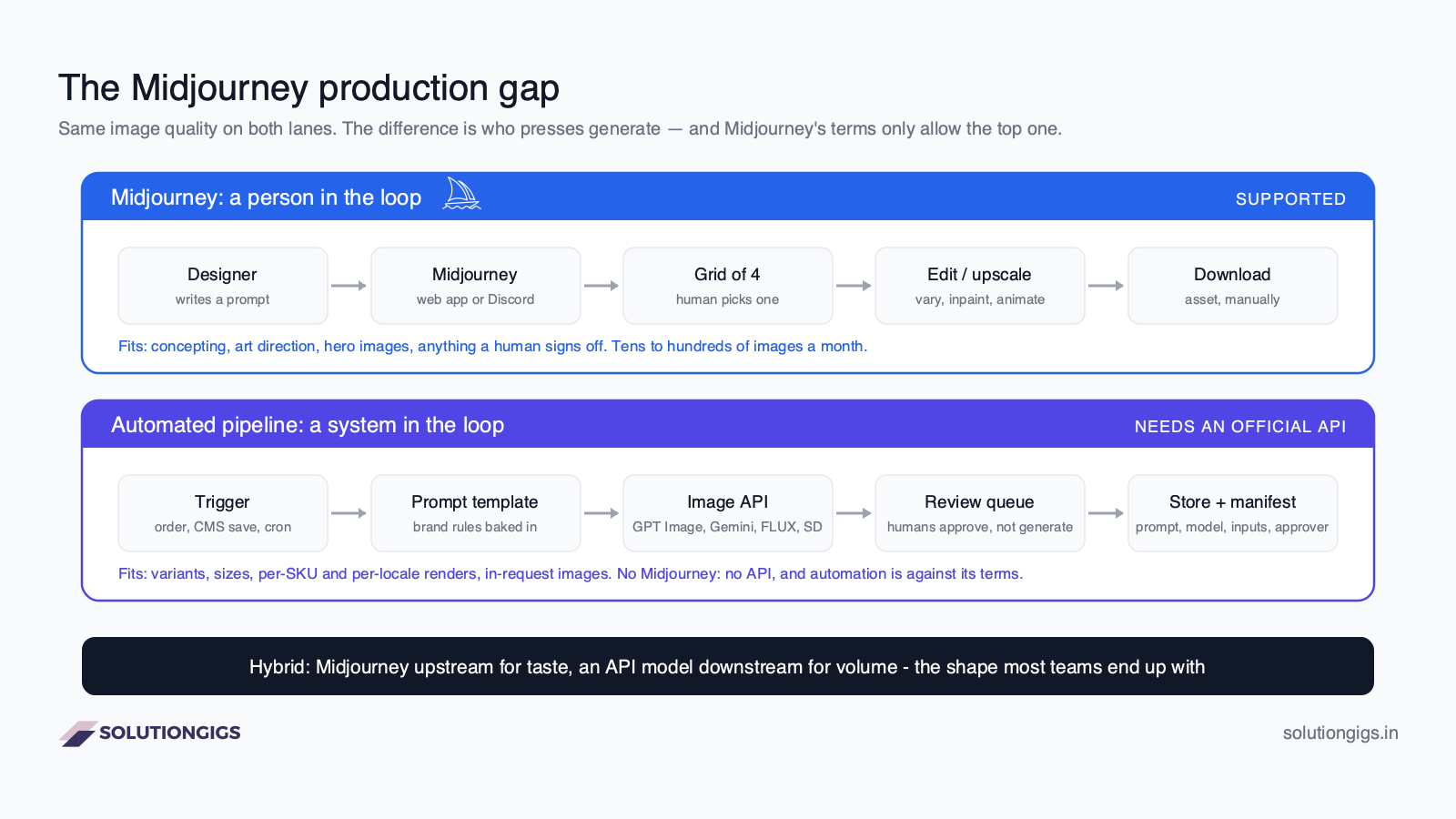
What the diagram makes visible is that the gap is not about image quality. It is about who presses the button. The five things a production image workflow eventually needs are the five things a person-at-a-keyboard tool structurally cannot give you:
| Production need | What Midjourney offers | What a pipeline needs |
|---|---|---|
| A trigger | A human types a prompt | An order, a CMS save, a nightly job calls an endpoint |
| Repeatability | Style references approximate a look | A seed, a fine-tune or a control input that pins the same product, every time |
| Throughput | 3–12 concurrent jobs, one operator | Hundreds of renders in parallel, nobody watching |
| Latency | Seconds to render, minutes to choose | The image exists inside the request that asked for it |
| Traceability | A gallery and a prompt history | Every asset linked to its prompt, model version, inputs and approver, for the day legal asks |
The workable pattern for most teams is a hybrid: Midjourney where taste matters and a human signs off — concepting, art direction, the hero image — and an image model with an official API for the repeatable volume: variants, sizes, per-SKU or per-locale renders. OpenAI's Images API, Google's Gemini image models through the Gemini API and Vertex AI, Black Forest Labs' FLUX (hosted API, or open weights you run yourself), Stability AI, Ideogram and Adobe Firefly Services all sell exactly that, with per-image pricing and terms written for automation. Where reference images cannot leave your environment — medical, financial, unreleased products — open weights on your own GPUs are the only compliant answer, and Midjourney is off the table entirely.
Answer five questions about your workflow — not your images — and the decider tells you which shape you are in and why.
Decider · five questions
Does Midjourney fit your production workflow?
Midjourney is a tool for a person at a keyboard. The moment your process needs a machine to press “generate”, it stops fitting — and that boundary is usually discovered three weeks into a project. Answer five questions about the workflow, not the images, and find out now.
What triggers an image?
Images per month?
Consistency needed across images?
Privacy of inputs and outputs?
How fast must the image exist after it is asked for?
Pull toward an API
1 / 20
Higher = less of this workflow can be a person.
Verdict
Midjourney, as it is
Your workflow is a person choosing images, and that is exactly what Midjourney is for. Buy the plan the calculator above suggested, invest a week in style references and personalisation, and you are done. There is nothing here that needs an engineer.
- triggerA person chooses when to generate — exactly the loop Midjourney is built for.
- volumeTens of images a month is comfortably one person and a Standard plan.
- consistencyA shared look is what style references and personalisation are for — Midjourney does this well.
- privacyPublic outputs are fine, so the default member gallery is not a problem.
- deadlineA same-day turnaround leaves room for a human review step.
lib/midjourneyModel.ts — argue with them in the comments.If the verdict was anything other than "Midjourney, as it is", the missing piece is engineering, not design, and it is small and well understood: a prompt template with the brand rules baked in, an image API behind a queue, a review step where humans stay in the loop, storage with a manifest per asset, and monitoring so you find out when the model provider changes something before your customers do. That is the shape of work I do as a forward deployed engineer on the services page — inside your stack, until it runs without me.
Common Midjourney mistakes
Most wasted Midjourney hours come from five habits, and none of them are about prompting talent.
- Keyword-pile prompts. "mug, desk, laptop, cinematic, 8k, award-winning" — V8 reads sentences. Write one.
- Cropping instead of
--ar. You are discarding composition the model optimised for the wrong frame. - Raising
--sto fix a dull image. Stylize changes interpretation, not content. Fix the light and the composition phrase first. - Leaving personalisation on for client work. The model is biasing toward your taste, not theirs. Toggle it off per prompt.
- Building a business process on an unofficial API. The account is the single point of failure and it is one policy sweep from gone. The hybrid pattern above costs the same and has no failure mode you cannot see.
A sixth, for teams: paying for Standard and never using Relax. If your work is images and you can queue overnight, Relax is the plan's actual value, and the calculator above shows it.
Reader poll
How does your team actually use AI image generation today?
Pick one to see how everyone else answered.
Frequently Asked Questions
What is Midjourney AI?
Midjourney is a text-to-image and image-to-video generation service from Midjourney, Inc., an independent research lab in San Francisco founded by David Holz. You describe a picture in words, optionally add reference images and parameters, and it returns a grid of four images you can upscale, vary, edit or animate. It is used through the midjourney.com web app or a Discord bot, and it is subscription-only.
Is Midjourney free?
No. Midjourney removed its free trial in March 2023 and has not restored it. The cheapest plan is Basic at $10 a month ($8 a month billed yearly), which includes 3.3 fast GPU hours — roughly 247 standard prompts, or about 988 images. If you need free image generation, use a tool with a free tier and an official API instead; our alternatives guide lists ten.
How much does Midjourney cost per month?
Four plans: Basic $10, Standard $30, Pro $60 and Mega $120 a month, each 20% cheaper billed annually. They include 3.3, 15, 30 and 60 fast GPU hours respectively; Standard and above add unlimited image generation in the slower Relax mode, and Pro and above add Stealth mode. Extra fast hours cost $4 each. Companies with more than $1M in annual revenue must use Pro or Mega.
Does Midjourney have an API?
No public API exists as of September 2026, and Midjourney's terms of service prohibit using automated tools to access the service or generate images. Every product sold as a "Midjourney API" is an unofficial wrapper that drives a real account through the web app or Discord, which puts that account at risk of a ban. For anything automated, use an image model with an official API and keep Midjourney for the human-judged work.
Can I use Midjourney images commercially?
Yes, if you are a paying subscriber: Midjourney's terms grant you ownership of the assets you create, with the condition that businesses over $1M in gross annual revenue subscribe to Pro or Mega. Two caveats matter. Unless you are on a Stealth-enabled plan your images are public in the member gallery, and under the US Copyright Office's 2025 guidance purely AI-generated images are not eligible for copyright, so owning an image is not the same as being able to stop others using it.
What is the latest Midjourney version?
V8.2 is the default model as of September 2026, released on 24 July 2026, with an editing model added on 27 August that supports instruction-based edits, inpainting, outpainting and up to four reference images. It followed V8.1 (April 2026, the default from June) and the V8 alpha of March 2026. V7 remains selectable with --v 7 and is still required for Omni Reference.
Which Midjourney parameters matter most?
Four do most of the work: --ar sets aspect ratio; --s (stylize, 0–1000, default 100) controls how much of Midjourney's own aesthetic is applied versus how literally it follows your words; --sref borrows the visual style of a reference image so a series looks like one campaign; and --no excludes elements. --c (chaos) and --w (weird) are for exploration, and --hd renders at 2K natively on V8.1 and later.
Conclusion
Midjourney AI is the best-looking image generator most people will use, and the reason is also its limit: it is built around a person looking at four images and choosing. Inside that loop — one designer, a Basic or Standard plan, style references to keep a set coherent, Stealth on for anything confidential — it is cheap and superb, and the calculator above will tell you the plan for your volume in ten seconds. Outside that loop, where an order or a schedule or a request has to produce an image with nobody watching, Midjourney cannot legitimately be part of the system at all, and the answer is a small, boring pipeline on an image model with an official API, with Midjourney kept upstream for the taste.
If the workflow decider told you that is where you are, and the person who would build it is you or nobody, tell me what needs building. I diagnose, quote, then work inside your stack until it runs without me — free to submit, and you get a scope and a price or a straight no.
Mohammed Yaseen
Founder, SolutionGigs
Data and AI engineer who works as a forward deployed engineer for teams putting generative models into production — image pipelines included. Every number in this article is computed from the model behind the interactive blocks, so when Midjourney changes a price, the post changes with it. LinkedIn →
More in AI Engineering
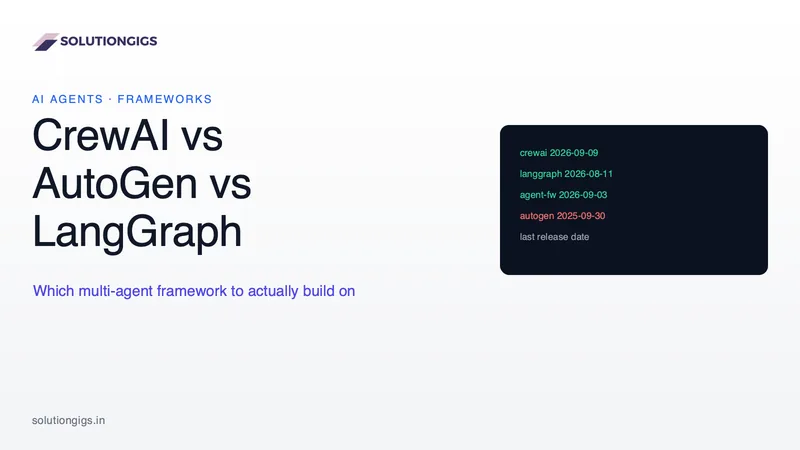
CrewAI vs AutoGen vs LangGraph: Which Multi-Agent Framework Should You Actually Use?
AutoGen is in maintenance mode and most comparison articles still miss it. We checked release dates on PyPI and GitHub, then compared CrewAI, LangGraph and Microsoft Agent Framework on architecture, failure behaviour and token cost — with a decision tree that tells you which to use, and when you need no framework at all.
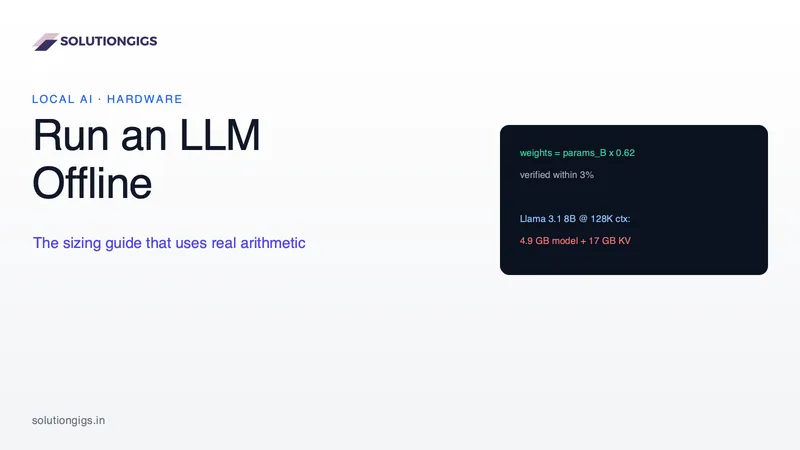
Run an LLM Offline: The Hardware Sizing Guide That Uses Real Arithmetic
Every local LLM guide hands you a lookup table that goes stale in a week. This one gives you the arithmetic instead — a weights formula verified within 3% against real model files, the KV cache maths that explains why your model slowed down mid-conversation, and a genuine offline checklist.
AI Agent Security: Stopping Prompt Injection
Prompt injection is the number one AI agent risk, and no prompt or filter fixes it. This guide covers the lethal trifecta, the arithmetic showing why a 99%-accurate guardrail is not a control, a decision table for which leg to cut in six common agent shapes, the exfiltration channels teams forget to audit, the MCP tool-poisoning and rug-pull attacks, the six research-backed design patterns that provably constrain agents, and how our own auto-publishing gate is built so a successful injection can flip at most one enum.