
Context Engineering: The Discipline That Replaced Prompt Engineering
Last Updated: August 2026 | 13 min read
Quick Answer: Context engineering is the practice of deciding what information occupies a model's context window at each step of a task — the system prompt, tool definitions, retrieved documents, conversation history, and memory. It replaced prompt engineering as the core skill because long-running agents fail from bad context far more often than from bad wording. The counterintuitive core of it: more context usually makes an agent worse, not better. The job is finding the smallest set of high-signal tokens that gets the task done — which means the primary skill is removal, not addition.
Two years ago the highest-leverage thing you could do to an AI feature was reword the prompt. Today, if you're building agents, it barely moves the needle.
The reason is simple. A single-turn prompt is maybe 500 tokens you control completely. A fifty-turn agent is 200,000 tokens, and you wrote almost none of them — they're tool results, retrieved documents, file contents, and the agent's own previous reasoning, accumulating turn after turn. Wording is a rounding error in a context window you're no longer curating.
This guide covers what context engineering actually is, the research showing why long contexts degrade, the four failure modes you'll hit in production, and the concrete techniques that fix each one. Everything with a number attached is cited.
What is context engineering?
Context engineering is the practice of deciding what enters a model's context window at each step of a task, and what gets removed when it stops being useful.
The context window is everything the model can see when it acts. In an agent, that's:
- The system prompt — role, constraints, output format
- Tool definitions — every tool's name, description, and input schema
- Retrieved content — documents, search results, database rows
- Conversation history — every prior turn, including tool calls and their results
- Memory — facts carried in from previous sessions
Prompt engineering optimizes the first bullet. Context engineering owns all five, plus their evolution over time.
The clearest one-line framing: prompt engineering asks "how do I phrase this?" Context engineering asks "what should the model know, see, and remember at the moment it acts — and what should it not?"
That last clause is where the real work is.
Why more context makes agents worse
Model accuracy degrades as input length grows, even on tasks that are trivial at short lengths. This is called context rot, and it has been measured across every major model family.
This is the finding that turns context engineering from a cost optimization into a correctness requirement.
Research published by Chroma evaluated 18 leading models — including Claude, GPT, Gemini, and Qwen variants — on how performance changes with input length. The conclusion: models do not process context uniformly across their windows. Performance degrades as input grows, the degradation is non-uniform and model-dependent, and it shows up even on simple tasks.
Four specific findings from that work are worth knowing, because each maps to a real bug:
| Experiment | Finding | What it means for your agent |
|---|---|---|
| Needle-in-a-haystack | Lower semantic similarity between question and answer accelerates the decline | Exact-match retrieval stays fine; paraphrased or conceptual lookups rot fastest |
| Distractors | Even a single distractor reduces accuracy, and the effect amplifies at longer contexts | One irrelevant retrieved document is not free — it actively costs you |
| LongMemEval | Large gap between focused prompts (relevant context only) and full prompts | Feeding the whole history instead of the relevant slice measurably hurts |
| Repeated words | Models fail at trivially replicating text as length grows | Long-context failures aren't a reasoning problem — they show up on tasks with no reasoning at all |
The distractor result is the one that should change your behaviour. It means the common instinct — "retrieve top-20 instead of top-5, just in case" — is not a safe hedge. You are trading a small chance of missing the answer for a measurable, compounding accuracy loss.
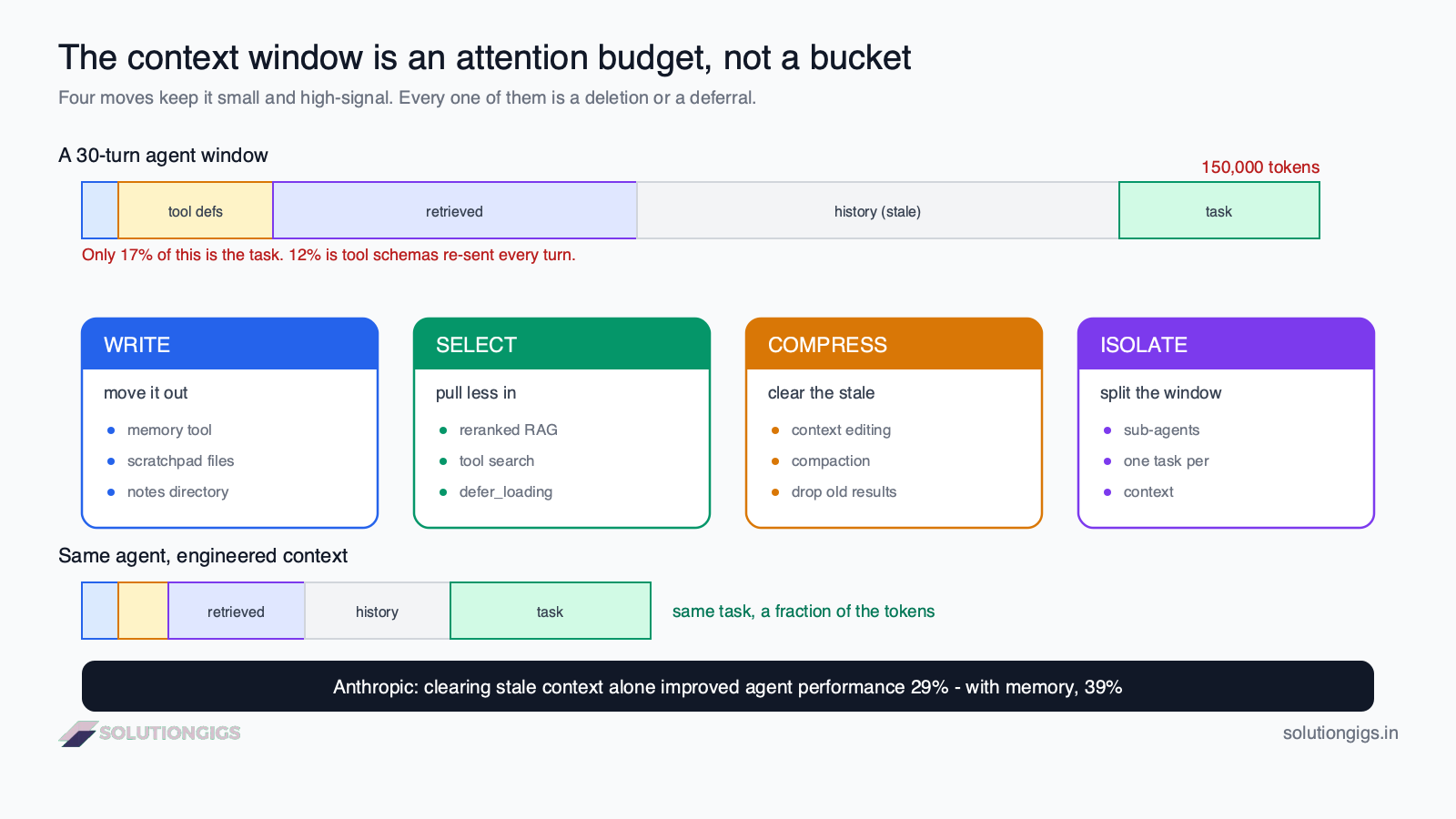
The mental model: a context window is not a bucket you fill. It's an attention budget you spend. Every token you add dilutes the ones that matter.
The four failure modes
Context problems fall into four distinct patterns, and each has a different fix. Diagnosing which one you have is most of the work.
1. Context rot — the window is too full
Accuracy drops as the window fills, per the research above. The agent starts missing instructions it followed perfectly ten turns ago.
Symptom: quality degrades steadily over a long session rather than failing outright. Fix: compress and clear (below).
2. Context distraction — irrelevant content crowds out relevant content
The retrieved documents contain the answer plus nine near-misses. The model latches onto the wrong one.
Symptom: confidently wrong answers that trace back to a plausible-but-irrelevant source. Fix: better selection — fewer, higher-precision retrievals.
3. Context clash — the window contains contradictions
An early turn established one approach; a later tool result implies another. Nothing was removed, so both are still in scope, and the model tries to satisfy both.
Symptom: the agent flip-flops, or produces output that half-follows two incompatible plans. Fix: clear superseded content instead of letting it accumulate.
4. Context poisoning — a wrong fact gets fixed in history
The agent hallucinates a detail on turn 5. That hallucination is now in the conversation history, so every subsequent turn treats it as established fact and builds on it.
Symptom: an error that gets more entrenched over time rather than self-correcting. Fix: validation at write time, and the willingness to prune history rather than only append to it.
Poisoning is the most dangerous of the four, because every other failure gets worse with length while this one gets worse with time. A single bad tool result at turn 3 can corrupt a fifty-turn run.
The four techniques: write, select, compress, isolate
Almost every context engineering technique reduces to one of four moves: write information out of the window, select only what's relevant back in, compress what's already there, or isolate work into separate windows.
This taxonomy is the useful one because it maps failure modes to fixes.
| Technique | What it does | Use when | Concrete implementations |
|---|---|---|---|
| Write | Move information out of context into external storage the agent can read back | State must survive beyond the window or the session | Memory tools, scratchpad files, notes directories |
| Select | Pull in only the relevant subset at each step | You have far more potentially-relevant data than fits | RAG, tool search, deferred tool loading |
| Compress | Summarize or delete content that has served its purpose | A long run is filling the window with stale material | Compaction, clearing old tool results |
| Isolate | Split work so each agent keeps a smaller, focused window | Subtasks are independent and each needs deep context | Sub-agents, separate contexts per workstream |
Most production systems use all four. They're layers, not alternatives.
Write: give the agent a place to put things
The simplest high-leverage change to a long-running agent is giving it a file to write notes to. Instead of carrying a finding across thirty turns of context, it writes the finding down and reads it back when needed.
Anthropic's client-side memory tool (memory_20250818) formalizes this: the model gets view, create, str_replace, insert, delete, and rename commands against a memory directory that you back with whatever storage you like. The context window holds a pointer; the storage holds the content.
A caution worth stating plainly: never write credentials, API keys, or tokens into agent memory. Memory persists across sessions and is replayed verbatim into future contexts — a secret written once is re-read into every later session that mounts that store.
Select: retrieve less, more precisely
This is where RAG lives, and where the distractor finding above should change your defaults. Retrieval quality matters more than retrieval quantity. Reranking to five excellent chunks beats dumping twenty adequate ones — not marginally, but measurably.
Selection also applies to tools, and this is the underserved half. Every tool an agent can call must have its schema in context so the model knows it exists. Connect four or five MCP servers and you can burn several thousand tokens on tool definitions before the user says anything — on every turn.
The fix is deferred loading: declare tools up front but keep their schemas out of context until a tool-search step surfaces the relevant ones.
tools = [
    # Always loaded — the agent's core capability
    {"name": "search_docs", "description": "...", "input_schema": {...}},

    # Declared but NOT in context until tool search surfaces it
    {"name": "generate_invoice", "description": "...",
     "input_schema": {...}, "defer_loading": True},
]
Deferred tools also preserve the prompt cache: schemas are appended when surfaced rather than swapping the whole tool list, so the cached prefix survives.
Compress: clear what's finished
Two distinct operations get conflated here, and the difference matters:
- Clearing removes stale content outright. Anthropic's context editing does this — the
clear_tool_uses_20250919strategy drops old tool results as the token limit approaches, while keeping the conversation structure intact. - Compaction summarizes instead of deleting. It condenses earlier history into a summary block when the context approaches a trigger threshold.
Clear when the content is done (a file you read three turns ago and already acted on). Compact when the content is superseded but still load-bearing (a long discussion whose conclusion still matters).
The measured impact is large. On Anthropic's internal agentic-search evaluation, context editing alone improved performance by 29%, and combining it with the memory tool reached 39%. In a 100-turn web search evaluation, context editing reduced token consumption by 84% while letting agents complete workflows that would otherwise fail from context exhaustion.
Read those numbers carefully, because they say something unintuitive: deleting information from the agent's context made it better at its job. Not cheaper-but-equal. Better.
Isolate: split the window
When two subtasks each need deep context and don't need each other's, run them in separate windows. Each sub-agent gets a focused context; only the result returns to the coordinator, not the sub-agent's working history. Our guide to building multi-agent systems covers the orchestration side.
The trade-off is real: each sub-agent re-establishes its own context, which costs tokens and latency. Isolate when subtasks are genuinely independent and sizeable — not to split one modest job into pieces.
A worked context budget
The most useful exercise in context engineering is writing down where your tokens actually go. Most teams have never done it, and are surprised by the answer.
Here's a realistic breakdown for a coding agent 30 turns into a session:
| Component | Tokens | Share | Notes |
|---|---|---|---|
| System prompt | 2,000 | 1% | Written once, stable, cacheable |
| Tool definitions (6 MCP servers) | 18,000 | 12% | Paid on every single turn |
| Retrieved docs / file contents | 45,000 | 30% | Much of it read once and never referenced again |
| Conversation history | 60,000 | 40% | Includes ~35,000 tokens of stale tool results |
| Current turn | 25,000 | 17% | The part actually about the task at hand |
| Total | 150,000 |
The system prompt — the thing prompt engineering optimizes — is 1%. The two biggest line items are tool definitions you're paying for repeatedly and history that has already served its purpose.
That table is the whole argument for context engineering in one place. If you want to improve this agent, rewording the system prompt is the least valuable edit available to you.
What we learned building this
At SolutionGigs, our infrastructure-monitoring platform Telemetrix runs an agent that answers questions about device telemetry — it queries our lakehouse, reads dashboards, and explains anomalies.
Our first version was straightforwardly wrong in the way this article describes. We had connected several MCP servers because each was individually useful, and we retrieved generously because retrieval felt cheap. The agent was good for about ten turns and then got noticeably worse — it would forget constraints from the system prompt, and occasionally re-answer a question it had already answered differently.
Three changes fixed it, in descending order of impact:
- Deferred tool loading. Most of our tool schemas weren't relevant to most questions. Moving them behind tool search recovered a large fixed cost we were paying on every turn.
- Clearing old tool results. A query result the agent had already summarized was pure weight. Dropping them stopped the late-session degradation almost entirely.
- Cutting retrieval from top-15 to top-5 with reranking. This is the one we resisted, because it felt like removing a safety margin. Accuracy went up. The distractor research explains why, and our experience matched it exactly.
The pattern across all three: every fix was a deletion. We added nothing. That's the part that's genuinely hard to internalize — the instinct when an agent underperforms is to give it more, and the correct move is usually to give it less.
The honest caveat: aggressive clearing can remove something that turns out to matter. When we cleared too eagerly, the agent occasionally re-ran a query it had already run. That's a real cost — just a much smaller one than the degradation it replaced. Tune the threshold; don't skip the technique.
Context engineering and cost
The cheapest token is the one you don't send — but the second cheapest is the one you send from cache.
Context engineering and cost control point the same direction, which is convenient. Two things compound:
- Fewer tokens per turn. In an agent loop you resend the accumulated context on every call, so a token added at turn 5 is paid again at turns 6 through 50. Removing it saves 45 times, not once.
- Cache-friendly structure. Prompt caching is a prefix match — stable content first, volatile content last. Cache reads cost roughly a tenth of a normal input token. Our guide to prompt caching covers the placement rules.
These interact in a way that catches people out: editing your system prompt mid-session invalidates the entire cached prefix behind it. So does adding or removing a tool. If you find yourself wanting to inject dynamic state into the system prompt — the current time, a mode flag, a user preference — put it after the cached prefix instead, in the message history where it invalidates nothing before it.
Common mistakes to avoid
- Treating the context window as a target to fill. A 1M-token window is a ceiling, not a recommendation. Filling it buys you degraded attention at maximum cost.
- Retrieving generously "just in case." Distractors measurably reduce accuracy. Precision beats recall for context.
- Connecting every MCP server you might need. Each one's schemas are a fixed per-turn tax. Defer what isn't core.
- Only appending, never pruning. If your agent's history can only grow, you've guaranteed both context rot and eventual poisoning.
- Putting dynamic values in the system prompt. A timestamp at the front of the prefix invalidates the cache for everything after it, on every request.
- Assuming a bigger model fixes it. Context rot was measured across 18 models. It is a property of long inputs, not of weak models.
- Skipping the budget exercise. You cannot optimize a distribution you've never looked at. Count your tokens before changing anything.
How SolutionGigs helps
Most AI features that underperform in production don't have a model problem or a prompt problem — they have a context problem, and it's invisible until you measure it. At SolutionGigs, we build and run agent systems that hold up past the demo: retrieval that stays precise at scale, tool surfaces that don't tax every turn, and memory that survives sessions without poisoning them. If your agent works for ten turns and degrades after that, we've debugged that exact failure and can help you find where your tokens are going.
Frequently Asked Questions
What is context engineering?
Context engineering is the practice of deciding what information occupies a model's context window at each step of a task — system prompt, tool definitions, retrieved documents, conversation history, and memory. Where prompt engineering asks how to word an instruction, context engineering asks what the agent should know, see, and remember at the moment of action, and what it should not.
What is the difference between context engineering and prompt engineering?
Prompt engineering optimizes the wording of an instruction; context engineering optimizes the entire information environment around it across many turns. Prompt engineering is a subset, not a rival — good wording still matters, it's just no longer the bottleneck. A prompt is text you write once; context is a budget you manage continuously as tool results and history accumulate.
What is context rot?
Context rot is the measured degradation in model accuracy as input tokens grow, even on tasks that are trivial at short lengths. Research from Chroma evaluated 18 leading models and found performance declines non-uniformly as input length increases across all of them. The practical consequence: a larger context window is not the same as more usable context.
Does a bigger context window make context engineering unnecessary?
No — it makes it more necessary. A million-token window replaces the hard error of running out of room with the soft failure of degraded accuracy, which is harder to detect because nothing crashes. Larger windows also cost more and add latency, since you pay for every token on every turn of an agent loop.
What are the main context engineering techniques?
Four families cover nearly everything. Write moves information into external memory the agent reads back later. Select retrieves only the relevant subset at each step (RAG, tool search). Compress summarizes or clears content that has served its purpose (compaction, clearing stale tool results). Isolate splits work across sub-agents so each keeps a focused window. Production systems typically combine all four.
Why do MCP servers increase context costs?
Every callable tool needs its name, description, and input schema in the context window so the model knows it exists. Connect several MCP servers and you can spend thousands of tokens on tool definitions before the user says anything — on every turn. The fix is deferred loading: declare tools up front but keep schemas out of context until a tool-search step surfaces the relevant few.
Is prompt engineering dead?
No. It's now a component of context engineering rather than the whole job. Wording still matters — a vague system prompt produces a vague agent. What changed is where the leverage sits: for a single-turn task, rewording is still the highest-value edit; for a fifty-turn agent, wording is a small fraction of a window dominated by tool results and history.
Conclusion
The shift from prompt engineering to context engineering isn't a rebrand. It's a real change in where the leverage sits, driven by a real change in what we're building — single-turn completions became fifty-turn agents, and the thing you control stopped being most of what the model sees.
The finding to carry away is the uncomfortable one: more context makes agents worse. Chroma measured degradation across 18 models as inputs grow. Anthropic measured a 29% improvement from removing stale content, and 39% when paired with external memory. Both point the same way. The instinct to hand the model more — more documents, more tools, more history — is the instinct to resist.
So start with the budget. Count where your tokens actually go on a representative turn, and you'll almost certainly find that the part you've been optimizing is a rounding error next to tool schemas you don't need and history you've already used. Then delete, in that order.
If you'd rather have engineers who've debugged this exact degradation curve do it with you, talk to us at SolutionGigs — it's free to start.

Mohammed Yaseen
Founder, SolutionGigs
Mohammed builds production AI agents and the data platforms behind them — retrieval pipelines, tool surfaces, and memory systems that hold up past the demo. He writes about the engineering decisions that actually move the needle. LinkedIn →