
Build a RAG Pipeline in Python: Step-by-Step Tutorial
Build a RAG pipeline in Python from scratch — chunk documents, create embeddings, store in ChromaDB, and generate grounded answers with GPT-4o or Claude. Full working code, common mistakes, and production upgrades.

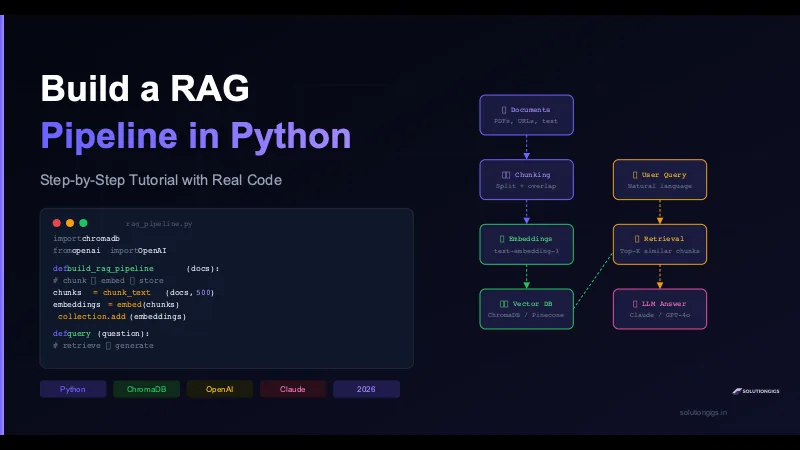
Quick Answer
A RAG pipeline (Retrieval-Augmented Generation) lets your LLM answer questions using your own documents instead of hallucinating. The four steps: chunk your docs → embed them into vectors → store in ChromaDB → at query time, retrieve the top-K chunks and feed them to GPT-4o or Claude as context. This guide builds a working RAG system in Python from scratch — ~60 lines of real, runnable code.
Your LLM doesn't know about your company's internal docs. It doesn't know the PDF you uploaded last week. It doesn't know what changed in your product last month.
That's the problem RAG solves.
RAG (Retrieval-Augmented Generation) is the technique that lets any LLM answer questions grounded in documents you provide — without retraining, without fine-tuning, and without burning through a 128K context window.
It's the backbone of most production AI assistants built in 2025 and 2026: customer support bots, internal knowledge tools, document Q&A, and AI research assistants. If you're building anything that needs an LLM to "know" things that aren't in its training data, you're building RAG.
This tutorial builds a complete RAG pipeline in Python from the ground up. By the end you'll have working code you can run today.
What Is RAG? (The Architecture in 2 Minutes)
RAG combines two systems: a retrieval system that finds relevant document chunks, and a generation system (the LLM) that synthesizes those chunks into an answer.
WITHOUT RAG:
  User question → [LLM training data only] → Answer (may hallucinate)

WITH RAG:
  User question → [retrieve relevant chunks from YOUR docs]
               → [LLM + retrieved context] → Grounded answer
The pipeline has two phases:
Indexing phase (run once, or when docs update):
- Load documents
- Split into chunks
- Embed each chunk into a vector
- Store vectors in a vector database
Query phase (run on every user question):
- Embed the user's question
- Find the most similar chunks in the vector DB
- Pass question + top chunks to the LLM
- Return the answer
That's it. Let's build each step.
Prerequisites
Install the required libraries:
pip install chromadb openai python-dotenv tiktoken
Set your OpenAI API key in .env:
OPENAI_API_KEY=sk-...
We're using ChromaDB as the vector store (runs locally, zero config) and OpenAI for embeddings and generation. The pattern is identical with Claude — we'll show that variant too.
Step 1 — Load and Chunk Your Documents
Chunking is the most important tuning decision in any RAG system. Too large and you get noise. Too small and you lose context.
import tiktoken

def chunk_text(text: str, chunk_size: int = 500, overlap: int = 50) -> list[str]:
    """Split text into overlapping chunks by token count."""
    enc = tiktoken.get_encoding("cl100k_base")
    tokens = enc.encode(text)
    chunks = []

    start = 0
    while start < len(tokens):
        end = start + chunk_size
        chunk_tokens = tokens[start:end]
        chunk_text = enc.decode(chunk_tokens)
        chunks.append(chunk_text)
        start += chunk_size - overlap  # overlap keeps context at boundaries

    return chunks
Why 500 tokens with 50-token overlap?
- 500 tokens ≈ 3–4 paragraphs — enough for a complete idea without burying the signal
- 50-token overlap ensures sentences split across boundaries appear in both chunks
- Test your own content: the right size depends on your document structure
For loading documents, keep it simple:
def load_documents(file_paths: list[str]) -> list[dict]:
    """Load text files and return list of {source, text} dicts."""
    docs = []
    for path in file_paths:
        with open(path, "r", encoding="utf-8") as f:
            text = f.read()
        docs.append({"source": path, "text": text})
    return docs
For PDFs, swap in pypdf or pdfplumber. For web pages, use trafilatura. The chunking logic is identical regardless of source.
Step 2 — Create Embeddings
Embeddings convert text into a list of numbers (a vector) that captures semantic meaning. Similar meaning = similar vectors.
from openai import OpenAI

client = OpenAI()

def embed_texts(texts: list[str]) -> list[list[float]]:
    """Return embeddings for a list of text strings."""
    response = client.embeddings.create(
        model="text-embedding-3-small",  # $0.02/million tokens
        input=texts
    )
    return [item.embedding for item in response.data]
Model choices:
| Model | Cost | Dimensions | Best for |
|---|---|---|---|
text-embedding-3-small |
$0.02/M tokens | 1536 | Most use cases — start here |
text-embedding-3-large |
$0.13/M tokens | 3072 | Better accuracy, bigger context |
all-MiniLM-L6-v2 (local) |
Free | 384 | Privacy-sensitive, no API needed |
For batch efficiency, embed 100 chunks per API call rather than one at a time:
def embed_chunks_batched(chunks: list[str], batch_size: int = 100) -> list[list[float]]:
    all_embeddings = []
    for i in range(0, len(chunks), batch_size):
        batch = chunks[i : i + batch_size]
        embeddings = embed_texts(batch)
        all_embeddings.extend(embeddings)
    return all_embeddings
Step 3 — Store in ChromaDB
ChromaDB is an open-source vector database that runs in your process — no Docker, no server, no account. Perfect for getting started.
import chromadb

def build_vector_store(
    chunks: list[str],
    embeddings: list[list[float]],
    metadata: list[dict],
    collection_name: str = "rag_docs"
):
    """Store chunks and their embeddings in ChromaDB."""
    chroma_client = chromadb.PersistentClient(path="./chroma_db")

    # Delete and recreate to start fresh (omit in production)
    try:
        chroma_client.delete_collection(collection_name)
    except Exception:
        pass

    collection = chroma_client.create_collection(
        name=collection_name,
        metadata={"hnsw:space": "cosine"}  # cosine similarity
    )

    collection.add(
        ids=[str(i) for i in range(len(chunks))],
        documents=chunks,
        embeddings=embeddings,
        metadatas=metadata
    )

    print(f"Stored {len(chunks)} chunks in ChromaDB")
    return collection
Metadata is important for filtering and citations. Always store the source file so you can tell the user which document the answer came from:
# Example metadata per chunk
metadata = [
    {"source": "docs/product_guide.pdf", "chunk_index": i}
    for i in range(len(chunks))
]
Step 4 — Retrieve Relevant Chunks
At query time, embed the user's question and find the most similar chunks:
import chromadb

def retrieve_chunks(
    query: str,
    collection_name: str = "rag_docs",
    top_k: int = 5
) -> list[dict]:
    """Retrieve top-K most relevant chunks for a query."""
    chroma_client = chromadb.PersistentClient(path="./chroma_db")
    collection = chroma_client.get_collection(collection_name)

    query_embedding = embed_texts([query])[0]

    results = collection.query(
        query_embeddings=[query_embedding],
        n_results=top_k,
        include=["documents", "metadatas", "distances"]
    )

    chunks = []
    for doc, meta, dist in zip(
        results["documents"][0],
        results["metadatas"][0],
        results["distances"][0]
    ):
        chunks.append({
            "text": doc,
            "source": meta.get("source", "unknown"),
            "similarity": 1 - dist  # convert distance to similarity score
        })

    return chunks
What top_k should you use?
top_k=3: Fast, lower cost, works when your docs are well-structuredtop_k=5: Best default for most casestop_k=10: Use for complex multi-step questions that span several sections
Step 5 — Generate the Answer
Pass the retrieved chunks to the LLM as context:
def generate_answer(query: str, retrieved_chunks: list[dict]) -> str:
    """Generate a grounded answer using retrieved context."""

    # Build context block from retrieved chunks
    context_parts = []
    for i, chunk in enumerate(retrieved_chunks, 1):
        context_parts.append(
            f"[Source {i}: {chunk['source']}]\n{chunk['text']}"
        )
    context = "\n\n---\n\n".join(context_parts)

    system_prompt = """You are a helpful assistant that answers questions based only on the provided context.
If the answer is not in the context, say "I don't have enough information to answer that."
Always cite which source(s) you used in your answer."""

    user_message = f"""Context:
{context}

Question: {query}

Answer based on the context above:"""

    response = client.chat.completions.create(
        model="gpt-4o",
        messages=[
            {"role": "system", "content": system_prompt},
            {"role": "user", "content": user_message}
        ],
        temperature=0.1  # low temperature = more factual, less creative
    )

    return response.choices[0].message.content
Using Claude instead of GPT-4o:
import anthropic

claude_client = anthropic.Anthropic()

def generate_answer_claude(query: str, retrieved_chunks: list[dict]) -> str:
    context = "\n\n---\n\n".join(
        f"[Source: {c['source']}]\n{c['text']}" for c in retrieved_chunks
    )

    response = claude_client.messages.create(
        model="claude-sonnet-4-6",
        max_tokens=1024,
        system="Answer using only the provided context. Cite sources. Say you don't know if it's not covered.",
        messages=[{
            "role": "user",
            "content": f"Context:\n{context}\n\nQuestion: {query}"
        }]
    )
    return response.content[0].text
Claude Sonnet 4.6 produces slightly more thorough citations and handles complex multi-document questions well. GPT-4o is marginally faster. Both work well for RAG.
Step 6 — Wire It All Together
Here's the full pipeline end to end:
import os
from dotenv import load_dotenv

load_dotenv()

def index_documents(file_paths: list[str]):
    """Load, chunk, embed, and store documents."""
    print("Loading documents...")
    docs = load_documents(file_paths)

    all_chunks = []
    all_metadata = []

    for doc in docs:
        chunks = chunk_text(doc["text"], chunk_size=500, overlap=50)
        metadata = [{"source": doc["source"], "chunk_index": i} for i in range(len(chunks))]
        all_chunks.extend(chunks)
        all_metadata.extend(metadata)

    print(f"Chunked into {len(all_chunks)} pieces. Embedding...")
    embeddings = embed_chunks_batched(all_chunks)

    print("Storing in ChromaDB...")
    build_vector_store(all_chunks, embeddings, all_metadata)
    print("Indexing complete.")


def ask(question: str) -> str:
    """Ask a question against the indexed documents."""
    chunks = retrieve_chunks(question, top_k=5)

    if not chunks:
        return "No relevant documents found."

    answer = generate_answer(question, chunks)

    # Append source citations
    sources = list({c["source"] for c in chunks})
    answer += f"\n\n**Sources:** {', '.join(sources)}"

    return answer


# Example usage
if __name__ == "__main__":
    # First run: index your docs
    index_documents(["docs/product_manual.txt", "docs/faq.txt"])

    # Every run: ask questions
    print(ask("How do I reset my password?"))
    print(ask("What is the refund policy?"))
Run it:
python rag_pipeline.py
Common Mistakes and How to Fix Them
Mistake 1 — Chunks Too Large
Symptom: The LLM answers correctly but the answer is buried in a wall of context. Retrieval scores are low.
Fix: Reduce chunk_size to 300–400 tokens. The retrieved chunk should have one clear idea per chunk.
Mistake 2 — Wrong Embedding Model at Query Time
Symptom: Retrieval returns completely irrelevant results — or nothing at all.
Fix: The embedding model you use to build the index must be identical to the one you use at query time. If you indexed with text-embedding-3-small, query with text-embedding-3-small. Never mix models.
Mistake 3 — Too Few Retrieved Chunks (top_k too low)
Symptom: The LLM says "I don't have enough information" even though the answer is clearly in your docs.
Fix: Increase top_k from 3 to 5 or 8. For questions that span multiple sections, the answer may require 4–6 chunks to assemble.
Mistake 3b — Too Many Retrieved Chunks (top_k too high)
Symptom: The LLM answers confidently but wrong, and the wrong answer traces back to a plausible-but-irrelevant chunk.
This is the mistake most people don't know they're making, because raising top_k feels like a free safety margin. It isn't. Research published by Chroma across 18 leading models found that even a single distractor in the context reduces accuracy, and the effect amplifies as the context grows longer. Retrieving 20 chunks to be safe means retrieving 15 distractors.
Fix: Retrieve widely, then rerank down. Pull top_k=20 from the vector store, run a cross-encoder reranker over them, and pass only the best 4–5 to the model:
from sentence_transformers import CrossEncoder

reranker = CrossEncoder("cross-encoder/ms-marco-MiniLM-L-6-v2")

def retrieve_reranked(query: str, k_fetch: int = 20, k_keep: int = 5):
    candidates = retrieve(query, top_k=k_fetch)          # cheap vector search
    scores = reranker.predict([(query, c) for c in candidates])
    ranked = sorted(zip(scores, candidates), reverse=True)
    return [c for _, c in ranked[:k_keep]]               # precise final set
This gets you recall from the wide fetch and precision from the rerank — without paying the distractor tax. See our guide to context engineering for why context precision beats context volume.
Mistake 4 — Not Cleaning Documents Before Chunking
Symptom: Embeddings include page numbers, headers, footers, and navigation text that pollute similarity search.
Fix: Strip boilerplate before chunking:
import re

def clean_text(text: str) -> str:
    text = re.sub(r'\n{3,}', '\n\n', text)   # collapse blank lines
    text = re.sub(r'Page \d+ of \d+', '', text)  # remove page numbers
    text = text.strip()
    return text
Mistake 5 — LLM Hallucinating Despite RAG
Symptom: The LLM gives a confident answer that isn't in the retrieved chunks.
Fix: Make the system prompt more restrictive:
system_prompt = """Answer ONLY using the context provided.
If the exact answer is not in the context, respond with exactly:
'This information is not available in the provided documents.'
Do not use outside knowledge."""
Also lower temperature to 0 for maximum factuality.
Production Upgrades
Once the basic pipeline works, these are the highest-impact improvements:
Hybrid Search (Keyword + Semantic)
Pure vector search misses exact keyword matches ("error code 404", product IDs, names). Hybrid search combines BM25 (keyword) with semantic search:
# ChromaDB doesn't support hybrid natively — use Weaviate or Qdrant for production
# Or add a keyword pre-filter before vector search
Reranking
After retrieving top-K chunks, use a cross-encoder reranker to re-score them. This significantly improves answer quality at the cost of one extra API call:
from sentence_transformers import CrossEncoder

reranker = CrossEncoder("cross-encoder/ms-marco-MiniLM-L-6-v2")

def rerank(query: str, chunks: list[dict]) -> list[dict]:
    pairs = [(query, c["text"]) for c in chunks]
    scores = reranker.predict(pairs)
    ranked = sorted(zip(scores, chunks), key=lambda x: x[0], reverse=True)
    return [chunk for _, chunk in ranked]
Streaming Responses
For a better UX, stream the LLM's answer token by token:
with client.chat.completions.stream(
    model="gpt-4o",
    messages=[{"role": "user", "content": user_message}]
) as stream:
    for text in stream.text_stream:
        print(text, end="", flush=True)
Frequently Asked Questions
What is a RAG pipeline in Python?
A RAG pipeline in Python is a system that combines a vector database with an LLM. You split documents into chunks, convert them to embeddings, store them in ChromaDB or Pinecone, and at query time retrieve the most relevant chunks to feed as context to GPT-4o or Claude. The LLM answers using your documents rather than relying on training data alone.
What is the best vector database for RAG in Python?
ChromaDB is the best starting point — pure Python, no setup, runs locally. For production, Pinecone (managed cloud) and Qdrant (self-hosted, fast) are the leading options. Weaviate is good for hybrid search. Start with ChromaDB for prototyping, then migrate when scale or features require it.
What is the best chunk size for RAG?
300–600 tokens with 10–20% overlap is the most reliable starting range. For technical documentation, 500 tokens with 50-token overlap is a safe default. Always test with your actual content — chunk size has more impact on RAG quality than almost any other parameter.
What embedding model should I use for RAG?
Start with text-embedding-3-small from OpenAI — it costs $0.02/million tokens and outperforms older models. For free local embeddings, use sentence-transformers/all-MiniLM-L6-v2. The model used at indexing time must match the one used at query time exactly.
How is RAG different from fine-tuning?
RAG retrieves documents at query time and injects them into the prompt. Fine-tuning permanently updates the model's weights by retraining. RAG is 10–100x cheaper, easier to update, and better for large or frequently-changing document sets. Fine-tuning is better for teaching tone, format, or reasoning style. Most production AI apps use RAG — not fine-tuning — for knowledge grounding.
Can I build a RAG pipeline without OpenAI?
Yes. Use sentence-transformers for local embeddings and Ollama to run Llama 3.3 or Mistral locally. ChromaDB handles the vector store. The full stack is free and runs on a laptop. Quality is slightly below GPT-4o or Claude, but it's completely private — the right choice for sensitive document types.
What are the most common RAG failures?
The three most common failures are: chunks too large (retrieved context buries the relevant sentence), mismatched embedding models at index vs query time (causes near-zero retrieval accuracy), and top_k too low (answer spans chunks that weren't retrieved). Clean your documents before chunking and add a keyword filter for exact matches (product names, error codes).
Conclusion
A RAG pipeline in Python breaks down to four steps: chunk → embed → store → retrieve + generate. The working code in this guide handles all of them.
This guide gets a working pipeline running. Keeping it correct once documents start changing is a separate discipline — see AI data pipelines for incremental sync, deletions, and embedding model upgrades.
The most important things to get right:
- Chunk size: 500 tokens with 50-token overlap is a reliable default
- Embedding model consistency: same model at index time and query time
- top_k = 5: cast a wider net than you think you need
- Low temperature (0.0–0.1): keeps answers grounded in retrieved context
From here, the highest-impact upgrades are hybrid search and reranking — both can dramatically improve answer quality on real-world documents with product names, codes, and jargon.
Want to go deeper? Check our guides on building MCP servers to expose your RAG pipeline as a Claude tool and wrapping any API as an MCP tool so Claude can call your RAG system directly. For understanding how AI models reason over retrieved context, see our AI reasoning models guide.
Need help building a production RAG system for your product or internal tools? SolutionGigs connects you with vetted AI developers who specialize in LLM pipelines — free to post, no commitment.
Mohammed Yaseen
Founder, SolutionGigs
Mohammed builds AI-powered developer tools and data pipelines. He has shipped RAG systems and LLM pipelines handling millions of documents in production. LinkedIn →
More in AI Development
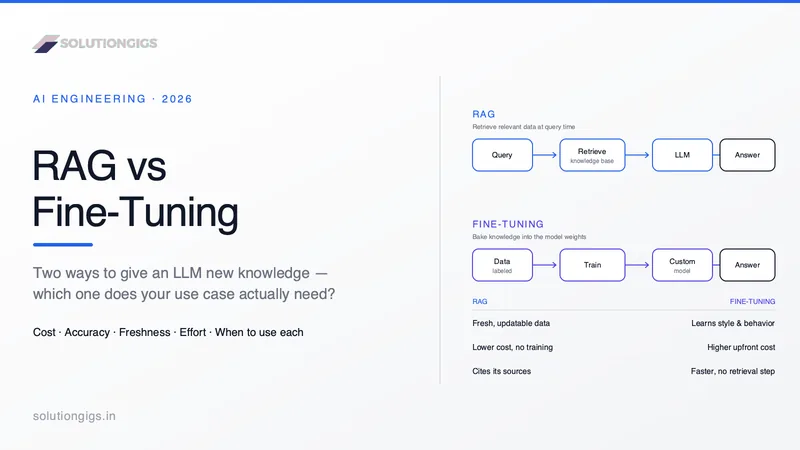
RAG vs Fine-Tuning: Which to Use for Your LLM App
RAG vs fine-tuning explained — the real difference, cost and accuracy trade-offs, and a clear decision framework for choosing how to give your LLM new knowledge in 2026.
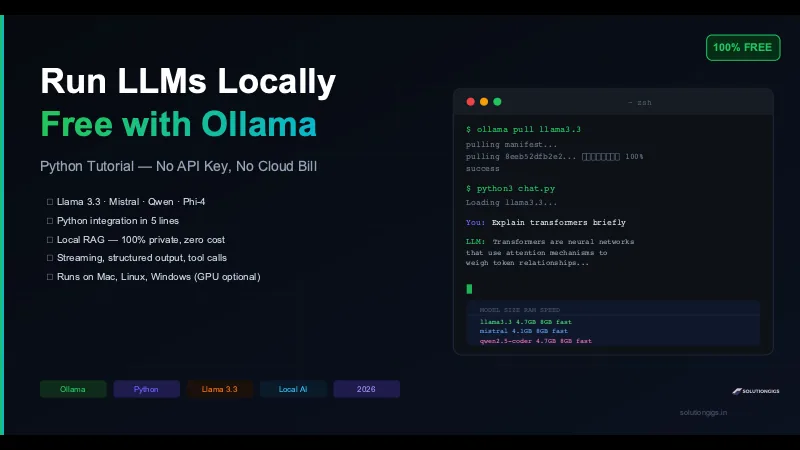
Ollama Tutorial: Run LLMs Locally for Free — Python Guide
Run Llama 3.3, Mistral, Qwen 2.5, and 100+ open-source LLMs on your own machine for free with Ollama. Full Python tutorial — streaming, structured output, local RAG, and tool calling. No API key needed.
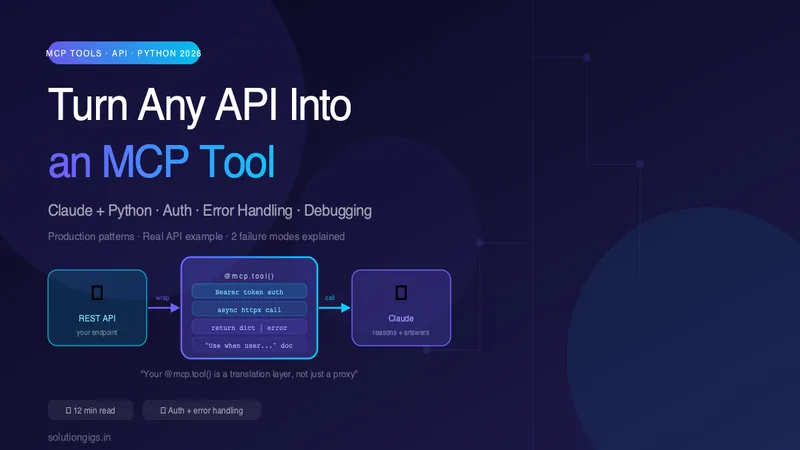
Turn Any API Into an MCP Tool: Claude + Python Tutorial
Got an existing API? Wrap it as an MCP tool so Claude can call it directly — real example with Bearer token auth, structured error returns, and the 2 failure modes that break most MCP servers in production.