
What Is an MCP Server? Build Your First One in Python
Last Updated: July 2026 · 10 min read
Quick Answer
An MCP server (Model Context Protocol server) is a lightweight program that exposes your Python functions and APIs as "tools" that AI assistants like Claude can call directly.
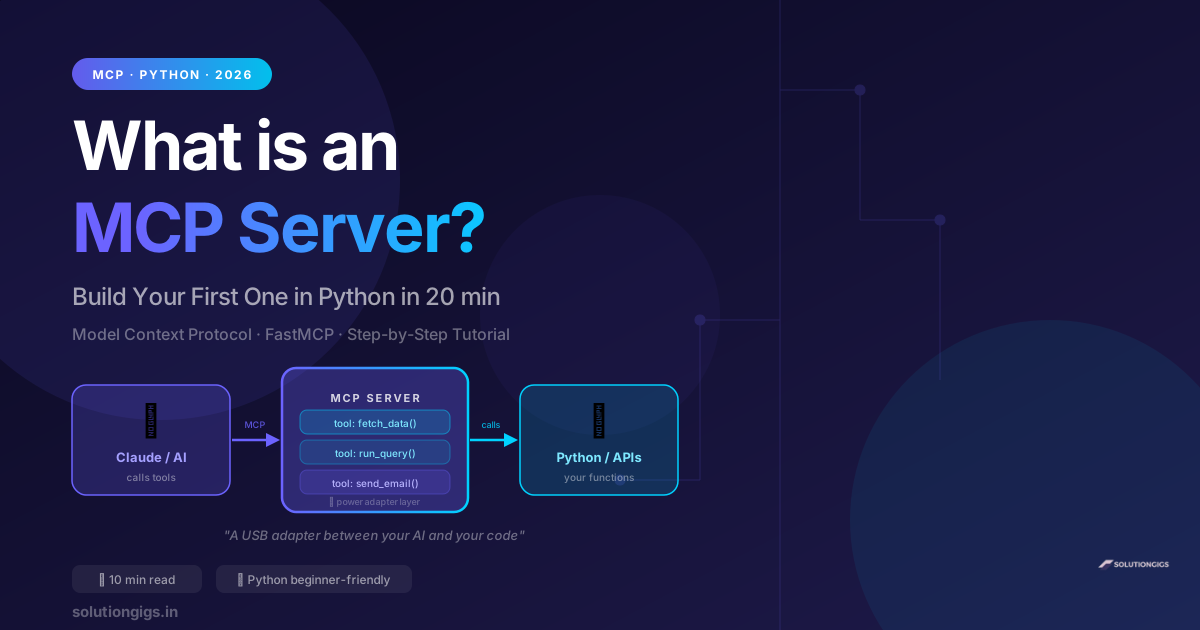
Think of it as a USB adapter between your AI and your code — the AI speaks MCP, your code speaks Python, and the MCP server translates. Building your first one takes less than 20 minutes.
MCP server Python development is exploding in 2026 — and for good reason. The Model Context Protocol, introduced by Anthropic, is fast becoming the standard way for AI assistants to connect to real-world tools and APIs. Whether you're building AI-powered developer tools, automations, or internal apps with Claude or Cursor, understanding MCP servers is now a core skill.
In this guide you'll learn exactly what an MCP server is (in plain English), why it matters, and how to build your first working MCP server in Python from scratch — step by step, with zero prior MCP experience required.
What Is an MCP Server?
An MCP server is defined as: a program that implements the Model Context Protocol (MCP) on the server side, exposing a set of "tools" — named, typed, documented functions — that AI clients can discover and call at runtime.
The core idea is deceptively simple. An AI like Claude is excellent at reasoning, but it can't natively reach into your database, call your API, or run a Python function. An MCP server gives it that ability.
Here's the clearest analogy: an MCP server is like a USB power adapter. Your laptop (the AI) and your external device (your Python code) speak different protocols. The adapter (MCP server) sits between them and makes both sides work together seamlessly.
The flow in three steps:
- You write a Python function (e.g.,
get_stock_price(ticker)) - You wrap it as an MCP tool in your server with one decorator
- Claude — or any MCP-compatible AI — discovers and calls
get_stock_price("AAPL")as if it were a native capability
MCP vs Traditional REST API — Key Differences
| MCP Server | REST API | |
|---|---|---|
| Who calls it | AI assistants (Claude, Cursor) | Other software / browsers |
| Protocol | Model Context Protocol | HTTP / REST |
| Tool discovery | AI auto-discovers at startup | Requires manual docs or spec |
| When to use | AI agent integration | General software integration |
| Best library (Python) | FastMCP | FastAPI / Flask |
The critical difference: with a REST API you write documentation for human developers. With an MCP server you write documentation for the AI — and the AI reads it to decide when and how to use each tool.
Why MCP Matters for AI Development in 2026
Before MCP existed, connecting an AI to a real tool meant custom prompt engineering, fragile JSON parsing, and writing integration code separately for every AI model. MCP standardizes all of that.
Four reasons MCP is worth learning now:
- Write once, use everywhere. Your MCP server works with Claude Desktop, Claude Code, Cursor, Windsurf, VS Code Copilot, and any future MCP-compatible client — without changing a line.
- AI auto-discovers your tools. Your server advertises what it can do (via the tool name and docstring). The AI reads that at startup and knows when each tool is relevant.
- Typed, validated parameters. MCP enforces Python type hints as the parameter contract. No more brittle string parsing or prompt-injection-style parameter passing.
- Persistent connections + streaming. Unlike a REST call-and-return pattern, MCP supports stateful sessions and streaming responses — important for long-running operations.
In 2026, MCP adoption has reached critical mass. If you're building developer tools, automations, or internal AI apps, MCP is the standard to build on.
How to Build Your First MCP Server in Python
We'll use FastMCP — the official Python library from Anthropic that wraps the MCP protocol so you can build a working server with just a decorated function.
Step 1 — Install FastMCP
pip install fastmcp
That's the only dependency you need to start.
Step 2 — Create Your First Tool
Create a file called my_mcp_server.py:
from fastmcp import FastMCP

mcp = FastMCP("My First MCP Server")

@mcp.tool()
def calculate_tax(amount: float, rate: float = 0.18) -> dict:
    """
    Calculate the tax and total for a given amount.
    Use when the user wants to know the tax on a price.
    Default GST rate is 18% (India standard).
    """
    tax = amount * rate
    return {
        "original": amount,
        "tax": round(tax, 2),
        "total": round(amount + tax, 2),
        "rate_percent": rate * 100
    }

if __name__ == "__main__":
    mcp.run()
What each part does:
| Part | What it does |
|---|---|
FastMCP("name") |
Creates your server with a display name |
@mcp.tool() |
Registers the function as a callable MCP tool |
| Docstring | This is what the AI reads to decide when to use the tool |
| Type hints | MCP uses these to validate parameters before calling your function |
| Return value | Any JSON-serializable Python object — dict, list, str, int |
Step 3 — Add a Real API Tool
Static calculations are useful, but MCP servers shine when they connect AI to live data. Here's a tool that hits a real external API:
import httpx
from fastmcp import FastMCP

mcp = FastMCP("Dev Toolkit")

@mcp.tool()
async def get_current_weather(city: str) -> dict:
    """
    Get the current weather for a city.
    Use when the user asks about weather, temperature, or conditions
    in a specific city. Works for any city worldwide.
    """
    async with httpx.AsyncClient() as client:
        resp = await client.get(
            f"https://wttr.in/{city}?format=j1",
            timeout=10
        )
        data = resp.json()
        condition = data["current_condition"][0]
        return {
            "city": city,
            "temp_c": condition["temp_C"],
            "temp_f": condition["temp_F"],
            "description": condition["weatherDesc"][0]["value"],
            "humidity": condition["humidity"],
            "wind_kmph": condition["windspeedKmph"]
        }

if __name__ == "__main__":
    mcp.run()
Step 4 — Run Your Server
python my_mcp_server.py
Your MCP server is now running on stdio transport (the default) — ready to accept connections from any MCP client.
Step 5 — Connect to Claude Desktop
- Open Claude Desktop → Settings → Developer
- Find the MCP config file path shown in the UI
- Add your server to the
mcpServersblock:
{
  "mcpServers": {
    "dev-toolkit": {
      "command": "python",
      "args": ["/absolute/path/to/my_mcp_server.py"]
    }
  }
}
- Restart Claude Desktop
- Start a new chat and try: "What's the weather in Mumbai right now?"
Claude will call your get_current_weather tool automatically — no prompting required.
Step 6 — Connect to Claude Code (CLI)
If you use Claude Code for development, add a .mcp.json file to your project root:
{
  "mcpServers": {
    "dev-toolkit": {
      "type": "stdio",
      "command": "python",
      "args": ["my_mcp_server.py"]
    }
  }
}
Claude Code discovers the server at session start. Your tools appear automatically in every Claude Code conversation within that project.
4 Common Mistakes That Break MCP Servers
1. Vague docstrings — the #1 failure
The AI uses your docstring to decide when to call a tool. If the docstring is vague, the tool never gets called.
Wrong:
@mcp.tool()
def process(data: str) -> str:
    """Process data."""
Right:
@mcp.tool()
def convert_csv_to_json(csv_text: str) -> list:
    """
    Convert a CSV string into a list of JSON objects.
    Use when the user provides CSV data and wants it as JSON.
    Each row becomes a dict with column headers as keys.
    Returns an empty list if the CSV has no data rows.
    """
A good docstring answers: what does this tool do, when should the AI use it, and what does it return?
2. Returning strings instead of structured data
MCP shines when tools return structured data. The AI can reason over a dict; it can only display a string.
Wrong: return f"Temperature in {city} is {temp}°C"
Right: return {"city": city, "temp_c": temp, "humidity": humidity}
3. Blocking I/O in synchronous tools
If your tool makes HTTP calls, database queries, or file reads — make it async. Synchronous blocking calls in an MCP server freeze the entire server under load.
# Wrong — blocks the server
def get_data(url: str) -> dict:
    return requests.get(url).json()  # blocks!

# Right — non-blocking
async def get_data(url: str) -> dict:
    async with httpx.AsyncClient() as client:
        resp = await client.get(url)
        return resp.json()
4. No error handling
If your tool raises an exception, the AI receives an error with no context. Return errors as structured data instead:
@mcp.tool()
async def fetch_page(url: str) -> dict:
    try:
        async with httpx.AsyncClient() as client:
            resp = await client.get(url, timeout=10)
            resp.raise_for_status()
            return {"success": True, "content": resp.text[:2000]}
    except httpx.TimeoutException:
        return {"success": False, "error": "Request timed out after 10s"}
    except Exception as e:
        return {"success": False, "error": str(e)}
With this pattern, Claude can read the error and explain it to the user rather than crashing silently.
Wrapping Your Own APIs as MCP Tools
The most powerful MCP pattern is wrapping your own existing APIs — we cover this end-to-end in how to turn any API into an MCP tool in Python. If you have a FastAPI backend, you can expose any endpoint as an MCP tool in minutes:
from fastmcp import FastMCP
import httpx

mcp = FastMCP("My SaaS Tools")

BASE_URL = "https://api.yourdomain.in"
API_KEY = "your-api-key"

@mcp.tool()
async def create_invoice(
    client_name: str,
    amount: float,
    currency: str = "INR"
) -> dict:
    """
    Create a new invoice in the billing system.
    Use when the user wants to generate or send an invoice.
    Supports INR, USD, EUR currencies.
    """
    async with httpx.AsyncClient() as client:
        resp = await client.post(
            f"{BASE_URL}/invoices",
            json={"client": client_name, "amount": amount, "currency": currency},
            headers={"Authorization": f"Bearer {API_KEY}"},
            timeout=15
        )
        return resp.json()
At SolutionGigs, we're doing exactly this — wrapping the free tools at solutiongigs.in (JSON formatter, regex tester, readability checker, and more) as MCP tools so developers can use them directly from Claude Code without leaving their terminal.
Frequently Asked Questions
What is an MCP server?
An MCP server is a program that implements the Model Context Protocol, exposing your Python functions and APIs as "tools" that AI assistants like Claude can discover and call at runtime. It acts as a translation layer between AI clients and your code. You can build one in under 20 minutes using the FastMCP Python library with pip install fastmcp.
What does MCP stand for in AI?
MCP stands for Model Context Protocol — an open standard developed by Anthropic to define how AI models connect to external tools and data sources. It specifies the protocol, tool discovery format, and data exchange structure between AI clients (like Claude Desktop or Cursor) and MCP servers.
Is FastMCP free to use?
Yes. FastMCP is fully open-source and free under the MIT license. It is the official Anthropic-maintained Python library for building MCP servers. Install it with pip install fastmcp. There is no cost to build or run MCP servers — you only pay for the AI API calls your client makes.
What AI assistants support MCP servers?
As of 2026, MCP is supported by Claude Desktop, Claude Code (CLI), Cursor, Windsurf, VS Code Copilot, Zed, and dozens of other AI development tools. Anthropic maintains an official list of MCP clients that is updated as new clients add support.
How is an MCP server different from a REST API?
The key difference is who calls it and why. A REST API is designed to be called by other software — browsers, mobile apps, backend services. An MCP server is designed to be called by AI assistants. AI clients auto-discover what tools a server offers, read the docstrings to decide when each tool is relevant, and handle typed parameter validation — no API documentation, Swagger spec, or prompt engineering required.
Can I build an MCP server without Python?
Yes. MCP has official SDKs for Python (FastMCP) and TypeScript/Node.js, plus community-maintained SDKs for Go, Rust, and other languages. Python with FastMCP is the most popular choice for rapid prototyping because the decorator syntax is extremely clean. For production TypeScript environments, the official @modelcontextprotocol/sdk package is the standard choice.
How do I connect my MCP server to Claude?
For Claude Desktop: open Settings → Developer, find the config file path, and add your server to the mcpServers block with the command and args fields. For Claude Code (CLI): add a .mcp.json file to your project root with the same structure. Both methods auto-discover your tools when the client starts. The Anthropic MCP documentation has exact config examples for every client.
Conclusion
MCP servers are the missing link between AI assistants and the real world. With two dozen lines of Python, you can expose any function — a database query, a third-party API call, a file operation — and have Claude or any MCP-compatible AI use it naturally in conversation, with no custom prompt engineering.
The key takeaways:
- An MCP server is a "power adapter" between AI clients and your Python functions
- FastMCP makes it trivial — just @mcp.tool() and a good docstring
- Docstrings are everything — they're how the AI decides when and how to call your tool
- Return structured dicts and lists, not strings — the AI reasons better over structured data
- Always make I/O-bound tools async, and always handle errors gracefully
- One MCP server works across all MCP-compatible clients: Claude, Cursor, Windsurf, and more
Ready to go further? Next up: wrapping a real API into an MCP tool with authentication, error handling, and the debugging techniques that actually matter in production. And if you want free developer tools to test your MCP server against, everything at solutiongigs.in — JSON formatter, regex tester, readability checker — is available for free with no sign-up.
📹 Video Recommendation: This post maps directly to Video 1.1 ("What is an MCP Server? Build Your First One in Python") in your YouTube roadmap. Show the working demo first — Claude calling your Python function live — then walk back through the build. The end-result-first approach is the single biggest retention lever for dev tutorial content.

Mohammed Yaseen
Founder, SolutionGigs
Full-stack developer and AI tools builder at solutiongigs.in. Mohammed builds MCP servers, FastAPI backends, and AI-powered developer utilities — and writes honest, no-fluff tutorials for developers who want to ship real things. LinkedIn →