
How to Build a Multi-Agent AI System in Python
Build a multi-agent AI system in Python from scratch — orchestrator, researcher, writer, and reviewer agents that cooperate. Includes parallel execution, tool calling, shared memory, and error recovery. No framework required.

Quick Answer
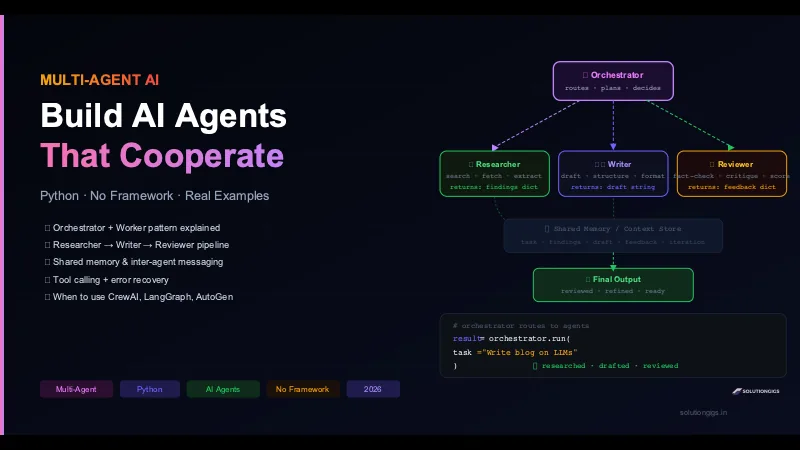
A multi-agent AI system is a collection of specialised AI agents — each with its own role, system prompt, and tools — coordinated by an orchestrator to complete tasks too complex for any single agent. The pattern: Orchestrator breaks the task → Researcher gathers information → Writer drafts output → Reviewer critiques → Orchestrator loops or returns final result. This guide builds the full system in Python from scratch — no framework, ~120 lines of real code.
A single LLM prompt can only do so much.
Ask one model to research a topic, write a 2,000-word article, fact-check every claim, suggest improvements, and format the final output — and you'll get mediocre results across all of them. The context window fills up. The model loses focus. The quality degrades.
Multi-agent AI systems solve this by doing what great teams do: specialisation.
One agent researches. One writes. One reviews. An orchestrator coordinates the whole pipeline. Each agent works in a clean, focused context — doing one job well.
This is the architecture behind the most capable AI systems built in 2026. It's how Anthropic recommends building complex Claude workflows. It's what LangGraph, CrewAI, and AutoGen are all implementing under the hood.
This guide strips away the frameworks and shows you exactly how it works in plain Python — so when you do reach for a framework, you understand what it's doing.
Why Multi-Agent? The Problem With Single Agents
Single agent (one LLM call):
  Task → [one model, one prompt, one context window] → Output

Problems:
  ✗ Context window fills up on long tasks
  ✗ Model tries to be researcher + writer + fact-checker simultaneously
  ✗ No specialisation — mediocre at everything
  ✗ One failure = total failure; no retry granularity
  ✗ Can't parallelise independent sub-tasks
Multi-agent system:
  Task → Orchestrator
           ├─ Researcher Agent  → findings
           ├─ Writer Agent      → draft (uses findings)
           └─ Reviewer Agent    → feedback (critiques draft)
         └─ Orchestrator loops or returns final output

Benefits:
  ✓ Each agent has a focused, short context
  ✓ Specialised system prompts per role
  ✓ Independent agents can run in parallel
  ✓ Retry individual agents without restarting the pipeline
  ✓ Easy to swap one agent (e.g., different LLM for reviewer)
The trade-off: more API calls, more latency, more complexity. Worth it when task quality matters more than cost.
The benefit at the top of that list is the one that matters most, and it's easy to miss: "each agent has a focused, short context" is not a nice-to-have — it's the primary reason multi-agent systems outperform a single agent on long tasks. Model accuracy measurably degrades as the context window fills, so splitting a task across agents that each keep a small window is a correctness technique, not just an organisational one. This is the "isolate" move in context engineering.
The corollary is a real caution: don't split work that isn't genuinely independent. Each sub-agent re-establishes its own context from scratch, which costs tokens and latency. Isolate when subtasks are separable and sizeable; don't shard one modest job into pieces.
The Architecture: Four Core Components
Every multi-agent system has the same fundamental pieces:
1. Agents — LLM instances with a specific role, system prompt, and optional tools.
2. Orchestrator — Coordinates agents: decides who runs when, passes outputs between them, handles retries.
3. Shared Context — A data structure agents read from and write to. Think of it as the team's whiteboard.
4. Tools — Functions the agents can call (web search, calculators, APIs, databases).
┌─────────────────────────────────────────────────┐
│                  Orchestrator                    │
│  routes · retries · decides when to stop        │
└──────────┬────────────┬────────────┬────────────┘
           │            │            │
    ┌──────▼──┐   ┌─────▼──┐   ┌───▼──────┐
    │Researcher│   │ Writer │   │ Reviewer │
    │+ tools   │   │        │   │          │
    └──────────┘   └────────┘   └──────────┘
           │            │            │
    ┌──────▼────────────▼────────────▼────────────┐
    │           Shared Context (dict)              │
    │  task · findings · draft · feedback · score  │
    └──────────────────────────────────────────────┘
Step 1 — Define the Base Agent Class
Start with a clean agent abstraction. Every agent has a role, a system prompt, and the ability to call an LLM:
from openai import OpenAI
from dataclasses import dataclass, field
from typing import Optional
import json

client = OpenAI()  # uses OPENAI_API_KEY env var

@dataclass
class Agent:
    name: str
    role: str          # human-readable description
    system_prompt: str # what this agent is and how it behaves
    model: str = "gpt-4o"
    temperature: float = 0.3
    tools: list = field(default_factory=list)

    def run(self, user_message: str, context: Optional[dict] = None) -> str:
        """Call the LLM with an optional shared context block."""

        # Inject shared context into the message if provided
        if context:
            context_str = json.dumps(context, indent=2, ensure_ascii=False)
            full_message = f"<shared_context>\n{context_str}\n</shared_context>\n\n{user_message}"
        else:
            full_message = user_message

        messages = [
            {"role": "system", "content": self.system_prompt},
            {"role": "user",   "content": full_message}
        ]

        kwargs = dict(
            model=self.model,
            messages=messages,
            temperature=self.temperature
        )
        if self.tools:
            kwargs["tools"] = self.tools
            kwargs["tool_choice"] = "auto"

        response = client.chat.completions.create(**kwargs)
        return response.choices[0].message.content

    def run_json(self, user_message: str, context: Optional[dict] = None) -> dict:
        """Same as run() but forces JSON output and parses it."""
        json_message = user_message + "\n\nRespond ONLY with valid JSON. No markdown, no explanation."
        raw = self.run(json_message, context)
        # Strip markdown code fences if the model adds them
        raw = raw.strip().strip("```json").strip("```").strip()
        return json.loads(raw)
Step 2 — Build the Specialist Agents
Now create the three worker agents. Each has a tightly focused system prompt:
# ── Researcher Agent ────────────────────────────────────────────────────────
researcher = Agent(
    name="Researcher",
    role="Gathers facts, data, and structured information on a given topic",
    system_prompt="""You are an expert researcher. Your job is to:
1. Break the topic into 4-6 key areas to cover
2. For each area, provide 2-3 concrete facts, statistics, or examples
3. Note any common misconceptions to address
4. Suggest 2 authoritative sources to cite

Return your findings as a structured JSON object with keys:
  - key_areas: list of strings
  - facts: dict mapping each area to a list of fact strings
  - misconceptions: list of strings
  - sources: list of {name, url, reason} dicts

Be factual. Do not invent statistics. If unsure, say so explicitly.""",
    model="gpt-4o",
    temperature=0.2
)


# ── Writer Agent ─────────────────────────────────────────────────────────────
writer = Agent(
    name="Writer",
    role="Turns research findings into clear, structured written content",
    system_prompt="""You are an expert technical writer. Given research findings in the shared context:
1. Write clear, engaging content that covers every key area
2. Use the provided facts — do NOT add facts not in the research
3. Address the listed misconceptions directly
4. Use concrete examples and analogies for complex ideas
5. Structure with H2/H3 headings, bullet points, and code blocks where relevant
6. Write for a technically literate audience — no fluff, no padding

Return the draft as clean markdown.""",
    model="gpt-4o",
    temperature=0.6  # slightly more creative for writing
)


# ── Reviewer Agent ────────────────────────────────────────────────────────────
reviewer = Agent(
    name="Reviewer",
    role="Critiques drafts for accuracy, clarity, and completeness",
    system_prompt="""You are a rigorous technical editor and fact-checker. Given a draft in the shared context:
1. Check every factual claim against the research findings
2. Flag anything vague, unclear, or potentially misleading
3. Note any key areas from the research that the draft missed
4. Suggest specific improvements (not just "improve clarity")
5. Give an overall quality score from 1-10

Return your review as JSON with keys:
  - score: integer 1-10
  - approved: boolean (true if score >= 7)
  - issues: list of specific problem strings
  - missed_topics: list of topics from research not covered in draft
  - suggestions: list of specific improvement strings
  - summary: one-sentence overall assessment""",
    model="gpt-4o",
    temperature=0.1  # very deterministic for review tasks
)
Step 3 — Build the Orchestrator
The orchestrator is the brain. It receives the task, routes to agents, collects results, and decides when to loop or return:
class Orchestrator:
    def __init__(
        self,
        researcher: Agent,
        writer: Agent,
        reviewer: Agent,
        max_iterations: int = 3,
        quality_threshold: int = 7
    ):
        self.researcher = researcher
        self.writer = writer
        self.reviewer = reviewer
        self.max_iterations = max_iterations
        self.quality_threshold = quality_threshold

    def run(self, task: str, verbose: bool = True) -> dict:
        """
        Run the full pipeline:
          research → write → review → (loop if needed) → final output
        """
        context = {
            "task": task,
            "findings": None,
            "draft": None,
            "feedback": None,
            "iteration": 0,
            "history": []
        }

        def log(msg):
            if verbose:
                print(f"[Orchestrator] {msg}")

        # ── Phase 1: Research ─────────────────────────────────────────────
        log(f"Starting research on: {task}")
        try:
            findings = self.researcher.run_json(
                f"Research this topic thoroughly: {task}"
            )
            context["findings"] = findings
            log(f"Research complete. Key areas: {findings.get('key_areas', [])}")
        except Exception as e:
            log(f"Research failed: {e}. Using empty findings.")
            context["findings"] = {"key_areas": [], "facts": {}, "misconceptions": [], "sources": []}

        # ── Phase 2: Write → Review loop ──────────────────────────────────
        for iteration in range(1, self.max_iterations + 1):
            context["iteration"] = iteration
            log(f"\n── Iteration {iteration}/{self.max_iterations} ──")

            # Build writer prompt (include previous feedback if looping)
            writer_prompt = f"Write comprehensive content for this task: {task}"
            if context["feedback"]:
                issues = context["feedback"].get("issues", [])
                suggestions = context["feedback"].get("suggestions", [])
                writer_prompt += f"""

Previous draft scored {context['feedback']['score']}/10. Reviewer said:
ISSUES TO FIX:
{chr(10).join(f'- {i}' for i in issues)}

SPECIFIC IMPROVEMENTS:
{chr(10).join(f'- {s}' for s in suggestions)}

Address ALL of the above in this revision."""

            # Write
            log("Writer drafting content...")
            context["draft"] = self.writer.run(writer_prompt, context={
                "task": context["task"],
                "research_findings": context["findings"],
                "previous_feedback": context["feedback"]
            })
            log(f"Draft complete. Length: {len(context['draft'])} chars")

            # Review
            log("Reviewer evaluating draft...")
            try:
                feedback = self.reviewer.run_json(
                    "Review this draft against the research findings.",
                    context={
                        "task": context["task"],
                        "research_findings": context["findings"],
                        "draft_to_review": context["draft"]
                    }
                )
                context["feedback"] = feedback
                score = feedback.get("score", 0)
                approved = feedback.get("approved", False)
                log(f"Review score: {score}/10 — {'APPROVED ✓' if approved else 'needs revision'}")

                context["history"].append({
                    "iteration": iteration,
                    "score": score,
                    "issues": feedback.get("issues", [])
                })

                if approved or score >= self.quality_threshold:
                    log(f"\nPipeline complete after {iteration} iteration(s).")
                    break

            except Exception as e:
                log(f"Reviewer failed: {e}. Skipping review, accepting draft.")
                break

        return {
            "task": task,
            "final_draft": context["draft"],
            "research": context["findings"],
            "final_score": context["feedback"].get("score") if context["feedback"] else None,
            "iterations": context["iteration"],
            "history": context["history"]
        }
Step 4 — Run the Full Pipeline
Wire it together and run a real task:
import os
from dotenv import load_dotenv

load_dotenv()

# Create the system
pipeline = Orchestrator(
    researcher=researcher,
    writer=writer,
    reviewer=reviewer,
    max_iterations=3,
    quality_threshold=7
)

# Run it
result = pipeline.run(
    task="Explain how Kubernetes horizontal pod autoscaling works and when to use it",
    verbose=True
)

# Output
print("\n" + "="*60)
print("FINAL DRAFT")
print("="*60)
print(result["final_draft"])
print(f"\nFinal score: {result['final_score']}/10 after {result['iterations']} iteration(s)")
Sample output:
[Orchestrator] Starting research on: Explain how Kubernetes HPA works...
[Orchestrator] Research complete. Key areas: ['HPA mechanism', 'metrics types', 'scaling algorithm', ...]

── Iteration 1/3 ──
[Orchestrator] Writer drafting content...
[Orchestrator] Draft complete. Length: 3847 chars
[Orchestrator] Reviewer evaluating draft...
[Orchestrator] Review score: 6/10 — needs revision

── Iteration 2/3 ──
[Orchestrator] Writer drafting content...
[Orchestrator] Draft complete. Length: 4312 chars
[Orchestrator] Reviewer evaluating draft...
[Orchestrator] Review score: 8/10 — APPROVED ✓

[Orchestrator] Pipeline complete after 2 iteration(s).
Step 5 — Add Parallel Execution
Agents that don't depend on each other can run simultaneously. Here's how to parallelise independent agents using asyncio:
import asyncio
from openai import AsyncOpenAI

async_client = AsyncOpenAI()

async def run_agent_async(agent: Agent, message: str, context: dict = None) -> str:
    """Async version of Agent.run() for parallel execution."""
    if context:
        context_str = json.dumps(context, indent=2)
        full_message = f"<shared_context>\n{context_str}\n</shared_context>\n\n{message}"
    else:
        full_message = message

    response = await async_client.chat.completions.create(
        model=agent.model,
        messages=[
            {"role": "system", "content": agent.system_prompt},
            {"role": "user", "content": full_message}
        ],
        temperature=agent.temperature
    )
    return response.choices[0].message.content


async def parallel_research(task: str) -> dict:
    """
    Run two research agents in parallel — one for facts,
    one for counterarguments — then merge results.
    """
    facts_agent = Agent(
        name="FactsResearcher",
        role="Research supporting facts and examples",
        system_prompt="Find concrete facts, statistics, and examples. Return JSON: {facts: [], examples: []}",
        temperature=0.1
    )
    counter_agent = Agent(
        name="CounterResearcher",
        role="Research limitations, caveats, and counterarguments",
        system_prompt="Find limitations, edge cases, and counterarguments. Return JSON: {limitations: [], caveats: []}",
        temperature=0.1
    )

    # Run both agents simultaneously
    facts_task = run_agent_async(facts_agent, f"Research: {task}")
    counter_task = run_agent_async(counter_agent, f"Find limitations for: {task}")

    facts_raw, counter_raw = await asyncio.gather(facts_task, counter_task)

    # Merge
    try:
        facts = json.loads(facts_raw.strip("```json").strip("```"))
        counter = json.loads(counter_raw.strip("```json").strip("```"))
        return {**facts, **counter}
    except json.JSONDecodeError:
        return {"facts": [facts_raw], "limitations": [counter_raw]}


# Run parallel research
research = asyncio.run(parallel_research("Kubernetes horizontal pod autoscaling"))
print(research)
Parallel execution typically cuts total latency by 40–60% on multi-agent pipelines where early stages have independent sub-tasks.
Step 6 — Add Tool Calling to Agents
Give agents the ability to call real tools — web search, calculators, APIs:
import requests

# Define tools in OpenAI function-calling format
search_tool = {
    "type": "function",
    "function": {
        "name": "web_search",
        "description": "Search the web for current information on a topic",
        "parameters": {
            "type": "object",
            "properties": {
                "query": {"type": "string", "description": "The search query"},
                "max_results": {"type": "integer", "default": 3}
            },
            "required": ["query"]
        }
    }
}

def execute_tool(tool_name: str, arguments: dict) -> str:
    """Execute a tool call and return the result as a string."""
    if tool_name == "web_search":
        # In production, use a real search API (Tavily, Serper, DuckDuckGo)
        query = arguments["query"]
        # Stub — replace with real API call
        return f"Search results for '{query}': [result 1] [result 2] [result 3]"
    return f"Unknown tool: {tool_name}"


def run_agent_with_tools(agent: Agent, message: str) -> str:
    """Run an agent that can call tools, handling the tool-call loop."""
    messages = [
        {"role": "system", "content": agent.system_prompt},
        {"role": "user", "content": message}
    ]

    while True:
        response = client.chat.completions.create(
            model=agent.model,
            messages=messages,
            tools=agent.tools,
            tool_choice="auto"
        )

        choice = response.choices[0]

        # If the model wants to call a tool
        if choice.finish_reason == "tool_calls":
            messages.append(choice.message)  # append assistant message with tool call

            for tool_call in choice.message.tool_calls:
                args = json.loads(tool_call.function.arguments)
                result = execute_tool(tool_call.function.name, args)

                # Append tool result
                messages.append({
                    "role": "tool",
                    "tool_call_id": tool_call.id,
                    "content": result
                })
            # Loop — the model will now generate a response using tool results

        else:
            # Model finished with a text response
            return choice.message.content


# Researcher with web search capability
researcher_with_search = Agent(
    name="WebResearcher",
    role="Researches using live web search",
    system_prompt="""You are a research agent with web search access.
Always search for current information before responding.
Summarise findings in JSON: {key_findings: [], sources: []}""",
    tools=[search_tool],
    temperature=0.1
)

result = run_agent_with_tools(
    researcher_with_search,
    "What are the latest developments in Kubernetes autoscaling in 2026?"
)
print(result)
Real-World Example: Content Pipeline End to End
Here's the complete, runnable content pipeline that produces a researched, written, and reviewed article:
def run_content_pipeline(topic: str) -> str:
    """Full pipeline: research → write → review → return polished content."""

    print(f"\n🚀 Starting content pipeline for: {topic}\n")

    # 1. Research
    print("🔍 Researching...")
    findings = researcher.run_json(f"Research this topic: {topic}")
    print(f"   Found {len(findings.get('key_areas', []))} key areas")

    # 2. First draft
    print("✍️  Writing first draft...")
    draft = writer.run(
        f"Write detailed content about: {topic}",
        context={"task": topic, "research_findings": findings}
    )

    # 3. Review loop (max 2 revisions)
    for attempt in range(2):
        print(f"✅ Reviewing (attempt {attempt + 1})...")
        review = reviewer.run_json(
            "Review this draft.",
            context={
                "task": topic,
                "research_findings": findings,
                "draft_to_review": draft
            }
        )

        score = review.get("score", 0)
        print(f"   Score: {score}/10")

        if review.get("approved") or score >= 7:
            print(f"\n✅ Approved after {attempt + 1} review(s)!")
            break

        # Revise based on feedback
        print(f"   Revising based on {len(review.get('issues', []))} issues...")
        draft = writer.run(
            f"Revise this content. Fix ALL listed issues.\nIssues:\n" +
            "\n".join(f"- {i}" for i in review.get("issues", [])),
            context={
                "task": topic,
                "research_findings": findings,
                "previous_draft": draft,
                "reviewer_suggestions": review.get("suggestions", [])
            }
        )

    return draft


# Run it
article = run_content_pipeline(
    "How connection pooling improves PostgreSQL performance"
)
print("\n" + "="*50)
print(article)
Common Failures and How to Fix Them
Failure 1 — Infinite Loop
Symptom: The reviewer never approves because the quality threshold is too high or the writer keeps repeating the same mistakes.
Fix: Always cap max_iterations. Log the history. If the score doesn't improve between iterations, break early:
if len(history) >= 2 and history[-1]["score"] <= history[-2]["score"]:
    print("Score not improving — accepting current draft.")
    break
Failure 2 — Context Explosion
Symptom: Token costs are enormous. Agent responses degrade because the context is overwhelmed.
Fix: Never pass the entire pipeline history to every agent. Give each agent only what it needs:
# Bad — passes everything
writer.run(prompt, context=entire_pipeline_state)

# Good — passes only what the writer needs
writer.run(prompt, context={
    "task": task,
    "research_findings": findings  # not the draft, not the history
})
Failure 3 — Cascading Failures
Symptom: The researcher returns garbage JSON, which breaks the writer's context, which makes the reviewer fail.
Fix: Validate every agent's output before passing it downstream:
def safe_run_json(agent: Agent, prompt: str, context: dict = None) -> dict:
    """Run agent and return empty dict on failure instead of crashing."""
    try:
        return agent.run_json(prompt, context)
    except (json.JSONDecodeError, Exception) as e:
        print(f"[{agent.name}] Failed: {e}. Using empty result.")
        return {}
Failure 4 — Agents Disagreeing in Loops
Symptom: The reviewer flags an issue, the writer fixes it, but the reviewer flags the same issue again differently.
Fix: Pass the full review history to the reviewer so it can see what's already been addressed:
reviewer.run_json(
    "Review this draft. Do not re-flag issues that were addressed in previous iterations.",
    context={
        "draft": draft,
        "previous_reviews": history  # reviewer sees what it already flagged
    }
)
When to Use a Framework vs Build From Scratch
| Situation | Recommendation |
|---|---|
| Learning / understanding the pattern | Build from scratch (this guide) |
| Rapid prototype, flexible roles | CrewAI — high-level, fast to set up |
| Complex branching, conditional logic | LangGraph — state machine approach, production-ready |
| Conversational debate between agents | AutoGen (Microsoft) — agents talk to each other |
| Need full control, minimal dependencies | Build from scratch and keep it |
| Large production system, team of engineers | LangGraph — best tooling, observability, deployment support |
The framework question matters less than the architecture. If you understand how orchestrator-worker patterns work — which this guide has now shown you — using CrewAI or LangGraph is just swapping in a higher-level API for the plumbing you wrote above.
For MCP-based multi-agent systems where Claude coordinates tools, see our guide on building MCP servers in Python and AI agent skills.
Frequently Asked Questions
What is a multi-agent AI system?
A multi-agent AI system is a collection of specialised AI agents — each with a defined role, system prompt, and optional tools — coordinated by an orchestrator to complete tasks too complex for a single agent. One agent researches, another writes, another reviews. Each works in a focused context, reducing hallucination and improving quality versus a single all-purpose prompt.
What is the difference between a single AI agent and a multi-agent system?
A single agent handles everything in one context window — limited in length, prone to losing focus, unable to parallelise. A multi-agent system splits work between specialists, each running in a clean context. Independent agents can run in parallel. Failed sub-tasks can be retried without restarting the whole pipeline. Quality is generally higher because each agent is optimised for one job.
What is an orchestrator agent?
The orchestrator is the coordinator — it receives the original task, breaks it into sub-tasks, routes each to the right specialist agent, collects results, and decides whether to loop or return the final output. It's the "project manager" of the system. Typically powered by a strong LLM (GPT-4o or Claude Sonnet) for routing decisions.
Should I use LangGraph, CrewAI, or AutoGen?
Use LangGraph for production systems with complex branching and state management. Use CrewAI for rapid prototyping with a clean declarative API. Use AutoGen for conversational multi-agent patterns where agents debate each other. Build from scratch when you need full control and minimal dependencies — the pattern is simple enough to own without a framework.
How do agents share information in a multi-agent system?
Through a shared context object — a Python dict passed to each agent with only the fields that agent needs. For persistent state across pipeline runs, use a database or Redis. The key rule: don't pass everything to everyone — keep each agent's context minimal and focused.
Can multi-agent AI systems run agents in parallel?
Yes. Use Python's asyncio and AsyncOpenAI to run independent agents simultaneously. Parallel execution reduces total latency by 40–60% in typical pipelines. Only agents that don't depend on each other's output can run in parallel — the writer must wait for the researcher, but two independent researchers can run at the same time.
What are the most common failures in multi-agent AI systems?
The three most common: (1) infinite loops — cap max_iterations and break if scores don't improve; (2) context explosion — pass only what each agent needs, not the full pipeline state; (3) cascading failures from bad upstream output — validate each agent's output schema before passing it downstream.
Conclusion
Multi-agent AI systems are the architecture that makes complex AI tasks reliable. The pattern is simple at its core: specialised agents, coordinated by an orchestrator, communicating through shared context.
The key principles from this guide:
- One job per agent — tight system prompts, focused context, no multi-tasking
- Orchestrator handles flow — routing, retrying, deciding when done
- Validate between agents — never let bad output cascade downstream
- Cap iterations — always have a
max_iterationsexit, and bail early if scores plateau - Parallelise where possible — independent agents run simultaneously with
asyncio
From here, the natural extensions are adding real tools (web search, database queries, code execution) and persistent memory so agents can recall context from previous runs. Both pair naturally with the RAG pipeline and MCP server patterns already covered on this blog.
Building a multi-agent AI system for a real product? SolutionGigs connects you with AI engineers who have shipped production agentic pipelines — free to post, no commitment.
Mohammed Yaseen
Founder, SolutionGigs
Mohammed designs and ships agentic AI pipelines for production — from single-agent tools to multi-agent systems handling complex real-world tasks. He focuses on reliability, cost control, and systems that don't require a framework to understand. LinkedIn →
More in AI Development
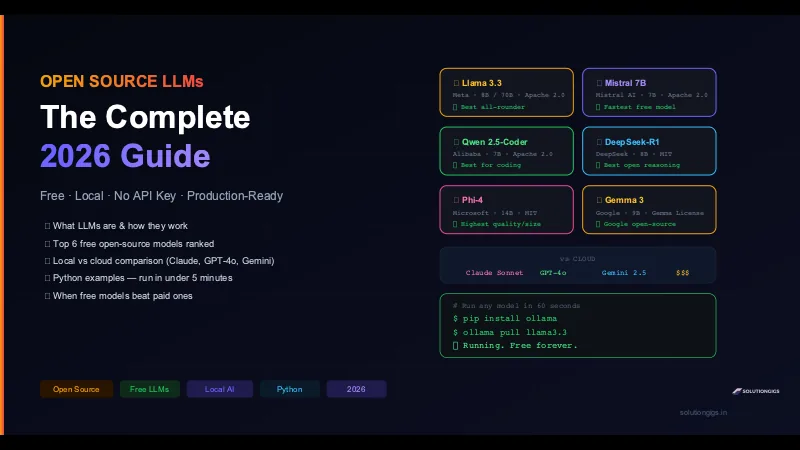
Best Open Source LLMs: Free Models Ranked
The best free open-source LLMs of 2026, ranked: Llama 3.3, Qwen 2.5-Coder, DeepSeek-R1, Phi-4, Mistral & Gemma — with Python examples and when they beat GPT-4o.
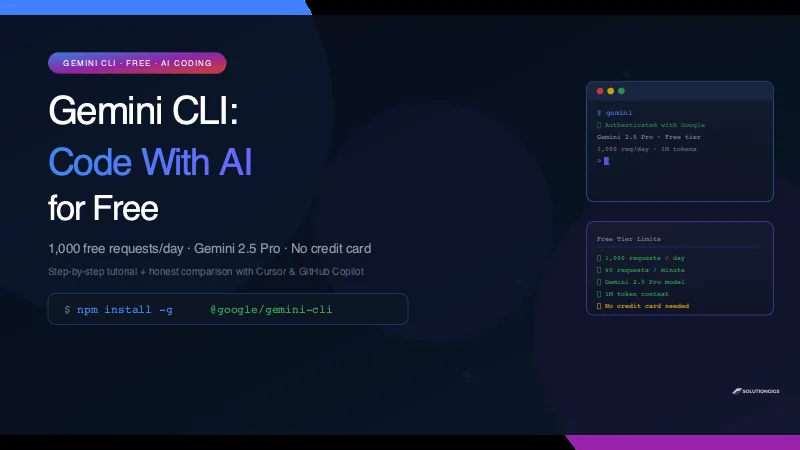
Gemini CLI Tutorial — Code With AI Free (1,000 Requests/Day)
Gemini CLI gives you Gemini 2.5 Pro in your terminal — 1,000 free requests per day, no credit card. Install in 5 minutes, use it on a real codebase, and see an honest comparison with Cursor and GitHub Copilot.
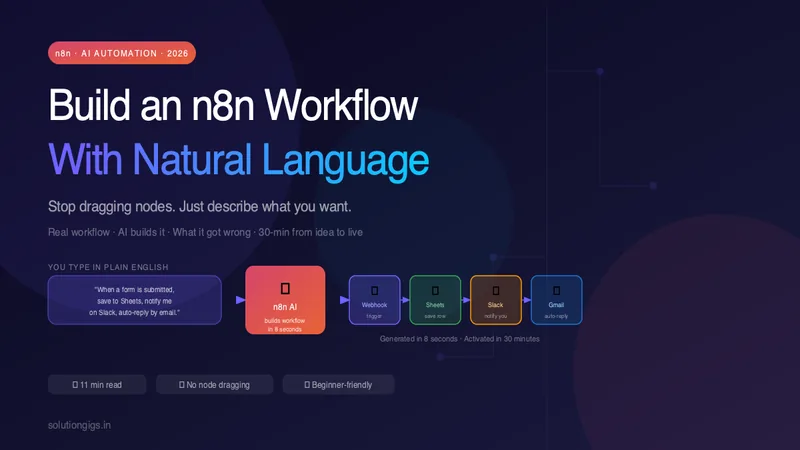
Build an n8n Workflow With Just Natural Language (n8n + AI)
Stop dragging nodes around. I describe a real automation in plain English, let n8n AI build it, show what it got wrong, and fix it live — from idea to a running workflow in under 30 minutes.