
Prompt Caching Explained: Cut LLM API Costs Up to 90%
Prompt caching cuts LLM API costs up to 90% and speeds up responses. Learn how it works, Claude vs OpenAI vs Gemini pricing, real cost math, and how to fix cache misses.

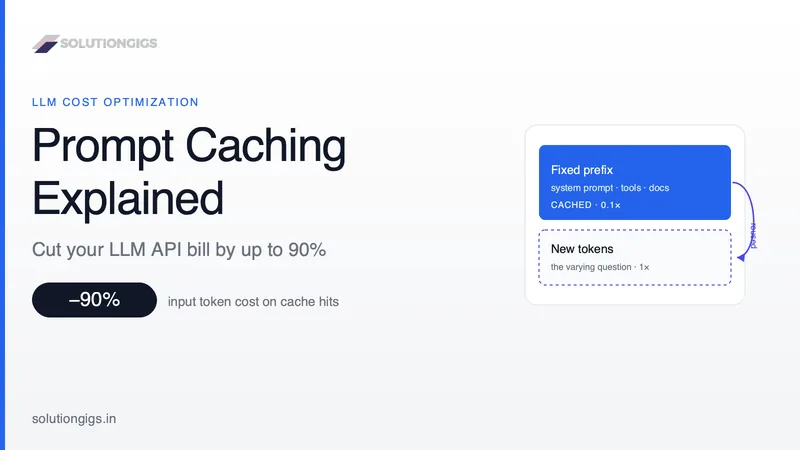
Quick Answer: Prompt caching is an LLM feature that stores the model's computed state for a repeated prompt prefix so it doesn't reprocess those tokens on the next request. When a new call starts with the same prefix — a long system prompt, your tool definitions, or a reused document — the model loads the saved state instead of recomputing it. Cached input is billed at roughly 10% of the normal input price, so prompt caching cuts input costs by up to 90% on repeated calls and usually lowers latency too. The output is identical; only the prefill step is skipped.
If your LLM bill is climbing faster than your usage, prompt caching is probably the single highest-leverage fix you're not using. Most teams resend the exact same 5,000-token system prompt on every request and pay full price for it every single time — even though the model already did that work seconds ago.
Prompt caching stops that waste. It's supported by every major provider in 2026 — Anthropic, OpenAI, and Google Gemini — and turning it on ranges from zero code changes to a single extra field. Yet it's the most under-used cost lever in production AI, mostly because the rules for making it actually work are poorly understood.
This guide explains exactly how prompt caching works, the real cost math (with break-even numbers), how the three big providers differ, and the silent mistakes that quietly make your cache do nothing. At SolutionGigs, applying the checklist at the end has cut client inference bills by more than half without touching a single line of prompt content.
What Is Prompt Caching?
Prompt caching is a technique that saves the model's internal computation for a repeated prompt prefix, so identical leading tokens are loaded from a cache instead of being reprocessed on every request.
When an LLM reads your prompt, it runs every token through its attention mechanism to build a set of key-value (KV) tensors — this is the prefill phase, and its cost scales roughly with prompt length. Prompt caching stores those tensors server-side. If your next request begins with the same bytes, the provider reuses the stored KV state and only processes the new tokens at the end.
The result: you pay full price for the fixed prefix once, then a heavily discounted "cache read" price on every request that reuses it. Nothing about the model, the weights, or the output changes — this is purely a billing and speed optimization. That makes it different from RAG or fine-tuning, which change what the model knows or how it behaves.
Prompt caching is ideal for:
- Long, fixed system prompts reused across many requests
- Tool/function definitions in agent loops
- A large document or codebase queried with many different questions
- Few-shot examples that stay constant
- Multi-turn chat, where each turn reuses the whole prior conversation
How Does Prompt Caching Work?
Prompt caching is a prefix match: the provider hashes the exact bytes of your prompt up to a cache checkpoint, and any change anywhere before that point invalidates everything after it.
The rendered order of a request is tools → system → messages. Providers cache from the beginning of that sequence forward. So the golden rule is simple: put stable content first, volatile content last.
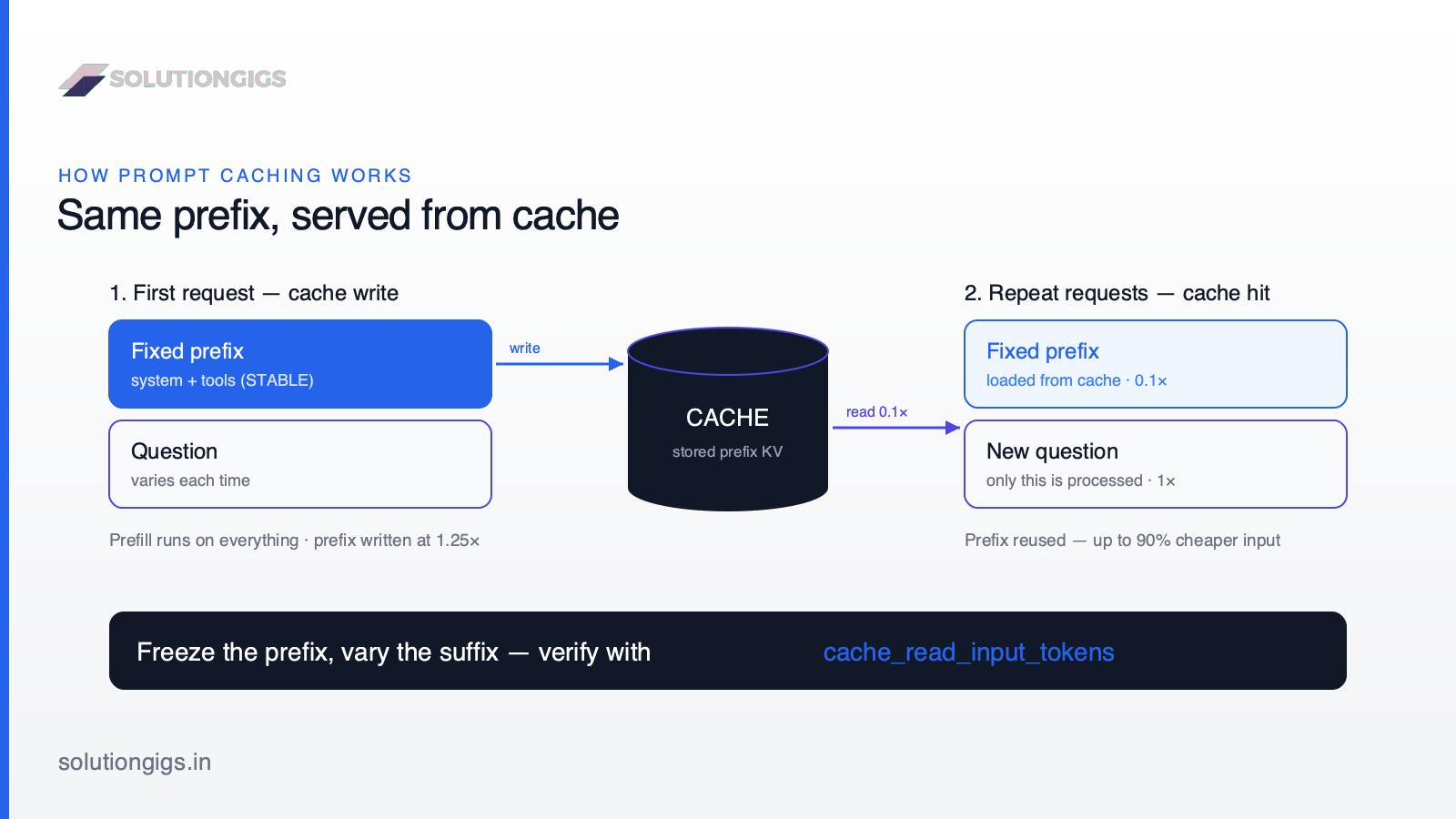
Here's the request lifecycle:
- First request — the model runs prefill on the whole prompt. The fixed prefix is written to the cache (you pay a normal or slightly higher "write" price for those tokens).
- Cache hit — a later request with the identical prefix loads the stored state. You pay the discounted "read" price for the cached tokens, plus full price for only the new tokens at the end.
- Cache miss — if any byte in the prefix changed, or the cache expired, the model reprocesses from the point of difference and writes a fresh cache entry.
The three numbers to watch in every API response tell you exactly what happened:
cache_creation_input_tokens— tokens written to the cache (write price)cache_read_input_tokens— tokens served from cache (~10% of input price)input_tokens— tokens processed fresh at full price
If cache_read_input_tokens stays at zero across repeated calls, your cache isn't working — jump to the cache-miss checklist below.
The Real Cost Math (With Break-Even Numbers)
Prompt caching pays off after just 2–3 requests that reuse the same prefix — and the more reads per write, the closer your savings get to the full 90%.
Let's make it concrete with Anthropic's Claude Opus 4.8 pricing ($5 per million input tokens, as of mid-2026):
| Token type | Price vs. base input | Cost per 1M tokens |
|---|---|---|
| Normal input (uncached) | 1× | $5.00 |
| Cache write (5-min tier) | 1.25× | $6.25 |
| Cache read (hit) | ~0.1× | $0.50 |
Now imagine a 10,000-token system prompt sent with 100 different user questions.
- Without caching: 100 × 10,000 tokens × $5/1M = $5.00 just for the repeated prefix.
- With caching: 1 write (10,000 × $6.25/1M = $0.06) + 99 reads (990,000 × $0.50/1M = $0.50) = $0.56.
That's an ~89% reduction on the fixed portion of the prompt — before counting the latency win. The break-even is fast: with a short-lived (5-minute) cache, the 1.25× write premium is repaid after the second request; with a 1-hour cache (2× write cost), after the third. Anything beyond that is pure savings.
Rule of thumb: if a chunk of your prompt is identical across 3 or more requests within the cache window, cache it. If it changes every time, don't — you'll pay the write premium for nothing.
Claude vs OpenAI vs Gemini: Prompt Caching Compared
All three major providers support prompt caching in 2026 and discount cached reads heavily, but they differ in whether you control caching, whether writes cost extra, and whether storage is billed.
| Anthropic (Claude) | OpenAI (GPT) | Google Gemini | |
|---|---|---|---|
| How to enable | Explicit cache_control markers |
Automatic, no code change | Implicit (auto) + explicit context cache |
| Control | Precise — you choose breakpoints | None — automatic prefix match | Both modes available |
| Write fee | 1.25× (5-min) / 2× (1-hour) | None | Storage billed per hour (explicit) |
| Read discount | ~90% (0.1× input) | Up to ~90% on newest models | Up to ~90% headline (explicit) |
| Min. prefix | 1,024–4,096 tokens (model-dependent) | 1,024 tokens | Model-dependent |
| Cache lifetime | ~5 min default, 1-hour optional | Several minutes idle | You set TTL (explicit) |
The practical takeaways:
- OpenAI is the easiest — caching is on by default with no write fee, so it wins for low-repetition workloads. You optimize it purely by ordering your prompt (static first, dynamic last).
- Anthropic gives you the most control via
cache_controlbreakpoints and a small write premium, which pays off in high-repetition workloads like agents and long chats. - Gemini offers automatic implicit caching plus explicit context caching, but explicit caches add a per-hour storage fee — great for one huge document reused for a while, less so for spiky traffic.
For a broader look at picking between these providers, see our Claude vs GPT vs Gemini comparison. Always confirm current numbers against the official docs — pricing shifts: Anthropic prompt caching, OpenAI prompt caching, and Google Gemini context caching.
How to Implement Prompt Caching (Claude Example)
With Anthropic's API, you add a cache_control marker to the last stable block you want cached — the model caches everything up to and including that point.
Here's a Python example that caches a large system prompt so it's only billed at full price once:
from anthropic import Anthropic

client = Anthropic()

response = client.messages.create(
    model="claude-opus-4-8",
    max_tokens=1024,
    system=[
        {
            "type": "text",
            "text": LARGE_SYSTEM_PROMPT,  # e.g. 10K tokens of stable instructions
            "cache_control": {"type": "ephemeral"},  # cache everything up to here
        }
    ],
    messages=[{"role": "user", "content": user_question}],  # varies each request → not cached
)

# Confirm the cache is working
u = response.usage
print(u.cache_creation_input_tokens, u.cache_read_input_tokens, u.input_tokens)
On the first call you'll see tokens under cache_creation_input_tokens; on every repeat within the cache window they move to cache_read_input_tokens at ~10% of the price. Prompt caching is generally available on current Claude models — no beta header required — and you can place up to four cache breakpoints per request.
The same principle applies everywhere, even with no code: freeze the prefix, vary the suffix. In agent frameworks like LangChain or LlamaIndex, keep your tool definitions and system prompt byte-stable so the framework's requests all share one cacheable prefix.
The Cache-Miss Checklist: Why Your Cache Does Nothing
The number-one reason prompt caching "doesn't work" is a silent invalidator — a small dynamic value near the top of the prompt that changes the prefix bytes on every request.
Because caching is a strict prefix match, one changed byte before your checkpoint invalidates the entire cache after it. Audit your prompt-building code for these culprits — every one of them is a saving quietly leaking away:
| Silent invalidator | Why it breaks caching | Fix |
|---|---|---|
datetime.now() / timestamp in system prompt |
Prefix changes every request | Move it to the end, or drop it |
| UUID / request ID early in the prompt | Every request is byte-unique | Put dynamic IDs after the last checkpoint |
json.dumps(d) without sorted keys |
Non-deterministic byte order | Serialize deterministically (sort keys) |
| User name/ID interpolated into system prompt | Per-user prefix, no cross-user sharing | Inject it in a later message, not the system block |
| Tools reordered or added mid-session | Tools render first — invalidates everything | Keep the tool list fixed and sorted |
| Prompt shorter than the model minimum | Below the cacheable threshold | Only cache prefixes above ~1K tokens |
| Switching models mid-conversation | Caches are model-scoped | Keep one model per conversation |
How to verify: log cache_read_input_tokens on repeated requests. If it's zero when it shouldn't be, diff the exact rendered bytes of two consecutive prompts — the difference is your invalidator. This one habit catches the vast majority of "caching isn't saving me anything" problems.
Two more pro tips:
- Pre-warm the cache at startup with a throwaway request so your first real user doesn't eat the cache-miss latency.
- For bursty traffic with long gaps, use a longer TTL (Anthropic's 1-hour tier) or a scheduled re-warm, so the cache doesn't expire between bursts.
Common Mistakes to Avoid
- Caching a prefix that changes every request. You pay the write premium and never get a read. If the first tokens vary, don't cache.
- Putting the checkpoint at the very end of the whole prompt. For a shared preamble with a varying question, mark the end of the shared part — not the end of the request — or every call writes a distinct entry that's never reused.
- Interpolating "current date" or user data into the system prompt. It feels harmless and silently kills caching for everything downstream.
- Assuming caching hurts quality. It doesn't. The output is identical — this is a common myth that keeps teams from turning it on.
- Ignoring the response usage fields. If you're not reading
cache_read_input_tokens, you have no idea whether caching is actually working.
Prompt Caching Quiz: Exam-Style Questions
These are the scenario questions that come up most often in Anthropic's developer certification material and in code review. Each one is a placement problem — the answer always falls out of the single rule that caching is a prefix match and that a request renders in the order tools → system → messages.
You're making many requests with the same large system prompt. What should you do?
Put one cache_control breakpoint on the last block of the system prompt.
system=[
    {"type": "text",
     "text": LARGE_SHARED_PROMPT,
     "cache_control": {"type": "ephemeral"}}
]
Because tools render before system, that single marker caches your tool definitions and the system prompt together — you do not need a second breakpoint for the tools. The first request pays a write premium (1.25× normal input price); every later request that starts with the same bytes pays roughly 0.1× for that prefix.
The trap in this scenario is what comes after the breakpoint. The varying part — the user's actual question — must sit in messages, after the marker. If you interpolate the question into the system prompt instead, every request renders a different prefix, every request writes a new cache entry, and nothing is ever read.
You want to cache your tool definitions. Where should the breakpoint go?
On the last tool in the tools array — or on the last system block, which covers the tools as well.
Tools render at position 0 of every request, so they are the most valuable thing you can cache and the easiest thing to accidentally invalidate. Two rules follow:
- The tool list must be byte-identical between requests.
tools=build_tools(user)— a per-user or per-feature-flag tool set — means no two users ever share a cache entry, and it invalidates everything downstream, because tools sit at position 0. - Order must be stable. Building the list from a
set, or from a dict you iterate without sorting, reorders it unpredictably between runs. The JSON bytes differ, so the cache misses, and nothing in the response tells you why.
Adding, removing, or reordering a single tool forces a full rebuild of the tools, system, and message caches. Changing tool_choice, by contrast, is free — it preserves all three.
You send Claude the same long document twice in a row. What happens?
Nothing is cached unless you asked for it. Anthropic's caching is explicit: without a cache_control marker, the second request reprocesses the entire document at full input price, exactly like the first.
Mark the document block and the second request reads it at ~0.1×:
messages=[{"role": "user", "content": [
    {"type": "text", "text": LONG_DOCUMENT,
     "cache_control": {"type": "ephemeral"}},
    {"type": "text", "text": question},   # varies — must come after
]}]
Note the ordering. The document carries the breakpoint and the question follows it, so every question against that document reuses one cache entry. Flip them and each question produces a distinct prefix that is written once and never read.
This is also where the default TTL bites: the entry lives about 5 minutes, refreshed each time it is read. "Twice in a row" hits; twice an hour apart misses. For that pattern, use {"type": "ephemeral", "ttl": "1h"} — but the write premium doubles to 2×, so it needs at least three reads to pay for itself.
When Claude uses extended thinking, what happens to your cache?
Two different things, and only one of them costs you.
- Toggling thinking on or off invalidates the message cache, but not the tools or system cache. Thinking sits in the same invalidation tier as
tool_choiceand images: a change there rebuildsmessageswhile your expensive tools + system prefix survives. You can switch thinking per-request without paying to rebuild the whole prefix. - Thinking blocks returned in a response must be echoed back unchanged when you continue the conversation on the same model. They are part of the message history, so they are part of the prefix — strip or rewrite them and you both break the prefix match and risk an ordering error from the API.
The practical rule for an agent loop: append response.content wholesale to your message list rather than extracting just the text. Pulling out the text and dropping the thinking blocks is the single most common way a multi-turn cache quietly stops hitting.
What is the minimum prompt length that can be cached?
It depends on the model, and it is not monotonic across generations — newer is not always lower:
| Model | Minimum cacheable prefix |
|---|---|
| Claude Opus 5 | 512 tokens |
| Claude Opus 4.8, Claude Sonnet 5, Sonnet 4.6 | 1,024 tokens |
| Claude Opus 4.7 | 2,048 tokens |
| Claude Opus 4.6, Haiku 4.5 | 4,096 tokens |
Below the threshold, the marker is accepted and simply does nothing: no error, no warning, and cache_creation_input_tokens: 0. A 3,000-token system prompt caches fine on Claude Opus 5 and Sonnet 5, and silently will not cache on Opus 4.6 or Haiku 4.5 — which means switching models can turn caching off without a single line of your code changing.
You are also limited to 4 breakpoints per request. That is a ceiling on marked positions, not on cache hits — earlier breakpoints stay valid as read points, so a growing conversation keeps hitting them.
Frequently Asked Questions
What is prompt caching in LLMs?
Prompt caching stores the model's computed KV state for a repeated prompt prefix so it doesn't reprocess those tokens on future requests. When a new call starts with the same prefix, the saved state loads instead — cutting input token cost by up to 90% and often lowering latency. Output is identical; only prefill is skipped.
How does prompt caching reduce API costs?
Cached input tokens are billed at roughly 10% of the normal input price. On a 10,000-token system prompt sent 100 times, the uncached bill is $5.00; with caching it drops to ~$0.56 — an 89% reduction. Break-even is 2–3 reads per write. The larger and more frequently reused the fixed prefix, the bigger the saving.
How do I enable prompt caching in Claude?
Add a cache_control: {type: ephemeral} marker to the last stable block in your system prompt or tools array. Everything up to that point is cached. The first request pays a 1.25× write premium; subsequent requests with the same prefix pay ~0.1×. Read cache_read_input_tokens in the response to confirm it's hitting.
What causes a prompt cache miss?
Cache misses happen when any byte before the checkpoint changes between requests. Common culprits: a timestamp or UUID near the top of the prompt, non-deterministic JSON serialization (unsorted keys), per-user data interpolated into the system prompt, tools reordered between calls, or a prompt shorter than the model's minimum cacheable length (512–4,096 tokens depending on model).
Does OpenAI support prompt caching?
Yes. OpenAI enables prompt caching automatically with no code changes and no write fee. Any request prefix over 1,024 tokens that repeats within the cache window is eligible for a discounted read — up to ~90% off on current models. To maximize hit rate, order your prompt with static content first and dynamic content last.
What is the TTL (time to live) for cached prompts?
Cache TTL is short and provider-specific. Anthropic's default is ~5 minutes, refreshed on each read; an optional 1-hour tier costs a 2× write premium. OpenAI's automatic cache persists for several minutes of inactivity. For bursty or low-frequency traffic, use a longer TTL or pre-warm with a throwaway request before real traffic arrives.
Conclusion
Prompt caching is the rare optimization that costs almost nothing to adopt and pays back within a handful of requests. The mental model is simple: you're a prefix match away from a 90% discount — freeze the stable parts of your prompt, keep the volatile parts last, and confirm it's working by watching cache_read_input_tokens.
Start today with the highest-repetition part of your workload: a long system prompt, your agent's tool definitions, or a document you query many times. Turn caching on, audit for silent invalidators, and measure the drop. For most teams that single change is worth more than any model downgrade — and unlike a downgrade, it costs you nothing in quality.
Building or scaling an LLM application and watching the bill climb? SolutionGigs connects you with vetted AI engineers who architect caching, RAG, and agent pipelines for production. Post your project on solutiongigs.in today — it's free to post →
Mohammed Yaseen
Founder, SolutionGigs
Mohammed builds and optimizes production LLM applications — from prompt caching and RAG pipelines to agents and cost tuning. He founded SolutionGigs to connect teams with engineers who ship efficient, reliable AI systems. LinkedIn →
More in AI & Machine Learning

10 Free AI Developer Tools (No Signup)
10 free AI developer tools with no signup — generate SQL, Docker Compose, Kubernetes YAML, Terraform, MCP servers, READMEs and more from plain English. Try them free.
LangChain vs LlamaIndex: Which to Use for RAG
LangChain vs LlamaIndex — the real differences, when each wins for RAG and agents, code examples, and a clear framework for choosing the right LLM framework in 2026.
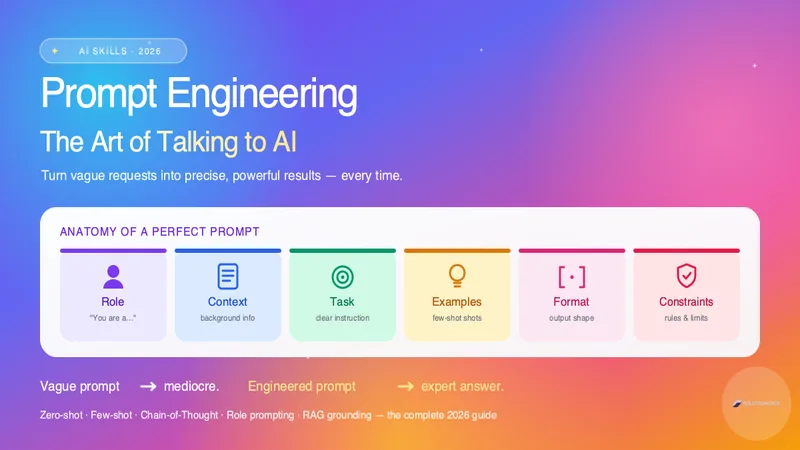
Prompt Engineering: Production Techniques, System Prompts & Guardrails
Master prompt engineering in 2026. Learn the anatomy of a perfect prompt, zero-shot vs few-shot, chain-of-thought, role prompting, and 12 proven techniques to get expert results from ChatGPT, Claude, and Gemini.