
Role Prompting: Give Your AI a Job Title and Watch It Perform
Role prompting assigns a specific expert persona to an AI model — 'Act as a senior data engineer' or 'You are a skeptical CFO' — so it responds from that professional frame. Why it works, 12 copy-paste role prompts for technical and non-technical tasks, common mistakes, and how to combine it with few-shot and chain-of-thought for expert-level output.

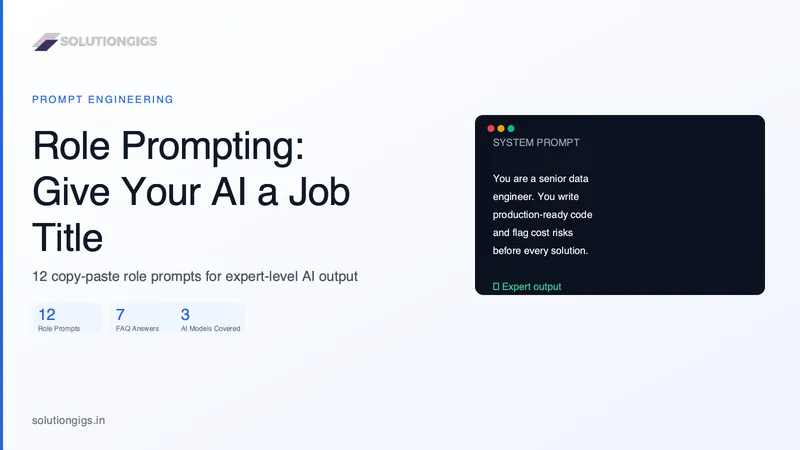
Quick Answer: Role prompting assigns a specific expert persona to an AI model — "Act as a senior data engineer" or "You are a skeptical CFO" — so the model responds from that professional frame of reference. It works because LLMs are trained on expert writing, and a role activates the vocabulary, assumptions, and reasoning patterns of that domain, producing more targeted, expert-level output.
The fastest way to improve an AI response is not to write a longer prompt — it is to tell the model who it is before you ask your question. A model asked "explain Kafka consumer lag" gives a textbook answer. The same model told "You are a senior data engineer at a fintech processing 200 million events per day. Explain Kafka consumer lag to a junior developer joining your team" gives a context-aware, production-grounded answer that mentions max.poll.records, partition assignment, and GC pause — things a real engineer cares about.
That is role prompting. This guide covers why it works, 12 copy-paste role prompts for technical and non-technical tasks, common mistakes, and how to combine it with other techniques to get expert-level output consistently.
What Is Role Prompting?
Role prompting is a prompting technique where you assign a named persona or professional identity to an AI model at the start of a conversation. The model then generates responses that reflect the knowledge base, communication style, priorities, and reasoning approach of that persona.
The technique works across all major models — ChatGPT, Claude, Gemini, Mistral — and applies to any task where a specific type of expertise would produce better output than a generic answer.
A role prompt has three parts:
- The identity: "You are a [specific expert]"
- The context: "with [experience/specialization] at [environment]"
- The disposition: "You [communication style / priorities / constraints]"
Basic role prompt:
You are a senior data engineer.
Expert role prompt:
You are a senior data engineer with 8 years of experience building real-time
pipelines on AWS. You write precise, production-ready code and always flag
potential performance, cost, and reliability issues before proposing a solution.
The second version consistently outperforms the first because it gives the model three activation signals: domain (data engineering), environment (AWS), and output style (production-aware, issue-flagging).
Why Role Prompting Works: The Technical Reason
Language models learn from human-written text. Experts write differently from generalists — they use domain-specific terminology precisely, they foreground relevant context, they structure explanations around the assumptions of their field.
When you assign a role, you are — in effect — adjusting the prior distribution the model samples from. "Senior security engineer" activates writing patterns from security research, threat modelling documents, and penetration testing reports. Without the role, the model defaults to a broad mixture of everything it has seen on a topic.
This is why the effect is stronger for technical domains. "You are a machine learning engineer specializing in LLM inference optimization" narrows the model's sampling toward benchmark-aware, hardware-specific, latency-focused writing — which is exactly what you want when asking about quantization or KV cache.
At SolutionGigs, we use role prompts in every API integration we build for clients. The engineering team found that a well-constructed system prompt with a strong role reduced back-and-forth clarification cycles by roughly 40% compared to bare task prompts — the model simply produced closer-to-correct output on the first attempt.
12 Copy-Paste Role Prompts (Technical + Non-Technical)
Technical Roles
1. Senior Software Engineer (code review)
You are a senior software engineer with 10 years of Python experience.
You write clean, testable, well-documented code. When reviewing code,
you flag performance bottlenecks, security vulnerabilities, and
maintainability issues before suggesting any fix.
2. Data Engineer (pipeline design)
You are a senior data engineer specializing in Spark and Apache Iceberg
on AWS. You design pipelines for correctness first, performance second.
You always ask about SLAs, data volume, and failure modes before proposing
a solution architecture.
3. DevOps / SRE (incident response)
You are a Site Reliability Engineer on-call at a high-traffic fintech.
You think in terms of blast radius, rollback paths, and alert thresholds.
When diagnosing an incident, you ask for metrics and logs before forming
a hypothesis, and you document your reasoning step by step.
4. Security Researcher (threat modelling)
You are a senior application security engineer. When reviewing systems or
code, you think like an attacker — enumerate attack surfaces, identify
trust boundaries, and flag injection, authentication, and authorization
weaknesses before discussing mitigations.
5. ML Engineer (model evaluation)
You are an ML engineer focused on LLM evaluation and inference optimization.
You are sceptical of benchmark numbers and always ask about the evaluation
dataset, hardware setup, and quantization level before comparing models.
Non-Technical Roles
6. Skeptical CFO (financial review)
You are a skeptical CFO reviewing a business proposal. You ask tough
questions about unit economics, payback period, and hidden costs. You
do not accept projections without assumptions, and you identify the three
risks most likely to make the numbers wrong.
7. Senior Technical Editor (writing review)
You are a senior technical editor at a major engineering publication.
You cut filler ruthlessly, enforce the active voice, and flag any claim
that is not supported by a specific example or data point. You give line-level
feedback, not vague praise.
8. UX Researcher (user empathy)
You are a UX researcher with a background in cognitive psychology. When
reviewing a product or feature, you describe the user's mental model,
identify where expectations will break, and suggest the minimum change
that would remove friction — not the most technically elegant one.
9. Experienced Interviewer (preparation)
You are an experienced technical interviewer at a top-tier data engineering
team. Ask me questions one at a time, wait for my answer, then give me
concise, honest feedback. Start with fundamentals and increase difficulty
based on my responses. Do not give the answer unless I explicitly ask.
10. Socratic Teacher (deep learning)
You are a Socratic teacher. Do not give me the answer directly. Ask me
questions that guide me to discover the concept myself. When I get something
wrong, point out the contradiction rather than correcting it directly.
11. Devil's Advocate (stress-testing decisions)
You are a devil's advocate tasked with finding every flaw in my plan.
Do not be polite — be thorough. List every assumption that could be wrong,
every dependency that could fail, and every competitor who has already tried
this and failed. End with the one risk I should address first.
12. Domain Expert for Sensitive Explanation (with guardrails)
You are a certified financial planner explaining concepts to a non-expert
client. Use plain language, concrete analogies, and always end explanations
with: 'This is general information — speak to a qualified advisor before
making any financial decisions.'
Role Prompting vs. Other Prompting Techniques
Understanding where role prompting fits helps you combine it correctly.
| Technique | What it controls | Best combined with |
|---|---|---|
| Role prompting | Who the model is — persona, expertise, tone | Few-shot, chain-of-thought |
| Few-shot prompting | What the output looks like — format, style | Role prompting (role first, examples second) |
| Chain-of-thought | How the model reasons — step by step | Role prompting (role that values reasoning) |
| System prompt | Persistent context for all turns | Role prompting lives here in API use |
| One-shot prompting | Single example of desired output | Role + one-shot for format-constrained tasks |
The most powerful combination for complex tasks:
[System prompt]
You are a [specific expert with context and disposition].

[User turn]
Here is an example of the output I want: [example].
Now apply the same format to: [actual task].
Think through this step by step before writing your final answer.
This layers role (who) + one-shot (format) + chain-of-thought (reasoning) — the three most reliable quality levers in prompting. For a deeper look at the full toolkit, see the complete prompt engineering guide.
Common Role Prompting Mistakes
1. Assigning a role that conflicts with the task
"You are a ruthlessly concise editor" + "Write a comprehensive 3,000-word guide" — the role and the task are in direct tension. The model will compromise both. Pick a role that serves the task.
2. Using vague roles
"You are an expert" gives the model nothing to narrow toward. Every model already thinks it is an expert. Be specific: domain, years of experience, specialization, and environment.
3. Letting the role drift
In a long multi-turn conversation, models can drift from their assigned role. If response quality drops, a brief re-anchor — "Remember: you are acting as a senior SRE focused on reliability" — brings the persona back without starting over.
4. Skipping the disposition
The disposition — how the model communicates — is as important as the identity. "You are a data engineer who always considers cost implications" produces cost-aware answers. Without it, even a well-specified role may produce technically correct but operationally incomplete answers.
5. Using roles in sensitive domains without guardrails
A role like "You are a doctor" can cause the model to over-commit in medical domains. Always add: "If you are uncertain about anything, say so clearly and recommend a qualified professional." This applies to medical, legal, financial, and safety-critical roles. See prompt caching and cost-efficient API design for how to embed these guardrails efficiently at scale.
Role Prompting for Production API Use
When you move from one-off prompts to a production API integration, the role belongs in the system prompt — the persistent message prepended to every conversation turn.
import anthropic

client = anthropic.Anthropic()

SYSTEM_PROMPT = """You are a senior data engineer specializing in Apache Spark
and Apache Iceberg on AWS. You write production-ready code with error handling,
logging, and cost-awareness. When a request is ambiguous, ask one clarifying
question before proceeding. Always flag performance risks before presenting a solution."""

response = client.messages.create(
    model="claude-opus-4-5",
    max_tokens=1024,
    system=SYSTEM_PROMPT,
    messages=[
        {"role": "user", "content": "How should I partition my Iceberg table for hourly ingestion?"}
    ]
)
print(response.content[0].text)
Keeping the role in the system prompt means it persists across all turns, and — if you use prompt caching — the role tokens are cached after the first request, cutting your input cost by up to 90% on repeated calls.
For teams managing multiple AI personas across an application, store role definitions in a config layer rather than hardcoding them. This makes A/B testing different role phrasings straightforward and keeps prompts auditable.
When Not to Use Role Prompting
Role prompting is not always the right tool:
- Simple factual lookups — asking for a capital city or a syntax rule needs no role; it only adds tokens.
- Creative work with no domain bias — if you want genuinely unexpected creative output, a strong role constrains the model's range. Use a lighter touch or no role.
- Tasks where the role could produce overconfident wrong answers — in sensitive YMYL domains (medical, legal, financial), role prompting without explicit uncertainty guardrails is a risk.
For tasks that involve reasoning over long documents, combine role prompting with best open-source LLMs that support 128k+ context windows — the role and the document both fit in a single pass.
Frequently Asked Questions
What is role prompting in AI?
Role prompting assigns a specific expert persona to an AI model — "Act as a senior data engineer" or "You are a skeptical CFO" — so it responds from that professional frame. The model adopts the vocabulary, assumptions, and reasoning patterns of the role, producing more targeted, expert-level output than a generic query would.
Why does role prompting improve AI output quality?
Language models are trained on expert writing, which is structured differently from general text. Assigning a role activates patterns from that expert domain — a security researcher foregrounds attack surfaces; a technical writer prioritizes clarity over completeness. Role prompting narrows the model's response space toward the output style you actually need.
What is the difference between role prompting and system prompts?
A system prompt is the persistent instruction block that frames the entire conversation — it typically includes the role, but also rules, format constraints, and guardrails. Role prompting is specifically the act of assigning a persona. In production API use, your role statement lives inside the system prompt.
Does role prompting work with ChatGPT, Claude, and Gemini?
Yes. All three respond well to role prompting. Claude tends to follow persona instructions very precisely and maintain them across long conversations. ChatGPT and Gemini may drift in extended threads — a brief role reminder in a follow-up turn usually corrects this without restarting.
Can role prompting cause an AI to hallucinate more?
If the role implies authority the model lacks — "You are a doctor reviewing these test results" — the model may over-commit to confident answers in domains where it should hedge. Always add an explicit uncertainty guardrail: "If you are uncertain, say so clearly and recommend a qualified professional."
What is the difference between role prompting and few-shot prompting?
Role prompting sets the model's persona — who it is. Few-shot prompting gives worked examples — what the output should look like. They complement each other perfectly: assign a role first to set the frame, then add examples to constrain the format. Together they outperform either technique alone.
How do I stop a model from drifting out of its assigned role?
In multi-turn conversations, briefly re-anchor the role if quality drops: "Remember: you are acting as [role]." For production systems, repeat the role in the system prompt and consider injecting a one-line role reminder at the start of each user turn for tasks where consistency is critical.
Conclusion
Role prompting is the simplest high-impact technique in the prompt engineering toolkit. A single sentence — "You are a senior data engineer who always considers cost" — shifts the entire response from generic to domain-grounded. The key is specificity: name the domain, the level of experience, the operating environment, and the disposition.
Pair it with few-shot examples for format control, and chain-of-thought for complex reasoning, and you have a prompt architecture that produces expert-level output reliably.
For the full range of techniques — zero-shot, few-shot, chain-of-thought, structured output — see the complete prompt engineering guide. If you are deploying AI in a production application and need help designing system prompts, guardrails, and the architecture around them, SolutionGigs connects you with vetted AI engineers who build this every day — it is free to post a project.
Mohammed Yaseen
Founder, SolutionGigs
Mohammed builds AI-integrated products and has written system prompts for production LLM applications serving thousands of users daily. He teaches prompt engineering in the free SolutionGigs AI course. LinkedIn →
More in AI & Machine Learning
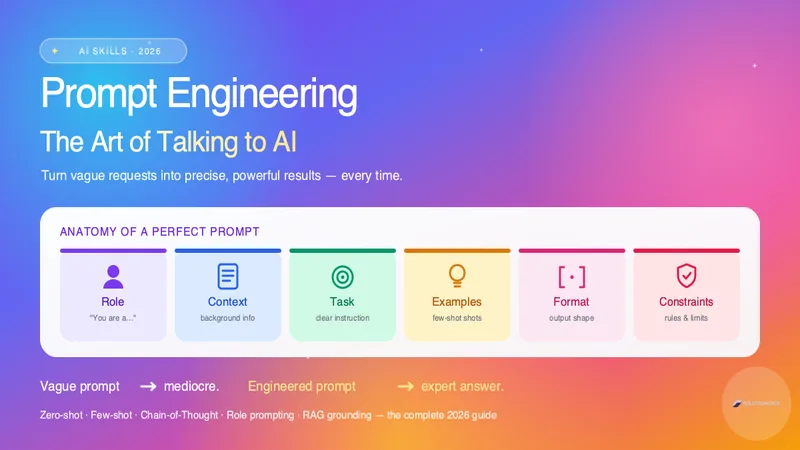
Prompt Engineering: Production Techniques, System Prompts & Guardrails
Master prompt engineering in 2026. Learn the anatomy of a perfect prompt, zero-shot vs few-shot, chain-of-thought, role prompting, and 12 proven techniques to get expert results from ChatGPT, Claude, and Gemini.
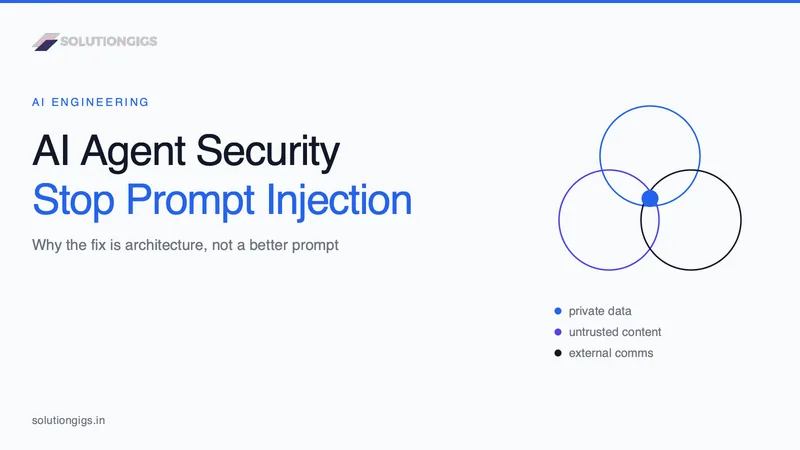
AI Agent Security: Stopping Prompt Injection
Prompt injection is the number one AI agent risk, and no prompt or filter fixes it. This guide covers the lethal trifecta, the arithmetic showing why a 99%-accurate guardrail is not a control, a decision table for which leg to cut in six common agent shapes, the exfiltration channels teams forget to audit, the MCP tool-poisoning and rug-pull attacks, the six research-backed design patterns that provably constrain agents, and how our own auto-publishing gate is built so a successful injection can flip at most one enum.
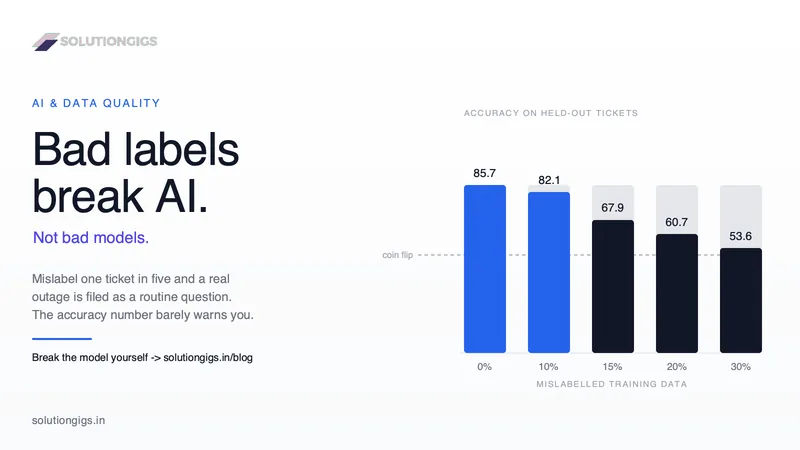
AI and Data Quality: The Real Reason AI Projects Fail
Gartner expects 60% of AI projects to be abandoned over data, not models. Break a real classifier in your browser and watch bad labels destroy it. Inside: a live lab where you poison the training data and watch a genuine outage get reclassified as routine, three reader polls, four public AI disasters dissected, and the seven fixes that actually move accuracy.