
Free Audio Transcription to Text: The Complete Workflow
Free audio transcription to text is good enough for real work now — but the recording, not the model, decides whether your transcript is usable. This guide explains how AI transcription actually works, how word error rate is measured (with a calculator you can run on your own text), the four things that destroy accuracy, the hallucination problem nobody warns beginners about, the difference between TXT, SRT and VTT, why free tools do not label speakers, and how to turn a raw transcript into meeting notes, chapters or subtitles.

Quick Answer: Free audio transcription to text is now good enough for real work — meeting notes, podcast show notes, interview research, subtitle drafts — provided you understand two things. First, the recording determines accuracy far more than the model does: clean, close-miked mono audio transcribes several times better than the same conversation captured across a room. Second, AI transcription can invent words during silence and noise, so anything that will be used as a record needs a human pass. Upload your file to the free transcription tool, get timestamped text back, then edit the 5% that matters.
Most articles about transcription tools compare feature lists. This one does something more useful: it explains what actually determines whether your transcript is usable, because that decision is made before you upload — in how the audio was recorded — and no tool on any pricing tier can undo it afterwards.
We built and run a free audio transcription tool on our own servers, which means we see the failure cases: the 90-minute Zoom recording where three people talked over each other, the lecture recorded from the back row, the interview where the air conditioning was louder than the interviewee. The pattern is consistent, and it is fixable.
Here is what this guide covers: what "free" really means across the tools you will find, how AI transcription works well enough to reason about it, how accuracy is actually measured and what destroys it, the hallucination problem nobody warns beginners about, the difference between TXT, SRT and VTT, why speaker labels are missing and what to do instead, and how to turn a raw transcript into a finished deliverable.
What "free" actually means in transcription
There are four different business models hiding behind the word "free", and they fail in four different ways. Knowing which one you are using tells you what will go wrong.
| Model | How it works | Where it bites |
|---|---|---|
| Freemium minutes | A monthly allowance, then a paywall | You hit the cap mid-project, usually on the longest file |
| API free tier | Credits on a developer platform | Expires; needs an account, a key and code |
| Ad-supported wrapper | Your file is forwarded to a paid API behind the scenes | Your audio goes somewhere you never agreed to |
| Self-hosted open model | The provider runs an open-weights model on their own hardware | Processing is CPU-bound, so it queues under load |
SolutionGigs is the fourth kind. We run OpenAI's Whisper{target="_blank" rel="noopener"} — which is open source — on our own servers, so there is no per-minute API cost to pass on, no file count limit, and no account. The honest trade-off is speed: a free CPU queue is slower than a paid GPU cluster, and we would rather tell you that than pretend otherwise.
The model to be most careful with is the third. If a tool is free, has no ads, and is clearly paying a per-minute API bill for you, ask what it is getting in return — and read where your file goes before you upload a recording you would not email to a stranger.
How AI transcription actually works
Modern speech recognition converts audio into a picture, then reads the picture. Understanding that in one minute makes every accuracy problem in this guide obvious rather than mysterious.
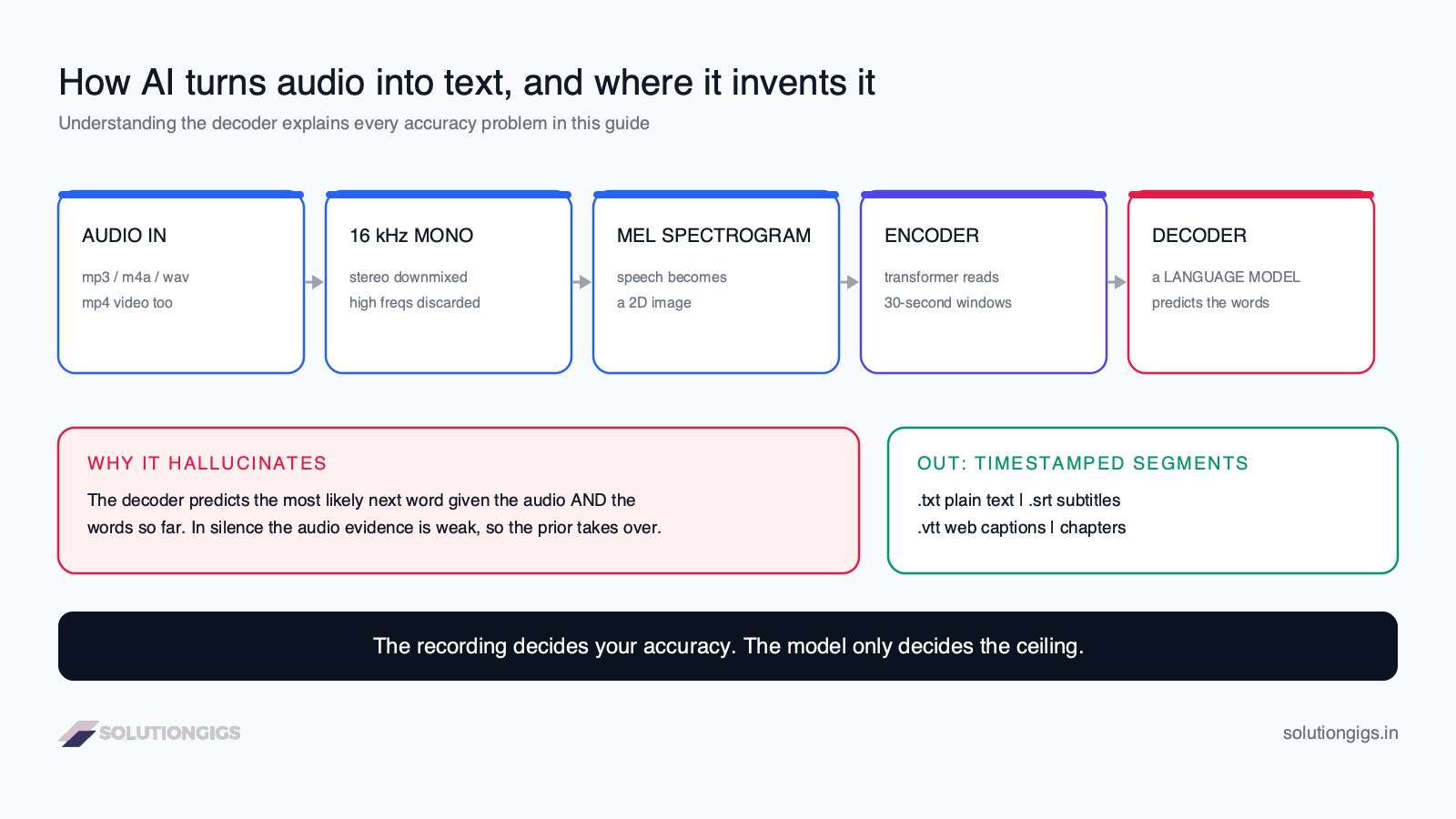
- Resample and downmix. Your file is decoded and converted to mono at 16 kHz. Everything above about 8 kHz is discarded, because human speech lives below it. This is why a 320 kbps stereo MP3 transcribes no better than a 64 kbps mono one — the extra data is thrown away before the model sees it.
- Spectrogram. The waveform becomes a mel spectrogram: a 2D image where the x-axis is time, the y-axis is frequency, and brightness is energy. Speech becomes a visual pattern.
- Encoder. A transformer reads that image in 30-second windows and produces a numerical representation of what was heard.
- Decoder. A second transformer generates text one token at a time, conditioned on the audio and on the words it has already produced. This is a language model, and that fact is the single most important thing in this article.
- Segment and timestamp. Output is emitted as segments with start and end times, which is what makes subtitles and chapters possible.
Step 4 is why AI transcription hallucinates. The decoder is not transcribing sound to symbols like a stenographer; it is predicting the most likely next word given the audio and the context. When the audio contains nothing useful — silence, a cough, HVAC hum — the audio evidence is weak and the language model's prior takes over, so it produces fluent, confident text that was never spoken. Every quirk below follows from this design.
How to transcribe audio to text for free
Three steps, no account, no install.
- Open the free audio transcription tool and drop in your file. It accepts MP3, M4A, WAV, OGG, FLAC, OPUS, WMA and AIFF, plus video files — MP4, MKV, MOV, WEBM — whose audio track is extracted automatically. The limit is 500 MB.
- Wait while it processes. Whisper runs on our server. Your file is never sent to OpenAI or any third party.
- Copy or download the result. You get the full text split into chapters with a timestamp every three minutes, downloadable as
.txtor as an.srtsubtitle file.
The upload is deleted the moment transcription finishes, and the transcript is cleared automatically within an hour.
One habit that improves every transcript: if the recording has any noticeable hiss, hum or fan noise, run it through the free audio noise remover first. Noise is the single largest driver of both errors and hallucinations, and removing it costs you thirty seconds.
How accurate is free transcription, really?
Transcription accuracy is measured as word error rate (WER): substitutions plus deletions plus insertions, divided by the number of words actually spoken. A 5% WER means one word in twenty is wrong, missing or invented.
The benchmark numbers are genuinely impressive and genuinely misleading. On LibriSpeech test-clean — professionally recorded audiobook English, one speaker, no noise — the largest Whisper models sit at roughly 3% WER, as reported in OpenAI's Whisper paper{target="_blank" rel="noopener"}. Real conversational audio is a different problem entirely, and published results on noisy, multi-speaker material land several times higher.
So the useful question is not "what is the WER" but "where are the errors?" A transcript with 5% WER spread across um, you know and the is effectively perfect. The same 5% concentrated in surnames, product names and figures is worthless. Filler-word errors cost nothing; a wrong number in a budget discussion costs you the meeting.
Try it on your own text — paste what was said and what the tool produced, and see how the number responds to different kinds of error:
Calculator · runs in your browser
Work out the word error rate yourself
Paste what was actually said and what the tool produced. This runs the same word-level alignment an ASR benchmark uses, so the number is the real one — WER = (substitutions + deletions + insertions) ÷ words spoken.
Word error rate
14.3%
2 errors over 14 words
Substitutions
2
Heard the wrong word
Deletions
0
Missed a word entirely
Insertions
0
Words that were never said
Aligned transcript
priyankaconfirmedthebudgetisfortytwolakhandcavalrysignsoffontuesday
substitutiondeletioninsertion
Same error count as a filler-word transcript. Completely different consequences.
The four things that actually destroy accuracy
In our experience running this tool, essentially every unusable transcript traces to one of four causes — and three of them are recording problems, not model problems.
| Cause | What it does | Fix |
|---|---|---|
| Low signal-to-noise ratio | Air conditioning, traffic, fan hum and room echo compete with speech; the model guesses | Move the mic closer; remove the noise before uploading |
| Overlapping speech | Two people at once is not two transcripts — it is one garbled one | Meeting etiquette, or record each speaker separately |
| Out-of-vocabulary terms | Names, jargon, acronyms and product names were rare in training | Keep a find-and-replace glossary; fix them in one pass |
| Distance from the microphone | Halves the signal and multiplies room reflections | The highest-leverage fix available, and it is free |
There is a fifth, subtler one: language switching mid-sentence. Whisper detects a single language per audio window, so a Hindi–English or Spanish–English conversation that switches inside a sentence will have one of the two transcribed phonetically into the other. If your recording is genuinely bilingual, expect to edit.
The hallucination problem
AI transcription does not only get words wrong — it sometimes invents sentences that were never spoken, and it does so in fluent, confident prose. This is the one risk worth taking seriously.
The most-cited research on this is the peer-reviewed study Careless Whisper: Speech-to-Text Hallucination Harms{target="_blank" rel="noopener"}, which found hallucinated content in about 1.4% of transcribed segments, with roughly 40% of those fabrications being harmful or misleading rather than merely wrong — invented medications, invented attributions, inserted commentary. The fabrications clustered around silence and disfluent speech, exactly as the decoder design predicts.
What this means practically:
- Trim leading and trailing silence before uploading. Long silent stretches are the highest-risk input there is.
- Be suspicious of fluent passages that feel out of place, particularly right after a pause. Real speech is messier than hallucinated speech; a suspiciously well-formed sentence deserves a listen.
- Never use an unreviewed AI transcript as a record in medical, legal, HR or safety-critical contexts. Use it as a first draft that a human verifies against the audio.
- Repeated phrases are a tell. A line that repeats several times in a row almost always means the decoder got stuck on a segment with no speech in it.
None of this makes free transcription unusable — it makes it a draft-generating tool rather than a record-generating one, which is the correct way to use it anyway.
Timestamps, chapters and subtitle formats
A transcript's format decides what you can do with it, and the three you will meet are TXT, SRT and VTT. They contain the same words and are not interchangeable.
Toggle between them to see how the same thirty seconds of speech is represented:
Format switcher · same twelve seconds
One transcript, five export formats
These are the same three spoken segments in every format a transcription tool offers. The timestamps are generated from one source, so the differences you see are the only differences there are — and two of them are why subtitle files get rejected.
transcript.srt
1
00:00:00,000 --> 00:00:03,480
Right, so the migration is scheduled for Thursday evening.

2
00:00:03,480 --> 00:00:08,120
Priya will handle the rollback if anything breaks,
and I will be on call from eight.

3
00:00:08,120 --> 00:00:12,900
Any objections? No? Good — I will send the runbook tonight.
Use it for: The universal subtitle format. Numbered cues, a COMMA before the milliseconds, no header. YouTube, Vimeo and every editor accept it.
WEBVTT header is missing.The rules that matter:
- SRT is the universal subtitle format. Cues are numbered, timestamps use
HH:MM:SS,mmmwith a comma before the milliseconds, and a blank line separates cues. YouTube, Vimeo, Premiere and almost every video tool accept it. - WebVTT is the web-native format used by the HTML5
<track>element. The file must begin with the lineWEBVTT, and timestamps use a dot before the milliseconds. Swapping the comma for a dot is the most common reason a subtitle file "doesn't work". - Plain text is what you want for reading, searching, and pasting into an AI tool. Timestamps in a body of prose actively hurt a summariser's output.
- Chapters — a timestamp every few minutes — are the format for navigating a long recording. Our tool produces these automatically every three minutes, which is what makes a two-hour podcast browsable rather than a wall of text.
Subtitle line length is a real constraint. Aim for ≤ 42 characters per line and at most two lines per cue, held on screen for at least one second. A cue lifted straight from a transcript is often too long to read before it disappears — this is the main manual edit a subtitle draft still needs.
Why free tools don't label the speakers
Identifying who is speaking is a separate problem from transcribing what was said, and it is called diarization. Whisper does not do it. Neither do most free tools built on it, which is why your two-person interview comes back as one continuous block.
Diarization requires clustering voice embeddings across the recording and aligning those clusters to transcript segments — a second model, more compute, and a meaningfully harder problem when speakers overlap or sound similar. That is why it tends to sit behind a paid tier.
The workarounds that actually work, in order of preference:
- Record each speaker to a separate track. Most conferencing tools and every multitrack recorder can do this. Transcribe each track separately and you have perfect attribution for free — this is what podcasters do, and it is the only approach that survives crosstalk.
- Use the timestamps. For a two-person interview, speaker turns are usually obvious from content. Attribute them during your edit pass; on a 30-minute interview it takes a few minutes.
- Announce the speaker at the start of each turn if you know in advance the recording will be transcribed. Slightly unnatural, completely effective.
- Pay for diarization when attribution is the deliverable — legal depositions, research interviews with many participants, compliance recordings.
What actually happens with long recordings
A three-hour recording is not the same job as a three-minute one, and three things change.
Upload dominates. A three-hour WAV can exceed 1 GB; the same audio as a 128 kbps MP3 is around 160 MB. Converting before uploading is almost always faster than uploading the original — our free WAV to MP3 converter handles that in the browser, and it is why the 500 MB limit is rarely the constraint people expect.
Errors compound in a specific way. Because the decoder is conditioned on the text it has already produced, a badly-transcribed passage can drag the following minute off course. If one section is garbage, re-transcribing just that section separately often produces a materially better result than re-running the whole file.
Structure becomes the deliverable. Nobody reads a 30,000-word transcript. Chapters, headings and a summary are what make it usable, which is the next section.
Turning a transcript into something you can use
A raw transcript is an intermediate artefact, not an output. The value comes from what you convert it into, and each of these is a five-minute job once you have the text.
| You recorded | You actually want | How to get there |
|---|---|---|
| A team meeting | Decisions, owners, action items | Paste the transcript into the meeting summarizer |
| A podcast or long video | Timestamped chapters for the description | Use the YouTube chapter generator |
| A vertical clip | Burned-in captions | Use the shorts caption tool |
| An interview | Quotes and a written piece | Transcript → outline → draft; the transcript is your research, not your article |
| A lecture | Searchable revision notes | Plain text plus chapter timestamps, in whatever your notes app is |
The workflow we recommend to clients, end to end: denoise → transcribe → fix names once with find-and-replace → summarise or chapter → publish. Five steps, all free, and the only one that needs human judgement is the third.
Common mistakes
| Mistake | Why it hurts | Do this instead |
|---|---|---|
| Uploading a huge WAV | The upload takes longer than the transcription | Convert to MP3 or M4A first |
| Transcribing noisy audio as-is | Noise causes both errors and hallucinations | Denoise first — it takes seconds |
| Trusting the transcript as a record | Fabricated content is rare but real | Human-verify anything consequential |
| Fixing names one by one | The same name is wrong in the same way every time | One find-and-replace pass per term |
| Sending timestamped text to an AI summariser | Timestamps distract the model and waste tokens | Use the plain-text export |
| Assuming higher bitrate helps | Audio is downmixed to 16 kHz mono anyway | Spend the effort on mic placement instead |
| Using SRT where VTT is required | Comma vs dot in the timestamp breaks it | Match the format to the player |
| Recording everyone on one mic and expecting labels | Diarization is a different problem | Record separate tracks when attribution matters |
When to pay instead
Free is genuinely the right answer for most work, and genuinely the wrong answer for some. Paid transcription is worth it when:
- The transcript is a legal or medical record and needs certified accuracy with an audit trail.
- You need speaker attribution you can rely on without editing.
- You need live captions in real time, which is a different technical problem from file transcription.
- You need guaranteed turnaround at volume, with an SLA behind it.
Everything else — meeting notes, show notes, interview research, lecture review, subtitle drafts, content repurposing — is a solved problem at zero cost. Here is the arithmetic for your own volume:
Calculator · list prices, August 2026
What does your transcription volume actually cost?
Set how much audio you transcribe in a typical month. The point is not that free wins — it is how small the paid-API numbers are at low volume, and how enormous the human number is at any volume. Those two facts decide the right answer for you.
| Option | Per minute | This month | Per year |
|---|---|---|---|
| SolutionGigs free toolOpen-weights Whisper on our own servers. No cap, no account — you pay in queue time at peak. | — | Free | Free |
| AssemblyAI (async)Developer API. Needs a key and code; diarization available as an add-on. | $0.0035 | $4.20 | $50 |
| OpenAI Whisper APIThe same model as the free tool, billed per minute and run on their hardware. | $0.0060 | $7.20 | $86 |
| Deepgram Nova-3Pay-as-you-go pre-recorded rate. Strong on real-time streaming. | $0.0077 | $9.24 | $111 |
| Human transcriptionTypical market midpoint. This is what certified accuracy and reliable speaker labels cost. | $1.5000 | $1,800 | $21,600 |
Frequently Asked Questions
Is free audio transcription to text actually accurate?
For clear speech with one speaker at a time, yes — accurate enough to publish after a light edit. Accuracy is measured as word error rate, and the biggest models sit at roughly 3% on clean read English; real meeting audio with crosstalk and room echo lands several times higher. The recording matters far more than the model: the same tool on a close microphone and on a laptop across the room produces transcripts that are barely comparable.
What does word error rate mean in transcription?
Word error rate (WER) is substitutions plus deletions plus insertions, divided by the number of words actually spoken. A 5% WER means one word in twenty is wrong, missing or invented. It is not the same as usefulness — 5% spread across filler words is barely noticeable, while 5% concentrated in names and numbers can make a transcript useless. Check where the errors are, not just how many.
Can AI transcription invent words that were never said?
Yes, and it is the failure mode people are least prepared for. The peer-reviewed study Careless Whisper found hallucinated content in about 1.4% of transcribed segments, with roughly 40% of those fabrications harmful or misleading rather than merely wrong. Hallucinations cluster around silence, noise and disfluent speech. Never treat an unreviewed AI transcript of a medical, legal or safety-critical recording as a record.
What is the difference between TXT, SRT and VTT transcripts?
TXT is plain text with no timing — best for reading, searching and feeding to an AI summariser. SRT is the subtitle format almost every video platform accepts: numbered cues with HH:MM:SS,mmm timestamps using a comma. WebVTT is the web-native format for the HTML5 <track> element: it must start with a WEBVTT header and uses a dot before the milliseconds. Upload SRT to YouTube; use VTT in your own player.
Does free transcription identify who is speaking?
Usually not. Speaker identification is a separate problem called diarization, and Whisper on its own transcribes what was said without labelling who said it. The practical free workarounds are recording each participant to a separate track and transcribing them individually, or attributing turns manually using the timestamps. Paid APIs bundle diarization; the free path is per-speaker recording.
Is it safe to upload confidential audio to a free transcription tool?
It depends on where the audio is processed and how long it is kept — read that before uploading anything sensitive. Many free tools are wrappers that forward your file to a third-party API. SolutionGigs runs Whisper on our own servers, never sends your file to OpenAI or any third party, deletes the upload the moment transcription finishes, and clears the transcript within an hour. For regulated material, running the model locally yourself is the only fully controlled option.
How long does it take to transcribe a one-hour recording?
On a free CPU-based service, expect a few minutes of processing per hour of audio, plus queue time when the server is busy. Speed depends on model size, hardware and whether the file needs converting first. Uploading a compressed MP3 or M4A rather than a large WAV removes most of the upload wait, and downmixing stereo to mono costs nothing in accuracy for speech.
When is free transcription not good enough?
When the transcript is a legal or medical record, when you need certified accuracy with an audit trail, when speaker attribution must be reliable without editing, or when you need real-time captions during a live event. For meeting notes, show notes, interview research, lecture review, subtitle drafts and content repurposing, free AI transcription plus ten minutes of editing is the right tool.
Conclusion
Free audio transcription to text stopped being a compromise a while ago. What has not changed is where the quality comes from: the recording, not the tool. Close the microphone gap, kill the background noise, avoid crosstalk, and a free model will hand you a transcript you can edit in minutes. Record a meeting from across a room and no amount of money will fix it afterwards.
The second thing worth carrying away is what kind of tool this is. AI transcription is a draft generator, not a court reporter. It is startlingly good at the first 95% and occasionally, confidently wrong about the rest — so treat the output as a first pass to verify, especially anywhere the words become a record.
Ready to try it? Transcribe an audio file for free — MP3, M4A, WAV, video files, 90+ languages, no signup, files deleted automatically. If the recording is noisy, clean it up first; if you need the step-by-step version for Zoom, Meet or a podcast episode, our guide on how to transcribe audio to text for free walks each one.
Mohammed Yaseen
Founder, SolutionGigs
Mohammed built and operates the free Whisper-based transcription, denoising and captioning tools on SolutionGigs, which run on our own servers rather than a third-party API. LinkedIn →
More in Transcription
Free AI Meeting Summarizer — Action Items, Notes & Decisions
Turn any Zoom, Teams, or Meet recording into structured meeting notes in minutes. Get AI-generated summaries, action items, key decisions, and topics — free, no signup, powered by Whisper + Llama 3.3.
How to Transcribe Audio to Text for Free (MP3, M4A, WAV, Zoom, Podcasts)
Turn any audio or video recording into text in minutes using free Whisper AI. Works with MP3, M4A, WAV, Zoom recordings, podcast episodes, and more — no account needed.
Claude vs GPT vs Gemini: Which LLM for Which Job
Claude vs GPT vs Gemini in 2026 — the real strengths of each LLM, a job-by-job recommendation table, a pricing snapshot, and a clear framework for choosing the right model.