

Spark cache() vs persist(): When to Use Each
Last Updated: July 2026 | 13 min read
Quick Answer: In Apache Spark, cache() and persist() do the same thing — store a computed DataFrame or RDD so Spark reuses it instead of recomputing its whole lineage. The only difference is control: cache() is a shorthand that uses a fixed default storage level, while persist() accepts a StorageLevel so you choose memory vs disk, serialized vs deserialized, replicated or off-heap. Under the hood, cache() literally calls persist() with the default level. The catch that bites people: for a DataFrame/Dataset, cache() = MEMORY_AND_DISK, but for a low-level RDD, cache() = MEMORY_ONLY. Both are lazy — nothing is stored until the first action runs.
cache() vs persist() is one of the most-asked Spark questions in interviews, and one of the most misused features in real pipelines. The one-liner everyone repeats — "cache keeps it in memory" — hides two things that actually matter in production: which storage level you're getting (it's not always memory-only), and when caching helps at all (far less often than people think). Cache the wrong DataFrame and you don't speed the job up — you fill the heap, trigger eviction, and make everything slower. This guide covers exactly what each call does, every storage level, the DataFrame-vs-RDD default gotcha, unpersist(), and a decision rule for when to reach for either — with real PySpark.
The core difference: same mechanism, different control
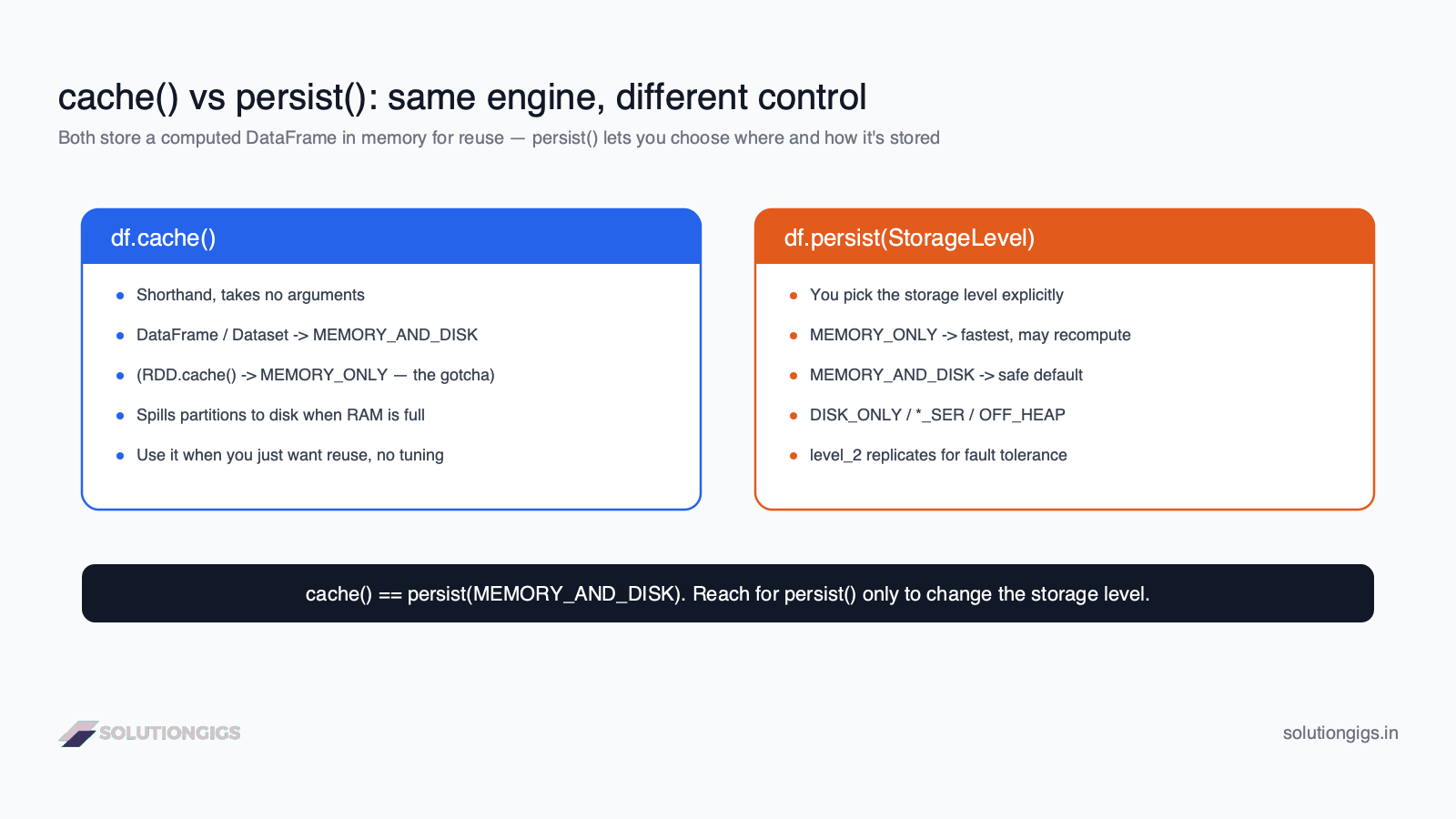
cache() and persist() both mark a dataset to be stored for reuse; persist() lets you specify the StorageLevel, and cache() is just persist() with a default level. That's the entire distinction — everything else is about which level you pick.
By default, every Spark DataFrame is lazy and recomputed on demand. When you run two actions on the same DataFrame, Spark re-executes the full chain of transformations — the read, the joins, the aggregations — both times, because it keeps no result between actions. Caching breaks that: it tells Spark to keep the computed partitions around after the first action so later actions read the stored copy instead of redoing the work.
df.cache()— no arguments. Marksdfto be stored at the default storage level.df.persist(StorageLevel.X)— same thing, but you chooseX: where it lives (memory, disk, both), how it's encoded (deserialized vs serialized), and whether it's replicated across nodes.
Mental model:
persist()is the full control panel;cache()is the one big "just store it" button wired to a sensible default. They're the same machine.
cache(): the one-line default (and its DataFrame vs RDD gotcha)
cache() stores a dataset at the default storage level, which is MEMORY_AND_DISK for DataFrames/Datasets but MEMORY_ONLY for RDDs — a difference that quietly changes how your job behaves under memory pressure. It's the right call when you just want reuse and don't need to tune anything.
from pyspark.sql import functions as F

# Expensive to build: a wide join + aggregation reused several times
enriched = (events.join(users, "user_id")
                  .groupBy("user_id", "country")
                  .agg(F.sum("amount").alias("total")))

enriched.cache()          # mark for reuse — DataFrame default = MEMORY_AND_DISK
enriched.count()          # first action: computes AND populates the cache

# These now read the cached result instead of re-running the join+agg:
top = enriched.orderBy(F.desc("total")).limit(10)
by_country = enriched.groupBy("country").agg(F.sum("total"))
The gotcha lives in that default. On a DataFrame, cache() uses MEMORY_AND_DISK, so partitions that don't fit in RAM spill to disk and are still available. On an RDD, cache() uses MEMORY_ONLY, so partitions that don't fit are dropped and recomputed from lineage on the next access — no disk fallback. Same method name, materially different failure mode. If you're working with RDDs and expecting disk spill, you won't get it unless you persist(MEMORY_AND_DISK) explicitly.
cache()returns the DataFrame — it doesn't cache in place and give you nothing.enriched = enriched.cache()andenriched.cache()are equivalent for DataFrames because it marks the same underlying plan; the call is still lazy either way.
persist(): pick your storage level
persist(StorageLevel) gives you explicit control over where and how the cached data is stored — memory, disk, or both; deserialized or serialized; single copy or replicated. Reach for it whenever the default doesn't fit your memory budget or fault-tolerance needs.
from pyspark import StorageLevel

# Too big for memory — keep it entirely on disk
big_df.persist(StorageLevel.DISK_ONLY)

# Tight on heap / GC pressure — store a compact serialized copy in memory, spill to disk
mid_df.persist(StorageLevel.MEMORY_AND_DISK_SER)

# Expensive to recompute AND you want node-failure resilience — replicate ×2
critical_df.persist(StorageLevel.MEMORY_AND_DISK_2)

# Always trigger materialization with an action after persist/cache
big_df.count()
persist() with no argument behaves like cache() — it uses the same default level. The value of persist() is entirely in passing a StorageLevel that matches your situation.
Storage levels explained
Each StorageLevel is a combination of four switches: use memory, use disk, serialized or not, and replication factor — the full list lives in the Apache Spark RDD persistence docs. Here are the ones you'll actually use:
| StorageLevel | Memory | Disk | Serialized | Notes |
|---|---|---|---|---|
MEMORY_ONLY |
✅ | ❌ | ❌ (deserialized) | Fastest reads. Partitions that don't fit are recomputed, not spilled. RDD cache() default. |
MEMORY_AND_DISK |
✅ | ✅ | ❌ | Spills overflow to disk. DataFrame cache() default — the safe everyday choice. |
MEMORY_ONLY_SER |
✅ | ❌ | ✅ | Compact (less RAM, less GC), costs CPU to deserialize. Big win in JVM/Scala. |
MEMORY_AND_DISK_SER |
✅ | ✅ | ✅ | Serialized + disk spill — best memory efficiency with a safety net. |
DISK_ONLY |
❌ | ✅ | ✅ | For datasets far larger than memory. Slower, but frees the heap. |
OFF_HEAP |
✅ (off-heap) | ❌ | ✅ | Stores in off-heap memory (needs spark.memory.offHeap.enabled=true); sidesteps JVM GC. |
*_2 (e.g. MEMORY_AND_DISK_2) |
— | — | — | Any level with _2 replicates each partition on two nodes for fault tolerance. |
Two practical notes. First, in PySpark, RDD data is always serialized (pickled), so the _SER distinction mostly matters for Scala/Java RDDs — but for DataFrames, Spark uses its own compact columnar in-memory format (Tungsten, optionally compressed) regardless, which is why DataFrame caching is already memory-efficient. Second, serialized levels trade CPU for RAM: smaller footprint and less garbage collection, at the cost of deserializing on every read. On heap-constrained clusters that trade is often worth it — the same lever that helps with Spark out-of-memory errors.
Both are lazy: nothing is cached until an action
Calling cache() or persist() stores nothing immediately — it only tags the DataFrame; the cache is populated when the first action forces computation. Forgetting this leads to confusing timings where the "cached" run is still slow.
df.cache()                # nothing stored yet — just a flag on the plan
df.filter(...).explain()  # still shows the full lineage; cache not materialized

df.count()                # FIRST action: runs the lineage AND fills the cache
df.count()                # SECOND action: reads from cache — fast
Because it's lazy, the first action pays the full computation cost plus the overhead of writing the cache — so a cached DataFrame's first use is never the fast one. A common pattern is to force materialization up front with a cheap action so the cost is paid at a predictable point:
df.cache()
df.count()   # deliberately materialize now, before the loop / multiple readers
You can confirm what's actually cached in the Storage tab of the Spark UI — it lists each cached dataset, its storage level, and the fraction of partitions in memory vs on disk. (For the SQL/DataFrame layer specifically, the Spark SQL performance tuning guide documents how cached columnar storage and compression behave.) If a dataset you "cached" isn't there, you never ran an action on it.
unpersist(): free the memory you reserved
unpersist() removes a dataset from the cache, releasing its memory and disk; call it as soon as you're done reusing a DataFrame, because Spark otherwise keeps cached data until it's forced to evict under memory pressure. Uncontrolled caching is a leading cause of avoidable OOMs.
enriched.cache()
enriched.count()
# ... several actions that reuse `enriched` ...

enriched.unpersist()   # done with it — give the memory back
Spark's cache is bounded by executor memory and uses LRU eviction: when it needs room, it drops the least-recently-used cached partitions. That sounds self-managing, but it causes cache thrashing — you cache A, then cache B and C, B and C evict A, and the next read of A silently recomputes the whole thing. Explicit unpersist() at the end of each reuse window keeps the cache small and predictable. This interacts directly with executor sizing and skew; if caching is pushing you into memory trouble, pair this with the fixes in the Spark out-of-memory guide and watch for data skew inflating a single cached partition.
When should you actually cache?
Cache a DataFrame only when it is reused by more than one action; if it's read once, caching adds cost and helps nothing. The decision is about reuse, not size or importance.
Cache when:
- The same DataFrame feeds multiple actions or branches — e.g. one enriched dataset that you both write to storage and aggregate two different ways. Without a cache, each branch re-runs the whole upstream chain.
- Iterative algorithms — ML training, graph iterations, or any loop that reads the same base data every pass. This is the textbook cache win.
- An expensive transformation is reused — a heavy join or aggregation whose result several later steps depend on.
- You're breaking a long lineage — caching a stable intermediate can shorten the plan Spark re-optimizes and re-computes on failure.
Do not cache when:
- The DataFrame is used once — the first-pass cost plus cache write is pure overhead.
- You're caching a huge dataset to reuse only a slice — filter/select first, then cache the small result.
- You cache before a cheap, single narrow transformation — there's nothing to save.
At Telemetrix, the biggest Spark speedups I've shipped came from removing caches, not adding them. A pipeline had
.cache()sprinkled on DataFrames used exactly once "to be safe"; each one filled the heap and forced eviction of the one dataset that was genuinely reused across a loop. Deleting the needless caches and caching only the reused intermediate cut runtime and stopped the OOMs.
See how SolutionGigs can help
Spark job spilling, thrashing its cache, or OOM-ing right after you added .cache() "for speed"? These memory-tuning problems are exactly where a second expert set of eyes pays off. SolutionGigs connects you with vetted data engineers who've tuned production Spark on EMR and Databricks at scale. See how SolutionGigs can help →
cache() vs persist(): side-by-side
| Aspect | cache() |
persist(StorageLevel) |
|---|---|---|
| Arguments | None | A StorageLevel (optional) |
| Storage level | Fixed default | Any level you choose |
| DataFrame default | MEMORY_AND_DISK |
MEMORY_AND_DISK if no arg |
| RDD default | MEMORY_ONLY |
MEMORY_ONLY if no arg |
| Control over disk/serialization/replication | No | Yes |
| Lazy? | Yes | Yes |
| Freed by | unpersist() |
unpersist() |
| Best for | "Just reuse this" with the default | Tuning memory, disk spill, GC, fault tolerance |
One-line verdict: use cache() when the default MEMORY_AND_DISK is fine (most of the time); use persist() when you need a different storage level — disk-only for oversized data, serialized/off-heap for GC pressure, or _2 for resilience.
Common mistakes (and how to avoid them)
- Caching a DataFrame used only once. You pay computation + cache-write overhead for zero reuse. Cache only at genuine reuse points.
- Forgetting the DataFrame vs RDD default. RDD
cache()isMEMORY_ONLY(no disk spill); DataFramecache()isMEMORY_AND_DISK. Usepersist()if you need a specific behavior. - Expecting
cache()to work immediately. It's lazy — nothing is stored until an action runs. Callcount()to materialize when timing matters. - Never calling
unpersist(). Cached data lingers and evicts the datasets that actually need to stay hot. Free it when the reuse window ends. - Caching a giant DataFrame to use a small slice. Filter and select first, then cache the small result — not the whole thing.
- Using
MEMORY_ONLYon data that doesn't fit. Partitions that don't fit are silently recomputed every access. PreferMEMORY_AND_DISKunless you've measured that recompute is cheaper than spill. - Caching to fix skew. A cache stores a skewed partition as-is; the hot partition stays hot. Rebalance with repartition() instead.
Frequently Asked Questions
What is the difference between cache() and persist() in Spark?
cache() and persist() both store a computed DataFrame or RDD so Spark reuses it instead of recomputing the whole lineage. The only difference is control: cache() is a shorthand that uses a fixed default storage level, while persist() accepts a StorageLevel to choose exactly where and how the data is stored — memory, disk, serialized, off-heap, or replicated. In fact, cache() simply calls persist() with the default level.
What storage level does cache() use in Spark?
It depends on the API. For a DataFrame or Dataset, cache() uses MEMORY_AND_DISK — partitions stay in memory and spill to disk if they don't fit. For a low-level RDD, cache() uses MEMORY_ONLY — partitions that don't fit are simply not cached and get recomputed on next access. This DataFrame-vs-RDD difference is the most common cache() surprise in Spark.
Is cache() in Spark lazy or eager?
Both cache() and persist() are lazy. Calling them only marks the DataFrame to be cached — nothing is stored until the first action (like count(), write, or collect) triggers computation. That first action runs the full lineage and populates the cache; every action after reads from it. To force materialization immediately, run an action such as df.count() right after df.cache().
When should you use persist() instead of cache() in Spark?
Use persist() whenever you need a storage level other than the default. Common cases: DISK_ONLY when a dataset is too large for memory, MEMORY_ONLY_SER or off-heap to cut memory pressure and GC in the JVM, and the _2 replicated levels for fault tolerance on an expensive-to-recompute dataset. If the default MEMORY_AND_DISK is fine, cache() is simpler and does exactly the same thing.
Do I need to call unpersist() in Spark?
You should. Cached data occupies memory and disk until removed, and Spark only evicts it automatically under memory pressure via LRU. Call df.unpersist() as soon as you're done reusing a DataFrame so those resources are freed. Leaving many DataFrames cached needlessly is a common cause of out-of-memory errors and cache thrashing, where reused data gets silently evicted and recomputed.
Does caching a DataFrame in Spark always make it faster?
No. Caching only helps when the same DataFrame is reused by more than one action; the first pass still pays full computation cost plus the overhead of writing the cache. If a DataFrame is used only once, cache() makes the job slower and wastes memory. Cache deliberately at reuse points — a DataFrame consumed by several downstream branches, or reused across the iterations of an algorithm — not everywhere.
What is the default storage level of persist() in Spark?
persist() called with no argument uses the same default as cache(): MEMORY_AND_DISK for DataFrames/Datasets and MEMORY_ONLY for RDDs. To use any other behavior — disk-only, serialized, off-heap, or replicated — pass an explicit StorageLevel, for example df.persist(StorageLevel.DISK_ONLY).
Conclusion
cache() and persist() are the same tool with different ergonomics. cache() is the one-button default; persist() is the full control panel. The distinction that trips people up isn't between the two methods — it's the default storage level (MEMORY_AND_DISK for DataFrames, MEMORY_ONLY for RDDs) and the fact that both are lazy.
The rules that cover almost every case:
- Just want reuse, default is fine →
cache(). - Too big for memory →
persist(DISK_ONLY). - GC / heap pressure →
persist(MEMORY_ONLY_SER)or off-heap. - Expensive to recompute + want resilience → a
_2replicated level. - Used only once → don't cache at all.
- Done reusing it →
unpersist().
Get this right and caching becomes a scalpel — applied at genuine reuse points, freed promptly — instead of a blunt instrument that fills your heap. If your Spark pipeline is fighting memory, spills, or a cache that seems to slow things down, get matched with a vetted data engineer on SolutionGigs. It's free to post your project.

Mohammed Yaseen
Founder, SolutionGigs
Mohammed tunes Spark jobs on AWS EMR at Telemetrix, processing hundreds of millions of events a day into Iceberg on S3. He's shipped his biggest speedups by removing needless .cache() calls and persisting only the datasets that are genuinely reused — in production, not in theory. LinkedIn →