
Polars vs Pandas: Which Python DataFrame Library to Use
Last Updated: July 2026 | 13 min read
Quick Answer: Use Polars for new analytics and ETL, large or memory-heavy data, and any pipeline where speed matters — it's built in Rust on Apache Arrow with multi-threaded, lazy execution and runs 5–50× faster than Pandas using far less memory. Use Pandas when you rely on its unrivaled ecosystem (scikit-learn, statsmodels, plotting), for small exploratory work, or where team familiarity wins. The honest 2026 answer: reach for Polars by default on new data work, keep Pandas for the ML boundary — and know that they interoperate freely.
For fifteen years, "working with data in Python" meant one thing: Pandas. It's on every tutorial, every notebook, every interview. But if you've ever watched a Pandas script crawl through a 5 GB CSV, spike your RAM, and use a single CPU core while the other fifteen sit idle, you've felt its limits. Polars is the Rust-powered answer that's genuinely reshaping the ecosystem — and the Polars vs Pandas question is now one every data engineer and analyst has to answer.
Having built ETL in both, I'll give you the straight comparison — not "Polars always wins" hype. You'll learn how they differ architecturally, where each genuinely belongs, the same operation written in both, and a migration path that doesn't require abandoning the Pandas ecosystem you rely on.
What Polars and Pandas actually are
Pandas is the original NumPy-based DataFrame library — single-threaded and eager; Polars is a newer Rust- and Arrow-based library — multi-threaded and lazy-capable, built for speed and memory efficiency. That architectural gap is the whole story.
- Pandas (2008) is the foundation of the Python data stack. It's built on NumPy, executes operations eagerly (each line runs immediately), uses a single CPU core, and organizes data around a labeled index. Its superpower is a fifteen-year ecosystem: scikit-learn, matplotlib, statsmodels, and thousands of libraries expect a Pandas DataFrame.
- Polars (2020) is built from the ground up in Rust on Apache Arrow. It runs multi-threaded across all your cores, uses SIMD vectorization, offers a lazy query optimizer, has no index, and exposes a clean expression-based API. The result is dramatically faster processing on less memory.
The one-line framing: Pandas is the familiar default; Polars is the fast, modern engine.
Polars vs Pandas: the comparison
| Polars | Pandas | |
|---|---|---|
| Built on | Rust + Apache Arrow | Python/C + NumPy (Arrow optional in 2.x) |
| Execution | Eager and lazy (query optimizer) | Eager only |
| Parallelism | Multi-threaded (all cores) | Single-threaded |
| Speed | 5–50× faster on real workloads | Baseline (faster in 2.x) |
| Memory use | Very low (~50–90% less) | Higher |
| API | Expression-based, no index | Index-based, huge surface |
| Larger-than-RAM | Streaming engine for bigger data | Must fit in memory |
| Ecosystem | Growing; Arrow interop | Unrivaled (scikit-learn, plotting, finance) |
| Best for | ETL, analytics, large data, speed | ML workflows, small data, familiarity |
| Maturity / community | Younger, fast-growing | Massive, battle-tested |
No row makes one strictly better — Polars wins on performance and memory, Pandas wins on ecosystem and ubiquity.
The real difference: eager vs lazy execution
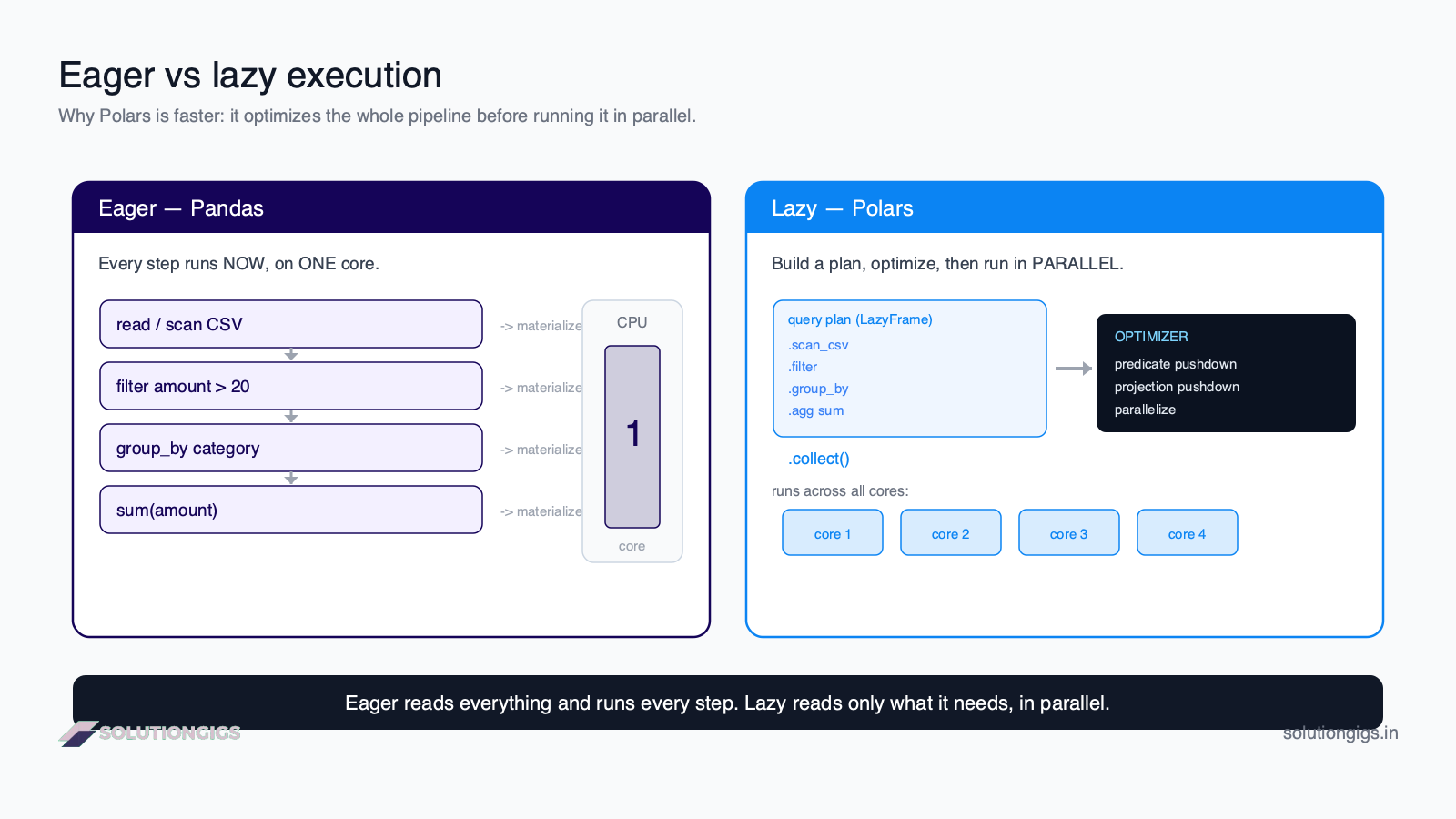
Pandas runs every operation the moment it's written; Polars can record the whole pipeline, optimize it, and run it once in parallel — and that lazy model is where most of the speedup comes from. Understanding this explains the benchmarks.
- Eager (Pandas, and Polars by default):
df.filter(...)thendf.groupby(...)each execute immediately, materializing an intermediate DataFrame at every step — even columns and rows you'll later throw away. - Lazy (Polars
LazyFrame): you chain operations on a plan, and only.collect()runs it. Before executing, Polars' query optimizer applies predicate pushdown (filter while reading the file), projection pushdown (read only the columns you use), and parallelizes the work across cores.
That's why the lazy version of a query over a large file can run 10–20× faster than the eager one — Polars simply never reads or processes the data you don't need. It's the same idea that makes Spark and DuckDB fast, brought to a single-machine DataFrame library.
The same operation in Pandas and Polars
The APIs differ most in how you express transformations: Pandas uses index/bracket selection, Polars uses composable expressions. Here's a group-by-and-aggregate in both.
Pandas:
import pandas as pd

df = pd.read_csv("orders.csv")
result = (
    df[df["amount"] > 20]
    .groupby("category")["amount"]
    .sum()
    .reset_index()
)
Polars (lazy — the fast way):
import polars as pl

result = (
    pl.scan_csv("orders.csv")            # lazy: nothing read yet
    .filter(pl.col("amount") > 20)
    .group_by("category")
    .agg(pl.col("amount").sum())
    .collect()                           # optimize + run in parallel
)
The Polars version reads only the amount and category columns, filters while scanning, and parallelizes the group-by — all from that single .collect(). If the expression style looks familiar, it's close to Spark's DataFrame API, which makes Polars a natural step up for data engineers.
When to use Pandas
Reach for Pandas when the ecosystem or familiarity matters more than raw speed — which is often true for ML and exploratory work. It remains the right tool for a large share of day-to-day analysis.
- Machine learning workflows. scikit-learn, XGBoost, statsmodels, and most ML tooling expect Pandas DataFrames or NumPy arrays. Pandas is the native language of that ecosystem.
- Small-to-medium, exploratory work. For a few thousand to a few hundred thousand rows in a notebook, Pandas is fast enough and instantly familiar.
- Team familiarity and hiring. Everyone knows Pandas; every Stack Overflow answer uses it. That has real value.
- The vast library ecosystem. Plotting, finance, geospatial, and countless integrations assume Pandas.
And Pandas 2.x is no slouch — the PyArrow backend (dtype_backend="pyarrow") and Copy-on-Write make modern Pandas meaningfully faster than the version most people remember.
When to use Polars
Reach for Polars when performance, memory, or data size are constraints — which increasingly describes real ETL and analytics. For new pipelines, it's a strong default.
- Large or memory-heavy datasets. Millions of rows, wide tables, tight RAM — Polars' Arrow backend and streaming engine handle what makes Pandas thrash.
- ETL and data pipelines. Lazy evaluation, pushdown, and parallelism make Polars ideal for the transform step of a pipeline; pair it with the right file format and it flies.
- Speed-sensitive analytics. When a report or dashboard query needs to be fast, Polars' multi-threaded execution wins.
- A cleaner, more consistent API. No index gotchas, no
SettingWithCopyWarning, composable expressions that read predictably.
The rule of thumb for 2026: new data-wrangling and ETL → Polars by default.
You don't have to choose
Polars and Pandas share Apache Arrow memory, so converting between them is fast (often zero-copy) — the best pipelines use each where it fits. This is the pattern I reach for most:
- Polars does the heavy lifting — read the big files, filter, join, aggregate, feature-engineer — where its speed and memory efficiency pay off.
- Pandas takes over at the boundary —
polars_df.to_pandas()— to feed scikit-learn, a plotting library, or a tool that only speaks Pandas.
You get Polars' performance on the expensive step and Pandas' ecosystem where you need it. This mirrors the broader "modern single-node stack" — see DuckDB vs Spark for the same "use the fast engine, keep the familiar tools" theme at the query level.
Common mistakes
- Porting Pandas code line-for-line. Polars rewards its expression API; a literal translation misses the lazy optimizer's benefits. Learn
scan_*+.collect(). - Using eager Polars and expecting the big speedup. Much of the gain is in the lazy query optimizer — use
LazyFramefor pipelines over real files. - Reaching for Polars on tiny data. For a few thousand rows, the difference is noise and Pandas' ecosystem may win. Match the tool to the size.
- Fighting Pandas' index in Polars. Polars has no index by design. Don't try to recreate it — use expressions and
group_byinstead. - Assuming Pandas is obsolete. It isn't. Pandas 2.x is fast and the ecosystem is irreplaceable for ML.
Frequently Asked Questions
Is Polars faster than Pandas?
Yes, usually by a wide margin. Built in Rust on Apache Arrow with multi-threaded, lazy execution, Polars typically runs 5–50× faster than Pandas and uses far less memory. The gap is largest on CSV/JSON reads and group-bys, and smallest on Parquet, where Pandas 2.x also uses PyArrow. On a few thousand rows the difference is negligible; it grows sharply with scale.
Should I switch from Pandas to Polars?
Switch for new analytics and ETL, large or memory-heavy data, and speed-sensitive pipelines — Polars is faster, leaner, and has a cleaner API. Stay on Pandas for scikit-learn-based ML, small exploratory work, and where team familiarity matters. Many teams use both and convert with .to_pandas() at the boundary.
What is the main difference between Polars and Pandas?
Pandas is single-threaded, eager, and NumPy-based with a labeled index. Polars is multi-threaded, offers lazy evaluation with a query optimizer, and is Arrow-based with no index and an expression API. So Polars parallelizes across cores and optimizes whole pipelines before running, while Pandas executes step by step on one core.
Is Polars a replacement for Pandas?
For data processing and ETL, yes — Polars can replace Pandas and usually improves speed and memory. But it's not a drop-in: the API differs, and the ML ecosystem (scikit-learn) still expects Pandas. So Polars replaces Pandas for the heavy wrangling step, while Pandas often stays at the ML and visualization boundary.
Does Polars work with scikit-learn?
Indirectly. scikit-learn expects Pandas DataFrames or NumPy arrays, so you do feature engineering in Polars and convert with .to_pandas()/.to_numpy() before fitting. Because both share Apache Arrow memory, conversion is fast and often zero-copy — wrangle in Polars, model in Pandas/NumPy.
What is lazy evaluation in Polars?
Lazy evaluation means Polars records a chain of transformations (via scan_csv/scan_parquet and a LazyFrame) and optimizes the plan — pushing filters and column selection down to the reader and parallelizing — before executing on .collect(). It skips reading data you never use, which is why lazy pipelines can be 10–20× faster than the eager equivalent.
Is Pandas still worth learning in 2026?
Yes. Pandas is still the most widely used DataFrame library, the default in tutorials and interviews, and the expected input for most ML and plotting libraries. Pandas 2.x is faster with its PyArrow backend and Copy-on-Write. Learn Pandas for ubiquity and ecosystem, and Polars for performance — strong data engineers know both.
Conclusion
The Polars vs Pandas decision isn't a war with a winner — it's knowing which tool fits the job. Pandas remains the familiar, ecosystem-rich default, and Pandas 2.x is genuinely faster than its reputation. Polars is the performance engine: Rust, Arrow, multi-threading, and a lazy optimizer that delivers 5–50× speedups and big memory savings on real data. For new ETL and analytics, Polars deserves to be your default; for ML and the long tail of the ecosystem, Pandas still rules.
The smartest move is to learn both and let them cooperate: Polars for the heavy data step, Pandas at the ML boundary, Arrow memory bridging the two. Do that and you stop choosing between speed and ecosystem — you get both.
Want more on the modern data stack? Explore the SolutionGigs blog for guides on DuckDB, Spark, file formats, and orchestration — and the free, hands-on Spark with Scala course, whose expression-based API will feel right at home if you like Polars. Building data pipelines and want expert help choosing the right tools? SolutionGigs connects you with vetted data engineers — it's free to post your project.

Mohammed Yaseen
Founder, SolutionGigs
Mohammed builds data pipelines in Python, Spark, and SQL — and has swapped more than one slow Pandas ETL step for Polars and never looked back. LinkedIn →