
Build Your First ETL Pipeline in Python (Tutorial)
Build your first ETL pipeline in Python step by step — extract from CSV, transform and clean with pandas, and load to Parquet or a database, with a full runnable script and best practices.

📚 Lesson 3 (final) of the Python track in our free Learn Data Engineering course. This ties together pandas and reading files & APIs.
Quick Answer: An ETL pipeline moves data through three stages: Extract (read from a source), Transform (clean and reshape), and Load (write to a destination). In Python you write three functions — extract(), transform(), load() — and run them in order. This is the core pattern behind every data pipeline, from a 20-line script to a company-wide platform. Below is a complete, runnable pipeline you can adapt today, plus the production habits (logging, error handling, idempotency) that separate a script from a pipeline.
Everything in this track has been building to this: you can query with SQL, manipulate data with pandas, and pull it from files and APIs. An ETL pipeline is just those skills, organized into a repeatable flow. In this lesson you'll build a real one end to end, understand why it's structured the way it is, and learn the handful of practices that make it safe to run in production. This is the moment the individual skills become data engineering.
What ETL actually means
ETL = Extract → Transform → Load: pull raw data, clean and reshape it, then write it somewhere useful. Each stage has one job, and keeping them separate is what makes pipelines testable and maintainable.
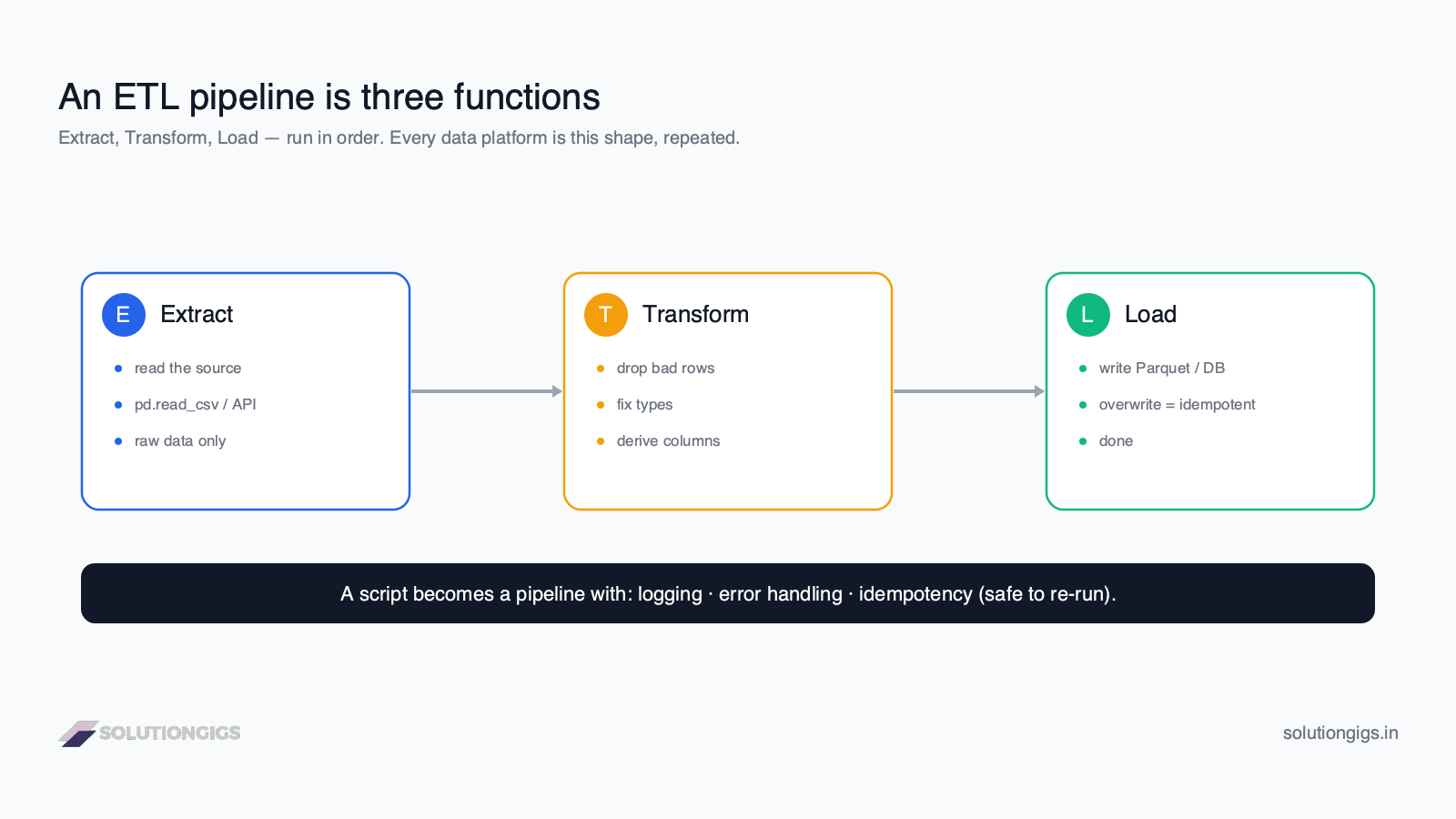
- Extract — read from the source (CSV, API, database). Don't clean here; just get the raw data.
- Transform — the heart of the pipeline: drop bad rows, fix types, derive columns, join, aggregate.
- Load — write the clean result to its destination (Parquet, a warehouse, a database).
ETL vs ELT: in ETL you transform before loading; in ELT you load raw data first and transform inside the warehouse (often with SQL or dbt). Cloud warehouses made ELT popular — but the Python ETL pattern below is still the clearest way to learn the fundamentals, and it's everywhere in practice.
The pipeline, one stage at a time
We'll build a pipeline that takes raw orders.csv, cleans it, adds a tax-inclusive total, and writes tidy Parquet. Each stage is a function.
Extract
import pandas as pd

def extract(path: str) -> pd.DataFrame:
    """Read raw orders from CSV."""
    return pd.read_csv(path, parse_dates=["created_at"])
Keep extract dumb — its only job is to return the raw data. Mixing cleaning in here makes the pipeline hard to test.
Transform
def transform(df: pd.DataFrame) -> pd.DataFrame:
    """Clean and enrich the raw orders."""
    df = df.copy()                                   # never mutate the input
    df = df.dropna(subset=["order_id", "amount"])    # drop rows missing keys
    df = df[df["amount"] > 0]                         # remove bad amounts
    df["amount"] = df["amount"].astype("float64")    # enforce type
    df["total"] = (df["amount"] * 1.18).round(2)     # add 18% tax
    df["country"] = df["country"].str.upper()        # normalize
    return df
The transform is where your business logic lives. Notice df.copy() — transforming a copy keeps the function pure and side-effect free, which makes it easy to test with a small sample.
Load
def load(df: pd.DataFrame, out_path: str) -> None:
    """Write clean orders to Parquet (overwrite → idempotent)."""
    df.to_parquet(out_path, index=False)
Writing Parquet with a plain overwrite makes this step idempotent — running it twice produces the same file, not duplicates.
Wire it together
def run_pipeline(src: str, dst: str) -> None:
    df = extract(src)
    df = transform(df)
    load(df, dst)

if __name__ == "__main__":
    run_pipeline("orders.csv", "clean_orders.parquet")
That's a complete ETL pipeline. Every large data platform is this same shape, repeated and scheduled.
Making it production-ready
A script becomes a pipeline when it's observable, safe to fail, and safe to re-run. Three additions do most of the work:
The load target below uses Python's built-in
sqlite3module, so nothing extra needs installing to follow along.
1. Logging — so you know what happened when it runs at 3 a.m.:
import logging
logging.basicConfig(level=logging.INFO, format="%(asctime)s %(levelname)s %(message)s")
log = logging.getLogger("orders_etl")

def run_pipeline(src, dst):
    log.info("extract: %s", src)
    df = extract(src)
    log.info("extracted %d rows", len(df))
    df = transform(df)
    log.info("transformed → %d clean rows", len(df))
    load(df, dst)
    log.info("loaded → %s", dst)
2. Error handling — fail loudly, not silently:
try:
    run_pipeline("orders.csv", "clean_orders.parquet")
except Exception:
    log.exception("pipeline failed")   # logs the full traceback
    raise                               # re-raise so the scheduler marks it failed
3. Idempotency — the most important habit. Re-running after a failure must not create duplicates. Overwrite a file or partition, or upsert into a database rather than blindly appending. (This is the same idempotency idea behind at-least-once delivery in Kafka.)
Scheduling: turning a script into a job
A pipeline runs on a schedule. The simplest option is cron — validate your schedule with our free cron tester:
# run every day at 2 AM
0 2 * * * /usr/bin/python3 /pipelines/orders_etl.py
As pipelines multiply and gain dependencies ("run C only after A and B succeed"), teams graduate from cron to an orchestrator like Apache Airflow or dbt — the subject of a later track in this course.
Try it yourself — exercises
- Add a transform step that keeps only orders with
status == "paid". - Make
loadwrite CSV instead of Parquet, without an index column. - Add a log line reporting how many rows were dropped in transform.
Show answers
# 1  (inside transform, before returning)
df = df[df["status"] == "paid"]

# 2
def load(df, out_path):
    df.to_csv(out_path, index=False)

# 3
def transform(df):
    before = len(df)
    df = df.dropna(subset=["order_id", "amount"])
    df = df[df["amount"] > 0]
    log.info("dropped %d bad rows", before - len(df))
    ...
Common mistakes to avoid
- Mixing stages. Cleaning inside
extract, or reading files insidetransform, makes the pipeline untestable. Keep E, T, and L separate. - Mutating the input DataFrame. Always
df.copy()in transform so the function is pure. - Appending blindly. Re-running a failed append duplicates data — overwrite or upsert instead (idempotency).
- No logging. A silent pipeline is impossible to debug when it fails unattended.
- Swallowing exceptions. Catch, log, and re-raise so the scheduler knows the run failed.
What's next: beyond the Python track
You've built a real ETL pipeline — extract, transform, load, with logging, error handling, and idempotency. That's the fundamental unit of data engineering, and every platform scales up from here. Next in the Learn Data Engineering path you'll move into data modeling and warehousing, then Spark for when your data outgrows a single machine, and Airflow for orchestrating many pipelines together — start with Airflow's own DAG core concepts, which formalise the scheduling ideas introduced above.
For the full production shape — source through to a dashboard someone actually opens — see build an end-to-end data pipeline. And if you need one standing up against a deadline rather than as a learning exercise, /services returns a scope and a fixed price within a business day.
Frequently Asked Questions
What is an ETL pipeline?
ETL stands for Extract, Transform, Load — the three stages of moving data from a source to a destination. Extract pulls raw data from files, APIs, or databases; Transform cleans, reshapes, and enriches it; Load writes the result to a warehouse, database, or file. The pipeline is the code that runs these steps, usually on a schedule.
What is the difference between ETL and ELT?
In ETL, data is transformed before loading. In ELT, raw data is loaded first and transformed inside the destination warehouse using its compute (often SQL or dbt). ELT suits cloud warehouses like Snowflake and BigQuery that transform large volumes efficiently; ETL is common when transformations happen in Python or a separate engine first.
How do I build an ETL pipeline in Python?
Write three functions — extract, transform, load — and call them in order. Extract reads the source (pd.read_csv), transform cleans and derives columns with pandas, and load writes the result (df.to_parquet). Add logging, error handling, and idempotency so it's safe to re-run, then schedule it with cron or Airflow.
Should an ETL pipeline be idempotent?
Yes. An idempotent pipeline gives the same result whether it runs once or five times, so re-running after a failure won't create duplicates or corrupt data. Achieve it by overwriting or upserting into a partition rather than blindly appending, and by making each run depend only on its input.
Is pandas good enough for production ETL?
pandas is excellent for small-to-medium ETL — up to a few million rows on one machine. It's readable, quick to develop, and easy to test. Beyond that, when data won't fit in memory, move to a distributed engine like Spark. Many pipelines start in pandas and graduate to Spark only when volume demands it.
Conclusion
An ETL pipeline is just three functions — extract, transform, load — run in order, and it's the beating heart of all data engineering. Keep the stages separate, transform a copy, write idempotently, and add logging and error handling, and you've turned a script into a production-grade pipeline. Schedule it with cron today; reach for Airflow when you have many pipelines with dependencies. Everything else in data engineering scales up from this pattern.
That completes the Python track of the free Learn Data Engineering course — you can now pull, clean, and move data end to end. Ready to build real pipelines at scale? Get matched with a vetted data engineer on SolutionGigs — it's free to post a project.
Mohammed Yaseen
Founder, SolutionGigs
Mohammed designs and operates ETL and streaming pipelines in production, and teaches the Python track in the free Learn Data Engineering course. LinkedIn →
More in Data Engineering
Python: Read Files, APIs & JSON into a DataFrame
Learn to load real data into Python — read CSV, JSON and Parquet files, call REST APIs with requests, and flatten nested JSON into a clean pandas DataFrame, with runnable examples.

SQL CTEs & Subqueries Explained: WITH Clause Guide
SQL CTEs and subqueries explained — the WITH clause, subqueries vs CTEs, when to use each, and how to break complex queries into clean, readable steps, with real examples and exercises.
SQL GROUP BY & Aggregations: COUNT, SUM, AVG
Learn SQL GROUP BY and aggregate functions — COUNT, SUM, AVG, MIN, MAX — how grouping works, HAVING vs WHERE, and the execution order, with one real dataset and exercises.