
Python: Read Files, APIs & JSON into a DataFrame
Learn to load real data into Python — read CSV, JSON and Parquet files, call REST APIs with requests, and flatten nested JSON into a clean pandas DataFrame, with runnable examples.

📚 Lesson 2 of the Python track in our free Learn Data Engineering course. Builds on pandas essentials.
Quick Answer: Getting data into Python is step one of every pipeline. Files: pd.read_csv(), pd.read_json(), pd.read_parquet() each return a DataFrame. APIs: use requests.get(url).json() to fetch JSON, then pd.DataFrame(data). Nested JSON: use pd.json_normalize(data) to flatten objects-inside-objects into flat columns. Writing back: df.to_csv() or df.to_parquet() (prefer Parquet for anything you'll query again). Mastering these four moves means you can pull data from almost anywhere.
In the last lesson you worked with data that was already loaded. In the real world, the hardest part is often just getting the data in — it lives in CSV exports, Parquet files in a data lake, and JSON behind web APIs, and it's usually messier than a tidy table. This lesson covers the handful of commands that pull data from all of these into a clean DataFrame, including the one skill that separates beginners from working data engineers: flattening nested JSON from an API into rows and columns.
The shape of every ingestion step
Every "extract" step follows the same pattern: a source (file or API) goes in, a clean DataFrame comes out. Keep this picture in mind and each format is just a different door into the same room.
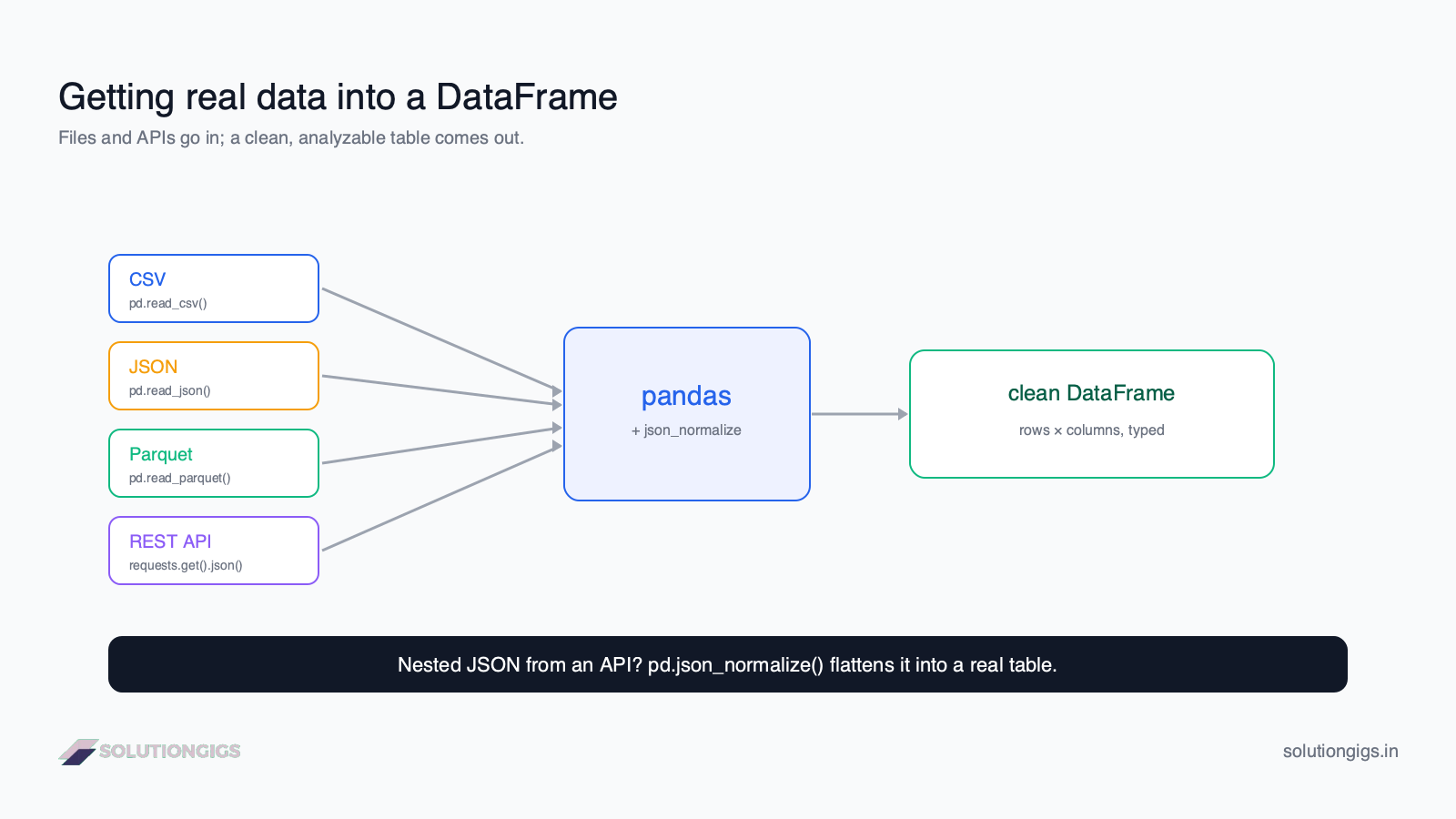
Reading files: CSV, JSON, Parquet
pandas has a read_* function for every common format, each returning a DataFrame.
import pandas as pd

df = pd.read_csv("orders.csv")                 # comma-separated text
df = pd.read_json("orders.json")               # JSON array of objects
df = pd.read_parquet("orders.parquet")         # compressed columnar (fast)
Useful read_csv options you'll reach for constantly:
df = pd.read_csv(
    "orders.csv",
    usecols=["order_id", "amount", "created_at"],  # load only these columns
    dtype={"order_id": "int64"},                    # set types explicitly
    parse_dates=["created_at"],                     # parse dates on load
)
CSV vs Parquet: CSV is readable and universal but big and slow. Parquet is compressed and columnar — often 5–10× smaller and far faster to query because engines read only the columns they need. For anything you'll query more than once, write Parquet. (This connects straight to the small files problem once you're at scale.)
Calling an API with requests
To pull data from a web API, use requests.get() and parse the JSON response — this is how most live data enters a pipeline.
import requests

resp = requests.get(
    "https://api.example.com/orders",
    headers={"Authorization": "Bearer YOUR_TOKEN"},   # auth, if needed
    params={"country": "IN", "limit": 100},           # query parameters
    timeout=10,
)
resp.raise_for_status()          # raise an error on 4xx/5xx
data = resp.json()               # parse JSON body → Python dict/list
Three things production code always does:
- Check the status.
raise_for_status()(orif resp.status_code == 200) so a failed call doesn't silently return garbage. - Set a
timeout. Without it, a hung API can freeze your pipeline forever. - Pass auth via
headers, not in the URL, so tokens don't leak into logs.
Flattening nested JSON — the key skill
API responses are usually nested — objects inside objects — and pd.json_normalize() flattens them into a proper table. This is the step that trips up most beginners.
Say the API returns this:
data = [
    {"order_id": 1, "amount": 4999,
     "customer": {"name": "Aisha", "country": "IN"}},
    {"order_id": 2, "amount": 1200,
     "customer": {"name": "Bruno", "country": "BR"}},
]
A plain pd.DataFrame(data) leaves customer as an unusable dictionary column. json_normalize flattens it:
df = pd.json_normalize(data)
# columns: order_id, amount, customer.name, customer.country
| order_id | amount | customer.name | customer.country |
|---|---|---|---|
| 1 | 4999 | Aisha | IN |
| 2 | 1200 | Bruno | BR |
For arrays nested inside each record, json_normalize takes a record_path and meta argument to explode them into rows — the standard way to turn a complex API payload into clean, analyzable data.
Writing data back out
After transforming, persist the DataFrame — and prefer Parquet for downstream use.
df.to_csv("clean_orders.csv", index=False)     # index=False avoids a junk column
df.to_parquet("clean_orders.parquet")          # smaller, faster, keeps dtypes
Note index=False on to_csv — otherwise pandas writes its row index as a mystery first column that breaks downstream readers. This is one of the most common beginner bugs.
Handling large files
When a file won't fit in memory, read it in chunks instead of all at once.
total = 0
for chunk in pd.read_csv("huge_orders.csv", chunksize=100_000):
    total += chunk["amount"].sum()      # process 100k rows at a time
chunksize yields DataFrames you handle one batch at a time. Combined with usecols, it lets pandas handle files far larger than RAM — though past a certain scale, the right move is Parquet plus a columnar engine or Spark.
Try it yourself — exercises
💡 No Python installed? The online compiler runs Python 3.13 in your browser with the full standard library, so the
json,csvand parsing exercises work without installing anything.
- Read
orders.csvloading onlyorder_idandamount. - Given the nested
datalist above, produce a flat DataFrame. - Write a DataFrame to Parquet without the index.
Show answers
# 1
pd.read_csv("orders.csv", usecols=["order_id", "amount"])

# 2
pd.json_normalize(data)

# 3
df.to_parquet("out.parquet")   # to_parquet never writes the index as a column
Common mistakes to avoid
- Not checking the API status — always
raise_for_status()or checkstatus_code. - No
timeouton requests — a hung endpoint freezes the whole job. pd.DataFrame(nested_json)— leaves dict columns; usejson_normalize.to_csvwithoutindex=False— writes a junk index column.- Loading a giant CSV whole — use
chunksize/usecols, or move to Parquet.
What's next in the Python track
You can now pull data from files and APIs and clean up nested JSON — the "extract" half of a pipeline. The final Python lesson in the Learn Data Engineering path puts it all together: building your first ETL pipeline — extract, transform, and load, as one real script.
Frequently Asked Questions
How do I read a CSV file into pandas?
Use pd.read_csv('file.csv'), which returns a DataFrame. Common options: sep for the delimiter, usecols to load only some columns, dtype to set types, and parse_dates for date columns. For large files, chunksize reads in batches instead of loading everything into memory.
How do I call an API in Python?
Use requests: resp = requests.get(url), then resp.json() to parse the JSON body into Python dicts and lists. Check resp.status_code (200 = success) or call raise_for_status(), pass auth via headers, and set a timeout because network calls can fail or hang.
How do I convert JSON to a pandas DataFrame?
For flat JSON (a list of objects), pd.DataFrame(data) works. For nested JSON with objects inside objects, use pd.json_normalize(data), which flattens nested fields into dot-separated columns. json_normalize is the standard tool for turning messy API responses into a clean table.
What is the difference between CSV and Parquet?
CSV is plain-text and row-based — readable but large and slow. Parquet is a compressed, columnar binary format that's much smaller and far faster for analytics because engines read only needed columns. Use CSV for interchange and small files; use Parquet for data you'll query repeatedly.
How do I read a large file without running out of memory?
Read in chunks with pd.read_csv('file.csv', chunksize=100000), processing one DataFrame at a time, or load only needed columns with usecols. For very large data, switch to Parquet with a columnar engine, or push the work to a database or Spark rather than pandas.
Conclusion
Loading data comes down to a few reliable moves: read_csv/read_json/read_parquet for files, requests.get().json() for APIs, and json_normalize() to flatten nested responses into a clean table. Add to_parquet() for output and chunksize for big files, and you can pull data from almost anywhere into pandas. That's the "extract" foundation every pipeline is built on.
This was Lesson 2 of the Python track. Finish the track in the free Learn Data Engineering course by building a full ETL pipeline. Building for real? Get matched with a vetted data engineer on SolutionGigs — it's free to post a project.
Mohammed Yaseen
Founder, SolutionGigs
Mohammed ingests data from files and dozens of APIs into production pipelines daily, and teaches the Python track in the free Learn Data Engineering course. LinkedIn →
More in Data Engineering
Build Your First ETL Pipeline in Python (Tutorial)
Build your first ETL pipeline in Python step by step — extract from CSV, transform and clean with pandas, and load to Parquet or a database, with a full runnable script and best practices.
pandas Tutorial for Data Engineering: The Essentials
A pandas tutorial for data engineering — load, inspect, select, filter, and aggregate data in Python, mapped directly to the SQL you already know, with runnable examples.

SQL CTEs & Subqueries Explained: WITH Clause Guide
SQL CTEs and subqueries explained — the WITH clause, subqueries vs CTEs, when to use each, and how to break complex queries into clean, readable steps, with real examples and exercises.