
Kafka Fundamentals: Topics, Partitions & Offsets
Kafka fundamentals explained — topics, partitions, offsets, producers, consumers, and consumer groups, with the mental model you need to build real streaming pipelines.

📚 Lesson 1 of the Kafka track in our free Learn Data Engineering course. This is the foundation for everything streaming.
Quick Answer: Apache Kafka is a distributed event streaming platform — a durable, append-only log for real-time data. Producers write events to topics; each topic is split into ordered partitions; every event has an offset (its position in the partition); and consumers read events, tracking their own offset. Kafka guarantees order within a partition and lets many independent consumer groups read the same stream at once. Get these five nouns — topic, partition, offset, producer, consumer group — and Kafka clicks.
Kafka is the backbone of real-time data engineering, but its docs throw a dozen terms at you at once. This lesson strips it to the fundamentals with one clear diagram and a mental model that sticks. Once you understand topics, partitions, and offsets, everything else — consumer lag, delivery guarantees, streaming frameworks — builds naturally on top.
What is Apache Kafka?
Kafka is a distributed, append-only log that decouples the systems producing data from the systems consuming it. Instead of services calling each other directly, producers publish events to Kafka and consumers read them independently — in real time or later, one consumer or many.
The core idea is the log: an ordered, durable, replayable sequence of events. That simple abstraction is what makes Kafka so powerful — it stores the history of everything that happened, and any consumer can read it at its own pace. This is why Kafka is often compared to traditional message queues like RabbitMQ, but its log-based design sets it apart.
Topics: the streams of events
A topic is a named, append-only log — the category producers write to and consumers read from. Think of it as a table name, but for a never-ending stream of events instead of a fixed set of rows.
- Producers publish events to a topic (e.g.
orders,clicks,payments). - Consumers subscribe to a topic to read those events.
- Events are retained for a configured time or size, so consumers can read at their own pace — or re-read the past.
Unlike a queue where a message disappears once read, a Kafka topic keeps events for the whole retention window. Many different consumers can read the same topic without interfering with each other.
Partitions: how Kafka scales and orders
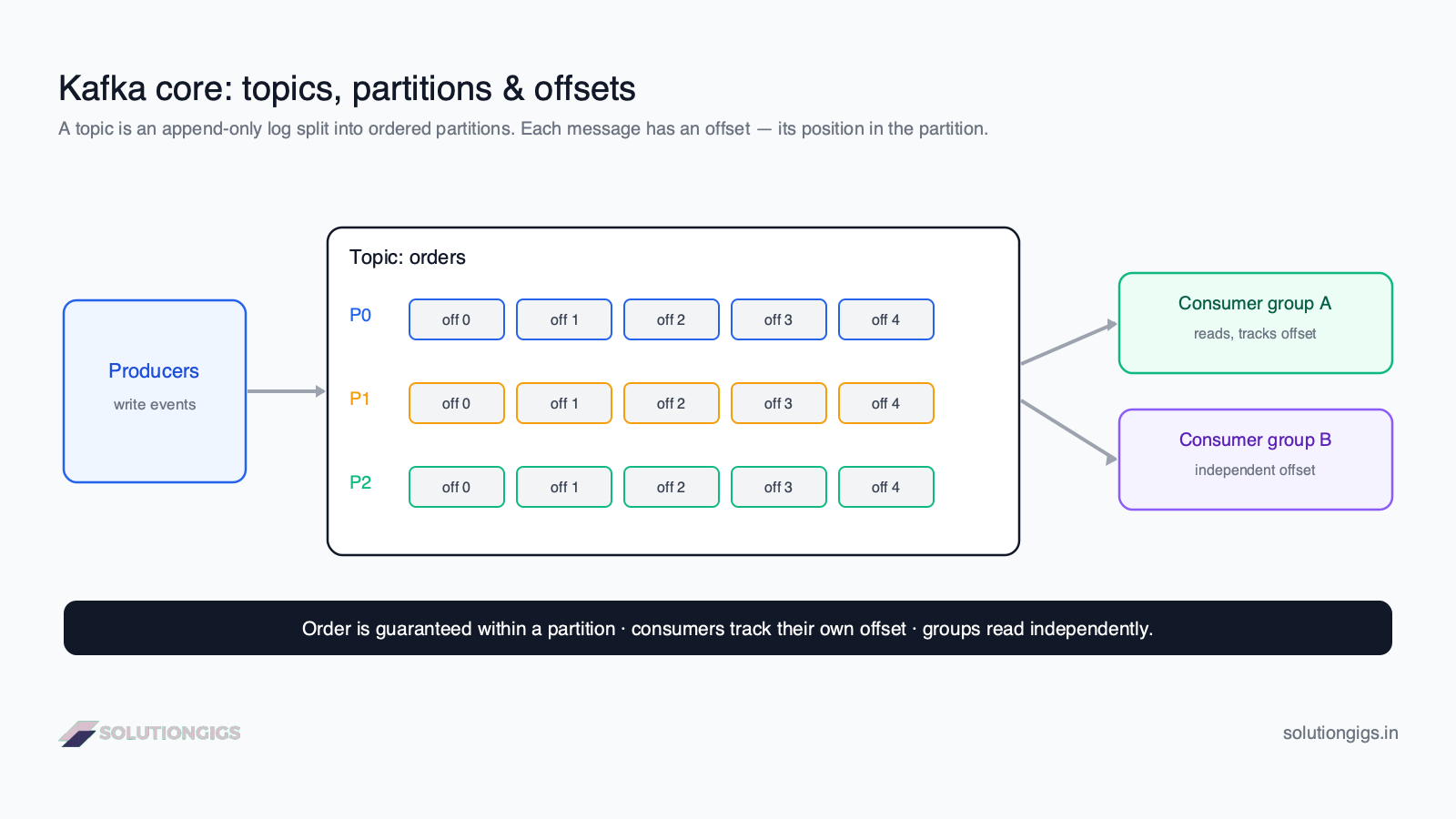
A partition is an ordered, immutable sequence of events within a topic — Kafka's unit of parallelism and ordering. A topic is split into partitions (P0, P1, P2 in the diagram) so that work can happen in parallel across the cluster.
Two guarantees matter:
- Order is guaranteed within a partition — events in P0 are read strictly in the order they were written.
- Order is not guaranteed across partitions — there's no global order across P0, P1, P2.
How does an event land in a partition? By its key. Events with the same key (e.g. the same customer_id) always go to the same partition, which preserves per-key ordering. No key → events are spread round-robin for even load.
This is the key trade-off: more partitions mean more parallelism and throughput, but ordering only holds within each one. Choose your partition key so that events which must stay ordered share a key.
Offsets: a consumer's position in the log
An offset is the sequential id of an event within a partition — offset 0, 1, 2, and so on. It's how a consumer remembers where it is. Each consumer commits the offset it has processed, so if it restarts, it resumes exactly where it left off.
Because Kafka retains events, offsets give consumers superpowers:
- Resume after a crash from the last committed offset — no data lost.
- Rewind to an earlier offset to reprocess history (e.g. after a bug fix).
- Skip ahead to the latest offset to ignore a backlog.
The gap between the newest offset in a partition and a consumer's committed offset is consumer lag — the single most important health metric for a Kafka consumer, and the subject of the next lesson.
Producers and consumers
Producers write events into topics; consumers read them out. They never talk to each other directly — Kafka sits between them, which is the whole point.
- Producers decide which topic (and, via the key, which partition) each event goes to. They can wait for acknowledgements to guarantee durability.
- Consumers read from partitions and track their offsets. They pull data at their own speed, so a slow consumer never blocks a fast producer.
This decoupling is why Kafka scales: you can add producers and consumers independently, and add partitions to increase throughput.
Consumer groups: scaling consumption
A consumer group is a team of consumers that split a topic's partitions between them, so each partition is read by exactly one consumer in the group. This gives horizontal scaling and fault tolerance:
- Add consumers to a group → Kafka rebalances, handing each consumer a share of partitions.
- A consumer dies → its partitions are reassigned to the survivors automatically.
- The parallelism ceiling equals the partition count — 3 partitions means at most 3 active consumers in a group.
Crucially, different consumer groups read the same topic independently, each with its own offsets (groups A and B in the diagram). So one orders stream can simultaneously feed a billing service, an analytics pipeline, and a fraud detector — each reading every event, at its own pace.
This ceiling applies to stream processors too, and it's the most misdiagnosed scaling problem in streaming. A topic with 16 partitions gives at most 16 useful parallel readers whether you point Spark Structured Streaming or Apache Flink at it — extra executors, cores or task slots sit idle. Before blaming the engine, count the partitions. See Spark vs Flink for how each engine maps partitions to parallelism.
Two independent consumer groups also give you a clean way to run a bake-off: point two engines at the same production topic, write to separate sinks, and compare results on real traffic without touching anything live.
Try it yourself — reason about Kafka
A topic payments has 4 partitions. Events are keyed by account_id.
- Your consumer group has 6 consumers. How many are actively reading, and how many sit idle?
- Two payments for the same account are published seconds apart. Are they guaranteed to be processed in order? Why?
- A bug corrupted yesterday's output. How does Kafka let you reprocess yesterday's events?
Show answers
- 4 active, 2 idle. A partition is read by exactly one consumer in a group, so with 4 partitions only 4 consumers can be active; the extra 2 stay idle (ready for failover).
- Yes. Same key (
account_id) → same partition, and order is guaranteed within a partition. Both payments land in the same partition and are read in order. - Rewind the offset. Reset the consumer group's committed offset to yesterday's position; because Kafka retains events, the consumer re-reads and reprocesses them.
Common mistakes with Kafka fundamentals
- Expecting global ordering. Order holds only within a partition. If you need strict ordering, route those events to one partition via a shared key.
- Too few partitions. Partitions cap consumer parallelism — under-partitioning throttles throughput and you can't easily add partitions later without reshuffling keys.
- Ignoring the partition key. Random keys destroy per-entity ordering; a good key (customer, account) keeps related events together.
- Treating Kafka like a queue. Messages aren't deleted on read — they're retained. Multiple groups can and should read the same topic.
- Not monitoring consumer lag. Growing lag means consumers are falling behind producers — catch it early.
Frequently Asked Questions
What is Apache Kafka?
Apache Kafka is a distributed event streaming platform that acts as a durable, append-only log for real-time data. Producers write events to topics and consumers read them, decoupled in time and space. Kafka stores events reliably across a cluster and lets many independent consumers read the same stream, making it the backbone for streaming pipelines and event-driven systems.
What is a Kafka topic?
A Kafka topic is a named, append-only log of events — the category producers write to and consumers read from, like a table name for a stream. Topics are split into partitions for scale. Events are retained for a configured time or size, so consumers can read at their own pace and even re-read the past.
Sizing topic storage and retention windows? To avoid running brokers out of disk space from high producer throughput, calculate required disk per broker with our free Kafka Retention & Storage Calculator. It accounts for ingestion rate, message sizes, retention periods, and replication factor.
What is a Kafka partition?
A partition is an ordered, immutable sequence of events within a topic — Kafka's unit of parallelism and ordering. A topic is split across partitions so producers and consumers work in parallel. Kafka guarantees order within a single partition, not across partitions. Events with the same key always go to the same partition, preserving per-key order.
What is a Kafka offset?
An offset is a sequential id marking an event's position within a partition — the first message is offset 0, the next 1, and so on. Each consumer tracks the offset it has read, so it knows where to resume. Because Kafka retains messages, a consumer can rewind to an earlier offset to reprocess data, or skip ahead.
What is a Kafka consumer group?
A consumer group is a set of consumers that cooperate to read a topic, with Kafka dividing the partitions among them so each partition is read by exactly one consumer in the group. This gives scaling and fault tolerance. Different consumer groups read the same topic independently, each tracking its own offsets.
Conclusion
Kafka is a distributed log, and its fundamentals are five nouns: producers write events to topics, topics split into ordered partitions, offsets mark positions, and consumer groups read in parallel — each group independently. Order holds within a partition, keys route related events together, and retained offsets let consumers resume, rewind, or replay. That model is the whole foundation of streaming data engineering.
Next in the Kafka track of the free Learn Data Engineering course you'll go deeper into consumer lag and Kafka vs RabbitMQ. If you're deciding whether to run Kafka at all, the partition is the thing to compare against the managed alternatives — see Kafka vs Kinesis vs Pub/Sub, where a Kinesis shard caps at 1 MB/s and a Kafka partition doesn't.
Standing up Kafka for the first time and unsure how many partitions, what retention, or which delivery guarantee you actually need? Those three decisions are hard to reverse later. Tell me what you're building and I'll help you get them right the first time.
Mohammed Yaseen
Founder, SolutionGigs
Mohammed builds real-time streaming pipelines on Kafka in production and teaches the Kafka track of the free Learn Data Engineering course. LinkedIn →
Learn Data Engineering — Free Course
Free, no signup — right in your browser.
Learn Data Engineering — Free Course →More in Data Engineering
dbt vs Airflow: Where Each Fits
dbt vs Airflow explained — why they solve different problems (transformation vs orchestration), when to use each, and how teams use them together, with a clear decision guide.
Delta Lake vs Iceberg: How to Choose
Delta Lake vs Apache Iceberg compared — architecture, features, ecosystem, and a clear decision guide for choosing an open table format for your lakehouse in 2026.
Dimensional Modeling & Star Schema Explained
Dimensional modeling and the star schema explained — fact vs dimension tables, grain, keys, star vs snowflake, and a step-by-step design method with SQL examples.