
10 Free AI Developer Tools (No Signup)
10 free AI developer tools with no signup — generate SQL, Docker Compose, Kubernetes YAML, Terraform, MCP servers, READMEs and more from plain English. Try them free.

Quick Answer: The best free AI developer tools let you generate code and configuration from plain English without signing up. SolutionGigs offers 10 of them — a SQL query generator, Docker Compose generator, Kubernetes YAML generator, Terraform generator, MCP server generator, GitHub README generator, Python code explainer, AI prompt optimizer, Spark config optimizer, and a resume ATS checker. All are free, need no login, and run on open-weight models served by Groq for fast, high-quality output.
Most "free" AI developer tools aren't really free. You hit a paywall after three uses, or you have to hand over an email, connect a GitHub account, or start a trial that quietly bills you next month. We wanted the opposite: developer tools that are genuinely free, work instantly, and don't ask for anything.
So we built a suite of free AI developer tools you can use right now — no signup, no login, no credit card. This guide walks through all 10, what each one does, and when to reach for it. Every tool links straight to its page so you can try it as you read.
What are AI developer tools?
AI developer tools are utilities that use a large language model (LLM) to turn a plain-English description into working code or configuration — SQL, YAML, Terraform, a README, and so on. Instead of remembering exact syntax, you describe what you want and the tool writes it.
The best ones are focused. A general chatbot can do many of these tasks, but a purpose-built tool gives you the right form fields, the right dialect options, and an output you can copy in one click — without prompt-wrangling every time.
Every tool below runs on Groq using GPT-OSS 120B, an open-weight model that's excellent at code and config, with Qwen3 27B as a fallback. Groq's inference is fast, so results come back in a second or two.
The 10 free AI developer tools
1. SQL Query Generator
The SQL Query Generator turns plain English into ready-to-run SQL. Describe what you need — "top 5 customers by revenue in the last 30 days" — pick your dialect (PostgreSQL, MySQL, SQL Server, Oracle, SQLite, BigQuery or Snowflake), and optionally paste your table schema so it uses your exact column names. You get clean, commented SQL you can run immediately.
Best for: analysts and backend developers who know what they want but don't want to hand-write another window function.
2. AI Prompt Optimizer
The AI Prompt Optimizer rewrites a rough prompt into a clearer, structured one that produces more reliable results. Paste your prompt, pick your target model (Claude, GPT-4o, Gemini, Llama and more), and it adds explicit structure, format instructions, and constraints — then shows you exactly what it changed.
Best for: anyone who's tired of vague AI answers and wants better output without becoming a prompt-engineering expert.
3. MCP Server Generator
The MCP Server Generator scaffolds a complete Model Context Protocol server from a description. MCP is the open standard that lets assistants like Claude connect to your tools and data. Describe the tools you want to expose, choose Python or TypeScript, and get a runnable server built on the official SDK.
Best for: developers building integrations for Claude Desktop or other MCP clients who want a working starting point in seconds.
4. Docker Compose Generator
The Docker Compose Generator writes a production-ready docker-compose.yml from a description of your stack. Say "FastAPI app, PostgreSQL 16, Redis and nginx" and it wires up services, named volumes, networks, healthchecks, restart policies and environment placeholders using a modern Compose spec.
Best for: spinning up a new local environment or documenting a stack without hand-editing YAML.
5. GitHub README Generator
A great GitHub README Generator saves the most-skipped step in any project. Enter your project name, a short description, your tech stack and key features, and get a polished README.md — title, badges, Features, Tech Stack, Getting Started, Usage, Configuration, Project Structure, Contributing and License — in clean GitHub Markdown.
Best for: shipping side projects that actually look maintained.
6. Python Code Explainer
The Python Code Explainer takes any Python snippet and explains it in plain English — a high-level summary, a step-by-step walkthrough, the techniques used, edge cases to watch, and suggestions to improve it.
Best for: understanding an unfamiliar codebase, reviewing a pull request, or learning Python faster.
7. Kubernetes YAML Generator
The Kubernetes YAML Generator produces valid manifests from a workload description. Describe your app — image, replicas, ports, how it's exposed — and get a Deployment, Service, Ingress and (when relevant) an HPA, complete with liveness and readiness probes, resource requests and limits, and correct labels. Resources are separated by --- so you can kubectl apply right away.
Best for: getting a correct first-pass manifest instead of copy-pasting from old projects.
8. Spark Config Optimizer
The Spark Config Optimizer recommends tuned Apache Spark settings for your cluster and job. Enter your node count, cores and memory, then describe the workload. You get concrete values for executor cores and memory, executor count, driver memory, shuffle partitions and overhead — with the reasoning behind each choice.
Best for: data engineers staring at a slow job who need a sensible starting configuration to benchmark from.
9. Terraform Generator
The Terraform Generator writes infrastructure-as-code for AWS, Google Cloud or Azure from a description. Explain the resources you need — "a VPC with public and private subnets, an ECS Fargate service behind an ALB, and an RDS Postgres instance" — pick your provider, and get clean HCL with variables, sensible defaults, outputs and tags.
Best for: bootstrapping a new module or learning the resource names for a service you haven't used before.
10. Resume ATS Checker
The Resume ATS Checker rounds out the suite for the career side of engineering. Upload your resume (PDF, DOCX or TXT) or paste it, add the job description, and get an instant keyword-match score plus an AI "Deep Review" — missing skills, recruiter-style bullet rewrites, and quick wins to pass applicant tracking systems.
Best for: developers job-hunting who want their resume to actually reach a human.
See how SolutionGigs can help → If you need more than a generated draft — an engineer to design the whole system — post a project on solutiongigs.in and get matched with vetted talent.
Why these tools are free and private
We made a deliberate choice to keep every tool free and anonymous, the same way our SQL Formatter and other utilities work. There's no login wall because the point is to help you get unstuck in ten seconds, not to capture a lead.
To keep them free for everyone, each tool has a light fair-use rate limit. And privacy is built in: your input is used only to generate the result and isn't stored, while the ATS checker parses uploaded resumes in memory and never writes them to disk.
How we built them (and why it matters to you)
At SolutionGigs, we build small, focused tools that solve one job well. This whole suite runs through a single, well-tested backend endpoint with a shared prompt for each tool — which means consistent quality and far fewer things that can break. The front end follows a strict content-security policy with no inline scripts, so pages stay fast and safe.
That engineering discipline is the same reason clients trust us to build their production systems. A tool that returns clean SQL is a small promise; shipping a reliable data platform is a bigger one. The mindset is identical.
Common mistakes when using AI code generators
AI developer tools are powerful, but a few habits separate people who ship from people who get burned:
- Shipping without reading. Always review generated code. Skim Terraform and Kubernetes manifests especially — they create real, sometimes billable, infrastructure.
- Pasting secrets. Never paste real credentials, API keys or private customer data into any AI tool. Use placeholders and fill them in locally.
- Skipping tests. Run generated SQL against a copy of your data first. Test manifests in a staging cluster. Trust, but verify.
- Over-relying on one prompt. If the first result isn't quite right, add detail — a schema, a constraint, a provider version — and regenerate. The AI Prompt Optimizer helps here too.
Follow those and these tools become a genuine speed-up rather than a new source of bugs.
Frequently Asked Questions
Are these AI developer tools really free?
Yes. All 10 AI developer tools on SolutionGigs are free to use with no signup, no login, and no credit card. They run on a free large language model, and a light fair-use rate limit keeps them available for everyone. You paste your input, click generate, and copy the result.
Do I need to create an account to use them?
No account is required. Every tool — the SQL query generator, Docker Compose generator, Kubernetes YAML generator, Terraform generator and the rest — works instantly in your browser. There is nothing to install and nothing to sign up for.
Which AI model powers the tools?
The tools run on GPT-OSS 120B, an open-weight model served on Groq's fast inference platform, with Qwen3 27B as an automatic fallback if the primary is busy. Both are strong at code and configuration generation, which is why responses come back in a second or two rather than the slower speeds you get from many hosted chat interfaces. The model is set in one server-side config rather than hardcoded per tool, so it can be swapped without the tools going down.
Is the generated code safe to use in production?
Treat every output as a strong first draft, not a final answer. AI-generated SQL, Terraform, Kubernetes and Docker Compose are usually correct and well structured, but you should always review them — especially anything that deletes data or creates billable cloud resources — and test in a non-production environment first.
Is my data or code stored?
No. Your input is sent to the AI only to generate a result and isn't saved on our servers. For the Resume ATS Checker, uploaded files are parsed in memory and never written to disk. Even so, avoid pasting real secrets, credentials or private customer data into any AI tool.
What is the best free AI tool for generating SQL?
The SolutionGigs SQL Query Generator turns plain English into ready-to-run SQL for PostgreSQL, MySQL, SQL Server, Oracle, SQLite, BigQuery and Snowflake. You can optionally paste your table schema so it uses your exact column names. It's free, needs no signup, and returns clean, commented SQL you can copy straight into your database client.
Conclusion
The best free AI developer tools remove friction: you describe the outcome, and you get correct code or config in seconds — no account, no paywall, no context-switching into a chat window and back. These 10 tools cover the tasks developers actually repeat every week, from writing SQL and Kubernetes manifests to tuning Spark and polishing a README.
Bookmark the ones you'll reuse, start with the SQL Query Generator or the Docker Compose Generator, and remember the golden rule: review before you ship. Used well, they'll save you hours a week.
And when a task grows beyond a generated draft into a real system to design and build, that's where people come in. Post your project on solutiongigs.in today — it's free to post → and get matched with a vetted engineer who can take it to production.
Mohammed Yaseen
Founder, SolutionGigs
Mohammed builds free, focused developer tools and the production systems behind them, and founded SolutionGigs to connect teams with vetted engineers. LinkedIn →
More in AI & Machine Learning
Vibe Coding: Building Production Web Apps with AI Assistants
What is vibe coding? Learn how to build real apps using just AI prompts — no deep coding experience needed. Best tools (Cursor, Claude Code, Copilot), step-by-step guide, real examples, and how Indian freelancers are earning with vibe coding in 2026.
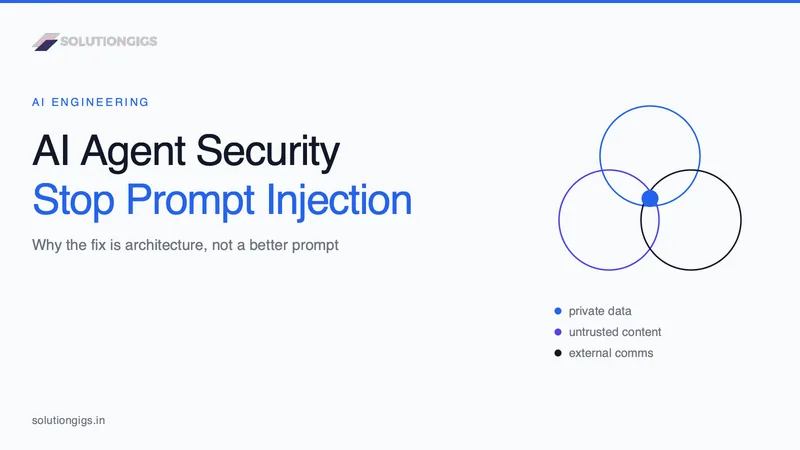
AI Agent Security: Stopping Prompt Injection
Prompt injection is the number one AI agent risk, and no prompt or filter fixes it. This guide covers the lethal trifecta, the arithmetic showing why a 99%-accurate guardrail is not a control, a decision table for which leg to cut in six common agent shapes, the exfiltration channels teams forget to audit, the MCP tool-poisoning and rug-pull attacks, the six research-backed design patterns that provably constrain agents, and how our own auto-publishing gate is built so a successful injection can flip at most one enum.
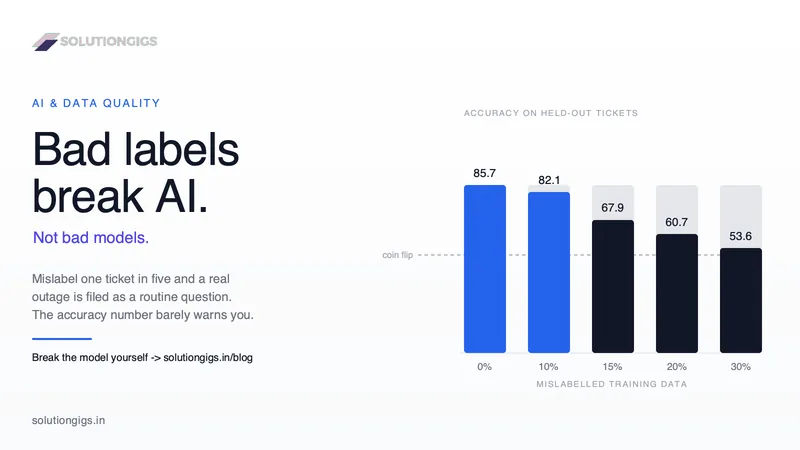
AI and Data Quality: The Real Reason AI Projects Fail
Gartner expects 60% of AI projects to be abandoned over data, not models. Break a real classifier in your browser and watch bad labels destroy it. Inside: a live lab where you poison the training data and watch a genuine outage get reclassified as routine, three reader polls, four public AI disasters dissected, and the seven fixes that actually move accuracy.