
SQL Window Functions Explained: ROW_NUMBER, RANK & More
SQL window functions explained simply — ROW_NUMBER, RANK, running totals, and per-group calculations that keep every row. OVER, PARTITION BY, and ORDER BY with real examples.

📚 Lesson 4 of the SQL track in our free Learn Data Engineering course. This builds directly on GROUP BY & aggregations.
Quick Answer: A window function runs a calculation across a set of rows related to the current row — without collapsing them like GROUP BY does. You write it as func() OVER (PARTITION BY … ORDER BY …): PARTITION BY splits rows into groups, ORDER BY orders them inside each group. This gives you rankings (ROW_NUMBER, RANK, DENSE_RANK), running totals (SUM() OVER (...)), and per-group values on every row. It's the difference between a summary and keeping all your detail plus the summary.
Window functions are the feature that separates intermediate SQL from beginner SQL — and the one that unlocks questions GROUP BY simply can't answer: "rank each customer's orders from newest to oldest", "running total of revenue by day", "each order next to its country's average". They look intimidating because of the OVER (...) syntax, but the idea is simple once you see it. Let's build it up.
GROUP BY vs window functions — the key difference
GROUP BY collapses rows into one per group; a window function keeps every row and adds the calculation as a new column. That one distinction is the whole concept.
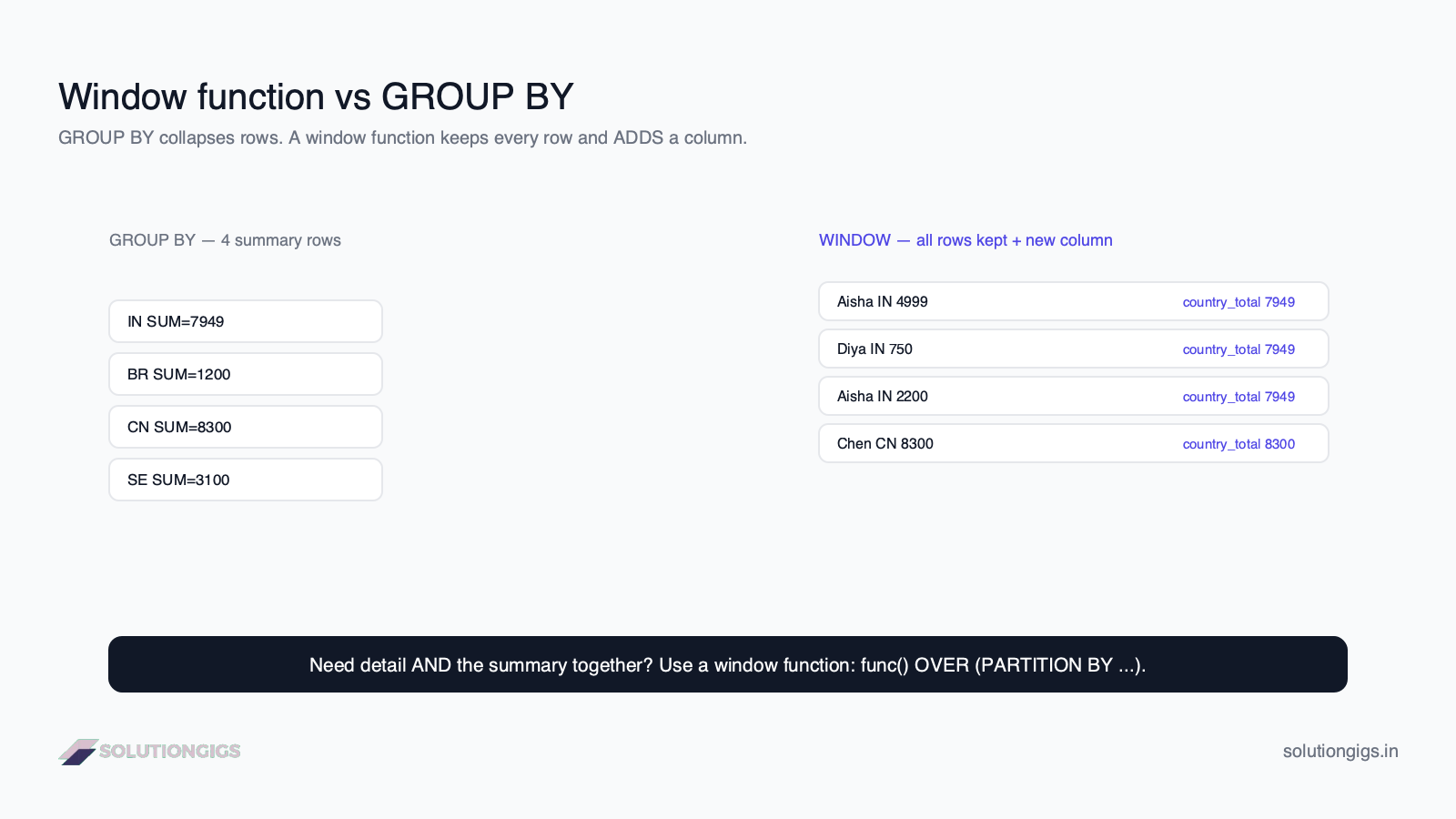
Same data, two different shapes:
SELECT country, SUM(amount) FROM orders GROUP BY country→ 4 summary rows.SELECT customer, amount, SUM(amount) OVER (PARTITION BY country) FROM orders→ all 6 rows, each with its country's total attached.
When you need the detail and the summary together, you need a window function.
The anatomy: OVER, PARTITION BY, ORDER BY
Our dataset (one orders table):
| order_id | customer | country | amount |
|---|---|---|---|
| 1 | Aisha | IN | 4999 |
| 2 | Bruno | BR | 1200 |
| 3 | Chen | CN | 8300 |
| 4 | Diya | IN | 750 |
| 6 | Aisha | IN | 2200 |
Every window function is func() OVER (window), where the window defines which rows the function sees.
SELECT customer, country, amount,
       SUM(amount) OVER (PARTITION BY country) AS country_total
FROM orders;
Result — every row kept, each tagged with its country's total:
| customer | country | amount | country_total |
|---|---|---|---|
| Bruno | BR | 1200 | 1200 |
| Chen | CN | 8300 | 8300 |
| Aisha | IN | 4999 | 7949 |
| Diya | IN | 750 | 7949 |
| Aisha | IN | 2200 | 7949 |
OVER (...)turns a normal function into a window function.PARTITION BY country= "calculate separately for each country" (like a miniGROUP BYthat doesn't collapse rows).- Omit
PARTITION BYand the window is the entire result set.
Ranking: ROW_NUMBER, RANK, DENSE_RANK
Ranking functions number rows within each partition, in an order you choose with ORDER BY inside the OVER. These are the most-used window functions.
SELECT customer, country, amount,
       ROW_NUMBER() OVER (PARTITION BY country ORDER BY amount DESC) AS rn
FROM orders;
Within IN, orders get numbered by amount, highest first:
| customer | country | amount | rn |
|---|---|---|---|
| Aisha | IN | 4999 | 1 |
| Aisha | IN | 2200 | 2 |
| Diya | IN | 750 | 3 |
| Chen | CN | 8300 | 1 |
| Bruno | BR | 1200 | 1 |
How the three ranking functions handle ties (say two amounts of 4999):
| Function | On a tie | Sequence |
|---|---|---|
ROW_NUMBER() |
still unique | 1, 2, 3, 4 |
RANK() |
same rank, then skips | 1, 1, 3, 4 |
DENSE_RANK() |
same rank, no skip | 1, 1, 2, 3 |
The classic use — "top N per group." Get each country's single biggest order. Because you can't filter a window function in WHERE, wrap it:
SELECT * FROM (
  SELECT customer, country, amount,
         ROW_NUMBER() OVER (PARTITION BY country ORDER BY amount DESC) AS rn
  FROM orders
) ranked
WHERE rn = 1;
That "rank, then filter in an outer query" pattern is one of the most useful things in all of SQL.
Running totals and moving calculations
Add ORDER BY inside OVER to a SUM and it becomes a running total — accumulating row by row instead of one flat total.
SELECT order_id, amount,
       SUM(amount) OVER (ORDER BY order_id) AS running_total
FROM orders;
| order_id | amount | running_total |
|---|---|---|
| 1 | 4999 | 4999 |
| 2 | 1200 | 6199 |
| 3 | 8300 | 14499 |
| 4 | 750 | 15249 |
| 6 | 2200 | 17449 |
The same idea powers LAG() and LEAD(), which peek at the previous or next row — perfect for "change since last order" or day-over-day deltas.
Try it yourself — exercises
Using the orders table above:
💡 No database to hand? Paste the queries into our online compiler and pick the SQL tab. It runs SQLite in your browser, supports window functions and CTEs, and lets you upload a CSV and query it as a table.
- Show each order with its country's average order amount on the same row.
- Number each customer's orders from newest to oldest (highest
order_id= newest). - Return only the single largest order per country.
Show answers
-- 1
SELECT customer, country, amount,
       AVG(amount) OVER (PARTITION BY country) AS country_avg
FROM orders;

-- 2
SELECT customer, order_id,
       ROW_NUMBER() OVER (PARTITION BY customer ORDER BY order_id DESC) AS recency
FROM orders;

-- 3
SELECT * FROM (
  SELECT customer, country, amount,
         ROW_NUMBER() OVER (PARTITION BY country ORDER BY amount DESC) AS rn
  FROM orders
) t
WHERE rn = 1;
Common mistakes to avoid
- Trying to filter a window function in
WHERE. It's computed afterWHERE— wrap the query in a subquery or CTE and filter outside. - Confusing
PARTITION BYwithGROUP BY.PARTITION BYkeeps all rows;GROUP BYcollapses them. UsingGROUP BYhere would defeat the purpose. - Forgetting
ORDER BYin a running total.SUM() OVER (PARTITION BY ...)with noORDER BYgives the flat group total, not a running one. - Picking the wrong ranker for ties. Use
ROW_NUMBERfor a strict unique order,RANK/DENSE_RANKwhen ties should share a number.
What's next in the SQL track
You can now rank, run totals, and compute per-group values without losing detail — genuinely advanced SQL. The final lesson in the Learn Data Engineering SQL track is CTEs and subqueries, which let you name and stack these queries into clean, readable steps (and are exactly how you'd tidy up that "rank then filter" pattern).
Frequently Asked Questions
What is a window function in SQL?
A window function performs a calculation across a set of rows related to the current row, without collapsing them. Unlike GROUP BY, which returns one row per group, a window function keeps every original row and adds the computed value — such as a running total or a rank within each group — as a new column.
What is the difference between GROUP BY and window functions?
GROUP BY collapses rows into one summary row per group; a window function keeps every row and adds the calculation alongside it. Use GROUP BY for a summary table, and a window function when you need per-row detail plus a group-level value like a running total, rank, or the group's average on each row.
What does PARTITION BY do?
PARTITION BY divides rows into groups that the window function is calculated over separately, restarting for each. It's like GROUP BY for the window — PARTITION BY country makes ranks or running totals reset per country, while still returning all the individual rows.
What is the difference between ROW_NUMBER, RANK, and DENSE_RANK?
All number rows within a partition. ROW_NUMBER is always unique, even on ties. RANK gives ties the same number then skips (1, 1, 3). DENSE_RANK gives ties the same number without skipping (1, 1, 2). Pick based on how you want ties handled.
Can I use a window function in a WHERE clause?
No. Window functions are computed after WHERE and GROUP BY, so they can't be referenced there. To filter on one — like keeping only rank = 1 — wrap the query in a subquery or CTE and filter in the outer query.
Conclusion
Window functions give you group-level calculations while keeping every row — rankings, running totals, and per-partition values that GROUP BY can't produce. The whole syntax reduces to func() OVER (PARTITION BY … ORDER BY …): partition to define the groups, order to sequence within them. Master the "rank then filter in an outer query" pattern and you'll solve a huge share of real analytics problems.
This was Lesson 4 of the SQL track. Finish strong in the free Learn Data Engineering course with CTEs and subqueries. Building real pipelines? Get matched with a vetted data engineer on SolutionGigs — it's free to post a project.
Mohammed Yaseen
Founder, SolutionGigs
Mohammed uses window functions daily for ranking, sessionization, and running metrics in production pipelines, and teaches the SQL track in the free Learn Data Engineering course. LinkedIn →
More in Data Engineering
Python: Read Files, APIs & JSON into a DataFrame
Learn to load real data into Python — read CSV, JSON and Parquet files, call REST APIs with requests, and flatten nested JSON into a clean pandas DataFrame, with runnable examples.
Build Your First ETL Pipeline in Python (Tutorial)
Build your first ETL pipeline in Python step by step — extract from CSV, transform and clean with pandas, and load to Parquet or a database, with a full runnable script and best practices.
pandas Tutorial for Data Engineering: The Essentials
A pandas tutorial for data engineering — load, inspect, select, filter, and aggregate data in Python, mapped directly to the SQL you already know, with runnable examples.