
SQL GROUP BY & Aggregations: COUNT, SUM, AVG
Learn SQL GROUP BY and aggregate functions — COUNT, SUM, AVG, MIN, MAX — how grouping works, HAVING vs WHERE, and the execution order, with one real dataset and exercises.


📚 Lesson 3 of the SQL track in our free Learn Data Engineering course. Come from SQL Joins? Perfect — this is the next step.
Quick Answer: GROUP BY collapses rows that share a value into one summary row, and aggregate functions compute a number over each group: COUNT (how many), SUM (total), AVG (average), MIN/MAX (extremes). Filter rows before grouping with WHERE, and filter groups after grouping with HAVING. Example: SELECT country, SUM(amount) FROM orders GROUP BY country returns one total per country. This is how raw data becomes answers.
Querying and joining gets you rows; aggregation gets you answers — "how many orders per country?", "what's our average order value?", "which customers spent over ₹5,000?". GROUP BY is the single most important step from looking at data to reporting on it, and it's the foundation of every dashboard and metric you'll ever build. Let's make it click with one dataset and a clear picture of how grouping actually works.
Our dataset
Back to a single orders table, now with a few more rows so groups are meaningful:
| order_id | customer | country | amount | status |
|---|---|---|---|---|
| 1 | Aisha | IN | 4999 | paid |
| 2 | Bruno | BR | 1200 | paid |
| 3 | Chen | CN | 8300 | paid |
| 4 | Diya | IN | 750 | paid |
| 5 | Erik | SE | 3100 | refunded |
| 6 | Aisha | IN | 2200 | paid |
What GROUP BY actually does
GROUP BY takes all the rows that share a value and folds them into one row per group, on which aggregates are calculated. Picture the rows being sorted into buckets, then each bucket reduced to a single number.
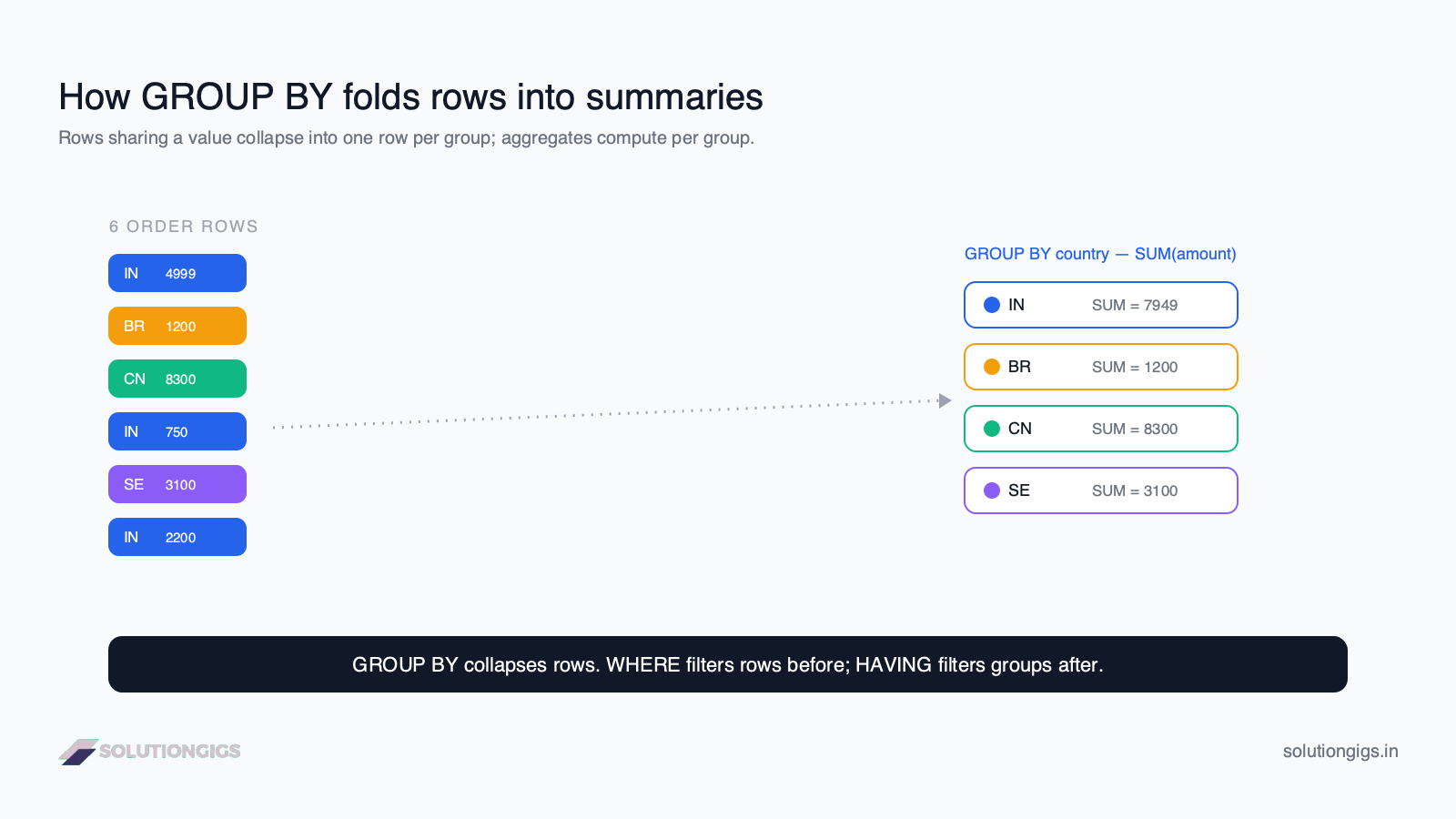
SELECT country, SUM(amount) AS total_sales
FROM orders
GROUP BY country;
The three IN rows fold into one; each other country stands alone:
| country | total_sales |
|---|---|
| IN | 7949 |
| BR | 1200 |
| CN | 8300 |
| SE | 3100 |
The rule that prevents most errors: every column in SELECT must be either in the GROUP BY or inside an aggregate function. SELECT customer, SUM(amount) ... GROUP BY country fails — the database can't pick one customer per country.
The aggregate functions you'll use daily
| Function | Returns | Example |
|---|---|---|
COUNT(*) |
number of rows in the group | orders per country |
COUNT(col) |
non-NULL values in col |
customers with a phone |
SUM(col) |
total | revenue per country |
AVG(col) |
average | average order value |
MIN(col) / MAX(col) |
smallest / largest | cheapest / priciest order |
A richer example — orders and average value per country, busiest first:
SELECT country,
       COUNT(*)      AS num_orders,
       SUM(amount)   AS total_sales,
       AVG(amount)   AS avg_order
FROM orders
GROUP BY country
ORDER BY total_sales DESC;
| country | num_orders | total_sales | avg_order |
|---|---|---|---|
| CN | 1 | 8300 | 8300 |
| IN | 3 | 7949 | 2649.67 |
| SE | 1 | 3100 | 3100 |
| BR | 1 | 1200 | 1200 |
COUNT(*)vsCOUNT(col):COUNT(*)counts every row;COUNT(col)skipsNULLs in that column. On nullable columns they return different numbers — a frequent source of "why don't these add up?"
HAVING — filter the groups
HAVING filters groups after aggregation, the same way WHERE filters rows before it. You need it because you can't put an aggregate in WHERE.
SELECT country, SUM(amount) AS total_sales
FROM orders
GROUP BY country
HAVING SUM(amount) > 3000;      -- keep only big-spending countries
Result — only groups whose total exceeds 3000:
| country | total_sales |
|---|---|
| IN | 7949 |
| CN | 8300 |
| SE | 3100 |
Combine both filters — WHERE first (drop refunded rows), then HAVING (keep big groups):
SELECT country, SUM(amount) AS paid_sales
FROM orders
WHERE status = 'paid'        -- filter rows BEFORE grouping
GROUP BY country
HAVING SUM(amount) > 2000;   -- filter groups AFTER aggregating
The execution order (why WHERE and HAVING differ)
Remember the logical processing order from Lesson 1 — now GROUP BY and HAVING slot into it, which is exactly why WHERE can't see aggregates but HAVING can:
FROM— get the tableWHERE— filter rowsGROUP BY— fold rows into groupsHAVING— filter groups (aggregates now exist)SELECT— choose columnsORDER BY— sort
WHERE runs at step 2, before any grouping — so WHERE SUM(amount) > 3000 is impossible. HAVING runs at step 4, after the sums exist. Internalize this order and the two clauses stop being confusing.
Try it yourself — exercises
💡 No database to hand? Run these in our online SQL compiler. It is SQLite in your browser with sample tables preloaded, and you can upload a CSV to query your own data.
Using the orders table above:
- Count the number of orders per
status. - Find the average
amountpercountry, highest average first. - List customers whose total spend is over 3000.
Show answers
-- 1
SELECT status, COUNT(*) AS orders
FROM orders
GROUP BY status;

-- 2
SELECT country, AVG(amount) AS avg_amount
FROM orders
GROUP BY country
ORDER BY avg_amount DESC;

-- 3
SELECT customer, SUM(amount) AS total_spend
FROM orders
GROUP BY customer
HAVING SUM(amount) > 3000;
Common mistakes to avoid
- Putting an aggregate in
WHERE.WHERE SUM(amount) > 100errors — useHAVING. - Selecting a non-grouped, non-aggregated column. Every
SELECTcolumn must be inGROUP BYor inside an aggregate. - Expecting
COUNT(col)to countNULLs. It doesn't — useCOUNT(*)for all rows. - Forgetting that
SUM/AVGignoreNULLs.AVGdivides by the count of non-NULL values, which can surprise you. - Summing an order-level column after a one-to-many join.
SUM(o.total)onordersjoined toorder_itemscounts each order once per item. Aggregate the column that matches the joined grain, or pre-aggregate in a subquery — this is the fan-out trap, and it is why AI query tools so often overstate revenue. - Grouping by the wrong grain.
GROUP BY country, statusgives a row per combination — make sure that's the grain you want.
What's next in the SQL track
You can now summarize data into metrics — the heart of analytics and reporting. Next in the Learn Data Engineering path: window functions, which give you running totals, rankings, and per-group calculations without collapsing your rows — the natural sequel to GROUP BY.
Frequently Asked Questions
What does GROUP BY do in SQL?
GROUP BY collapses rows that share the same value in one or more columns into a single summary row, so aggregate functions like COUNT, SUM, or AVG apply to each group. For example, GROUP BY country turns a table of individual orders into one row per country with its total sales.
What is the difference between WHERE and HAVING?
WHERE filters individual rows before grouping; HAVING filters whole groups after aggregation. Use WHERE for conditions on raw columns like status = 'paid', and HAVING for conditions on aggregates like SUM(amount) > 5000. WHERE runs before GROUP BY; HAVING runs after.
Can I use an aggregate function in a WHERE clause?
No. Aggregates like SUM() or COUNT() can't appear in WHERE, because WHERE runs before rows are grouped and aggregated. To filter on an aggregate, use HAVING, which runs after GROUP BY has computed the values.
Why do I get a "not in GROUP BY" error?
Every SELECT column that isn't inside an aggregate must appear in GROUP BY. If you select customer and SUM(amount) but only GROUP BY country, the database can't decide which customer to show per country, so it errors. Add the column to GROUP BY or wrap it in an aggregate.
What is the difference between COUNT(*) and COUNT(column)?
COUNT(*) counts all rows in the group, including those with NULLs. COUNT(column) counts only rows where that column is not NULL. On nullable columns they return different numbers, which is a common source of confusing results.
How do I filter groups with HAVING in SQL?
Add HAVING after GROUP BY to filter based on aggregate results. For example, HAVING SUM(amount) > 1000 returns only groups where the total exceeds 1000. Unlike WHERE (which filters rows before grouping), HAVING runs after aggregation — so any aggregate function works inside it.
Conclusion
GROUP BY plus aggregate functions is how SQL turns rows into answers — counts, sums, averages, and extremes, one number per group. Filter rows first with WHERE, group them, then filter the groups with HAVING, and keep the execution order in mind so those two clauses always make sense. Master this and you can build almost any metric or report a business asks for.
This was Lesson 3 of the SQL track. Keep going in the free Learn Data Engineering course toward window functions and production SQL. Ready to build for real? Get matched with a vetted data engineer on SolutionGigs — it's free to post a project.
Mohammed Yaseen
Founder, SolutionGigs
Mohammed builds the aggregation logic behind production dashboards and metrics, and teaches the SQL track in the free Learn Data Engineering course. LinkedIn →
More in Data Engineering

SQL CTEs & Subqueries Explained: WITH Clause Guide
SQL CTEs and subqueries explained — the WITH clause, subqueries vs CTEs, when to use each, and how to break complex queries into clean, readable steps, with real examples and exercises.

SQL Joins Explained: INNER, LEFT, RIGHT & FULL
SQL joins explained with one real dataset — INNER, LEFT, RIGHT, and FULL joins, when to use each, what happens to unmatched rows, common mistakes, and exercises.
SQL SELECT, WHERE & ORDER BY: A Beginner's Guide
Learn SQL SELECT, WHERE, and ORDER BY from scratch — how to query, filter, and sort data — with one real dataset, runnable examples, exercises, and the execution order most beginners get wrong.