
SQL Joins Explained: INNER, LEFT, RIGHT & FULL
SQL joins explained with one real dataset — INNER, LEFT, RIGHT, and FULL joins, when to use each, what happens to unmatched rows, common mistakes, and exercises.

📚 Lesson 2 of the SQL track in our free Learn Data Engineering course. New here? Start with SELECT, WHERE & ORDER BY first.
Quick Answer: A SQL JOIN combines rows from two tables using a shared column (a key). The four you'll use: INNER JOIN keeps only rows that match in both tables; LEFT JOIN keeps all rows from the left table and fills NULL where the right has no match; RIGHT JOIN does the reverse; FULL OUTER JOIN keeps all rows from both tables. The whole game is deciding what happens to rows that don't match — that single question tells you which join to pick.
Real data is never in one table. Orders live in one table, customers in another, products in a third — and joins are how you stitch them back together to answer real questions. Joins are also where beginners lose the most time: pick the wrong one and you silently drop rows or multiply them. In this lesson we'll use two small tables, see exactly what each join does to the rows, and give you a mental model (plus a diagram) so you never guess again.
Our two tables
We'll extend the orders table from Lesson 1 with a customers table. Notice two deliberate mismatches: customer 4 (Diya) has no order, and order 99 has a customer_id (7) that doesn't exist in customers. Those mismatches are what make joins interesting.
customers
| customer_id | name | country |
|---|---|---|
| 1 | Aisha | IN |
| 2 | Bruno | BR |
| 3 | Chen | CN |
| 4 | Diya | IN |
orders
| order_id | customer_id | amount |
|---|---|---|
| 1 | 1 | 4999 |
| 2 | 2 | 1200 |
| 3 | 3 | 8300 |
| 99 | 7 | 500 |
The mental model: what happens to unmatched rows?
Every join matches rows on a key; the only real difference is whether it keeps or drops the rows that don't match. Hold this picture in your head:
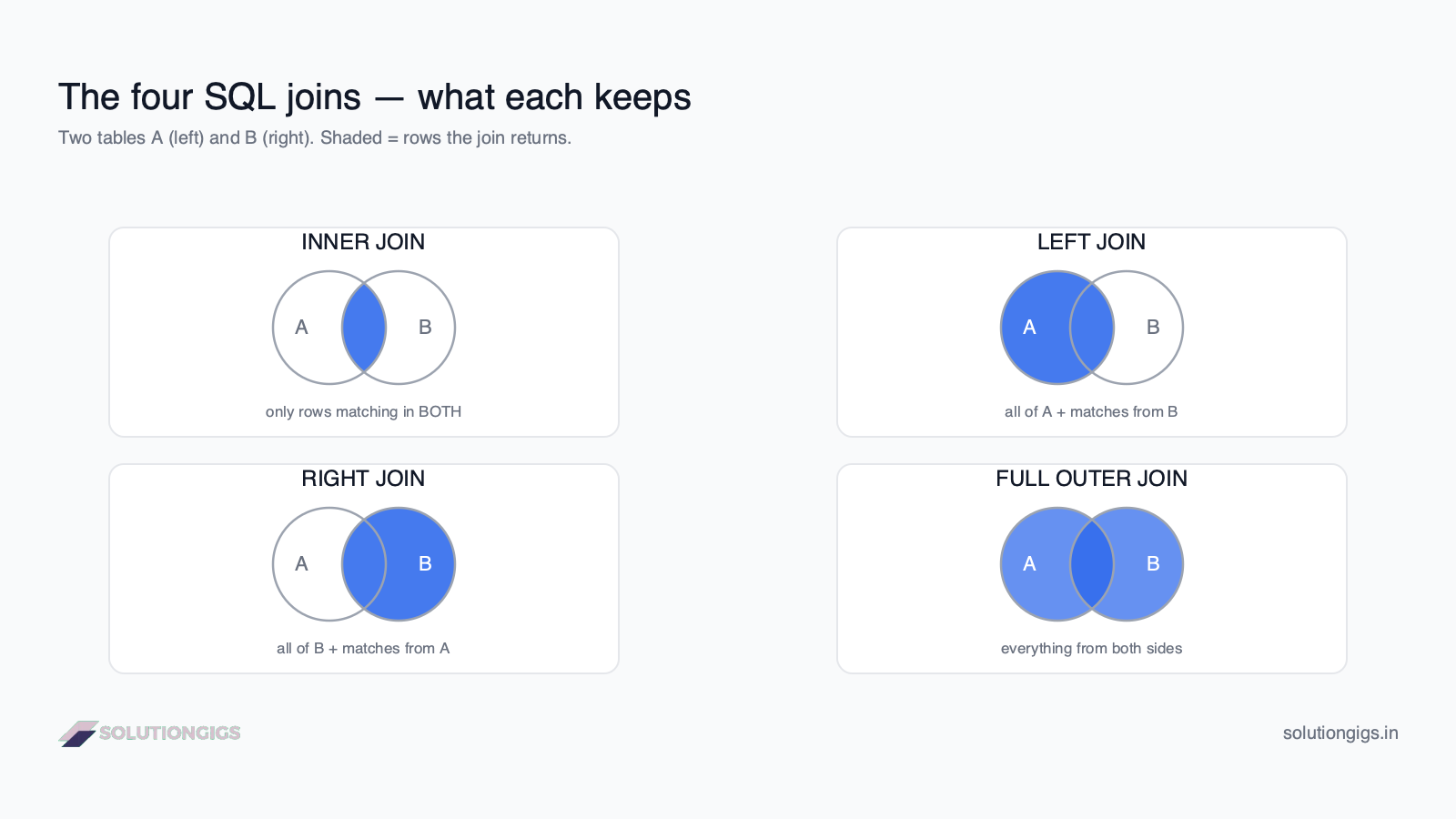
- INNER → keep only matches (intersection).
- LEFT → keep all left rows + matches from the right.
- RIGHT → keep all right rows + matches from the left.
- FULL → keep everything from both sides.
Now let's run each one on the tables above.
INNER JOIN — only matching rows
INNER JOIN returns rows only where the join key exists in both tables; anything unmatched on either side is dropped. It's the most common join.
SELECT o.order_id, c.name, o.amount
FROM orders o
INNER JOIN customers c ON o.customer_id = c.customer_id;
Result — Diya (no order) and order 99 (no matching customer) both vanish:
| order_id | name | amount |
|---|---|---|
| 1 | Aisha | 4999 |
| 2 | Bruno | 1200 |
| 3 | Chen | 8300 |
Note the o and c — those are table aliases, and ON o.customer_id = c.customer_id is the join condition. Every join needs one; forget it and you get a cross join (every row paired with every other — usually a bug).
Use INNER JOIN when you only care about records that have a match on both sides — e.g. "orders that belong to a known customer."
LEFT JOIN — keep every row from the left table
LEFT JOIN returns every row from the left table, plus matching columns from the right — filling NULL where there's no match. This is the join you'll reach for most in analytics.
SELECT c.name, o.order_id, o.amount
FROM customers c
LEFT JOIN orders o ON c.customer_id = o.customer_id;
Result — Diya stays, with NULLs because she has no order:
| name | order_id | amount |
|---|---|---|
| Aisha | 1 | 4999 |
| Bruno | 2 | 1200 |
| Chen | 3 | 8300 |
| Diya | NULL | NULL |
That NULL row is a feature, not a bug — it's how you find customers with no orders:
SELECT c.name
FROM customers c
LEFT JOIN orders o ON c.customer_id = o.customer_id
WHERE o.order_id IS NULL;      -- only the unmatched left rows
That returns just Diya — a classic "find the missing relationship" pattern.
Use LEFT JOIN when the left table is your source of truth and you want to keep all of it, matched or not.
RIGHT JOIN — keep every row from the right table
RIGHT JOIN is the mirror of LEFT JOIN: it keeps every row from the right table and fills NULL on the left where there's no match.
SELECT c.name, o.order_id, o.amount
FROM customers c
RIGHT JOIN orders o ON c.customer_id = o.customer_id;
Result — order 99 stays (unknown customer), Diya is gone:
| name | order_id | amount |
|---|---|---|
| Aisha | 1 | 4999 |
| Bruno | 2 | 1200 |
| Chen | 3 | 8300 |
| NULL | 99 | 500 |
In practice, most people just swap the table order and use LEFT JOIN instead — it reads more naturally. But knowing RIGHT JOIN exists helps you read other people's SQL.
FULL OUTER JOIN — keep everything from both
FULL OUTER JOIN returns all rows from both tables, matching where it can and NULL-filling where it can't. You get the complete union of both sides.
SELECT c.name, o.order_id, o.amount
FROM customers c
FULL OUTER JOIN orders o ON c.customer_id = o.customer_id;
Result — both Diya and order 99 appear:
| name | order_id | amount |
|---|---|---|
| Aisha | 1 | 4999 |
| Bruno | 2 | 1200 |
| Chen | 3 | 8300 |
| Diya | NULL | NULL |
| NULL | 99 | 500 |
Use FULL OUTER JOIN when you're reconciling two datasets and need to see records missing from either side. (Note: MySQL doesn't support
FULL OUTER JOINdirectly — you emulate it with aLEFT JOINUNIONaRIGHT JOIN.)
Try it yourself — exercises
Using the customers and orders tables above:
- List each order's
order_idwith the customer'sname(matched orders only). - List every customer and their total order
amount, including customers with none. - Find any orders whose
customer_idhas no matching customer.
Show answers
-- 1  (INNER — only matched)
SELECT o.order_id, c.name
FROM orders o
INNER JOIN customers c ON o.customer_id = c.customer_id;

-- 2  (LEFT — keep all customers; more on SUM in the next lesson)
SELECT c.name, o.amount
FROM customers c
LEFT JOIN orders o ON c.customer_id = o.customer_id;

-- 3  (orphan orders — unmatched right rows)
SELECT o.order_id
FROM orders o
LEFT JOIN customers c ON o.customer_id = c.customer_id
WHERE c.customer_id IS NULL;
Tidy your joins with our free SQL Formatter while you practice.
The fan-out trap: joins that silently inflate totals
The most expensive join bug does not throw an error — it returns a number that is too big. When you join a one-row-per-order table to a one-row-per-line-item table, every order row is duplicated once per item. That is correct and expected. The bug appears the moment you aggregate an order-level column afterwards.
-- Each order is counted once per line item. Revenue is overstated
-- by the average basket size. No error, no warning.
SELECT p.category, SUM(o.total) AS revenue
FROM orders o
JOIN order_items oi ON oi.order_id = o.id
JOIN products    p  ON p.id = oi.product_id
GROUP BY p.category;

-- Correct: sum the column that is already at line-item grain.
SELECT p.category, SUM(oi.price) AS revenue
FROM orders o
JOIN order_items oi ON oi.order_id = o.id
JOIN products    p  ON p.id = oi.product_id
GROUP BY p.category;
Two rules keep you out of this:
- After any one-to-many join, only aggregate columns from the "many" side. If you need a "one" side measure, aggregate it in a subquery first and join the result.
- Say the grain out loud before you write the
SELECT. "One row per line item" tells you immediately thatSUM(o.total)is wrong.
This is also the single most common failure of AI query assistants, which write both queries above with equal confidence — see why text-to-SQL fails and how to fix it for a runnable demo of the same bug.
Common mistakes to avoid
- Forgetting the
ONcondition. NoON= a cross join that pairs every left row with every right row. On big tables this explodes into millions of rows. - Filtering an outer join in
WHEREinstead ofON. PuttingWHERE o.amount > 0on aLEFT JOINsilently turns it back into anINNER JOINby removing theNULLrows. Put conditions on the right table in theONclause to preserve them. - Joining on a non-unique key → row multiplication. If one customer has 5 orders and you expected 1 row, you'll get 5. Join on a unique key, or aggregate first.
- Assuming LEFT vs RIGHT matters for
INNER. For anINNER JOIN, table order doesn't change the result. For outer joins, it decides which side is preserved.
What's next in the SQL track
You can now combine tables — the skill that unlocks real analytics. Next in the Learn Data Engineering path: GROUP BY and aggregations to turn joined rows into counts, sums, and averages (exactly what exercise 2 above was hinting at).
Frequently Asked Questions
What is a JOIN in SQL?
A JOIN combines rows from two or more tables based on a related column, usually a key. Joining orders to customers on customer_id lets you see each order with the customer's name and country. Joins are how relational databases reconnect data that's deliberately split across tables.
What is the difference between INNER JOIN and LEFT JOIN?
INNER JOIN returns only rows with a match in both tables — unmatched rows are dropped. LEFT JOIN returns every row from the left table and fills the right-table columns with NULL where there's no match. Use INNER when you only want matched data, LEFT when you want to keep all rows from the main table.
When should I use a LEFT JOIN?
Use a LEFT JOIN when you want every row from your main (left) table whether or not it matches the second table — e.g. all customers, including those with no orders. The unmatched rows return with NULLs, which is also how you find missing relationships with WHERE right_key IS NULL.
What is a FULL OUTER JOIN?
A FULL OUTER JOIN returns all rows from both tables, matching where possible and filling NULL where there's no match on either side. It's ideal for reconciling two datasets to find records that exist in one but not the other. (MySQL emulates it with LEFT JOIN UNION RIGHT JOIN.)
Why does my JOIN return too many rows?
A JOIN outputs one row per matching pair. If the join column isn't unique in the second table, each left row matches multiple right rows and the result multiplies. Fix it by joining on a unique key, or aggregate/de-duplicate the second table before joining.
Conclusion
All four SQL joins do the same thing — match rows on a key — and differ only in how they treat rows that don't match. INNER drops unmatched rows; LEFT and RIGHT keep one side; FULL keeps both. Once you frame every join as "what happens to the non-matches?", choosing the right one becomes automatic, and the NULLs stop being mysterious.
This was Lesson 2 of the SQL track. Continue the free Learn Data Engineering course to reach aggregations, window functions, and the SQL that powers real pipelines. Building something real? Get matched with a vetted data engineer on SolutionGigs — it's free to post a project.
Mohammed Yaseen
Founder, SolutionGigs
Mohammed joins data across dozens of tables daily in production pipelines, and teaches the SQL track in the free Learn Data Engineering course. LinkedIn →
More in Data Engineering
SQL GROUP BY & Aggregations: COUNT, SUM, AVG
Learn SQL GROUP BY and aggregate functions — COUNT, SUM, AVG, MIN, MAX — how grouping works, HAVING vs WHERE, and the execution order, with one real dataset and exercises.

SQL CTEs & Subqueries Explained: WITH Clause Guide
SQL CTEs and subqueries explained — the WITH clause, subqueries vs CTEs, when to use each, and how to break complex queries into clean, readable steps, with real examples and exercises.
SQL SELECT, WHERE & ORDER BY: A Beginner's Guide
Learn SQL SELECT, WHERE, and ORDER BY from scratch — how to query, filter, and sort data — with one real dataset, runnable examples, exercises, and the execution order most beginners get wrong.