
SQL SELECT, WHERE & ORDER BY: A Beginner's Guide
Learn SQL SELECT, WHERE, and ORDER BY from scratch — how to query, filter, and sort data — with one real dataset, runnable examples, exercises, and the execution order most beginners get wrong.

📚 This is Lesson 1 of the SQL track in our free Learn Data Engineering course. No setup required — read, run the examples, and check yourself with the exercises.
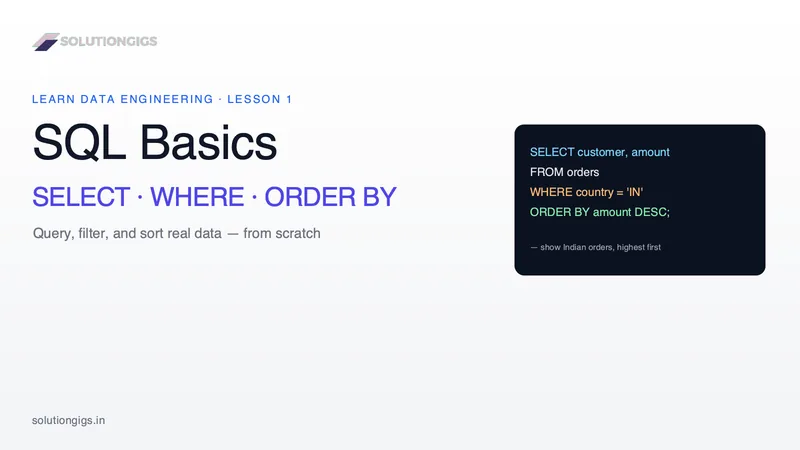
Quick Answer: Three clauses do 90% of everyday SQL: SELECT chooses the columns you want, WHERE filters which rows come back, and ORDER BY sorts the result. You write them in that order — SELECT … FROM … WHERE … ORDER BY … — for example: SELECT customer, amount FROM orders WHERE country = 'IN' ORDER BY amount DESC. That reads as: show the customer and amount, from the orders table, only for India, sorted by amount highest-first. Master these three and you can answer most real questions asked of a database.
If you're starting data engineering — or any data role — SQL is the one skill you'll use every single day, and it starts with SELECT, WHERE, and ORDER BY. Most tutorials teach these three in isolation with a toy customers table. Here we'll do it differently: one realistic dataset, one query we build up step by step, and — the part beginners always miss — the order SQL actually runs your query in, which explains errors that otherwise look like magic. By the end you'll be able to query, filter, and sort real data, and you'll have exercises (with answers) to prove it.
Our dataset: an orders table
Everything below uses this one table, orders — the kind of data you'd actually see in a data pipeline:
| order_id | customer | country | amount | status | created_at |
|---|---|---|---|---|---|
| 1 | Aisha | IN | 4999 | paid | 2026-07-01 |
| 2 | Bruno | BR | 1200 | pending | 2026-07-01 |
| 3 | Chen | CN | 8300 | paid | 2026-07-02 |
| 4 | Diya | IN | 750 | paid | 2026-07-02 |
| 5 | Erik | SE | 3100 | refunded | 2026-07-03 |
Keep this table in mind — we'll query it the whole way through.
SELECT — choose your columns
SELECT is how you pull data out of a table; you name the columns you want, and FROM names the table. It's the foundation of every query.
SELECT customer, amount
FROM orders;
Result — every row, but only the two columns you asked for:
| customer | amount |
|---|---|
| Aisha | 4999 |
| Bruno | 1200 |
| Chen | 8300 |
| Diya | 750 |
| Erik | 3100 |
Two things to know early:
SELECT *returns all columns. It's handy for exploring, but in real pipelines you name columns explicitly — it's faster, clearer, and won't silently break when someone adds a column.- Column order follows your
SELECTlist, not the table.SELECT amount, customerputsamountfirst.
Takeaway:
SELECTdecides which columns you see. It does not filter rows — that's the next clause's job.
WHERE — filter your rows
WHERE keeps only the rows that match a condition, so you get the subset you actually care about. Everything that fails the condition is dropped before you ever see it.
SELECT customer, amount, status
FROM orders
WHERE status = 'paid';
Result — only the paid orders:
| customer | amount | status |
|---|---|---|
| Aisha | 4999 | paid |
| Chen | 8300 | paid |
| Diya | 750 | paid |
The operators you'll use constantly:
| Operator | Meaning | Example |
|---|---|---|
= |
equals | country = 'IN' |
<> or != |
not equal | status <> 'refunded' |
> < >= <= |
comparisons | amount >= 1000 |
BETWEEN |
inclusive range | amount BETWEEN 1000 AND 5000 |
IN |
matches a list | country IN ('IN', 'BR') |
LIKE |
pattern match | customer LIKE 'A%' |
AND / OR |
combine conditions | status = 'paid' AND amount > 1000 |
A combined example — paid orders over ₹1,000:
SELECT customer, amount
FROM orders
WHERE status = 'paid' AND amount > 1000;
That returns just Aisha (4999) and Chen (8300) — Diya's ₹750 order is filtered out.
Note on quotes: text values go in single quotes (
'paid'), numbers do not (1000). Mixing this up is the most common beginner error.
ORDER BY — sort your result
ORDER BY sorts the rows that survived the filter — ascending by default, or descending with DESC. It's always the last of the three clauses.
SELECT customer, amount
FROM orders
WHERE status = 'paid'
ORDER BY amount DESC;
Result — paid orders, highest amount first:
| customer | amount |
|---|---|
| Chen | 8300 |
| Aisha | 4999 |
| Diya | 750 |
Key points:
ASC(ascending) is the default — smallest→largest, A→Z, oldest→newest. AddDESCto reverse.- Sort by multiple columns, each with its own direction. Ties on the first column break on the second:
SELECT customer, country, amount
FROM orders
ORDER BY country ASC, amount DESC;
That groups rows by country alphabetically, and within each country sorts amount high-to-low.
The part beginners miss: how SQL actually runs your query
You write SELECT first, but SQL doesn't run it first — the clauses execute in a different logical order, and knowing it prevents a whole class of confusing errors. This is the single most valuable idea in this lesson.
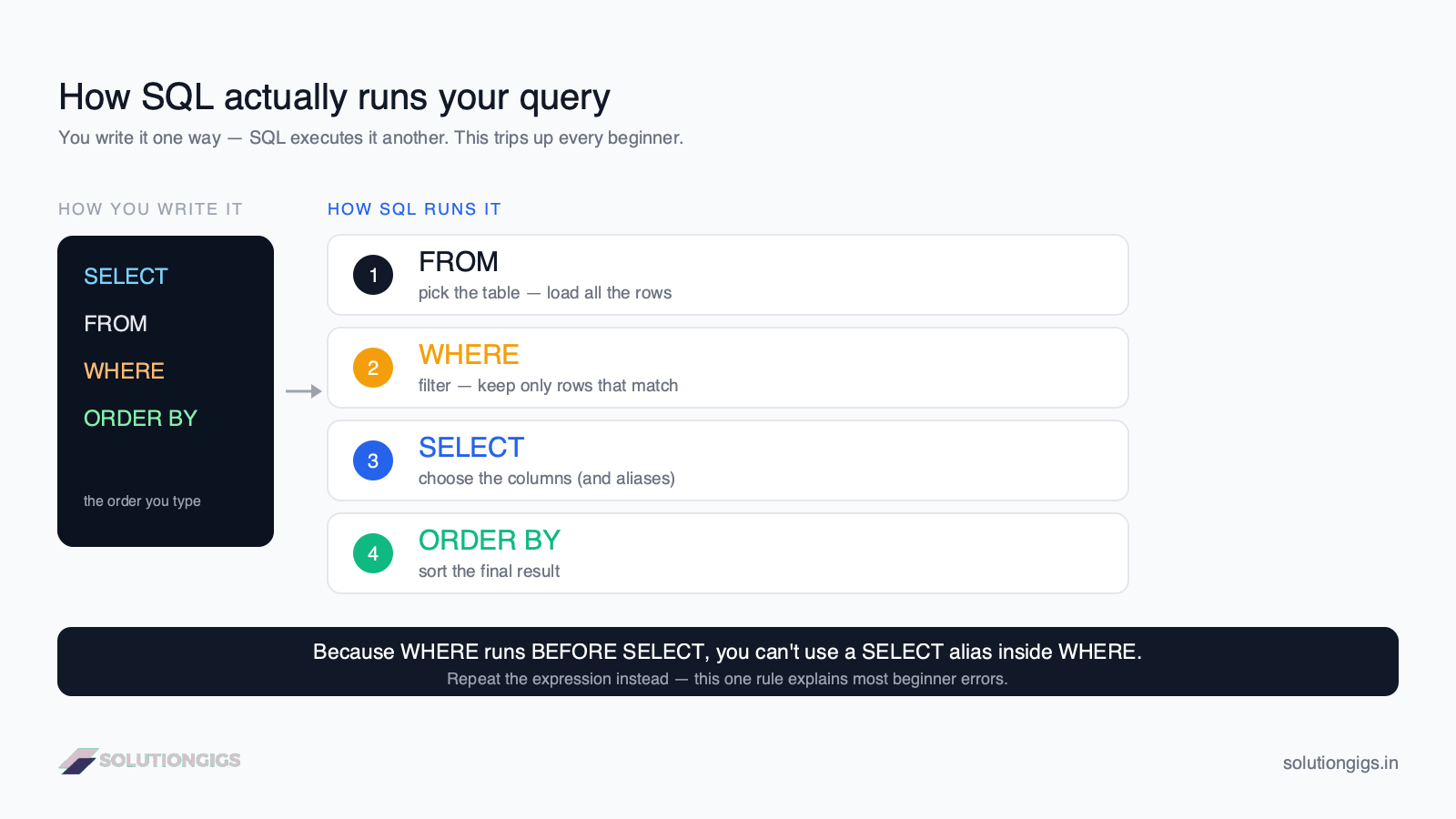
The logical processing order is:
FROM— pick the table (get all the rows).WHERE— filter the rows.SELECT— choose the columns (and compute aliases).ORDER BY— sort the final result.
Why it matters, concretely: you cannot use a column alias from SELECT inside WHERE, because WHERE runs before SELECT exists.
-- ❌ This FAILS — 'total' doesn't exist yet when WHERE runs
SELECT amount * 1.18 AS total
FROM orders
WHERE total > 1000;

-- ✅ This works — repeat the expression, or filter on the raw column
SELECT amount * 1.18 AS total
FROM orders
WHERE amount * 1.18 > 1000;
ORDER BY, on the other hand, runs after SELECT, so it can use the alias: ORDER BY total DESC is perfectly valid. Once you internalize the execution order, these rules stop being arbitrary.
Try it yourself — exercises
💡 No database to hand? Run these in our online SQL compiler. It is SQLite in your browser with sample tables preloaded, and you can upload a CSV to query your own data.
Using the orders table above, write a query for each. Answers follow.
- Show the
customerandcountryof every order. - Show all columns for orders from India (
country = 'IN'). - Show
customerandamountfor orders over 3000, highest amount first.
Show answers
-- 1
SELECT customer, country FROM orders;

-- 2
SELECT * FROM orders WHERE country = 'IN';

-- 3
SELECT customer, amount
FROM orders
WHERE amount > 3000
ORDER BY amount DESC;
(Once the interactive SQL playground lands in this course, you'll run these right in the page. For now, any free online SQL sandbox — or our SQL Formatter to tidy your queries — works great.)
Common mistakes to avoid
- Quoting numbers or forgetting quotes on text.
WHERE amount > '1000'andWHERE status = paidboth cause errors or wrong results. Text → single quotes; numbers → none. - Using a
SELECTalias inWHERE. As shown above,WHEREruns first. Repeat the expression instead. - Assuming row order without
ORDER BY. Databases do not guarantee any order unless you ask. If order matters, always addORDER BY. - Confusing
=with==. SQL uses a single=for equality, unlike most programming languages. NULLsurprises.WHERE country = NULLnever matches — useWHERE country IS NULL.NULLalso sorts to one end inORDER BY(database-dependent).
What's next in the SQL track
You can now query, filter, and sort a single table — that's genuinely most of day-to-day SQL. Next in the Learn Data Engineering path you'll combine multiple tables with JOINs, then aggregate data with GROUP BY and window functions. If you're still deciding which database to learn on, our guide on SQL vs NoSQL explains where each fits.
Frequently Asked Questions
What does the SELECT statement do in SQL?
SELECT retrieves data from one or more tables. You list the columns you want after SELECT and the table after FROM — for example, SELECT customer, amount FROM orders returns those two columns for every row. SELECT * returns all columns, but naming columns explicitly is better practice in production pipelines.
What is the difference between WHERE and ORDER BY?
WHERE filters which rows are returned, keeping only rows that match a condition like amount > 100. ORDER BY sorts the rows that survive the filter, ascending (default) or descending. WHERE decides what you see; ORDER BY decides the order you see it in. In a query, WHERE always comes before ORDER BY.
Does ORDER BY sort ascending or descending by default?
Ascending (ASC) by default — smallest to largest for numbers, A to Z for text, earliest to latest for dates. Add DESC after the column to reverse it, e.g. ORDER BY amount DESC. You can sort by several columns, each with its own direction.
In what order does SQL actually run a query?
Although you write SELECT first, SQL processes clauses as: FROM (pick the table), WHERE (filter rows), SELECT (choose columns), then ORDER BY (sort). That's why you can't use a SELECT alias inside WHERE — WHERE runs before SELECT.
Can I use WHERE and ORDER BY in the same query?
Yes — it's very common. The order is fixed: SELECT columns, FROM table, WHERE condition, ORDER BY column. For example, SELECT customer, amount FROM orders WHERE country = 'IN' ORDER BY amount DESC filters to Indian orders, then sorts them highest-amount first.
Conclusion
SELECT, WHERE, and ORDER BY are the three clauses you'll reach for in almost every query you ever write — choose columns, filter rows, sort the result. Practice them on one dataset until the pattern is automatic, and keep the execution order (FROM → WHERE → SELECT → ORDER BY) in mind, because it quietly explains most of the "why did this error?" moments beginners hit.
This was Lesson 1 of the SQL track. Continue the free Learn Data Engineering course to build up to joins, aggregations, and the SQL that powers real data pipelines. When you're ready to build production systems, get matched with a vetted data engineer on SolutionGigs — it's free to post a project.
Mohammed Yaseen
Founder, SolutionGigs
Mohammed writes SQL every day against production data pipelines processing hundreds of millions of events, and teaches the SQL track in the free Learn Data Engineering course. LinkedIn →
More in Data Engineering
SQL GROUP BY & Aggregations: COUNT, SUM, AVG
Learn SQL GROUP BY and aggregate functions — COUNT, SUM, AVG, MIN, MAX — how grouping works, HAVING vs WHERE, and the execution order, with one real dataset and exercises.
SQL Joins Explained: INNER, LEFT, RIGHT & FULL
SQL joins explained with one real dataset — INNER, LEFT, RIGHT, and FULL joins, when to use each, what happens to unmatched rows, common mistakes, and exercises.

SQL CTEs & Subqueries Explained: WITH Clause Guide
SQL CTEs and subqueries explained — the WITH clause, subqueries vs CTEs, when to use each, and how to break complex queries into clean, readable steps, with real examples and exercises.