
SQL CTEs & Subqueries Explained: WITH Clause Guide
SQL CTEs and subqueries explained — the WITH clause, subqueries vs CTEs, when to use each, and how to break complex queries into clean, readable steps, with real examples and exercises.

📚 Lesson 5 (final) of the SQL track in our free Learn Data Engineering course. This ties together everything from window functions and earlier lessons.
Quick Answer: A subquery is a query nested inside another query. A CTE (Common Table Expression) does the same job but is defined up front with the WITH keyword and given a name you reference like a table. Both build intermediate results; CTEs win on readability because they turn one giant query into clean, named steps you read top to bottom. Use a subquery for a small one-off calculation, and a CTE when a query gets complex or you reference the same result twice.
By now you can query, join, aggregate, and rank. The last skill is organizing all of that into queries humans can actually read six months later. As queries grow, nesting subqueries inside subqueries becomes an unreadable mess; CTEs let you name each step and stack them like a pipeline. This is the difference between SQL that works and SQL that's maintainable — and it's exactly how production analytics queries and dbt models are written.
Subqueries: a query inside a query
A subquery is a SELECT nested inside another statement — in WHERE, in FROM, or in the SELECT list — that produces a value or a table for the outer query to use.
Our orders table:
| order_id | customer | country | amount |
|---|---|---|---|
| 1 | Aisha | IN | 4999 |
| 2 | Bruno | BR | 1200 |
| 3 | Chen | CN | 8300 |
| 4 | Diya | IN | 750 |
| 6 | Aisha | IN | 2200 |
A subquery in WHERE — orders above the overall average amount:
SELECT customer, amount
FROM orders
WHERE amount > (SELECT AVG(amount) FROM orders);   -- subquery returns one number
The inner query computes the average (3489.8); the outer keeps rows above it — Aisha (4999) and Chen (8300). Subqueries are perfect for these small, single-use calculations.
CTEs: name your steps with WITH
A CTE is a named temporary result defined with WITH, then referenced by name in the query that follows — same power as a subquery, far more readable. You read it top to bottom, like steps.
WITH avg_order AS (
    SELECT AVG(amount) AS avg_amount FROM orders
)
SELECT customer, amount
FROM orders, avg_order
WHERE amount > avg_amount;
Same result as the subquery above — but now the intermediate result has a name (avg_order) that explains what it is. On a small query the win is modest; on a big one it's the difference between readable and hopeless.
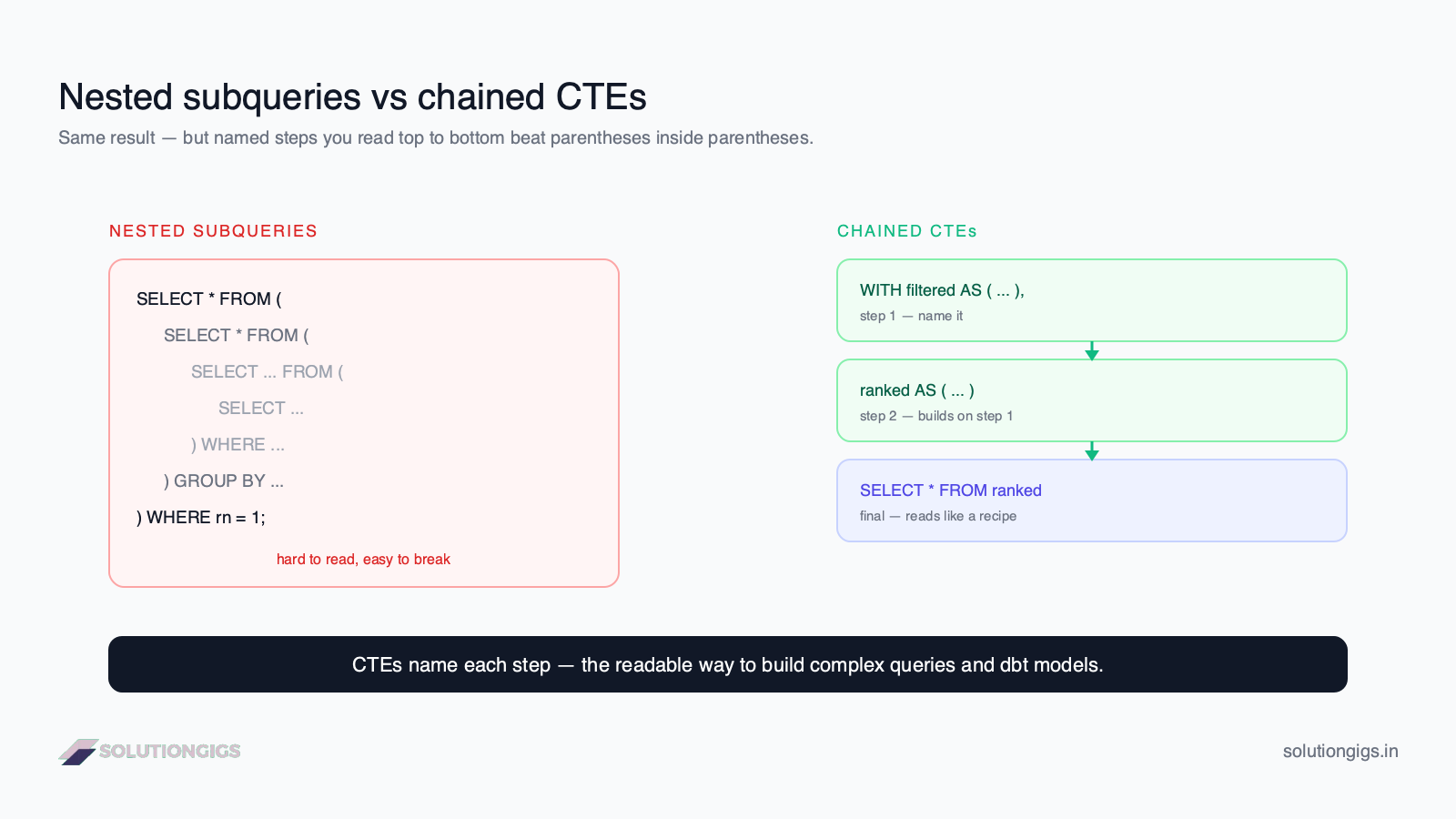
Chaining CTEs — a readable pipeline
The real power of CTEs is chaining: each one can build on the previous, turning a complex problem into a sequence of named steps. This is where they leave subqueries behind.
Remember the "top order per country" query from the window-functions lesson? With a CTE it reads like plain English:
WITH ranked AS (
    SELECT customer, country, amount,
           ROW_NUMBER() OVER (PARTITION BY country ORDER BY amount DESC) AS rn
    FROM orders
)
SELECT customer, country, amount
FROM ranked
WHERE rn = 1;
Compare that to the nested-subquery version — same logic, but the CTE names the intermediate step (ranked) instead of burying it in parentheses. Now chain two steps — per-country totals, then only the big ones:
WITH country_totals AS (
    SELECT country, SUM(amount) AS total
    FROM orders
    GROUP BY country
),
big_countries AS (
    SELECT country FROM country_totals WHERE total > 3000
)
SELECT * FROM big_countries;
Each CTE is a labeled step; the final SELECT reads them like a recipe. This exact pattern is how production SQL and dbt transformations are structured.
CTE vs subquery — which to use
| Subquery | CTE (WITH) |
|
|---|---|---|
| Defined | inline, nested | up front, named |
| Readability | fine when small | much better when complex |
| Reuse in same query | must repeat it | reference the name repeatedly |
| Chaining steps | gets messy fast | clean and linear |
| Performance | same in most modern engines | same in most modern engines |
Rule of thumb: reach for a subquery for a quick one-off value; reach for a CTE the moment the query grows, repeats a result, or needs to be read by someone else (including future you).
A note on recursive CTEs
A recursive CTE references itself to walk hierarchical data — org charts, category trees, folder structures. It has a base case and a recursive step combined with UNION ALL, repeating until no new rows appear. It's an advanced tool, but it's the standard SQL answer to "how do I query a parent-child hierarchy?" — worth knowing it exists for when you hit that problem.
Try it yourself — exercises
💡 No database to hand? Run these in our online SQL compiler. It is SQLite in your browser with sample tables preloaded, and you can upload a CSV to query your own data.
Using the orders table above:
- Use a subquery to return orders larger than the smallest order amount.
- Use a CTE named
paidto first select all rows, then count them by country. (Adapt to your columns.) - Rewrite the "top order per country" query using a CTE.
Show answers
-- 1
SELECT customer, amount
FROM orders
WHERE amount > (SELECT MIN(amount) FROM orders);

-- 2
WITH by_country AS (
    SELECT country, amount FROM orders
)
SELECT country, COUNT(*) AS orders, SUM(amount) AS total
FROM by_country
GROUP BY country;

-- 3
WITH ranked AS (
    SELECT customer, country, amount,
           ROW_NUMBER() OVER (PARTITION BY country ORDER BY amount DESC) AS rn
    FROM orders
)
SELECT customer, country, amount FROM ranked WHERE rn = 1;
Common mistakes to avoid
- Deeply nesting subqueries. Three-plus levels of nesting is unreadable — refactor into chained CTEs.
- Assuming a CTE persists across queries. A CTE lives only for the single statement it's attached to; it's gone afterward. For reuse across queries, create a view or table.
- Expecting a scalar subquery to return many rows. A subquery used with
=or inWHERE amount > (...)must return exactly one value; useINfor a list. - Worrying about CTE performance prematurely. In modern engines it usually matches a subquery — optimize for readability first, measure only if there's a real problem.
What's next: beyond the SQL track
Congratulations — you've completed the SQL track: querying, filtering, sorting, joining, aggregating, windowing, and organizing with CTEs. That's the SQL foundation every data engineer relies on daily. Next in the Learn Data Engineering path, you'll move into Python for data engineering and then data modeling — turning these query skills into real pipelines.
Frequently Asked Questions
What is a CTE in SQL?
A CTE (Common Table Expression) is a named temporary result set defined with the WITH keyword that exists only for one query. You define it once and reference it by name like a table, which makes complex queries readable by breaking them into named steps.
What is the difference between a CTE and a subquery?
Both compute an intermediate result, but a subquery is nested inline inside another query, while a CTE is defined up front with WITH and given a name you can reference — sometimes multiple times. CTEs are usually easier to read and can be chained; subqueries are convenient for small one-off calculations.
When should I use a CTE instead of a subquery?
Use a CTE when a query gets hard to read, when you need to reference the same intermediate result more than once, or when you want a pipeline of named steps. Use a simple subquery for a small, single-use calculation where naming it would add noise instead of clarity.
Are CTEs slower than subqueries?
In most modern databases, no — the optimizer typically treats a non-recursive CTE and an equivalent subquery the same, so performance is usually identical. Choose based on readability. Some older engine versions materialized CTEs, so test both if performance is critical on a specific database.
What is a recursive CTE?
A recursive CTE references itself to walk hierarchical or graph data like org charts, category trees, or bill-of-materials. It has a base case and a recursive step joined with UNION ALL, repeating until no new rows are produced — the standard way to handle parent-child hierarchies in SQL.
Conclusion
Subqueries and CTEs both build intermediate results — CTEs just give them names, and that changes everything for readability. Use a subquery for a quick inline value; use a WITH clause to break a complex query into clean, chained steps that read top to bottom. This is the skill that turns working SQL into maintainable SQL, and it's how every production analytics query and dbt model is built.
That completes the SQL track of the free Learn Data Engineering course — query, join, aggregate, window, and organize like a professional. Ready to put it to work on real systems? Get matched with a vetted data engineer on SolutionGigs — it's free to post a project.
Mohammed Yaseen
Founder, SolutionGigs
Mohammed structures production analytics and dbt models with CTEs every day, and teaches the SQL track in the free Learn Data Engineering course. LinkedIn →
More in Data Engineering
SQL GROUP BY & Aggregations: COUNT, SUM, AVG
Learn SQL GROUP BY and aggregate functions — COUNT, SUM, AVG, MIN, MAX — how grouping works, HAVING vs WHERE, and the execution order, with one real dataset and exercises.
SQL Joins Explained: INNER, LEFT, RIGHT & FULL
SQL joins explained with one real dataset — INNER, LEFT, RIGHT, and FULL joins, when to use each, what happens to unmatched rows, common mistakes, and exercises.
SQL SELECT, WHERE & ORDER BY: A Beginner's Guide
Learn SQL SELECT, WHERE, and ORDER BY from scratch — how to query, filter, and sort data — with one real dataset, runnable examples, exercises, and the execution order most beginners get wrong.