
Resume Keyword Match Score: Check Your Resume Against Any Job Description
See exactly how well your resume matches a job posting with our free ATS checker. Get a keyword match percentage, list of missing skills, and actionable tips — no signup, runs in browser.

Sending out resumes and hearing nothing back? You might be getting filtered out before a human ever sees your application. Our free ATS resume checker analyzes your resume against any job description, shows your keyword match percentage, flags missing skills, and gives you actionable tips to improve your chances — no signup, and your file is never stored.
Updated August 2026: the tool has been rebuilt. You now upload the actual PDF or DOCX rather than pasting text, which lets it audit the structure of your file as well as the keywords. This article covers the keyword-matching side; for the full pipeline, see how an ATS resume checker works.
What Is an ATS?
An Applicant Tracking System (ATS) is software used by employers to manage job applications. When you apply online, your resume typically goes through an ATS before any human sees it. The ATS:
- Parses your resume (converts it to searchable text)
- Scores it based on keyword matches with the job description
- Ranks applications by score
- Filters out low-scoring resumes (often automatically)
Major ATS platforms include Workday, Greenhouse, Lever, iCIMS, BambooHR, Taleo, and SmartRecruiters. Most Fortune 500 companies use them. Many small-to-mid-size companies do too.
How Our Free ATS Checker Works
The keyword-matching stage — the part this article is about — runs like this:
- Extract keywords from the job description: We identify the most important terms — skills, tools, certifications, job titles, and multi-word phrases — filtering out common stop words
- Check your resume: We look for each keyword in the text extracted from your uploaded file
- Categorize matches:
- ✅ Found: keyword appears exactly in your resume
- ⚠️ Partial: one word from a phrase appears but not the full phrase
- ❌ Missing: keyword doesn't appear at all
- Calculate a match score: percentage of job keywords found in your resume
- Generate tips: specific, actionable improvements based on your results
Keyword match is one of six sub-scores in the current tool, and it carries 20% of the total. The other 80% covers things a keyword count cannot see — whether your file parses at all, whether your bullets carry evidence, whether a recruiter can contact you. That side is covered in how an ATS resume checker works.
What Is a Good ATS Match Score?
| Score | Rating | Interpretation |
|---|---|---|
| 80%+ | Excellent | Strong match — focus on quantified achievements now |
| 70–79% | Good | Solid foundation — add a few missing keywords naturally |
| 50–69% | Fair | Significant keywords missing — targeted updates needed |
| Below 50% | Needs Work | Major gap — resume likely needs substantial tailoring |
Note: ATS scores are one factor among many. A high score doesn't guarantee an interview, but a very low score almost guarantees a rejection — at least for automated filtering.
How ATS Systems Parse Your Resume
Different ATS platforms parse resumes differently, which is why formatting matters:
What ATS reads well:
- Plain text with standard section headers (Experience, Education, Skills)
- Simple single-column layout
- Standard fonts (Arial, Calibri, Times New Roman)
- .docx or PDF format (most modern ATS handle both)
- Dates in consistent formats (MM/YYYY or Month YYYY)
What breaks ATS parsing:
- Tables: content inside tables is often ignored or garbled
- Text boxes: ATS may not read content inside text boxes
- Headers and footers: contact info in headers may not be captured
- Graphics and images: completely invisible to ATS
- Columns: multi-column layouts often confuse the text extraction order
- Unusual section headers: "Where I've Been" instead of "Work Experience"
- Creative PDF fonts: may not embed properly
Keyword Strategy for ATS Optimization
1. Mirror the exact language from the job posting
If the job says "React.js" and you wrote "ReactJS", some ATS won't match them. Use the exact spelling, capitalization, and phrasing from the job description.
2. Don't keyword-stuff
Adding every keyword regardless of relevance is unethical and will backfire in interviews. Only include keywords for skills you genuinely have.
3. Include keywords in context
Instead of a "Keywords" section (which looks suspicious), include them naturally:
- Work experience bullets: "Built 5 React.js dashboards that reduced reporting time by 40%"
- Summary: "Full-stack developer with 4 years of experience in React.js, Node.js, and PostgreSQL"
- Skills section: List all relevant tools and technologies
4. Use both acronyms and full forms
"Search Engine Optimization (SEO)" covers you whether the ATS searches for "SEO" or the full term.
5. Target multi-word phrases
"Project management" is a keyword phrase. So is "Agile methodology" and "machine learning". Our tool extracts these bigrams from job descriptions.
High-Impact Resume Sections for ATS
Professional Summary (2–4 lines)
Place your most important keywords here. The summary appears at the top and is almost always parsed.
Skills Section
A dedicated skills list is easy for ATS to parse. Separate by category:
Technical: Python, React.js, PostgreSQL, Docker, AWS
Methodologies: Agile, Scrum, CI/CD, Test-Driven Development
Tools: Jira, Figma, Tableau, Salesforce
Work Experience
Use the same title as in the job posting (or close to it) when it's accurate. Include tools and technologies used in each role.
Certifications
List certification names exactly as employers search for them: "AWS Certified Solutions Architect — Associate" not "Amazon Cloud Cert".
Beyond ATS: Getting Past the Human Reviewer
After passing ATS, your resume reaches a human recruiter who typically spends 7–10 seconds on the first pass. Optimize for both:
For ATS: keyword density, exact phrase matching, clean formatting
For humans:
- Quantify achievements: "Increased conversion rate by 23%" vs "Improved conversion"
- Use strong action verbs: Built, Led, Reduced, Increased, Automated, Architected
- Tailor your summary to each role
- Keep to 1 page (early career) or 2 pages maximum
- Use white space generously — dense text gets skipped
How to Check Your Resume Against a Job Posting Free
- Go to the SolutionGigs Free ATS Checker
- Upload the actual resume file you send to employers — PDF, DOCX or TXT
- Paste the job description in the panel beside it (optional, but it sharpens the match)
- Click Analyse my resume
- See your score, the matched and missing keywords, and every structural issue with the evidence behind it
- Add missing keywords naturally to your resume — in context, not in a keyword list
- Re-upload and re-analyse to see the score move
- No signup, nothing stored, 100% free
Try the ATS Resume Checker Free
ATS resume checker — check your keyword match score against any job description in seconds, and get a structural audit of the file itself at the same time. No signup, 100% free, nothing stored.
Want to know exactly what happens to your file after you upload it? Read how an ATS resume checker works, from upload to job match.
Once the score is where you want it, the next question is where to send it. Applying from a structured profile beats attaching the same PDF to every posting, and it helps to apply somewhere that screens its listings first — see how our developer job board screens scams before they go live.
Frequently Asked Questions
What does ATS stand for? ATS stands for Applicant Tracking System — software companies use to automatically screen and filter job applications before a human recruiter ever sees them. Most Fortune 500 companies and many SMBs use an ATS.
What is a good ATS resume match score? A score of 70% or above is considered competitive. Scores above 80% significantly improve your chances of passing the initial ATS filter. Our free ATS checker shows your exact score and which keywords are missing.
Why does ATS reject qualified candidates? ATS systems reject resumes for reasons like missing keywords, unusual formatting, tables, columns, graphics, or PDFs that the parser cannot read correctly. Matching the job description's exact language is critical.
What file format is best for ATS? A clean, simple .docx or plain text file works best. Avoid PDFs with complex layouts, text boxes, headers/footers with key info, and graphics — many ATS systems struggle to parse these accurately.
Is the ATS resume checker free? Yes — completely free, with no account and no signup. Upload your resume, optionally paste a job description, and you get a keyword match score plus a full structural audit of the file. Your resume is not stored.
Mohammed Yaseen
Founder, SolutionGigs
Mohammed has been building developer tools since 2018 and writes about JSON, JWT, regex, SQL, APIs, and web development utilities. LinkedIn →
More in Developer
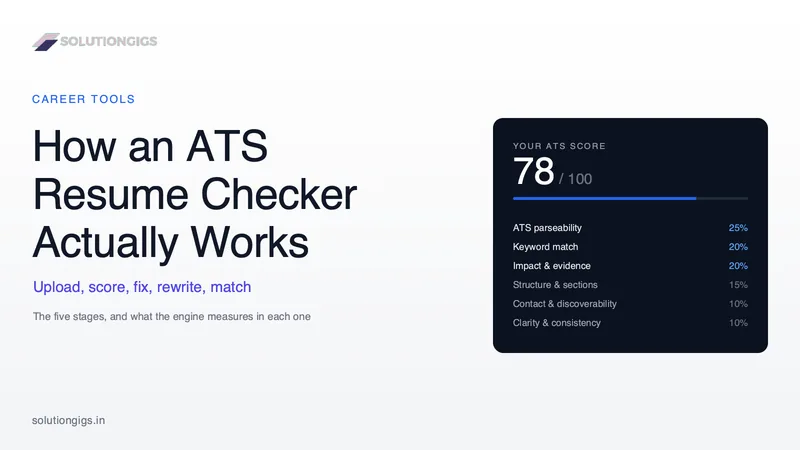
How an ATS Resume Checker Works — Upload to Job Match
How an ATS resume checker works, stage by stage: what it reads in your file, how the score is built, and how job matching works. A five-stage walkthrough from the team that built one — including the published sub-score weights, how two-column layouts are detected from glyph positions, why a pasted resume hides the faults that matter, and how the AI rewrite is verified against your original so nothing is invented.
A Developer Job Board That Screens Scams Before They Go Live
Every listing on the SolutionGigs job board is screened before it goes live. Here is what the gate refuses, and how to post a developer role for free. It covers the deterministic checks that reject advance fees, identity harvesting, money-mule work, MLM pitches and discriminatory restrictions before any AI model runs — plus the classification bug that put welding engineers on a developer board, and why a fallback category is not a filter.
Free SQL Formatter Online — Beautify & Minify SQL Queries
Format messy SQL instantly. Our free online SQL formatter beautifies, indents, and minifies SELECT, INSERT, UPDATE, and JOIN queries — no signup, works for MySQL, PostgreSQL, SQLite.